

What Is StoryLab.ai’s AI eBook Chapter Generator?
StoryLab.ai is an online AI Tool that helps you write better content. Fast.
Our eBook Chapter Generator helps you create full chapters including Intro, Main Content, and Conclusions based on your inputs, point of view, and writing style.
Use our AI Suite to come up with eBook ideas, titles, outlines, and chapters and complete your eBook faster than ever before.
Get started for free with the AI eBook Chapter Generator.
Outlines are easy. Chapters are where eBooks go to… take a very long nap.
StoryLab.ai’s AI eBook Chapter Generator helps you write chapters faster by turning one chapter topic into a clean structure: an intro that hooks, sections that teach, examples that make it real, and a recap that helps readers apply what they learned.
Use the draft as your starting point, then add your voice, stories, screenshots, and case studies to make it truly yours.
Benefits of AI-Powered eBook Chapter Generator
Simply describe what your eBook chapter is about, your point of view and writing style, run the AI eBook Chapter Creator, and be amazed by the quality. Add your unique human touch and finish each chapter of your eBook faster than ever before.
Top benefits of the AI eBook Chapter Generator
 AI modes AI modes |
13 writing styles |
 Improves Improves |
Copy, creativity, and more |
 Support Support |
17+ Languages |
 Price Price |
Free and Premium |

Chapters
- What Is StoryLab.ai’s AI eBook Chapter Generator?
- Benefits of AI-Powered eBook Chapter Generator
- How to start with the AI eBook Chapter Generator
- Best Practices Writing an Effective eBook Chapter
- AI eBook Chapter Generator Pricing
- What you can generate with the AI eBook Chapter Generator
- Chapter brief template (copy, fill, generate)
- Prompt Playbook: copy-paste prompts for better eBook chapters
- Chapter structures you can reuse (pick one)
- End-of-chapter elements (make it feel “complete”)
- Quality scorecard (before you ship a chapter draft)
- FAQ
How to start with the AI eBook Chapter Generator
First, create a free account at StoryLab.ai and select the AI eBook Chapter Generator. You get 3 free runs every month and can upgrade after you see how much our AI Suite can help you create better eBooks and other content faster than ever before.
After selecting the eBook Chapter Maker, add and select the inputs. Here’s what we used for this example:
- Tone of voice: Professional
- Style: Explainer
- Content goals: Educate
- Target audience: Marketers
- Point of view: AI can Help your Write an eBook, but you should always add your unique human touch
- Topic: How to create an eBook
Here’s what the AI eBook Chapter Generator came up with on the first run:
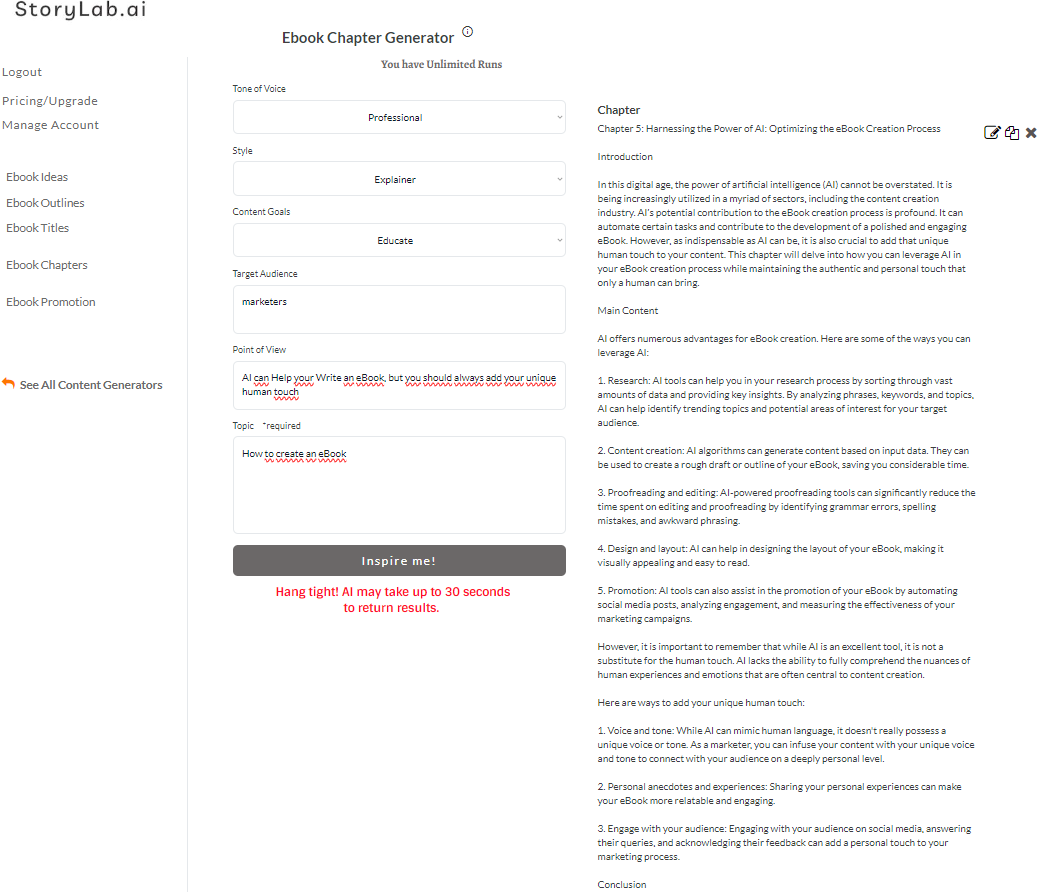
AI eBook Chapter Generator output example
Chapter
Chapter 5: Harnessing the Power of AI: Optimizing the eBook Creation Process
In this digital age, the power of artificial intelligence (AI) cannot be overstated. It is being increasingly utilized in a myriad of sectors, including the content creation industry. AI’s potential contribution to the eBook creation process is profound. It can automate certain tasks and contribute to the development of a polished and engaging eBook. However, as indispensable as AI can be, it is also crucial to add that unique human touch to your content. This chapter will delve into how you can leverage AI in your eBook creation process while maintaining the authentic and personal touch that only a human can bring.
Main Content
AI offers numerous advantages for eBook creation. Here are some of the ways you can leverage AI:
1. Research: AI tools can help you in your research process by sorting through vast amounts of data and providing key insights. By analyzing phrases, keywords, and topics, AI can help identify trending topics and potential areas of interest for your target audience.
2. Content creation: AI algorithms can generate content based on input data. They can be used to create a rough draft or outline of your eBook, saving you considerable time.
3. Proofreading and editing: AI-powered proofreading tools can significantly reduce the time spent on editing and proofreading by identifying grammar errors, spelling mistakes, and awkward phrasing.
4. Design and layout: AI can help in designing the layout of your eBook, making it visually appealing and easy to read.
5. Promotion: AI tools can also assist in the promotion of your eBook by automating social media posts, analyzing engagement, and measuring the effectiveness of your marketing campaigns.
However, it is important to remember that while AI is an excellent tool, it is not a substitute for the human touch. AI lacks the ability to fully comprehend the nuances of human experiences and emotions that are often central to content creation.
Here are ways to add your unique human touch:
1. Voice and tone: While AI can mimic human language, it doesn’t really possess a unique voice or tone. As a marketer, you can infuse your content with your unique voice and tone to connect with your audience on a deeply personal level.
2. Personal anecdotes and experiences: Sharing your personal experiences can make your eBook more relatable and engaging.
3. Engage with your audience: Engaging with your audience on social media, answering their queries, and acknowledging their feedback can add a personal touch to your marketing process.
Conclusion
Artificial Intelligence is undeniably a powerful tool that can streamline the eBook creation process. It can automate numerous tasks, provide valuable insights, and contribute to the development of a polished product. However, it’s crucial to remember that AI cannot replicate the unique human touch that marketers can add to their content. By combining the power of AI with the authenticity of human interaction, you can create an engaging and impactful eBook that resonates deeply with your audience.
Pretty cool, right? I can re-run the AI Tool again or adjust some inputs. Change my writing style, make my input more specific, etc.

Best Practices Writing an Effective eBook Chapter
Writing an effective eBook chapter involves strategic planning and execution to engage readers and communicate your message clearly. Here are some best practices to consider when crafting a chapter for your eBook:
Define the Chapter’s Purpose:
Each chapter should have a clear purpose and contribute to the overall narrative or argument of the book. Before you start writing, outline what you want the chapter to achieve and what key points you want to cover.
Start with a Strong Opening:
Capture the reader’s interest right from the beginning. An engaging opening can be a compelling question, a surprising fact, or a vivid story that ties into the chapter’s main theme.
Structure Content Clearly:
Organize the chapter in a logical sequence. Use headings and subheadings to break up text, guide readers through your argument, and make the content easy to digest.
Consider including lists, bullet points, and diagrams to clarify complex information and keep the reader engaged.
Maintain a Consistent Voice and Style:
Keep your writing style consistent with the rest of the eBook. This includes tone, language complexity, and technicality. The consistency helps in maintaining the reader’s comfort and understanding throughout the book.
Use Engaging and Accessible Language:
Write in a clear, concise, and engaging style. Avoid jargon and overly complex sentences, especially if you are writing for a general audience. The goal is to communicate your ideas clearly and persuasively.
Incorporate Real-Life Examples and Case Studies:
Examples and case studies not only illustrate your points but also make abstract concepts tangible and relatable for readers. They can enhance understanding and retention of the material.
Include Actionable Tips or Takeaways:
Provide readers with practical advice or actionable steps they can take based on the information discussed in the chapter. This adds value to your eBook and helps readers apply the knowledge in real-world scenarios.
Conclude Each Chapter Effectively:
Summarize the key points at the end of each chapter to reinforce what the reader has learned. This recap can also help transition smoothly into the next chapter.
Engage Visually:
Where applicable, include relevant images, graphs, or charts that complement the text. Visual aids can help explain complex information and break up large blocks of text, making the chapter more visually appealing and easier to read.
Solicit Feedback Before Finalizing:
Before finalizing the chapter, get feedback from peers or your target audience. Fresh eyes can offer valuable insights and point out areas that may need more clarification or improvement.
Edit and Proofread Thoroughly:
Ensure the chapter is free from grammatical errors and typos. Well-edited text speaks to the professionalism of the eBook and enhances the reader’s experience.
These best practices can help you craft effective and engaging eBook chapters that resonate with readers and effectively convey your expertise or story.
AI eBook Chapter Generator Pricing
Our pricing is set up as followed:
- Free – get 3 runs a month to try our tools out for free;
- Pro – $15 a month – 100 runs a month;
- Unlimited – $19 a month – unlimited runs a month;
You can also opt-in for the yearly membership and receive a 20% price reduction.
You can check out our full pricing here.
What you can generate with the AI eBook Chapter Generator
- Chapter outlines and section headings
- Full chapter drafts (intro, body sections, transitions)
- Examples, scenarios, and mini case studies
- End-of-chapter summaries and key takeaways
- Checklists, worksheets, and action steps
- Optional tone variations (friendly, formal, punchy, etc.)
Chapter brief template (copy, fill, generate)
| Brief field | What to write | Example |
|---|---|---|
| eBook topic | What the eBook is about | “YouTube SEO for beginners” |
| Chapter title | The chapter’s focus | “How to pick keywords that get views” |
| Target reader | Who this chapter is for | “New creators with under 1,000 subscribers” |
| Chapter promise | What they can do after reading | “Find and validate 10 keyword ideas for their next videos” |
| Key points | 3–7 bullets you want covered | “Search intent, autocomplete, competitor patterns, long-tail phrases” |
| Proof | Examples, screenshots, results | “2 examples of good/bad keywords + a case study snippet” |
| Tone | Voice and vibe | “Friendly, practical, no fluff” |
| Length | How long the chapter should be | “1,200–1,800 words” |
Prompt Playbook: copy-paste prompts for better eBook chapters
| Goal | Copy-paste prompt template |
|---|---|
| Structured chapter draft | “Write an eBook chapter titled ‘[chapter title]’ for an eBook about [topic]. Target reader: [reader]. Include: a short intro, 4–6 sections with subheadings, 2 examples, a ‘common mistakes’ section, a checklist, and a short recap. Tone: [tone]. Length: [length].” |
| Chapter outline first | “Create a detailed outline for a chapter called ‘[chapter title]’. Include section headings, bullet points per section, and where examples should go. Then suggest a strong opening paragraph.” |
| Workbook-style chapter | “Write a workbook chapter about [chapter title]. For each section: a short lesson, 3 reflection questions, and a simple worksheet. Add an example filled-out worksheet.” |
| Case study chapter | “Write a case study chapter for [topic]. Structure: context, problem, what we tried, results, lessons learned, checklist. Add 2 mini case studies with different scenarios.” |
| Template-heavy chapter | “Create a chapter about [chapter title] that includes 8 templates readers can copy. For each template: when to use it, how to fill it, and a filled example.” |
| Rewrite for voice | “Rewrite this chapter text in a [tone] voice for [audience]. Keep meaning the same, make it clearer, more skimmable, and add one practical example per section: [paste text].” |
Chapter structures you can reuse (pick one)
| Structure | Best for | What it includes |
|---|---|---|
| Teach + do | How-to chapters | Concept → steps → example → checklist → action task |
| Mistakes + fixes | Beginner topics | Common mistakes → why they happen → fixes → examples |
| Framework playbook | Business and marketing | Framework → breakdown → templates → implementation plan |
| Case studies | Proof-first eBooks | Context → actions → results → lessons → repeatable checklist |
| Workbook | Coaching and education | Lesson → prompts → worksheet → example answers |
End-of-chapter elements (make it feel “complete”)
| Element | Why it matters | Paste-ready prompt |
|---|---|---|
| Key takeaways | Helps readers remember | “Summarize this chapter into 5 key takeaways.” |
| Checklist | Makes it actionable | “Create a 10-point checklist the reader can use immediately.” |
| Action task | Turns reading into results | “Create a 15-minute action task based on this chapter.” |
| Quick recap | Improves comprehension | “Write a 3-sentence recap in plain language.” |
| Transition to next chapter | Keeps momentum | “Write a transition that tees up the next chapter: [next chapter title].” |
Quality scorecard (before you ship a chapter draft)
| Score (1-5) | What to check | Quick fix |
|---|---|---|
| Clarity | Each section has one main point | Split long sections into smaller subheads |
| Specificity | Examples are concrete, not generic | Add 2 real scenarios or mini case studies |
| Skimmability | Short paragraphs, bullets, clear headings | Turn long paragraphs into bullets |
| Actionability | Reader knows what to do next | Add checklist + action task |
| Voice | Matches your brand tone | Rewrite intro and transitions in your voice |
FAQ
What is an AI eBook chapter generator?
An AI eBook chapter generator helps you write a chapter draft from a title or topic by creating structure, sections, examples, and a recap.
Should I generate the whole chapter at once or section by section?
Section by section usually gives more control, but generating a full draft first can be a fast way to get momentum and then refine.
How do I make an AI-generated chapter sound like my brand?
Add your tone, audience details, and real examples. Then rewrite transitions and intros in your own voice.
Can I create workbook chapters with prompts and worksheets?
Yes. Ask for reflection questions, exercises, and a worksheet per section plus example answers.
How long should an eBook chapter be?
It depends on your eBook length and format. Many chapters land between 1,000 and 2,000 words, especially for practical guides.
Can this help with case studies and examples?
Yes. Provide your scenario and proof points, and generate mini case studies you can edit for accuracy.
Do I need to fact-check AI chapter drafts?
Yes. Treat outputs as drafts. Review claims, numbers, and references before publishing.
YouTube Video Title Generator
Create catchy titles for your next videos.
YouTube Description Generator
Write great descriptions in half the time.
AI eBook Generator
Create full eBooks
Social Media Caption Generator
Get the most out of your Social Marketing.
Instagram Caption Generator
Stand out on Insta with great captions.
LinkedIn Caption Generator
Awesome captions in half the time
YouTube Video Idea Generator
Effective Video ideas
YouTube Video Script Generator
Engaging Videos
AI Video Hook Generator
Create Engaging Videos
All Marketing Copy Generator
See all our AI Geenrators