
What Is StoryLab.ai’s AI YouTube Video Script Generator?
StoryLab.ai is an online AI Tool that helps you write better content. Fast.
With the AI-Powered YouTube Video Script Generator, you can get AI to inspire you to write a video script that will engage your audience.
AI can help you come up with ideas to cover a topic from multiple angles and you have 13 styles to choose from to really boost your creativity.
Simply enter the topic of the YouTube Video you’re working on, choose a length and style, and see magic happen.
A good YouTube video usually isn’t “made in the edit.” It’s made in the plan.StoryLab.ai’s AI YouTube Video Script Generator helps you turn a topic into a structured script fast: a strong opening hook, clear beats, and a finish that tells viewers what to do next.
Use the output as your draft, then add your stories, examples, and opinions so it sounds like you, not like generic internet soup.
Get started for free with the AI YouTube Video Script Generator.
More than just an AI YouTube Video Script Generator
StoryLab.ai is a complete Content Creation Platform. Create Ads, Blog Posts, Social Media Posts, and more in seconds. Check out the video intro to learn more.
Benefits of AI-Powered YouTube Video Script Generator
Engage your audience with unique video content. It can be difficult to step outside of your comfort zone when creating video content. By having an AI Buddy to come up with various angles from different styles, you can ensure your audience gets fresh and exciting video content.
Let’s explore the benefits and how to get started below.
Top benefits of the AI YouTube Video Script Generator
 AI modes AI modes |
13 writing styles |
 Improves Improves |
Script, creativity, and more |
 Support Support |
17+ Languages |
 Price Price |
Free and Premium |

Chapters
- Que es StoryLab.ai¿El generador de secuencias de comandos de vídeo de YouTube con IA?
- Beneficios del generador de secuencias de comandos de vídeo de YouTube con tecnología de inteligencia artificial
- Cómo empezar con el generador de secuencias de comandos de vídeo de YouTube con IA
- Estilos del generador de secuencias de comandos de vídeo AI de YouTube
- Otros generadores de textos de marketing de YouTube con IA
- Precios del generador de secuencias de comandos de vídeo de YouTube con IA
- Lo que puedes generar con este generador de scripts de YouTube
- Manual de instrucciones: copiar y pegar indicaciones para crear mejores guiones de YouTube
- Estructuras de guiones que funcionan (elige una y complétala)
- Fórmulas de gancho (roba estas)
- Guía de ritmo según la duración del vídeo
- Lista de verificación del guión de YouTube (antes de grabar)
- Preguntas Frecuentes
How to start with the AI YouTube Video Script Generator
Let’s walk through how the AI YouTube Video Script Creator works so you can follow along with us.
First, create a free account at StoryLab.ai and select the Video Script Generator. You get 3 free runs every month and can upgrade if you need more.
Second, enter the topic of your video (be as descriptive or broad as you like), select a video length, select a style, and click inspire me.
For this example, we’ve used the topic: ‘How to improve your Video Marketing’. Here’s what it looks like:
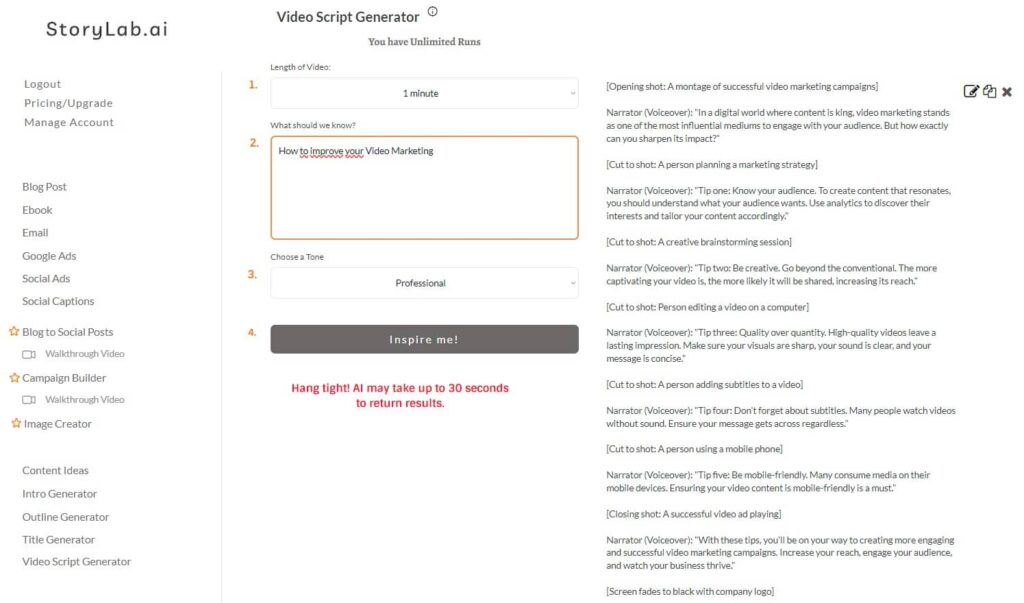
YouTube Video Script Output example
[Opening shot: A montage of successful video marketing campaigns]
Narrator (Voiceover): “In a digital world where content is king, video marketing stands as one of the most influential mediums to engage with your audience. But how exactly can you sharpen its impact?”
[Cut to shot: A person planning a marketing strategy]
Narrator (Voiceover): “Tip one: Know your audience. To create content that resonates, you should understand what your audience wants. Use analytics to discover their interests and tailor your content accordingly.”
[Cut to shot: A creative brainstorming session]
Narrator (Voiceover): “Tip two: Be creative. Go beyond the conventional. The more captivating your video is, the more likely it will be shared, increasing its reach.”
[Cut to shot: Person editing a video on a computer]
Narrator (Voiceover): “Tip three: Quality over quantity. High-quality videos leave a lasting impression. Make sure your visuals are sharp, your sound is clear, and your message is concise.”
[Cut to shot: A person adding subtitles to a video]
Narrator (Voiceover): “Tip four: Don’t forget about subtitles. Many people watch videos without sound. Ensure your message gets across regardless.”
[Cut to shot: A person using a mobile phone]
Narrator (Voiceover): “Tip five: Be mobile-friendly. Many consume media on their mobile devices. Ensuring your video content is mobile-friendly is a must.”
[Closing shot: A successful video ad playing]
Narrator (Voiceover): “With these tips, you’ll be on your way to creating more engaging and successful video marketing campaigns. Increase your reach, engage your audience, and watch your business thrive.”
[Screen fades to black with company logo]
Narrator (Voiceover): “Stay tuned for more tips and tricks from us on how to enhance your marketing strategy.”
[End of video]
Pretty cool, right? Now let’s see what it looks like when we keep the length the same ( 1 minute), use the same prompt, but only change the style to Comedic:
[Clip opens to a scene at an office cubicle with a man (BOB) struggling to make a dynamic video using simple office supplies. Bob looks to the camera, exasperated.]
BOB: (with a cheesy salesman grin) “Hey there, folks! You struggling to boost your video marketing game and failing… like me?”
[Cut to a goofy montage of Bob’s failed video attempts – poorly lit shots, out of focus images, a cat walking over his keyboard.]
BOB: (voiceover) “But don’t worry. I’ve learned a few tricks and you can too.”
[Cuts to Bob holding a whiteboard saying ‘Rule #1: Know Your Audience’]
BOB: “If your audience loves cooking, don’t show them how to change a car tire. Unless…it’s cooking a steak on a hot car hood. Maybe?”
[Bob winks at the camera, cut to a flash animation of a steak cooking on a car hood.]
BOB: (holding whiteboard saying ‘Rule #2: Quality over Quantity’) “One great video is better than ten…not so great ones.”
[Bob theatrically discards a bunch of crumpled papers titled ‘idea 1’, ‘idea 2’]
BOB: (holding whiteboard saying ‘Rule #3: Call To Action’) “End your videos with a bang. Tell your viewers what to do next. Like… Liking this video? Wink, wink.”
[Bob winks dramatically while pointing at an imaginary ‘like’ button.]
BOB: “Lastly, have fun with it! Who knew video marketing could be as fun as bob-sledding… no pun intended.”
[Ends with Bob laughing at his own joke while holding a whiteboard saying ‘Rule #4: Have Fun’]
Narrator (V.O): “That’s it. Video Marketing 101 with Bob. Get out there and conquer!”
FADE OUT with upbeat music.
Title: “And remember, don’t be like pre-enlightened Bob.”
[Clip ends with Bloopers of Bob slipping on a banana peel or getting tangled in a film reel, for added comedic effect.]
Quite a difference, right? You can play with the styles and prompts and get the video script you need in minutes. Be sure to always add your unique human touch and don’t just copy what AI comes up with.

AI YouTube Video Script Generator Styles
Choosing a different style for your YouTube Video Script can make a big difference. Here are the Style you can choose from at the moment. If you’re looking for something specific, simply reach out to us.
AI YouTube Video Script Styles:
- Professional;
- Witty;
- List;
- Storytelling;
- Bold;
- Adventurous;
- Friendly;
- Persuasive;
- Empathetic;
- Sassy;
- Classy;
- Casual;
- Comedic.

Other AI YouTube Marketing Copy Generators
Alright! Coming up with an engaging YouTube Video Script is one thing, but how do you come up with cool ideas in the first place? Which YouTube Title should you use? How do you create a great YouTube Description fast so you can spend your time creating new video content? And. How do you promote your video?
As mentioned earlier, StoryLab.ai is more than just an AI YouTube Video Script Maker. We’re here to help marketers and content creators to create more and better content faster than ever before. Here are just four of our cool AI Marketing Copy Generators.
Oh. The best thing about it. You’ll have access to all these tools and more when you sign up to StoryLab.ai.
YouTube Video Idea Generator
Let AI help you come up with cool ideas for your next videos. Our AI YouTube Video Idea Generator can help you do just that in seconds. Here’s what it looks like for the topic: “How to improve your Video Marketing” with the Comedic style:
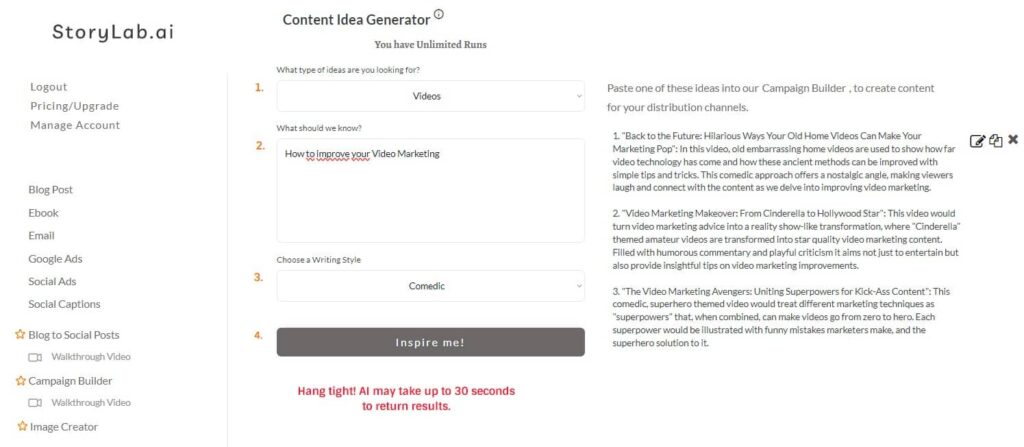
YouTube Video Idea Output Examples:
1. Back to the Future: Hilarious Ways Your Old Home Videos Can Make Your Marketing Pop:
In this video, old embarrassing home videos are used to show how far video technology has come and how these ancient methods can be improved with simple tips and tricks. This comedic approach offers a nostalgic angle, making viewers laugh and connect with the content as we delve into improving video marketing.
2. Video Marketing Makeover: From Cinderella to Hollywood Star:
This video would turn video marketing advice into a reality show-like transformation, where “Cinderella” themed amateur videos are transformed into star quality video marketing content. Filled with humorous commentary and playful criticism it aims not just to entertain but also provide insightful tips on video marketing improvements.
3. The Video Marketing Avengers: Uniting Superpowers for Kick-Ass Content:
This comedic, superhero themed video would treat different marketing techniques as “superpowers” that, when combined, can make videos go from zero to hero. Each superpower would be illustrated with funny mistakes marketers make, and the superhero solution to it.
YouTube Video Title Generator
Let AI help you come up with catchy titles for your next videos. Our AI YouTube Title Generator can help you come up with catchy headlines in seconds. Here’s what it looks like for the topic: “How to improve your Video Marketing” with the Comedic style:
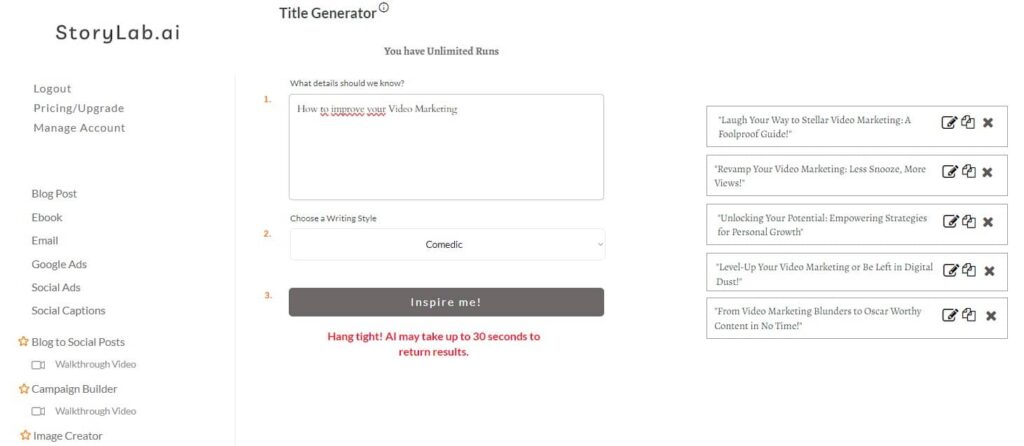
YouTube Video Title Output Examples:
- Laugh Your Way to Stellar Video Marketing: A Foolproof Guide!
- Revamp Your Video Marketing: Less Snooze, More Views!
- Unlocking Your Potential: Empowering Strategies for Personal Growth
- Level-Up Your Video Marketing or Be Left in Digital Dust!
- From Video Marketing Blunders to Oscar-Worthy Content in No Time!
Simply re-run the AI Title Generator until you’ve got enough inspiration for your Video Headline.
YouTube Video Description Generator
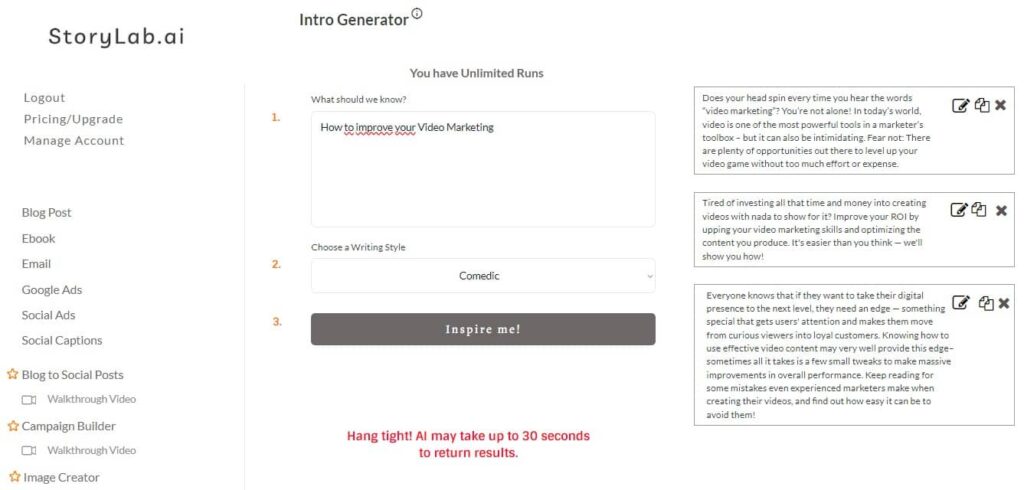
Let AI help you come up with YouTube Descriptions for your next videos. Our AI YouTube Description Generator can help you come up with copy for your YouTube Description in seconds. Always add a clear CTA, Hashtags, and links to your offers or website in your description. Here’s what it looks like for the topic: “How to improve your Video Marketing” with the Comedic style:
YouTube Video Description Output Examples:
- Does your head spin every time you hear the words “video marketing”? You’re not alone! In today’s world, video is one of the most powerful tools in a marketer’s toolbox – but it can also be intimidating. Fear not: There are plenty of opportunities out there to level up your video game without too much effort or expense.
- Tired of investing all that time and money into creating videos with nada to show for it? Improve your ROI by upping your video marketing skills and optimizing the content you produce. It’s easier than you think — we’ll show you how!
- Everyone knows that if they want to take their digital presence to the next level, they need an edge — something special that gets users’ attention and makes them move from curious viewers into loyal customers. Knowing how to use effective video content may very well provide this edge–sometimes all it takes is a few small tweaks to make massive improvements in overall performance. Keep reading for some mistakes even experienced marketers make when creating their videos, and find out how easy it can be to avoid them!
If you want to create longer YouTube Descriptions, simply copy/paste one of the text into our AI Text / Sentence Expander.
Social Media Caption Generator
After you’ve created and published your video, you also want to make sure people see it. We also have AI Tools to help you create promotional content. In this example, we’ve used our AI Social Media Caption Generator to create some social posts in seconds.
Here’s what it looks like for the topic: “How to improve your Video Marketing” with the Comedic style:
Social Media Caption Generator Output Examples:
- Are your videos getting the same attention as a mime at a rock concert? 🎸🤐 Fear not, we’ve got the secret sauce to boost your video marketing game! Stay tuned, we promise it’s more exciting than watching paint dry! 🎨🤣 #VideoMarketing #LevelUp #Engagement101
- Want to grab the Oscar for best Director in the video marketing world? 🎬🏆 We’ve got the plot twist! Dive into our latest article and learn how to make your video marketing Spielberg-worthy! #VideoMarketing #ImpressSteven
- Step right up folks, don’t be shy! Ready to turn your video marketing from “meh” to “marvellous?” Lights, camera, engagement! 🎬😂 #VideoMarketing #LightsCameraAction
AI YouTube Video Script Generator Pricing
Our pricing is set up as followed:
- Free – get 3 runs a month to try our tools out for free;
- Pro – $15 a month – 100 runs a month;
- Unlimited – $19 a month – unlimited runs a month;
You can also opt-in for the yearly membership and receive a 20% price reduction.
You can check out our full pricing here.
What you can generate with this YouTube script generator
- Full YouTube scripts for different lengths (short, medium, longer-form)
- Hook options and opening lines that reduce early drop-off
- Clear structure: intro, main points, transitions, recap, CTA
- On-screen cues (B-roll ideas, visuals, sections)
- Multiple tones and writing styles to match your channel voice
Prompt Playbook: copy-paste prompts for better YouTube scripts
| Goal | Copy-paste prompt template |
|---|---|
| High-retention tutorial | “Write a YouTube tutorial script about [topic] for [audience]. Start with a 10-second hook, then a quick roadmap. Use short sentences. Add timestamps and a recap. Include 3 common mistakes and how to avoid them.” |
| List video (fast pacing) | “Create a YouTube script: ‘[number] ways to [result]’. For each item: 1 line setup, 1 example, 1 quick tip. Add punchy transitions and a CTA at the end.” |
| Story-driven script | “Write a storytelling YouTube script about [topic]. Use a cold open, then ‘what happened’, ‘what I learned’, and ‘what you should do next’. Add 3 moments of tension and a payoff.” |
| Review / comparison | “Write a YouTube review script comparing [A] vs [B] for [audience]. Include: who each is for, pros/cons, dealbreakers, a simple verdict, and 3 real scenarios.” |
| Faceless / voiceover | “Write a voiceover YouTube script about [topic]. Include B-roll suggestions per section, on-screen text ideas, and keep sentences easy to read aloud.” |
| Shorts-style (tight) | “Write a 45–60 second YouTube Shorts script about [topic]. Hook in the first 2 seconds, 3 quick points, and a simple CTA. Use simple language and fast pacing.” |
Script structures that work (pick one and fill it)
| Video type | Best structure | Why it works |
|---|---|---|
| Tutorial / how-to | Hook → Promise → Steps → Mistakes → Recap → CTA | Clear progression keeps viewers oriented |
| List video | Hook → Roadmap → Items (repeatable pattern) → Best pick → CTA | Predictable pacing reduces drop-off |
| Case study | Hook → Setup → What we tried → Results → Lessons → CTA | Results create curiosity and credibility |
| Review / comparison | Hook → Who it’s for → Pros/Cons → Scenarios → Verdict → CTA | Viewers get fast clarity before they bounce |
| Commentary / opinion | Hook → Thesis → 3 arguments → Counterpoint → Summary → CTA | Debate-style structure keeps attention |
| Faceless / documentary | Cold open → Context → Key moments → Takeaways → CTA | Story beats pair well with visuals |
Hook formulas (steal these)
| Hook type | Formula | Example (swap in your topic) |
|---|---|---|
| “Stop doing this” | Stop X → Do Y → Here’s why | “Stop doing [common mistake]. Do this instead, and here’s why it works.” |
| Quick promise | In X minutes, you’ll learn Y | “In 5 minutes, you’ll learn the simplest way to [result].” |
| Curiosity gap | You think X → Actually Y | “You think [belief] helps. It usually makes things worse.” |
| Proof first | Result → How → Steps | “This is how I got [result]. Here are the steps I used.” |
| Relatable pain | If you’ve struggled with X, this fixes it | “If [pain point] keeps happening, this will save you hours.” |
| Challenge | Do X without Y | “Can you [result] without [usual tool]? Yes. Here’s how.” |
Pacing guide by video length
| Length | Hook | Setup | Main content | Recap + CTA |
|---|---|---|---|---|
| 60 seconds | 0–2s | 2–5s | 5–50s (3 quick points) | 50–60s |
| 3 minutes | 0–10s | 10–25s | 25–160s (3–5 beats) | 160–180s |
| 8 minutes | 0–15s | 15–45s | 45s–7:15 (chapters + examples) | 7:15–8:00 |
| 15 minutes | 0–20s | 20–60s | 1:00–13:30 (story + depth) | 13:30–15:00 |
YouTube script checklist (before you record)
| Check | What “good” looks like | Quick fix |
|---|---|---|
| Hook is clear | Viewer knows what they’ll get fast | Rewrite first 2 lines to state the promise |
| One main promise | Video does not try to cover everything | Cut 1 section and save it for a part 2 |
| Examples included | At least 2 real examples or demos | Add “Here’s what that looks like…” moments |
| Transitions exist | No awkward jumps between points | Add 1-line bridges: “Next…”, “Here’s the catch…” |
| CTA fits the video | CTA matches what the viewer wants next | Offer a next video, playlist, or free resource |
FAQ
What is an AI YouTube Video Script Generator?
An AI YouTube Video Script Generator is a tool that uses artificial intelligence to create scripts for YouTube videos. It automates the scriptwriting process based on input topics, keywords, or themes.
How does an AI Video Script Generator work?
It utilizes natural language processing (NLP) algorithms to interpret the provided input and generate a coherent script that aligns with the intended topic, style, and length.
What are the benefits of using AI for creating YouTube video scripts?
The benefits include saving time in content creation, ensuring consistency in scripting, generating a variety of script ideas, and helping creators overcome writer’s block.
Can AI Script Generators tailor scripts for different video genres?
Yes, these generators can be programmed or instructed to produce scripts for various genres, from educational content to entertainment, by adjusting the tone, terminology, and structure.
How do AI-generated scripts maintain viewer engagement?
AI scripts are often structured to maintain engagement by incorporating storytelling elements, key information points, and calls to action, based on successful script patterns.
Are AI-generated video scripts customizable?
While AI provides a base script, creators can further customize and tweak the content to add personal flair, ensure brand alignment, and make it more relatable to their audience.
Can AI Script Generators include SEO elements for YouTube?
Yes, these tools can integrate SEO elements like relevant keywords and phrases, ensuring the script is optimized for YouTube search algorithms.
How accurate are AI YouTube Video Script Generators?
Accuracy can vary, but advanced generators are generally proficient in creating coherent and relevant scripts, though they may require human editing for nuances and specificity.
What types of YouTube channels can benefit from AI scriptwriting?
Channels focusing on tutorials, vlogs, educational content, product reviews, and more can benefit, especially those requiring consistent and high-volume content production.
Are AI Video Script Generators user-friendly for non-writers?
Our AI script generators are designed to be user-friendly, enabling creators with minimal writing experience to produce quality scripts easily.
What is an AI YouTube video script generator?
An AI YouTube video script generator is a tool that creates a structured script from your topic, including a hook, talking points, transitions, and a CTA.
Can I generate scripts for Shorts and long-form videos?
Yes. Pick a length, then generate scripts that match Shorts pacing or longer, chapter-based videos.
How do I make an AI script sound like me?
Add specifics: your audience, your opinion, and real examples. Then read it out loud and rewrite lines that feel unnatural to say.
Is it okay to use AI scripts on YouTube?
Yes. Use AI as a draft, then improve it with your own voice, stories, and visuals so the content feels original and helpful.
What should I include in every YouTube script?
A clear promise in the first seconds, a simple roadmap, examples, smooth transitions, and a next step (CTA) that fits the topic.
How long should my YouTube script be?
It depends on your video type and pacing. Use the pacing guide above, then keep the script tight by removing repeated points.
Can this help with B-roll and on-screen text?
Yes. Ask for B-roll suggestions per section and short on-screen text lines to support the narration.
Can I use this tool for different niches?
Yes. It works for tutorials, reviews, commentary, education, business, gaming, fitness, and more. The key is adding niche context in your prompt.
Should I avoid adding sensitive information?
Yes. Treat prompts like public text and avoid sharing confidential, personal, or client-sensitive details.