

What Is StoryLab.ai’s AI Social Media Video Script Generator?
StoryLab.ai is an online AI Tool that helps you create better content. Fast.
The Social Media Video Script Generator is an AI-driven tool designed to help content creators produce engaging, ready-to-use scripts for their social media videos in minutes. Whether you’re crafting content for Instagram, TikTok, Facebook, or LinkedIn, our tool makes the process fast, easy, and fun.
Why use the Social Media Video Script Generator?
- Generate unique ideas for social media videos.
- Tailor scripts to your style with 13 creative modes.
- Save time while keeping your content fresh and audience-focused.
Simply enter your topic, select the style and length, and let AI do the rest!
Get started for free with the AI Social Media Video Script Generator.
Short-form videos aren’t hard because you need a Hollywood budget. They’re hard because you need clarity fast.
StoryLab.ai’s Social Media Video Script Generator helps you create Reels, TikTok, and Shorts scripts in minutes. You’ll get hook ideas, a simple beat-by-beat structure, on-screen text suggestions, and a CTA that doesn’t feel awkward.
Generate a few versions, pick the strongest hook, then record with confidence instead of “umm”-ing your way through the first 5 seconds.
More than just an Social Media Video Script Generator
StoryLab.ai is a complete Content Creation Platform. Create Ads, Blog Posts, Social Media Posts, and more in seconds. Check out the video intro to learn more.
Benefits of AI-Powered Social Media Video Script Generator
Explore topics from different angles and uncover fresh ideas effortlessly. Choose from a range of tones, including Professional, Comedic, Witty, Empathetic, and more, to match your brand’s voice. Create scripts in 17+ languages to connect with global audiences. Save time with quick, high-quality scripts, allowing you to focus on creating engaging visuals.
Top benefits of the AI Social Media Video Script Generator
 AI modes AI modes |
13 writing styles |
 Improves Improves |
Copy, creativity, and more |
 Support Support |
17+ Languages |
 Price Price |
Free and Premium |

Chapters
- What Is StoryLab.ai’s AI Social Media Video Script Generator?
- Benefits of AI-Powered Social Media Video Script Generator
- How to Use the Social Media Video Script Generator
- Why Choose our Social Media Video Script Generator?
- Social Media Video Script Generator Writing Styles:
- Social Media Video Script Best Practices
- What you can generate with the Social Media Video Script Generator
- Short-form script brief template (copy, fill, generate)
- Script formats that work (choose one)
- Prompt Playbook: copy-paste prompts for better video scripts
- Beat-by-beat script builder (30 seconds)
- On-screen text pack (copy, tweak, use)
- Short-form Script Scorecard (pick winners)
- FAQ
How to Use the Social Media Video Script Generator
- Sign Up for Free
Create a free account and access three script runs per month. Upgrade for more! - Enter Your Topic
Describe your video idea. Be as specific or broad as you like. - Select Style and Length
Pick the tone that fits your brand and set the desired video length. - Generate Your Script
Click “Inspire Me” and watch the AI work its magic.
Here’s what the Social Media Video Script Generator looks like:
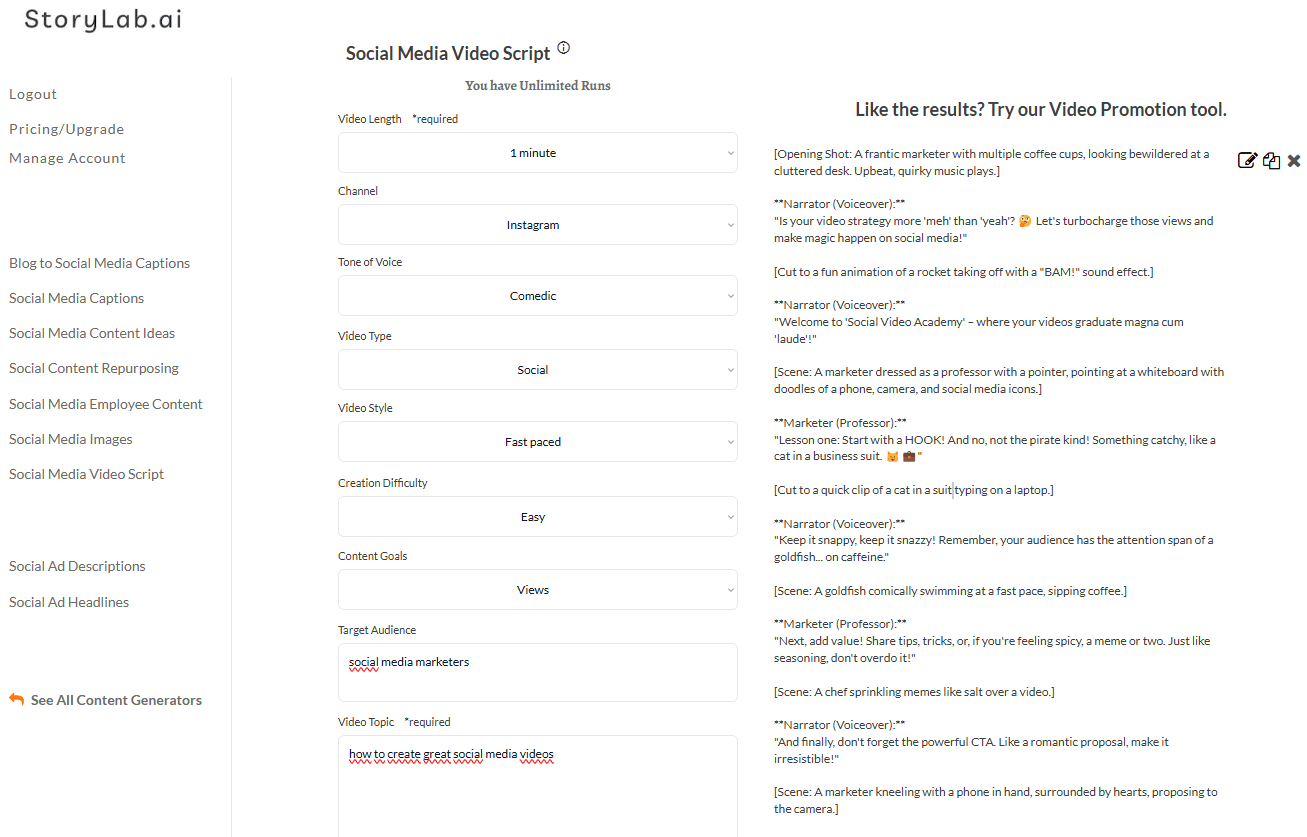
AI Social Media Video Script Generator Example
[Opening Shot: A frantic marketer with multiple coffee cups, looking bewildered at a cluttered desk. Upbeat, quirky music plays.]
**Narrator (Voiceover):**
“Is your video strategy more ‘meh’ than ‘yeah’? 🤔 Let’s turbocharge those views and make magic happen on social media!”
[Cut to a fun animation of a rocket taking off with a “BAM!” sound effect.]
**Narrator (Voiceover):**
“Welcome to ‘Social Video Academy’ – where your videos graduate magna cum ‘laude’!”
[Scene: A marketer dressed as a professor with a pointer, pointing at a whiteboard with doodles of a phone, camera, and social media icons.]
**Marketer (Professor):**
“Lesson one: Start with a HOOK! And no, not the pirate kind! Something catchy, like a cat in a business suit. 🐱💼”
[Cut to a quick clip of a cat in a suit typing on a laptop.]
**Narrator (Voiceover):**
“Keep it snappy, keep it snazzy! Remember, your audience has the attention span of a goldfish… on caffeine.”
[Scene: A goldfish comically swimming at a fast pace, sipping coffee.]
**Marketer (Professor):**
“Next, add value! Share tips, tricks, or, if you’re feeling spicy, a meme or two. Just like seasoning, don’t overdo it!”
[Scene: A chef sprinkling memes like salt over a video.]
**Narrator (Voiceover):**
“And finally, don’t forget the powerful CTA. Like a romantic proposal, make it irresistible!”
[Scene: A marketer kneeling with a phone in hand, surrounded by hearts, proposing to the camera.]
**Marketer (Professor):**
“So, hit that ‘create’ button, and take your videos from zero to hero faster than you can say ‘algorithm’!”
[Closing Shot: The marketer holding a giant thumbs-up emoji with confetti raining down.]
**Narrator (Voiceover):**
“Ready to become a video virtuoso? Smash that ‘Follow’ button for more sizzling tips! Because let’s face it, we’ve got more tricks than a magician at a rabbit convention! 🎩🐇”
[End Screen: Channel logo with a playful subscribe button and “Follow for more laughter and learning!” caption.] [Quirky music fades out.]

Why Choose our Social Media Video Script Generator?
Our Social Media Video Script Generator is part of a complete content creation platform. From video scripts to captions, blog posts, and ads, we’re your one-stop shop for all things content creation.
Other AI Marketing Tools Include:
- Video Idea Generator: Brainstorm video topics in seconds.
- Title Generator: Craft catchy titles that grab attention.
- Description Generator: Write optimized descriptions for maximum reach.
- Social Media Caption Generator: Create compelling captions for every platform.
Social Media Video Script Generator Pricing
Start Free – 3 script runs/month.
Pro Plan – $15/month for 100 runs.
Unlimited Plan – $19/month for unlimited creativity.
Sign up annually to save 20%!
Social Media Video Script Generator Writing Styles:
- Professional;
- Witty;
- List;
- Storytelling;
- Bold;
- Adventurous;
- Friendly;
- Persuasive;
- Empathetic;
- Sassy;
- Classy;
- Casual;
- Comedic.

Social Media Video Script Best Practices
Creating a compelling social media video script is key to grabbing attention and driving engagement. Here are the best practices to follow when creating scripts for social platforms like Instagram, TikTok, Facebook, and LinkedIn:
1. Start with a Strong Hook
Social media users scroll quickly, so your opening seconds must grab attention.
- Use bold statements: “Did you know 90% of people prefer videos over text content?”
- Ask engaging questions: “What’s stopping your videos from going viral?”
- Add intrigue: “Here’s the secret to skyrocketing your engagement in 60 seconds.”
2. Be Clear and Concise
Attention spans are short on social media, so keep your script direct and easy to understand.
- Limit the script length based on the platform’s best practices (e.g., 15–60 seconds for Instagram Reels, up to 3 minutes for TikTok).
- Use simple, conversational language. Avoid jargon unless it suits your audience.
3. Align Tone with Audience and Platform
Different platforms and audiences require tailored tones.
- Instagram and TikTok: Fun, casual, and trendy.
- LinkedIn: Professional, insightful, and value-driven.
- Facebook: Friendly, community-focused, and informative.
4. Highlight Key Messages Early
Deliver your main points within the first 10–15 seconds.
- Viewers are more likely to engage if they understand the value early on.
- Structure your script like this: Hook → Key Message → Supporting Details → CTA.
5. Incorporate a Clear Call-to-Action (CTA)
Every video should guide viewers on what to do next.
- Examples of CTAs:
- “Click the link in bio for more tips!”
- “Follow us for weekly hacks!”
- “Comment your favorite idea below!”
6. Tell a Story
People love stories, even in short-form content.
- Setup: Introduce the problem or topic.
- Action: Share the solution or tip.
- Resolution: Showcase the result or next steps.
7. Use Visual and Verbal Cues
- Visual cues: Highlight key points with text overlays, animations, or cutaways.
- Verbal cues: Emphasize important details with pauses, tone changes, or repetition.
8. Optimize for Silent Viewing
Many users watch videos without sound.
- Include captions or subtitles.
- Use text overlays to emphasize key points.
9. Be Platform-Specific
Each platform has unique video specs and preferences.
- Aspect Ratios: Vertical (9:16) for TikTok and Instagram Reels; Square (1:1) or Horizontal (16:9) for Facebook and YouTube.
- Video Length: Research and adhere to platform best practices.
10. Keep Branding Subtle but Present
- Use your brand colors, fonts, or logo sparingly.
- Ensure your tone and messaging align with your brand personality.
11. Test and Iterate
Social media trends evolve quickly. Test different script styles and formats to see what resonates.
- Analyze metrics like views, shares, and comments.
- Incorporate audience feedback to improve future scripts.
By following these best practices, you can create engaging, memorable, and share-worthy social media videos that resonate with your audience. Start with our AI Social Media Video Script Generator and improve your creativity while speeding up the video generation process. Start for free!
What you can generate with the Social Media Video Script Generator
- 15–60 second scripts for TikTok, Reels, and Shorts
- Multiple hook options per topic
- Beat-by-beat structure (what to say and show)
- On-screen text suggestions and caption ideas
- CTA variations (comment, save, follow, click)
- Series scripts (Part 1/Part 2/Part 3)
Short-form script brief template (copy, fill, generate)
| Brief field | What to write | Example |
|---|---|---|
| Topic | One clear promise | “3 hooks that increase watch time” |
| Platform | TikTok / Reels / Shorts | “Instagram Reels” |
| Audience | Who it’s for + pain | “Creators who lose viewers early” |
| Length | 15s / 30s / 45s / 60s | “30 seconds” |
| Tone | Voice and vibe | “Direct, friendly, practical” |
| Proof | Example or result (optional) | “Before/after hook examples” |
| CTA | One action | “Save this” / “Follow for part 2” |
Script formats that work (choose one)
| Format | Best for | Structure (beats) |
|---|---|---|
| Quick win tutorial | Fast how-to content | Hook → Step 1 → Step 2 → Step 3 → CTA |
| Mistake + fix | Beginner audiences | Hook → Mistake → Why it hurts → Fix → Example → CTA |
| Myth-busting | Correcting bad advice | Hook → Myth → Truth → What to do → CTA |
| Before/after | Proof-driven content | Hook → Before → Change → After → Lesson → CTA |
| 3 tips list | Save-worthy content | Hook → Tip 1 → Tip 2 → Tip 3 → CTA |
| Mini story | Relatable, human content | Hook → Situation → What changed → Result → CTA |
Prompt Playbook: copy-paste prompts for better video scripts
| Goal | Copy-paste prompt template |
|---|---|
| 10 scripts (15–30 seconds) | “Write 10 short-form scripts about [topic] for [platform]. Audience: [audience]. Length: [15/30] seconds. Each script must include: a 2-second hook, 3 value beats, on-screen text suggestions, and a CTA.” |
| Hook bank only | “Generate 30 hooks for short-form videos about [topic]. Include: pain hooks, curiosity hooks, proof hooks, and ‘stop doing this’ hooks.” |
| Series scripts (Part 1–6) | “Turn [topic] into a 6-part short-form series. For each part: hook, 3 beats, on-screen text, CTA to follow for the next part.” |
| UGC-style scripts | “Write 8 UGC-style short-form scripts for [offer]. Make them sound natural. Structure: hook → what I tried → what happened → what to do → CTA.” |
| Repurpose a long video into Shorts | “Turn this long video summary into 12 Shorts/Reels scripts (15–25s). Each should focus on one key point, include a hook, and end with a CTA to watch the full video: [paste summary].” |
| Objection-handling scripts | “Write 10 short-form scripts about [topic] that address common objections. Structure: objection → quick answer → micro example → CTA.” |
Beat-by-beat script builder (30 seconds)
| Time | What to say | What to show | On-screen text |
|---|---|---|---|
| 0–2s | Hook: call out the problem or outcome | Face-to-camera, quick pattern interrupt | [Big promise] |
| 2–6s | Context: who this is for | Point to text, quick b-roll cut | For: [audience] |
| 6–18s | Value beats (2–3 points) | Switch shots every 2–3 seconds | Step 1 / Step 2 / Step 3 |
| 18–24s | Example or proof (quick) | Show a before/after or screenshot | Example: |
| 24–30s | CTA: one clear next step | Point to comment/follow button | Save this / Follow for more |
On-screen text pack (copy, tweak, use)
| Use case | On-screen text templates | Where it fits |
|---|---|---|
| Promise | [Result] in [timeframe] • Without [pain] | 0–2s |
| Targeting | If you’re [audience], watch this | 2–6s |
| Steps | Step 1: [verb] • Step 2: [verb] • Step 3: [verb] | 6–18s |
| Mistakes | Stop doing this: [mistake] | 6–18s |
| Proof | Before → After | 18–24s |
| CTA | Save this • Follow for part 2 • Comment “X” | 24–30s |
Short-form Script Scorecard (pick winners)
| Score (1-5) | What to check | Quick test |
|---|---|---|
| Hook strength | First 2 seconds are clear and compelling | Listen to only the hook: would you keep watching? |
| One idea | Script stays focused | Can you summarize it in 6 words? |
| Pacing | Beats move quickly | No section longer than 6 seconds |
| Specificity | Includes an example, number, or scenario | Add one “for example…” line |
| CTA clarity | One simple next step | Remove extra asks and keep one CTA |
FAQ
What is a social media video script generator?
A social media video script generator helps you create short-form scripts for TikTok, Instagram Reels, and YouTube Shorts, including hooks, beats, and CTAs.
How long should a Reel or TikTok script be?
Most high-performing scripts are 15–45 seconds. For tutorials and lists, 30 seconds is often a sweet spot.
What makes a short-form video hook strong?
A strong hook is clear and specific. It calls out a problem, a desired outcome, or a surprising truth in the first 1–2 seconds.
Should I write scripts word-for-word?
It depends on your style. Many creators use a beat outline and speak naturally, as long as the hook and key points stay tight.
How do I add on-screen text effectively?
Use short phrases that match your spoken words. Keep it readable, high contrast, and aligned with the key beats.
How many script variations should I generate?
Start with 10 drafts, pick the best 2–3 hooks, then test. Let performance decide what to iterate.
Can I repurpose long videos into short scripts?
Yes. Break the long content into single-point clips. One key idea per short is the easiest way to keep retention high.