
Free Sentence Case Converter: Fix Capitalization Online [Unlimited Use]
Turn uppercase, lowercase, or inconsistently capitalized text into clear, readable sentence case in seconds.
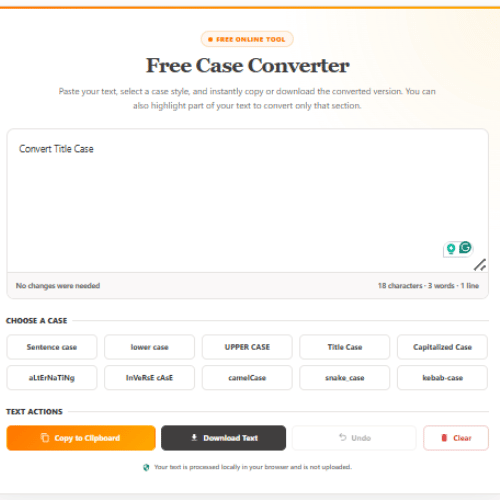
Paste your text into StoryLab.ai’s free sentence case converter and select Sentence case. The tool changes unnecessary capital letters to lowercase while capitalizing the beginning of each sentence.
Use it to clean up blog paragraphs, emails, social media captions, video descriptions, advertising copy, product descriptions, reports, and other written content.
There is no need to edit each sentence manually. Convert your text, review proper names and branded terms, and copy or download the finished version.
Start below for free. Unlimited usage and no signup!
Free Case Converter
Paste your text, select a case style, and instantly copy or download the converted version. You can also highlight part of your text to convert only that section.
How to Use the Free Sentence Case Converter
Follow these steps:
- Type or paste your text into the converter.
- Select the Sentence case option.
- Review the converted text.
- Correct any names, acronyms, or branded terms when needed.
- Copy the text to your clipboard or download it as a text file.
You can also highlight a specific passage before selecting Sentence case. The tool will convert only the highlighted section while leaving the rest of your content unchanged.
What Is Sentence Case?
Sentence case is a capitalization style in which the first word of a sentence is capitalized while most other words remain lowercase.
Proper nouns, names, acronyms, and branded terms should still use their correct capitalization.
For example:
Before:
THIS IS AN EXAMPLE OF TEXT WRITTEN ENTIRELY IN CAPITAL LETTERS. IT CAN BE DIFFICULT TO READ.
After:
This is an example of text written entirely in capital letters. It can be difficult to read.
Sentence case is the standard format for most paragraphs, emails, captions, descriptions, and conversational writing.
Sentence Case Examples
Here are several examples of text before and after conversion.
Uppercase paragraph
Before:
CONTENT MARKETING HELPS BUSINESSES EDUCATE THEIR AUDIENCE. IT CAN ALSO BUILD TRUST OVER TIME.
After:
Content marketing helps businesses educate their audience. It can also build trust over time.
Lowercase paragraph
Before:
content marketing helps businesses educate their audience. it can also build trust over time.
After:
Content marketing helps businesses educate their audience. It can also build trust over time.
Inconsistent capitalization
Before:
Content MARKETING Helps BUSINESSES reach MORE people. A Clear STRATEGY can improve RESULTS.
After:
Content marketing helps businesses reach more people. A clear strategy can improve results.
Social media caption
Before:
FIVE SIMPLE WAYS TO CREATE BETTER SOCIAL MEDIA CONTENT. SAVE THIS POST FOR LATER!
After:
Five simple ways to create better social media content. Save this post for later!
Create new caption ideas with StoryLab.ai’s Social Media Caption Generator, then use the sentence case converter to clean up the capitalization before publishing.
Email copy
Before:
THANK YOU FOR DOWNLOADING OUR GUIDE. WE HOPE IT HELPS YOU PLAN YOUR NEXT CAMPAIGN.
After:
Thank you for downloading our guide. We hope it helps you plan your next campaign.
Develop the complete message with the AI Email Copy Generator and create supporting inbox text with the Email Preview Text Generator.
When Should You Use Sentence Case?
Sentence case works well for most everyday and professional writing.
It is commonly used for:
- Blog paragraphs
- Article introductions
- Website copy
- Social media captions
- Email body copy
- Video descriptions
- Product descriptions
- Advertising descriptions
- Reports
- Instructions
- Help documentation
- Presentation bullet points
- Survey questions
- Calls to action
- Mobile notifications
It creates a natural reading experience because it follows the capitalization style people expect in normal sentences.
Which Words Are Capitalized in Sentence Case?
The first word of each sentence should normally begin with a capital letter.
For example:
This is the first sentence. This is the second sentence.
The first word after a question mark or exclamation mark is also capitalized:
Did the campaign work? Review the results before planning the next one.
Other words generally remain lowercase unless they require capitals for a specific reason.
These can include:
- Names of people
- Company names
- Brand names
- Countries
- Cities
- Languages
- Days and months
- Product names
- Acronyms
- Initialisms
- Titles used with names
Examples include:
- StoryLab.ai
- YouTube
- Amsterdam
- English
- Monday
- AI
- SEO
- CEO
An automated converter may not recognize every proper noun or stylized brand name. Always review the text after converting it.
Sentence Case Versus Title Case

Sentence case and title case use different capitalization rules.
Sentence case:
How to create better marketing content
Title case:
How to Create Better Marketing Content
Sentence case usually capitalizes only the first word and proper nouns. Title case capitalizes most of the important words.
Sentence case is commonly used for:
- Paragraphs
- Descriptions
- Captions
- Email body copy
- Instructions
- Conversational headings
Title case is commonly used for:
- Article titles
- Ebook titles
- Presentation titles
- Formal headings
- Video titles
- Advertising headlines
Neither style is automatically better. Choose the format that fits the type of content and your brand guidelines.
Use StoryLab.ai’s Free Title Case Converter when you need to capitalize the important words in a headline rather than format standard sentences.
Sentence Case Versus Lowercase
Lowercase changes every letter to a lowercase letter.
Lowercase:
this is an example sentence. this is another sentence.
Sentence case:
This is an example sentence. This is another sentence.
Sentence case is usually easier to read because the capital letter at the start helps readers identify where each new sentence begins.
Lowercase can be used as a deliberate creative style, but it may not be suitable for formal articles, professional emails, reports, or instructions.
Sentence Case Versus Capitalized Case
Capitalized case begins each word with a capital letter.
Capitalized case:
This Is An Example Of Capitalized Case
Sentence case:
This is an example of sentence case.
Capitalized case may work for labels, menu items, categories, or short design elements. It often looks unnatural when applied to complete paragraphs.
Sentence case is normally the better option for longer, continuous text.
Sentence Case Versus UPPERCASE
Uppercase converts every letter into a capital letter.
UPPERCASE:
THIS MESSAGE IS WRITTEN ENTIRELY IN CAPITAL LETTERS.
Sentence case:
This message is written entirely in capital letters.
Uppercase may be useful for:
- Short warnings
- Brief labels
- Small design elements
- Acronyms
- Short calls to action
Long uppercase passages are generally harder to scan and can feel as though the writer is shouting. Sentence case usually creates a calmer and more natural reading experience.
Use Sentence Case for Blog Content
Most blog paragraphs should be written in sentence case. It helps visitors move naturally through introductions, explanations, examples, and conclusions.
Use the converter when:
- A paragraph was accidentally written with Caps Lock enabled.
- Copied content contains inconsistent capitalization.
- An imported article uses unnecessary capital letters.
- AI-generated copy needs formatting cleanup.
- Content from several contributors follows different styles.
- A title needs to be converted into a paragraph.
- Text extracted from a document has formatting errors.
StoryLab.ai’s AI Blog Content Generators can help you develop the article. You can create individual sections using the:
Blog Title Generator
Blog Introduction Generator
Blog Outline Generator
AI Article Writer
AI Sentence Expander
Once the draft is ready, use the sentence case converter to fix inconsistent capitalization.
Clean Up Social Media Captions
Social media copy is often drafted quickly or reused across several platforms. That can lead to extra capital letters, uppercase paragraphs, or inconsistent formatting.
Sentence case works especially well for captions because it feels conversational and is easy to read on smaller screens.
For example:
Before:
HERE ARE THREE WAYS TO IMPROVE YOUR CONTENT STRATEGY. WHICH ONE WILL YOU TRY FIRST?
After:
Here are three ways to improve your content strategy. Which one will you try first?
Generate the initial copy with the Social Media Caption Generator or use a channel-specific tool:
Instagram Caption Generator
LinkedIn Caption Generator
Facebook Caption Generator
Twitter Caption Generator
TikTok Caption Generator
Pinterest Description Generator
You can then turn the finished copy into a visual with the Free Social Media Post Maker or Free Instagram Post Maker.
Format Email Copy
Sentence case is frequently used in professional and marketing emails because it feels natural and personal.
It works well for:
- Opening paragraphs
- Product announcements
- Newsletters
- Welcome emails
- Follow-up messages
- Sales outreach
- Customer support replies
- Calls to action
- Email preview text
For example:
Before:
WE HAVE ADDED THREE NEW FEATURES TO HELP YOU CREATE CONTENT FASTER.
After:
We have added three new features to help you create content faster.
Create your message with the AI Email Copy Generator. Use the Email Subject Line Generator for headline ideas and the Email Preview Text Generator for the supporting inbox copy.
Format YouTube Descriptions
YouTube descriptions should be easy to scan and understand. Sentence case is usually the most natural format for introductory paragraphs, explanations, links, and calls to action.
For example:
Before:
IN THIS VIDEO, YOU WILL LEARN HOW TO DEVELOP A SIMPLE CONTENT PLAN FOR YOUR BUSINESS.
After:
In this video, you will learn how to develop a simple content plan for your business.
Create the first draft with the YouTube Description Generator. You can also build the rest of the video package using the:
YouTube Video Idea Generator
AI Video Hook Generator
YouTube Video Script Generator
YouTube Title Generator
YouTube Tags Generator
YouTube Video SEO Generator
Use title case or sentence case for the video title according to your preferred style, but use normal sentence formatting for most of the description.
Improve Advertising Descriptions
Advertising descriptions need to communicate information quickly. Writing entire descriptions in uppercase can reduce readability and make the message feel overly aggressive.
Sentence case creates a cleaner result:
Before:
CREATE BETTER CAMPAIGNS WITH AI-POWERED MARKETING TOOLS. START GENERATING CONTENT TODAY.
After:
Create better campaigns with AI-powered marketing tools. Start generating content today.
Develop new campaign variations with StoryLab.ai’s AI Ad Copy Generators and AI Marketing Copy Generators.
You can also use the:
Google Ad Description Generator
Facebook Ad Copy Generator
LinkedIn Ad Copy Generator
Instagram Ad Copy Generator
Social Media Ad Copy Generator
Once you have selected the strongest copy, use the sentence case converter to standardize its capitalization.
Format Survey and Questionnaire Copy
Survey questions should be clear, consistent, and easy to read.
Sentence case works well for:
Customer satisfaction questions
Employee surveys
Website feedback forms
Market research questionnaires
Event feedback surveys
Product research
Onboarding forms
For example:
Before:
HOW SATISFIED ARE YOU WITH YOUR RECENT EXPERIENCE?
After:
How satisfied are you with your recent experience?
Create question ideas with the AI Survey Question Generator or Customer Satisfaction Question Generator. Then convert the full questionnaire into a consistent sentence case style.
Common Sentence Case Mistakes
Sentence case is simple, but several issues can still appear.
Leaving every word capitalized
Incorrect:
This Is A Sentence With Too Many Capital Letters.
Better:
This is a sentence with too many capital letters.
Forgetting proper nouns
Incorrect:
We created the campaign with storylabai.com and published it on linkedin.
Correct:
We created the campaign with StoryLab.ai and published it on LinkedIn.
Changing acronyms to lowercase
Incorrect:
Ai and seo can support the content workflow.
Correct:
AI and SEO can support the content workflow.
Failing to capitalize a new sentence
Incorrect:
The campaign ended yesterday. we are now reviewing the results.
Correct:
The campaign ended yesterday. We are now reviewing the results.
Capitalizing words for emphasis
Incorrect:
Our New Tool Helps You Create Better Content Faster.
Better:
Our new tool helps you create better content faster.
Capitalization should not replace clear wording. Use bold text, design, or sentence structure when emphasis is needed.
Does Sentence Case Improve Readability?
Sentence case can make long passages easier to scan because it clearly shows where each new sentence begins without adding unnecessary visual emphasis.
Readers are familiar with this format from articles, books, emails, reports, and everyday communication. That familiarity can make the text feel more natural.
Sentence case does not automatically make weak writing effective. The text still needs:
- Clear wording
- Logical structure
- Useful information
- Appropriate sentence length
- Consistent tone
- Accurate spelling and grammar
Use the converter to fix capitalization, then review the content itself.
Does Sentence Case Improve SEO?
Sentence case does not directly guarantee better search rankings.
Search engines can understand content written in sentence case, title case, or other capitalization formats. However, sentence case can support:
- Readability
- Consistency
- Professional presentation
- Clearer headings and descriptions
- A better user experience
These factors can help visitors engage with your content, but capitalization alone is not an SEO strategy.
Focus first on answering the reader’s question. Then use sentence case to present the answer clearly.
Sentence Case Conversion Versus Rewriting
A sentence case converter changes capitalization. It does not intentionally change the message, structure, or tone.
Use the sentence case converter when:
- The words are already correct.
- The text contains unnecessary capitals.
- An uppercase paragraph needs to be normalized.
- You want consistent formatting.
Use StoryLab.ai’s AI Tone Changer and Rewriter when you want to make the content more professional, friendly, direct, persuasive, confident, or conversational.
Use the AI Sentence Expander when the sentence needs more information rather than different capitalization.
A simple workflow is:
- Generate or write the text.
- Rewrite or expand it when needed.
- Convert it to sentence case.
- Review names, acronyms, and brands.
- Copy or download the final version.
Create and Format Content With StoryLab.ai
The free sentence case converter helps with formatting. StoryLab.ai’s other tools can help you create, rewrite, and design the content.
A complete workflow could look like this:
- Find a topic with the Content Idea Generator.
- Create a first draft with the relevant content generator.
- Adjust the wording with the AI Tone Changer.
- Convert inconsistent capitalization to sentence case.
- Review proper nouns and acronyms.
- Turn the final copy into a visual with the Free Social Media Post Maker.
- Publish the completed content.
This keeps the creative and formatting stages separate, making it easier to review each part of the content before publishing.
Frequently Asked Questions
What does a sentence case converter do?
A sentence case converter changes text so that the first word of each sentence begins with a capital letter while most other words remain lowercase.
Is the StoryLab.ai sentence case converter free?
Yes. You can use the converter to change text into sentence case for free.
Can I convert uppercase text into sentence case?
Yes. Paste the uppercase text into the tool and select Sentence case.
For example:
BEFORE CONVERSION. THIS IS ANOTHER SENTENCE.
Becomes:
Before conversion. This is another sentence.
Can I convert lowercase text into sentence case?
Yes. The tool capitalizes the beginning of each sentence after converting the rest of the text to lowercase.
Can I convert only part of my text?
Yes. Highlight the part you want to change before selecting Sentence case. The rest of your text will remain unchanged.
Does the converter correct grammar?
No. It changes capitalization but does not fully correct grammar, spelling, punctuation, or sentence structure.
Does it recognize names and brand names?
The converter may not recognize every name, company, product, acronym, or stylized brand.
Review terms such as StoryLab.ai, YouTube, LinkedIn, TikTok, Google, AI, and SEO after conversion.
What is the difference between sentence case and title case?
Sentence case capitalizes the first word of a sentence and proper nouns.
Title case capitalizes most important words in a headline.
Sentence case:
How to create better content
Title case:
How to Create Better Content
Should headings use sentence case?
Headings can use sentence case or title case. Sentence case often feels modern and conversational, while title case can feel more formal.
Choose one style and use it consistently across similar headings.
Should blog paragraphs use sentence case?
Yes. Sentence case is the normal format for most article paragraphs and long-form website copy.
Is sentence case suitable for social media?
Yes. Sentence case works well for captions, replies, descriptions, and conversational posts.
Short uppercase phrases can still be used sparingly for emphasis.
Is sentence case suitable for email subject lines?
Yes. Sentence-case subject lines can feel personal and conversational.
For example:
Five ideas for your next marketing campaign
Title case is also valid:
Five Ideas for Your Next Marketing Campaign
Testing can help you determine which style works best for your audience.
Can I download the converted text?
Yes. After converting the content, select the download option to save it as a plain text file.
Does the converter store my text?
The tool processes the text locally in the visitor’s browser. The text does not need to be uploaded for the capitalization conversion.
Can sentence case improve my writing?
Sentence case can improve consistency and readability, but it does not rewrite weak or unclear content.
Use the AI Tone Changer and Rewriter when you want to improve the wording or style as well as the capitalization.