
What Is StoryLab.ai’s AI YouTube Channel Description Generator?
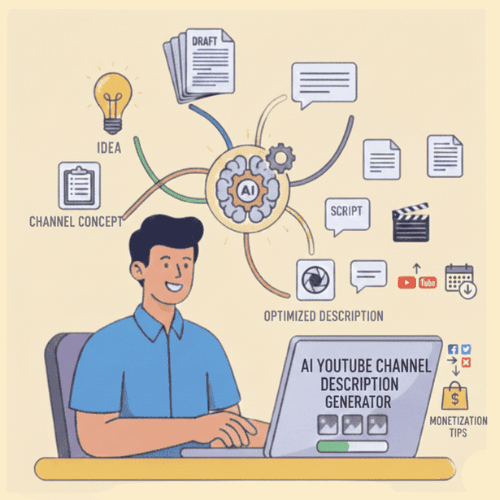
StoryLab.ai is an advanced AI-powered tool designed to help content creators, businesses, and influencers craft compelling YouTube channel descriptions effortlessly.
A well-optimized YouTube channel description helps attract new subscribers and boost visibility in search results. With our AI YouTube Channel Description Generator, you can create multiple variations of engaging, keyword-rich descriptions in seconds before selecting the best one.
Many YouTubers focus heavily on content creation but overlook the importance of an optimized channel description. Our AI tools simplify this process, ensuring your channel stands out in YouTube’s search algorithm.
Your YouTube channel description is your “front door sign.”
It helps new viewers understand what you post, who it’s for, and what they’ll get if they subscribe. It also gives YouTube extra context about your niche, topics, and keywords.
StoryLab.ai’s YouTube Channel Description Generator helps you create channel bios that are clear, keyword-aware, and actually readable by humans. Because nobody ever subscribed to a wall of buzzwords.
Start optimizing your YouTube channel description for free!
More than just an AI YouTube Channel Description Generator
StoryLab.ai is more than a YouTube SEO tool — it’s a full-scale content creation platform. From generating blog posts to crafting social media captions, we help you create engaging content at scale.
Check out our platform and start optimizing your content today!
Benefits of AI-Powered YouTube Channel Description Generator
Writing an effective channel description can be time-consuming. Whether you’re a beginner or an experienced YouTuber, getting it right the first time can be challenging. AI makes it easier than ever to create and refine your descriptions. Start with our AI YouTube Channel Description Generator today!
Top benefits of the AI YouTube Channel Description Generator
 AI modes AI modes |
13 writing styles |
 Improves Improves |
Copy, creativity, and more |
 Support Support |
17+ Languages |
 Price Price |
Free and Premium |
Chapters
- Wat is StoryLab.ai's AI YouTube-kanaalbeschrijvingsgenerator?
- Voordelen van de door AI aangestuurde YouTube-kanaalbeschrijvingsgenerator
- Hoe te beginnen met de AI Tone Changer / Rewriter
- YouTube-kanaal SEO-best practices
- AI YouTube-kanaalbeschrijvingsgenerator Prijzen
- Wat je kunt genereren met de YouTube-kanaalbeschrijvinggenerator
- Sjabloon voor een korte kanaalbeschrijving (kopiëren, invullen, genereren)
- Handleiding voor prompts: kant-en-klare prompts voor YouTube-kanaalbeschrijvingen
- Formules voor kanaalbeschrijvingen (kies een stijl)
- Kopieer blokken die je in elke kanaalbeschrijving kunt plakken.
- Kanaal-zoekwoordkaart (hoe je zoekwoorden kunt noemen zonder ze te overdrijven)
- Scorekaart voor de beschrijving van het YouTube-kanaal
- FAQ
How to start with the AI Tone Changer / Rewriter
Starting is simple! Follow these steps to generate your optimized YouTube channel description:
- Create a Free Account – Sign up in seconds to access the tool.
- Describe Your Channel – Input details like niche, content type, and audience.
- Select a Tone – Choose a writing style that matches your brand’s personality.
- Generate & Edit – Let AI create multiple variations, then refine as needed.
- Copy & Paste – Use your new optimized description on your YouTube channel.
For this example, we used the inputs: Channel topic: Vegetables Growing Guides.
Here’s what the YouTube Channel Description Generator came up with:
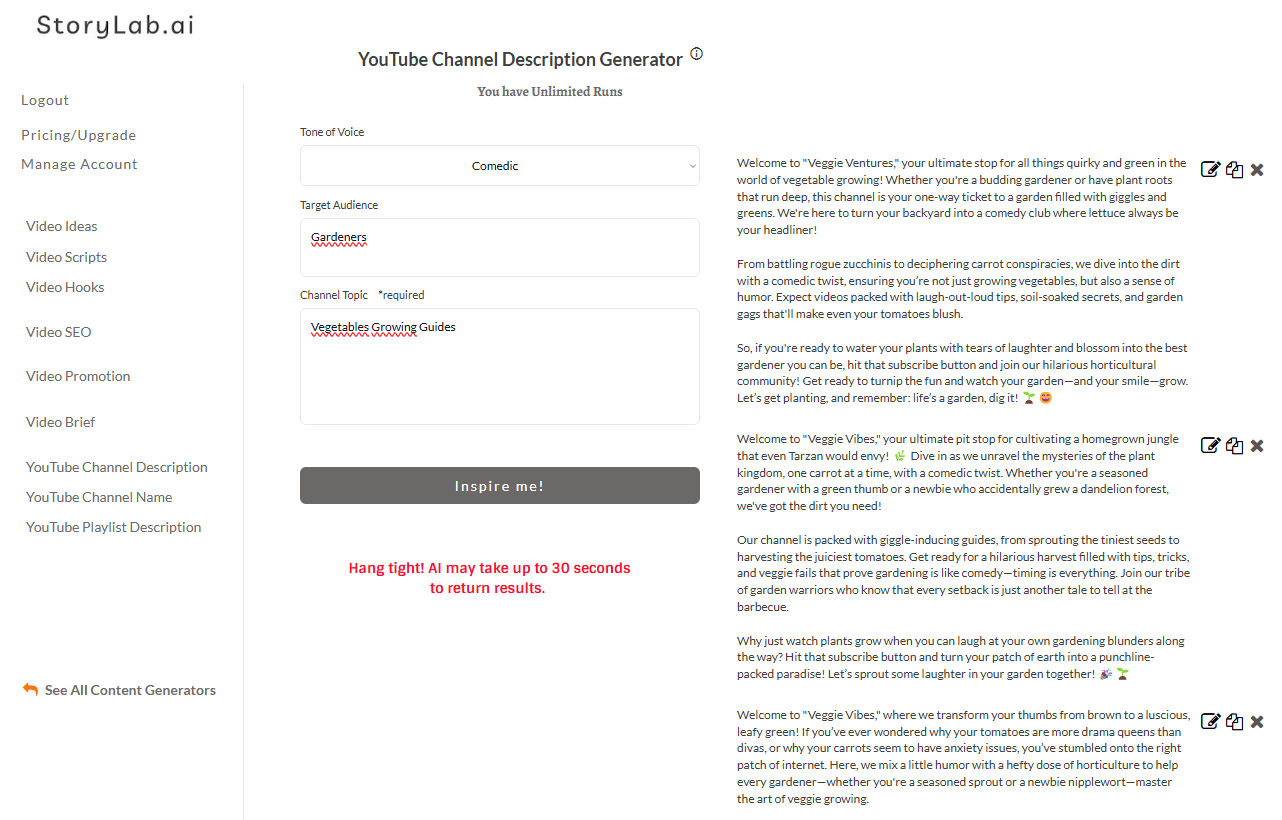
YouTube Channel Description Generator Example:
Welcome to “Veggie Ventures,” your ultimate stop for all things quirky and green in the world of vegetable growing! Whether you’re a budding gardener or have plant roots that run deep, this channel is your one-way ticket to a garden filled with giggles and greens. We’re here to turn your backyard into a comedy club where lettuce always be your headliner!
From battling rogue zucchinis to deciphering carrot conspiracies, we dive into the dirt with a comedic twist, ensuring you’re not just growing vegetables, but also a sense of humor. Expect videos packed with laugh-out-loud tips, soil-soaked secrets, and garden gags that’ll make even your tomatoes blush.
So, if you’re ready to water your plants with tears of laughter and blossom into the best gardener you can be, hit that subscribe button and join our hilarious horticultural community! Get ready to turnip the fun and watch your garden—and your smile—grow. Let’s get planting, and remember: life’s a garden, dig it! 🌱😄
—
Welcome to “Veggie Vibes,” your ultimate pit stop for cultivating a homegrown jungle that even Tarzan would envy! 🌿 Dive in as we unravel the mysteries of the plant kingdom, one carrot at a time, with a comedic twist. Whether you’re a seasoned gardener with a green thumb or a newbie who accidentally grew a dandelion forest, we’ve got the dirt you need!
Our channel is packed with giggle-inducing guides, from sprouting the tiniest seeds to harvesting the juiciest tomatoes. Get ready for a hilarious harvest filled with tips, tricks, and veggie fails that prove gardening is like comedy—timing is everything. Join our tribe of garden warriors who know that every setback is just another tale to tell at the barbecue.
Why just watch plants grow when you can laugh at your own gardening blunders along the way? Hit that subscribe button and turn your patch of earth into a punchline-packed paradise! Let’s sprout some laughter in your garden together! 🎉🌱
—
Welcome to “Veggie Vibes,” where we transform your thumbs from brown to a luscious, leafy green! If you’ve ever wondered why your tomatoes are more drama queens than divas, or why your carrots seem to have anxiety issues, you’ve stumbled onto the right patch of internet. Here, we mix a little humor with a hefty dose of horticulture to help every gardener—whether you’re a seasoned sprout or a newbie nipplewort—master the art of veggie growing.
Join us as we dig deep into the dirt (pun totally intended) with hilarious how-tos, laugh-out-loud bloopers, and plenty of green-thumb wisdom to make those zucchinis grow faster than your neighbor’s envy. Got pests? We’ll turn them from terrorizing terrors to comedic entertainers in no time. Love cheesy plant puns? Lettuce entertain you with a full plate of those, too!
So, if your idea of a good time is watching peas make peace and finding out how to make your basil more fabulous, hit that subscribe button and let’s plant the seeds of laughter and learning together! Don’t beet around the bush—join the Veggie Vibes tribe today!
—
Pretty cool, right?
I can simply re-run the AI tool or adjust my inputs and get new ideas.
YouTube Channel SEO Best Practices
Maximize your reach with these best practices for optimizing your YouTube channel:
1. Use Keywords Strategically
Include relevant keywords in your channel name, description, and video titles. This improves your discoverability in search results and helps YouTube’s algorithm understand your content.
2. Optimize Your About Section
The first few lines of your channel description should clearly explain what your content is about. Include primary keywords naturally while keeping the text engaging.
3. Create Eye-Catching Thumbnails
Thumbnails are the first thing viewers notice. Use high-quality images, bold text, and contrasting colors to grab attention and increase click-through rates.
4. Maintain Consistency
Consistency in content uploads, branding, and messaging helps build audience trust and engagement. Stick to a schedule and ensure your branding is cohesive across videos.
5. Encourage Engagement
YouTube values audience interaction. Encourage likes, comments, and subscriptions in your videos and descriptions to boost engagement.
6. Add Relevant Links
Include links to your website, social media, and other platforms in your channel description. This improves cross-platform engagement and builds a stronger brand presence.
7. Utilize YouTube Tags and Hashtags
Tags and hashtags help categorize your content, making it easier for YouTube to recommend your videos to the right audience. Use them wisely without overloading.
8. Analyze Performance and Optimize
Regularly check YouTube Analytics to see what’s working. Adjust your SEO strategy based on audience behavior and engagement metrics.
AI YouTube Channel Description Generator Pricing
Our pricing is set up as followed:
- Free – get 3 runs a month to try our tools out for free;
- Pro – $15 a month – 100 runs a month;
- Unlimited – $19 a month – unlimited runs a month;
You can also opt-in for the yearly membership and receive a 20% price reduction.
You can check out our full pricing here.
What you can generate with the YouTube Channel Description Generator
- Channel descriptions (short, medium, long)
- Keyword-rich “About” sections that still sound natural
- Channel value proposition lines (what you help people do)
- Upload schedule blurbs (without sounding robotic)
- Channel taglines and positioning statements
- CTA lines (subscribe, newsletter, website, downloads)
Channel description brief template (copy, fill, generate)
| Brief field | What to write | Example |
|---|---|---|
| Channel niche | Main topic area | “Personal finance for beginners” |
| Target audience | Who it’s for + scenario | “Young professionals paying off debt” |
| Channel promise | Outcome viewers get | “Build a simple budget and grow savings” |
| Content pillars | 3–6 topics you cover | “Budgeting, debt payoff, investing basics, side hustles” |
| Style | How you teach | “Short practical tutorials + real examples” |
| Upload cadence | How often you post | “New videos every Tuesday” |
| Credibility | Proof (optional) | “10 years in finance, helped 500+ clients” |
| CTA | One next step | “Subscribe” / “Get the free checklist” |
Prompt Playbook: copy-paste prompts for YouTube channel descriptions
| Goal | Copy-paste prompt template |
|---|---|
| 3 channel descriptions (short/medium/long) | “Write 3 YouTube channel descriptions for a channel about [niche]. Audience: [audience]. Promise: [promise]. Content pillars: [pillars]. Style: [style]. Include a friendly CTA and mention upload cadence: [cadence]. Make it keyword-aware but natural.” |
| SEO-friendly keyword section | “Create a YouTube channel description that includes a short keyword section like: ‘On this channel you’ll learn about…’ Use 10–15 relevant keyword phrases for [niche] without stuffing.” |
| Creator-first (more personality) | “Write a YouTube channel description that sounds human and personal. Include: why I started, who it’s for, what you’ll learn, and a simple CTA. Topic: [niche]. Tone: [tone].” |
| Business channel (leads) | “Write a YouTube channel description for a business offering [offer]. Include: who we help, what results we deliver, what videos cover, proof points, and a CTA to [next step]. Keep it clear and professional.” |
| Faceless channel (content-led) | “Write a YouTube channel description for a faceless channel about [niche]. Focus on value, topics covered, and consistency. Add a keyword-rich list of content themes.” |
| Rewrite and tighten | “Rewrite this YouTube channel description to be clearer and more specific. Keep it friendly, add content pillars and a stronger CTA: [paste description].” |
Channel description formulas (pick a style)
| Formula | Best for | Structure |
|---|---|---|
| Value-first | Most channels | Who it’s for → what you’ll learn → topics → upload cadence → CTA |
| Proof-first | Competitive niches | Proof → results → topics → what’s different → CTA |
| Story-first | Personal brands | Why I started → who it’s for → what we cover → CTA |
| Series-first | Format-heavy channels | What series exist → what each series teaches → cadence → CTA |
| Community-first | Creators building a tribe | Who we are → what we do here → participation prompt → CTA |
Copy blocks you can plug into any channel description
1) “Who it’s for” lines
| Style | Copy block |
|---|---|
| Direct | This channel is for [audience] who want to [result] without [pain]. |
| Friendly | If you’re trying to [result] and you’re tired of [pain], you’re in the right place. |
| Specific scenario | If you’re [audience] dealing with [scenario], I’ll show you how to [result]. |
| Business | We help [audience] achieve [result] through [method]. |
2) “What you’ll learn” lines
| Style | Copy block |
|---|---|
| Bullet promise | Here you’ll learn: • [topic] • [topic] • [topic] |
| Outcome promise | By the end of these videos, you’ll be able to [specific outcome]. |
| Beginner-friendly | No jargon. Just step-by-step tutorials you can apply right away. |
| Advanced | Strategy, systems, and experiments you can test and measure. |
3) CTA lines (non-cringey)
| CTA type | Copy block |
|---|---|
| Subscribe | Subscribe if you want more videos on [topic] each week. |
| Comment prompt | Tell me what you’re working on and I’ll add it to the list. |
| Resource | Grab the free [resource] here: [link] |
| Next video | Start with this video: [recommended video topic]. |
Channel keyword map (how to mention keywords without stuffing)
| Place in description | What to add | Example |
|---|---|---|
| First 2 lines | Main niche + main promise | “Weekly YouTube SEO tutorials for creators who want more search views.” |
| Middle (bullets) | Content pillars (topic clusters) | “Titles, thumbnails, keywords, retention, analytics” |
| End | Secondary keywords as a natural list | “On this channel we cover: [keywords]” |
| Links area | Branded terms and resources | “Free checklist, newsletter, tools” |
YouTube Channel Description Scorecard
| Score (1-5) | What to check | Quick test |
|---|---|---|
| Clarity | Viewer instantly understands the channel | Read only the first 2 lines: is it obvious? |
| Targeting | Audience is specific | Add “for [audience]” if it’s missing |
| Value | Promise is worth subscribing for | Does it solve a real problem? |
| Topics | Content pillars are listed | Include 5–8 pillar topics |
| CTA | One clear next step | Keep one CTA and make it easy |
FAQ
What is a YouTube channel description generator?
A YouTube channel description generator helps you write an “About” section for your channel that explains what you post, who it’s for, and what viewers get by subscribing.
Do YouTube channel descriptions help with SEO?
They can help YouTube understand your channel’s topic and context, especially when your description clearly mentions your niche and content pillars.
How long should a YouTube channel description be?
It depends, but keep the first 2–3 lines strong because that’s what most viewers see first. You can add more detail below for clarity and keywords.
What should I put in the first line of my description?
Lead with your niche and your promise: who you help and what result you deliver.
Should I include an upload schedule?
If you’re consistent, yes. A simple line like “New videos every Tuesday” sets expectations and builds trust.
How do I make my channel description stand out?
Be specific about your audience and include examples of what you cover. Avoid vague claims and replace them with clear deliverables.
Can I use the generator for a business channel?
Yes. Add your offer, proof, and one clean CTA so viewers know what to do next.