
Free Social Media Post Maker – No Sign-Up Required
Create beautiful social media posts in minutes with our free Social Media Post Maker.
No sign-up. No design experience needed. No complicated software.
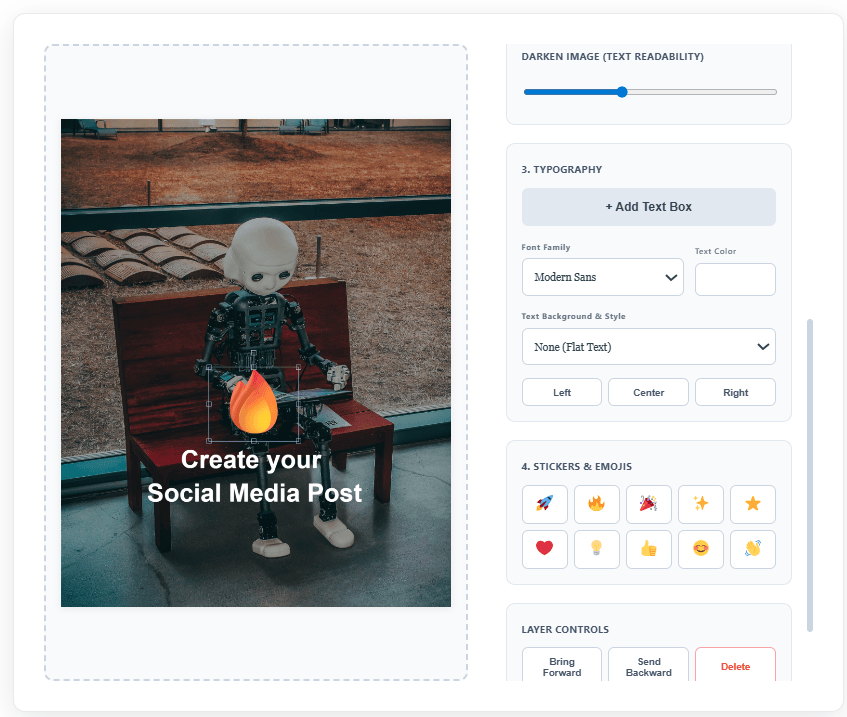
Upload your image, choose the right post size, add text, apply filters, use stickers or emojis, and download your finished design as an image. You can create posts for Instagram, LinkedIn, X, Pinterest, Stories, Reels, and more.
Use the free design tool below to create your post, then combine it with StoryLab.ai’s AI tools to write captions, generate post ideas, create visuals, and repurpose your content faster.
Design Studio
Create your perfect social media post.
💡 You can also drag & drop an image directly onto the canvas!
Chapters
- What You Can Create with This Free Social Media Post Maker
- Social Media Post Sizes Included
- How to Use the Free Social Media Post Maker
- Make Your Post Stronger with AI
- Social Media Post Ideas You Can Design Today
- Tips for Creating Better Social Media Posts
- Social Media Post Maker for Marketers
- Social Media Post Maker for Small Businesses
- Social Media Post Maker for Creators
- Free Social Media Design Workflow
- FAQ
What You Can Create with This Free Social Media Post Maker
You can use this tool to create social media graphics for many different platforms and content types.
Create:
- Instagram feed posts
- Instagram Stories
- Instagram Reels covers
- LinkedIn posts
- X posts
- Pinterest pins
- Quote graphics
- Promotional posts
- Event announcements
- Product posts
- Educational posts
- Personal brand posts
- Motivational posts
- Blog promotion graphics
- Newsletter promotion graphics
- Simple ad creatives
Start with an image, add your message, and download a ready-to-share design.
Social Media Post Sizes Included
Choosing the right format helps your post look better in the feed. This Social Media Post Maker includes common post sizes so you can quickly design for the platform you need.
Available formats include:
- Instagram Feed Portrait
- Classic Square
- Story and Reels
- X Post
- LinkedIn Post
- Pinterest Pin
This makes it easy to create platform-ready content without resizing your image manually in another design tool.
How to Use the Free Social Media Post Maker
Creating your post is simple.
- Choose your post format.
- Upload your background image.
- Zoom or reposition the image so the most important part is visible.
- Add a text box.
- Choose your font, text color, and text style.
- Add emojis or stickers if they fit your brand.
- Use the dark overlay setting to make your text easier to read.
- Apply an image filter if you want a different look.
- Download your finished image.
You can create one post or use the same design idea to make multiple versions for different platforms.
Make Your Post Stronger with AI
A good social media post needs more than a nice image. It also needs a strong idea, a clear message, and a caption that makes people stop scrolling.
You can use StoryLab.ai’s AI tools to build the full post workflow faster.
Need caption ideas? Use the AI Social Media Caption Generator to write captions for your finished design.
Need a complete post from scratch? Try the AI Social Media Post Generator to create platform-specific post copy.
Need a visual idea before designing? Use the AI Social Media Image Generator or the StoryLab.ai Text-to-Image Generator to create image concepts.
Need more content angles? Use the AI Social Media Content Idea Generator to brainstorm new post ideas.
Need to turn one post into many? Use the AI Social Media Repurposing Generator to create fresh versions for different platforms.
Creating a LinkedIn post? Try the AI LinkedIn Post Generator.
Creating Instagram content? Use the AI Instagram Caption Generator to create caption ideas for your post, Reel, or carousel.
Social Media Post Ideas You Can Design Today
Not sure what to create first? Here are simple post ideas you can make with the tool.
- A quote post with a strong background image
- A product announcement post
- A new blog post promotion
- A customer testimonial graphic
- A before-and-after post
- A quick tip post
- A behind-the-scenes post
- A personal brand thought post
- A checklist post
- A mini tutorial post
- A giveaway announcement
- A sale or discount graphic
- A new service launch post
- A podcast episode promo
- A YouTube video promo
- A carousel cover image
- A seasonal campaign post
- A motivational Monday post
- A brand value post
- A community announcement
You can start with one idea, create your design, and then use AI to turn it into captions, hooks, hashtags, and follow-up posts.
Tips for Creating Better Social Media Posts
Keep your message short.
A strong social media graphic should be easy to understand quickly. Use one main message instead of trying to fit a full paragraph into the image.
Make the text readable.
Use contrast between the background and the text. If the image is too busy, darken the background or use a text box.
Use the right format.
A Pinterest pin, Instagram Story, and LinkedIn post all have different shapes. Pick the format before you start designing so your post does not get cropped.
Match the design to the platform.
LinkedIn posts often work well with clean, professional designs. Instagram can be more visual and emotional. Pinterest needs clear, tall visuals that communicate the topic fast.
Use captions to add context.
Your image should catch attention. Your caption should explain the idea, add value, and guide people toward the next step.
Social Media Post Maker for Marketers
Marketers can use this free tool to create quick campaign visuals without opening complex design software.
Use it for:
- Content calendar graphics
- Campaign teasers
- LinkedIn thought leadership posts
- Instagram quote posts
- Product promotion images
- Newsletter and blog promotion
- Ad concept mockups
- Social media tests
- Client preview graphics
Pair the tool with StoryLab.ai’s AI content generators to create the post idea, caption, visual direction, and final graphic in one simple workflow.
Social Media Post Maker for Small Businesses
Small businesses need to create consistent content without spending hours on every post.
This tool helps you quickly design posts for:
- New offers
- Opening hours
- Local promotions
- Customer reviews
- Service highlights
- Seasonal campaigns
- Team updates
- Product features
- Event reminders
Upload your own photo, add a clear message, and download a branded post you can publish right away.
Social Media Post Maker for Creators
Creators can use the tool to make quick visuals for personal brands, newsletters, videos, podcasts, and online communities.
Create:
- Podcast promo graphics
- YouTube thumbnail-style posts
- Quote cards
- Story backgrounds
- Reel cover images
- Content teasers
- Personal announcements
- Community updates
You can also use StoryLab.ai to turn one idea into multiple captions and post variations so you can publish more consistently.
Free Social Media Design Workflow
Use this simple workflow when creating social media content.
Start with the message.
What do you want people to understand, feel, or do?
Choose the platform.
Pick the right format for Instagram, LinkedIn, X, Pinterest, Stories, or Reels.
Create the visual.
Use the Social Media Post Maker to upload your image, add text, and download the design.
Write the caption.
Use the AI Social Media Caption Generator to create caption options.
Repurpose the post.
Use the AI Social Media Repurposing Generator to turn the post into more versions for other platforms.
Publish and learn.
Check which posts get saves, shares, comments, clicks, and profile visits. Use those insights to create better posts next time.
FAQ
Is this Social Media Post Maker free?
Yes. You can use this Social Media Post Maker for free and download your design without signing up.
Do I need to create an account?
No. The design tool on this page can be used without sign-up. Just upload an image, create your post, and download it.
What social media platforms can I create posts for?
You can create posts for Instagram, LinkedIn, X, Pinterest, Stories, Reels, and other platforms that use image-based content.
Can I upload my own image?
Yes. You can upload your own image and use it as the background for your social media post.
Can I add text to my social media post?
Yes. You can add text boxes, choose fonts, change colors, apply text styles, and position the text on your image.
Can I create captions for my post with AI?
Yes. After creating your design, you can use StoryLab.ai’s AI Social Media Caption Generator to write captions for your post.
Can I generate social media post ideas with AI?
Yes. You can use StoryLab.ai’s AI Social Media Content Idea Generator to brainstorm fresh post ideas for different topics, platforms, and audiences.
Can I create AI images for social media?
Yes. You can use StoryLab.ai’s AI Social Media Image Generator to create visual ideas for your social media content.
Can I repurpose one social media post into more posts?
Yes. You can use StoryLab.ai’s AI Social Media Repurposing Generator to turn one post into multiple versions for different platforms or angles.
What makes a good social media post?
A good social media post has a clear message, readable design, strong visual focus, and a caption that gives context or encourages action.
Other Interesting Articles
- AI LinkedIn Post Generator
- Gardening YouTube Video Idea Examples
- AI Agents for Gardening Companies
- Top AI Art Styles
- Pest Control YouTube Video Idea Examples
- Automotive Social Media Content Ideas
- Plumber YouTube Video Idea Examples
- AI Agents for Pest Control Companies
- Electrician YouTube Video Idea Examples
- How Pest Control Companies Can Get More Leads
- AI Google Ads for Home Services
- 60-Second Training Videos Are the New Corporate Standard
- Cybersecurity PR Pricing: Retainers, Deliverables & ROI
- Best AI Tools for Product Consistency in E-Commerce Video
Master the Art of Video Marketing
AI-Powered Tools to Ideate, Optimize, and Amplify!
- Spark Creativity: Unleash the most effective video ideas, scripts, and engaging hooks with our AI Generators.
- Optimize Instantly: Elevate your YouTube presence by optimizing video Titles, Descriptions, and Tags in seconds.
- Amplify Your Reach: Effortlessly craft social media, email, and ad copy to maximize your video’s impact.