
Free Title Case Converter: Capitalize Titles Online [Unlimited Use]
Convert any headline, article title, email subject line, or video title into properly formatted title case in seconds.
Paste your text into the free title case converter and let the tool capitalize the important words while keeping shorter connecting words lowercase where appropriate. You can then copy the converted title and use it in your blog, video, email, advertisement, presentation, or social media post.
No manual editing is needed. Enter your title, convert it, and continue creating.
Start below for free. Unlimited usage and no signup!
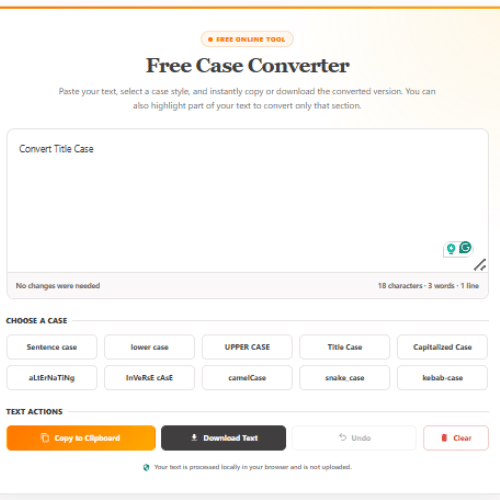
Free Case Converter
Paste your text, select a case style, and instantly copy or download the converted version. You can also highlight part of your text to convert only that section.
How to Use the Free Title Case Converter
Using the title capitalization tool only takes a few steps:
- Type or paste your title into the text box.
- Select the Title Case option.
- Review the converted title.
- Copy the result to your clipboard.
- Paste it into your article, video, email, advertisement, or social post.
You can also highlight part of your text when you only want to convert a specific title or heading.
What Is Title Case?
Title case is a capitalization style in which the first and last words of a title are capitalized, along with the other important words.
For example:
Before: how to create better content with ai
After: How to Create Better Content With AI
Nouns, verbs, adjectives, adverbs, and pronouns are generally capitalized. Short articles, conjunctions, and prepositions are often written in lowercase unless they are the first or last word of the title.
Title case is commonly used for:
- Blog post titles
- YouTube video titles
- Email subject lines
- Landing page headings
- Ebook titles
- Presentation titles
- Podcast episode titles
- Advertising headlines
- Social media graphics
- Reports and documents
The exact rules can differ slightly between writing styles. A title case converter provides a quick, consistent format that works well for most marketing and online content.
Which Words Are Capitalized in Title Case?
The most important words in a title are normally capitalized.
These commonly include:
- The first word
- The last word
- Nouns
- Pronouns
- Verbs
- Adjectives
- Adverbs
- Longer or important prepositions
- Important words in hyphenated terms
For example:
How Content Marketing Helps Small Businesses Grow
In this title, the nouns, verb, adjective, and adverb are capitalized.
The title case converter handles this automatically so you do not need to review every word individually.
Which Words Usually Stay Lowercase?
Short connecting words are frequently written in lowercase when they appear in the middle of a title.
These may include:
- a
- an
- the
- and
- but
- or
- nor
- as
- at
- by
- for
- from
- in
- of
- on
- per
- to
- up
- via
- with
For example:
The Complete Guide to Writing Better Blog Posts
The word “to” remains lowercase because it is a short connecting word in the middle of the title.
However, a short word should still be capitalized when it is the first or final word.
Example:
To Create Better Content, Start With a Clear Idea
Title Case Examples
Here are a few examples of text before and after conversion.
Before:
how to write an engaging blog introduction
After:
How to Write an Engaging Blog Introduction
Need help developing the opening itself? Use StoryLab.ai’s Blog Introduction Generator to create ideas for the first section of your article.
Before:
the easiest way to create better youtube videos
After:
The Easiest Way to Create Better YouTube Videos
You can develop more headline ideas with the YouTube Title Generator and create supporting metadata with the YouTube Description Generator.
Email subject line
Before:
five ways to improve your next email campaign
After:
Five Ways to Improve Your Next Email Campaign
Use the Email Subject Line Generator when you need more subject line variations before converting your preferred option to title case.
Before:
the practical guide to building your personal brand
After:
The Practical Guide to Building Your Personal Brand
You can continue the process with the AI Ebook Title Generator, AI Ebook Outline Generator, and Free Ebook Cover Maker.
Advertising headline
Before:
grow your business without increasing your advertising budget
After:
Grow Your Business Without Increasing Your Advertising Budget
Create additional campaign options with StoryLab.ai’s AI Ad Copy Generators.
Title Case Versus Sentence Case
Title case and sentence case are both valid capitalization styles, but they produce different results.
Title case:
How to Create Better Social Media Content
Sentence case:
How to create better social media content
Title case capitalizes the most important words. Sentence case usually capitalizes only the first word and proper nouns.
Title case often feels more formal and structured. Sentence case can feel more natural and conversational.
Neither format is automatically better in every situation. The best option depends on your brand style and the type of content you are creating.
Title Case Versus Capitalized Case
Title case and capitalized case are not exactly the same.
Title case:
How to Build a Successful Content Strategy
Capitalized case:
How To Build A Successful Content Strategy
Capitalized case begins every word with a capital letter. Title case usually leaves short connecting words such as “to,” “a,” and “of” lowercase.
Title case is generally more natural for professional headlines and titles.
Capitalized case may be useful for:
- Navigation labels
- Buttons
- Short design elements
- Product categories
- Creative visual layouts
Use Title Case for Blog Titles
Blog post titles need to be clear, readable, and consistent with the rest of your website.
A title case converter helps when:
- Several writers use different capitalization styles.
- Titles were imported from another platform.
- A draft was written entirely in lowercase.
- AI-generated headlines use inconsistent formatting.
- You want all article titles to follow the same style.
Start by generating ideas with the AI Blog Title Generator. Choose the strongest option and run it through the title case converter before publishing.
You can then develop the article using StoryLab.ai’s Blog Outline Generator, Blog Intro Generator, or broader collection of AI Blog Content Generators.
Format YouTube Video Titles
Title capitalization can make YouTube video titles easier to scan, especially when they appear next to several competing videos.
For example:
Before: why your social media content is not getting results
After: Why Your Social Media Content Is Not Getting Results
Title case does not automatically make a video rank higher or receive more clicks. The title still needs to communicate a clear benefit, question, problem, or reason to watch.
Use the YouTube Video Idea Generator to develop the concept, the AI Video Hook Generator to strengthen the opening, and the YouTube Video SEO Generator to improve the complete video package.
The title case converter can then standardize the capitalization of your final title.
Improve Email Subject-Line Formatting
The way an email subject line is capitalized can affect how it feels.
Title case can make a subject line appear more structured:
Five Ideas for Your Next Marketing Campaign
Sentence case can make it feel more conversational:
Five ideas for your next marketing campaign
Complete uppercase subject lines can appear aggressive and may be more difficult to read:
FIVE IDEAS FOR YOUR NEXT MARKETING CAMPAIGN
Use title case when it fits your brand and campaign style, but avoid assuming that one capitalization style will always produce the best result. Testing different approaches can help you learn what your audience responds to.
Create your initial options with the Email Subject Line Generator. You can then develop the message with the AI Email Copy Generator and finish the inbox text with the Email Preview Text Generator.
Format Social Media Headlines and Graphics
Title case can work well for text placed inside social media images, carousels, video thumbnails, and promotional graphics.
For example:
Seven Mistakes That Are Hurting Your Content Strategy
The capitalization creates a clear headline that can be scanned quickly.
For regular caption text, sentence case often feels more natural. You can use title case for the main headline and sentence case for the supporting copy.
Create caption ideas with StoryLab.ai’s Social Media Caption Generator. When the copy is ready, turn it into a visual with the Free Social Media Post Maker or Free Instagram Post Maker.
Use Title Case for Advertising Headlines
Advertising headlines often need to communicate a benefit with very few words.
Title case can help create a structured visual style for:
- Google Ads
- Facebook ads
- Instagram ads
- LinkedIn ads
- Display advertisements
- Landing pages
- Retargeting campaigns
- Sponsored social media posts
For example:
Create Better Marketing Content in Less Time
Develop your campaign copy with the Google Ad Headline Generator, Facebook Ad Copy Generator, or LinkedIn Ad Copy Generator.
Once you select a headline, use the title case converter to standardize the formatting.
Common Title Capitalization Mistakes
Even short titles can contain capitalization mistakes.
Capitalizing every word
Not every word needs to begin with a capital letter.
Incorrect:
How To Create A Blog Post For Your Website
Better title case:
How to Create a Blog Post for Your Website
Forgetting the final word
The final word is normally capitalized, even when it is a short word.
Example:
The Marketing Tools We Cannot Work Without
Writing the entire title in uppercase
Uppercase can attract attention, but it can also make a title more difficult to read.
Instead of:
HOW TO BUILD A BETTER CONTENT STRATEGY
Consider:
How to Build a Better Content Strategy
Changing proper nouns
Brand names, locations, product names, and personal names may use their own capitalization.
Examples include:
- StoryLab.ai
- YouTube
- TikTok
- iPhone
Always review proper nouns after using an automated capitalization tool.
Using inconsistent styles
A website can feel less polished when some article titles use title case and others use sentence case without a clear reason.
Choose a preferred capitalization style and use it consistently across similar content types.
Does Title Case Improve SEO?
Using title case does not directly guarantee higher search rankings.
Search engines can understand titles written in title case, sentence case, or lowercase. What matters more is whether the title:
- Clearly describes the content
- Matches the reader’s search intent
- Includes the main topic naturally
- Encourages the right people to click
- Accurately represents the page
- Is easy to read
Title case can support readability and visual consistency, but it should not replace good keyword research or strong headline writing.
Start with a relevant title idea. Improve the wording. Then use the title case converter to clean up the capitalization.
A Simple Title-Creation Workflow
You can combine the title case converter with StoryLab.ai’s content tools.
- Generate topic ideas with the Content Idea Generator.
- Create headline options with the relevant title generator.
- Select the title that best matches the content.
- Adjust the wording and tone when needed.
- Convert the final headline to title case.
- Check proper nouns and branded terms.
- Publish or test the title.
Use the AI Tone Changer and Rewriter when the title needs to sound more professional, conversational, playful, persuasive, or direct.
Frequently Asked Questions
What does a title case converter do?
A title case converter automatically capitalizes the important words in a title while leaving certain short articles, conjunctions, and prepositions lowercase where appropriate.
It saves you from manually checking the capitalization of every word.
Is the StoryLab.ai title case converter free?
Yes. You can use the free title case converter to format titles, headlines, headings, and subject lines online.
Do I need to download software?
No. The title case tool works online in your browser.
Can I convert more than one title?
Yes. You can paste multiple titles into the text box and convert them. Review each line afterward to confirm that proper nouns and branded terms use the correct capitalization.
Should “the” be capitalized in a title?
“The” is generally lowercase when it appears in the middle of a title.
Example:
How to Build the Perfect Content Calendar
It should be capitalized when it is the first word.
Example:
The Complete Guide to Content Marketing
Should “to” be capitalized in title case?
“To” is usually lowercase when used as a short preposition or as part of an infinitive.
Example:
How to Create a Better Landing Page
However, capitalization rules can vary between style guides.
Should “with” be capitalized in a title?
Some title case styles keep “with” lowercase, while others capitalize longer prepositions. Automated tools may use different conventions.
The most important point for marketing content is to select a style and apply it consistently.
Are all words capitalized in title case?
No. Important words are capitalized, while shorter articles, conjunctions, and prepositions are often lowercase.
Capitalizing every word is usually called capitalized case rather than standard title case.
Is title case good for blog post titles?
Yes. Title case is frequently used for blog titles because it creates a clear, structured headline style.
Sentence case is also valid. Choose the style that fits your website and use it consistently.
Should YouTube titles use title case?
YouTube titles can use title case or sentence case. Title case may create a more structured appearance, while sentence case can feel more conversational.
The wording and relevance of the title are more important than the capitalization style alone.
Can title case be used for email subject lines?
Yes. Title case can make an email subject line look polished and structured. Sentence case may feel more personal or conversational.
Consider testing both styles with your audience.
Does the tool change the meaning of my title?
No. A title case converter changes capitalization rather than intentionally rewriting the title.
Use the AI Tone Changer and Rewriter when you want to change the wording or tone.
Can the converter recognize every brand name?
Automated capitalization tools may not recognize every brand, person, product, or intentionally stylized word.
Review names such as StoryLab.ai, YouTube, LinkedIn, TikTok, and iPhone after converting your title.
What is the difference between a title generator and a title case converter?
A title generator helps you create new headline ideas. A title case converter formats the capitalization of a title you already have.
You can generate ideas with the Blog Title Generator or YouTube Title Generator, and then use the title case converter to format the final option.
Jump back to a section
- Free Case Converter
- How to Use the Free Title Case Converter
- What Is Title Case?
- Which Words Are Capitalized in Title Case?
- Which Words Usually Stay Lowercase?
- Title Case Examples
- Title Case Versus Sentence Case
- Title Case Versus Capitalized Case
- Use Title Case for Blog Titles
- Format YouTube Video Titles
- Improve Email Subject-Line Formatting
- Format Social Media Headlines and Graphics
- Use Title Case for Advertising Headlines
- Common Title Capitalization Mistakes
- Does Title Case Improve SEO?
- A Simple Title-Creation Workflow
- Frequently Asked Questions