
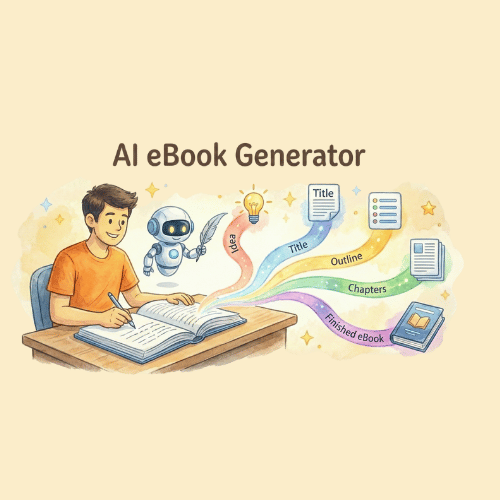
What Is StoryLab.ai’s AI eBook Generator?
StoryLab.ai is an online AI Tool that helps you write better content. Fast.
One of our most powerful AI Tools is the AI eBook Creator. Easily go from idea to entering a couple of keywords to describe your idea, to an eBook outline in seconds. Use our AI Text Expander and Intro Generator to build your eBook, add your unique human touch and visuals and you’re ready to go.
Writing an eBook sounds fun until you hit chapter 3 and start negotiating with your future self.
StoryLab.ai’s AI eBook Generator helps you turn one topic into a complete draft faster: a clear outline, chapter structure, and text you can shape into a lead magnet, guide, or downloadable resource.
Use the output as your first draft, then add your examples, screenshots, and real-world experience so it reads like a human wrote it (because one did).
Check out this short video to learn more.
Benefits of AI-Powered eBook Generator
Using an AI eBook generator offers various advantages, particularly in the rapidly evolving digital content creation landscape. One of the most evident advantages of using AI for eBook Creation is the incredible speed at which content can be produced. Instead of spending hours, days, or even weeks writing, editing, and formatting, an AI can generate content in significantly less time. For businesses or individuals that need to produce content rapidly, this can be a game-changer.
Top benefits of the AI eBook Generator
| 🤖 AI modes | 13 writing styles |
| ✍️ Improves | eBook copy, creativity, and more |
| 📖 Support | 17+ Languages |
| 💲Price | Free and Premium |

Chapters
- O que é StoryLab.aiGerador de e-books de IA?
- Benefícios do gerador de e-books com tecnologia de IA
- Como começar com o AI eBook Generator
- Estilos de escrita do gerador de e-books AI
- Escreva seu e-book com a ajuda da IA
- Preços do gerador de e-books AI
- O que você pode gerar com o Gerador de eBooks com IA
- Modelo de resumo de eBook (copie, preencha, gere)
- Guia de prompts: copie e cole prompts para criar eBooks melhores.
- Escolha uma estrutura para seu e-book (e mantenha-se fiel a ela).
- Planejador de capítulos (use este para cada capítulo)
- Lista de verificação de design e formatação (para que tenha uma aparência profissional)
- Cronograma de produção de eBook (simples e realista)
- Gerador de ideias de e-book
- Gerador de títulos de e-books
- Gerador de esboço de e-book
- Gerador de capítulo de e-book
- Gerador de promoção de e-book
- Perguntas frequentes
How to start with the AI eBook Generator
Let’s first look into how to fire up the AI eBook Maker and then go into other cool AI Generators to help you finish your book faster and promote it.
First, create a free account at StoryLab.ai and select the AI eBook Creator. You get 3 free runs every month and can upgrade if you need more.
Second, describe the idea of your eBook, select one of the writing styles from the drop-down, and click inspire me.
For this example, we’ve used the prompt; ‘How to write great and engaging eBooks’ with a ‘Storytelling’ writing style. Let’s see if AI can help us create a cool story for our eBook instead of a lot of marketing jargon. Here’s what the AI eBook Maker came up with:
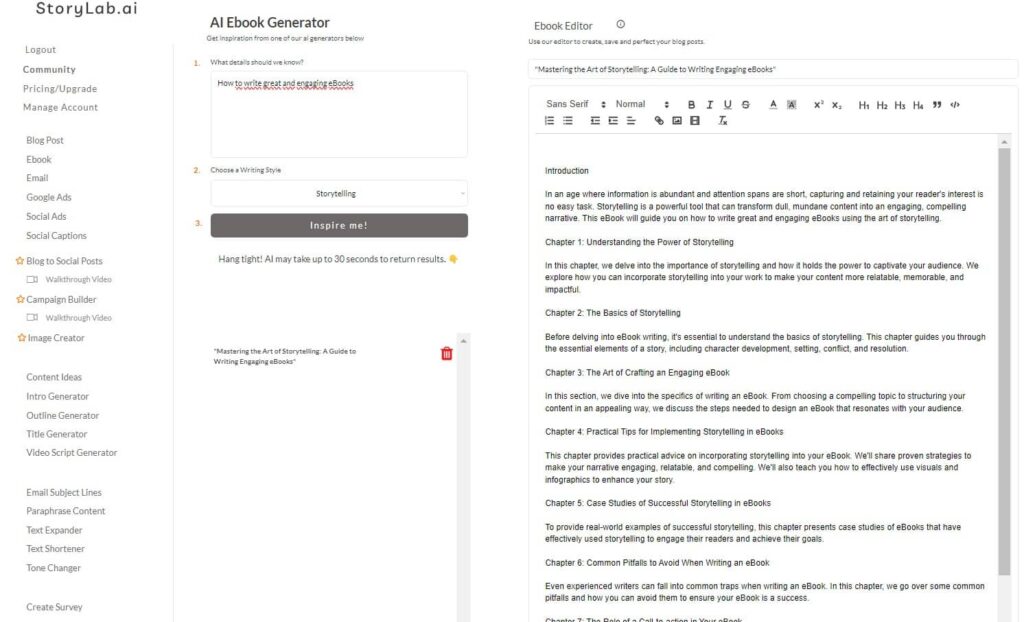
You can now copy/paste the eBook outline into a text editor like Grammarly or you can install Grammarly and use StoryLab.ai’s text editor to finish the eBook.
We’re going to use a couple of AI Generators like our Intro Generator and AI Text Expander to show you how to get AI to help you fill in some blanks.
But first, let’s have a look at the AI eBook Creator writing styles. It matters quite a bit which writing style you choose, so be sure to try out a couple.

AI eBook Generator Writing Styles
AI eBook Generator Writing Styles:
- Professional;
- Witty;
- List;
- Storytelling;
- Bold;
- Adventurous;
- Friendly;
- Persuasive;
- Empathetic;
- Sassy;
- Classy;
- Casual;
- Comedic.

Write your eBook with the help of AI
Using an AI Introduction Generator for your eBook Creation
Let’s start off with the AI Intro Generator to create a couple of cool Introduction variations for all your chapters.
For this example, I simply copy/pasted the snippet the AI eBook Generator created for us for the first chapter into the Intro Maker, I chose a storytelling writing style again, and here are the outputs the AI Tool provided:
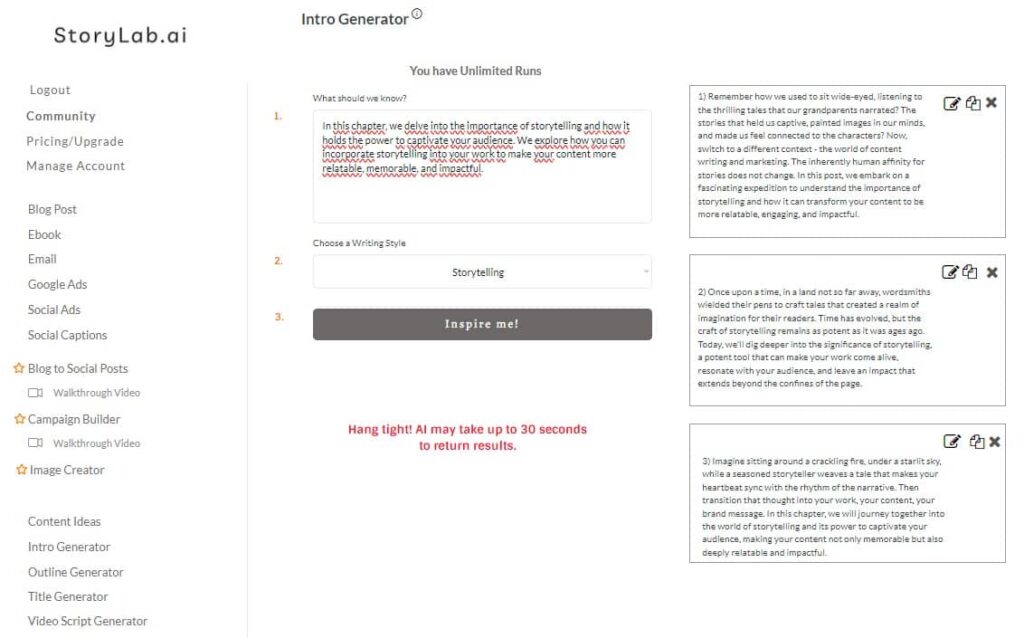
eBook Intro Output examples:
- Remember how we used to sit wide-eyed, listening to the thrilling tales that our grandparents narrated? The stories that held us captive, painted images in our minds, and made us feel connected to the characters? Now, switch to a different context – the world of content writing and marketing. The inherently human affinity for stories does not change. In this post, we embark on a fascinating expedition to understand the importance of storytelling and how it can transform your content to be more relatable, engaging, and impactful.
- Once upon a time, in a land not so far away, wordsmiths wielded their pens to craft tales that created a realm of imagination for their readers. Time has evolved, but the craft of storytelling remains as potent as it was ages ago. Today, we’ll dig deeper into the significance of storytelling, a potent tool that can make your work come alive, resonate with your audience, and leave an impact that extends beyond the confines of the page.
- Imagine sitting around a crackling fire, under a starlit sky, while a seasoned storyteller weaves a tale that makes your heartbeat sync with the rhythm of the narrative. Then transition that thought into your work, your content, your brand message. In this chapter, we will journey together into the world of storytelling and its power to captivate your audience, making your content not only memorable but also deeply relatable and impactful.
I can now take my favorite variation, use the AI Text Expander, and get a bit more body.
Using an AI Text Expander for your eBook Creation
Now, we’ve simply copy/pasted our favorite intro variation into our AI Text Expander, and here’s what the AI tool came up with within a couple of seconds:
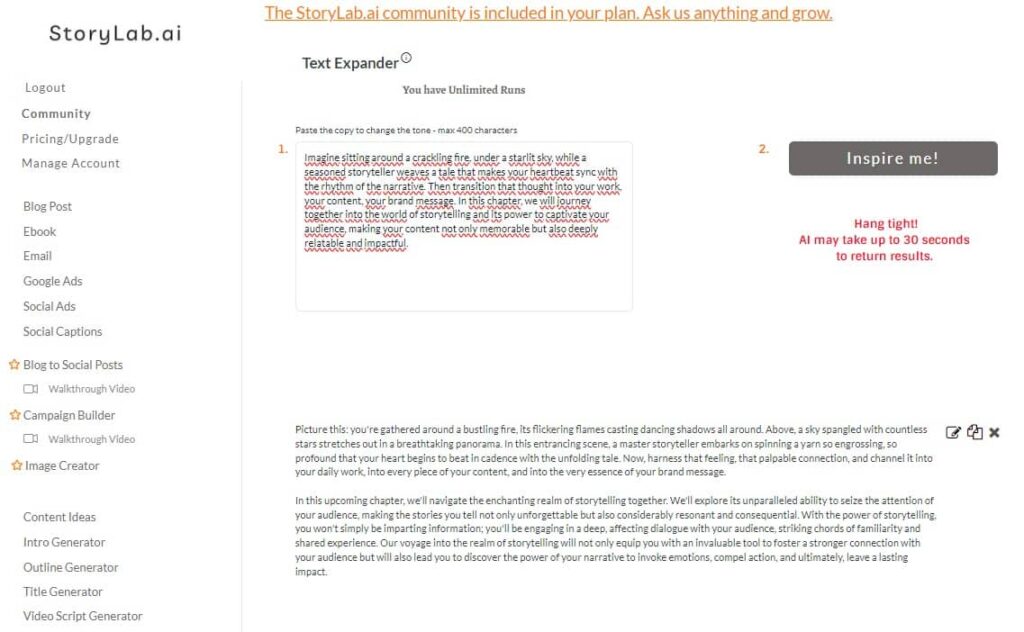
AI Text Expander Example eBook Copy:
Picture this: you’re gathered around a bustling fire, its flickering flames casting dancing shadows all around. Above, a sky spangled with countless stars stretches out in a breathtaking panorama. In this entrancing scene, a master storyteller embarks on spinning a yarn so engrossing, so profound that your heart begins to beat in cadence with the unfolding tale. Now, harness that feeling, that palpable connection, and channel it into your daily work, into every piece of your content, and into the very essence of your brand message.
In this upcoming chapter, we’ll navigate the enchanting realm of storytelling together. We’ll explore its unparalleled ability to seize the attention of your audience, making the stories you tell not only unforgettable but also considerably resonant and consequential. With the power of storytelling, you won’t simply be imparting information; you’ll be engaging in a deep, affecting dialogue with your audience, striking chords of familiarity and shared experience. Our voyage into the realm of storytelling will not only equip you with an invaluable tool to foster a stronger connection with your audience but will also lead you to discover the power of your narrative to invoke emotions, compel action, and ultimately, leave a lasting impact.
You can repeat the steps for all your chapters and have your eBook finished in no time!
Remember to always add your unique human touch. AI is here to help overcome writing blocks when writing your ebook and other marketing copy. It’s not meant to create full ebooks with AI.
AI eBook Generator Pricing
Here’s what our pricing looks like:
- Free – get 3 runs a month to try our standalone AI Generators for free;
- Pro – $15 a month – 100 runs a month on our standalone AI Generators;
- Unlimited – $19 a month – unlimited runs a month plus extras like access to our community and courses;
You can also opt-in for the yearly membership and receive a 20% price reduction.
You can check out our full pricing here.
What you can generate with the AI eBook Generator
- eBook outlines and chapter structures
- Chapter drafts (introductions, sections, summaries)
- Headlines, subheads, and chapter titles
- Checklists, frameworks, and templates
- Lead magnet landing page copy and email promotion drafts
eBook brief template (copy, fill, generate)
| Brief field | What to write | Example |
|---|---|---|
| Topic | The subject of the eBook | “Beginner’s guide to YouTube SEO” |
| Target reader | Who it’s for and what they struggle with | “New creators who want more search views” |
| Promise | What readers will be able to do after reading | “Build a repeatable YouTube SEO workflow” |
| Format | Lead magnet, guide, workbook, or playbook | “Lead magnet + workbook” |
| Length | Short (10–20 pages) or longer (30–60 pages) | “20 pages” |
| Proof | Results, examples, stats, screenshots you can include | “3 case studies, 5 screenshots, 2 quotes” |
| Tone | Voice and vibe | “Friendly, practical, no fluff” |
| CTA | What happens after they finish the eBook | “Join newsletter” / “Book a call” |
Prompt Playbook: copy-paste prompts for better eBooks
| Goal | Copy-paste prompt template |
|---|---|
| Lead magnet (fast, actionable) | “Create a 15–20 page lead magnet eBook about [topic] for [audience]. Include: a strong intro, a step-by-step framework, 3 common mistakes, a checklist, and a 1-page action plan. Tone: [tone].” |
| Workbook style | “Write a workbook eBook about [topic]. For each chapter: short lesson + 5 prompts + 1 worksheet + example answers. Add a progress tracker at the end.” |
| Authority guide (deeper) | “Create a 40–60 page guide on [topic] for [audience]. Use a clear table of contents, add examples, mini case studies, and end-of-chapter summaries.” |
| Case study eBook | “Write a case-study eBook about how to achieve [result] using [method]. Include 3 case studies with: context, actions, results, and lessons learned.” |
| Template pack | “Create an eBook that is mostly templates for [topic]. Include: 10 templates, how to use each, and an example filled-out version.” |
| Industry-specific angle | “Write an eBook about [topic] tailored for [industry/niche]. Use industry language, include common scenarios, and add a glossary.” |
Pick an eBook structure (and stick to it)
| Structure | Best for | Chapters you include |
|---|---|---|
| Problem → Solution → Steps | Beginner guides | Problem, why it matters, step-by-step, mistakes, checklist |
| Framework playbook | Business and marketing topics | Framework, explanation, examples, templates, action plan |
| Workbook | Coaching, learning, self-improvement | Short lessons, exercises, worksheets, progress tracker |
| Case studies | Proof-first offers | Method overview, 3–5 case studies, patterns, next steps |
| Toolkit / swipe file | Lead magnets with high conversion | Templates, scripts, checklists, examples, FAQ |
Chapter planner (use this for every chapter)
| Chapter element | What to write | Example prompt |
|---|---|---|
| Chapter promise | What the reader will get from this chapter | “In this chapter, the reader will learn how to…” |
| Key concept | The one idea the chapter teaches | “Explain [concept] in plain language with an example.” |
| Steps / framework | 3–7 steps the reader can follow | “Write 5 steps for [task] with 1 example per step.” |
| Common mistakes | What typically goes wrong | “List 3 mistakes and how to fix them.” |
| Mini checklist | A quick recap the reader can apply | “Create a checklist for this chapter in 8 bullets.” |
| Action task | One thing they do today | “Give a 15-minute action task based on this chapter.” |
Design and formatting checklist (so it looks professional)
| Item | What “good” looks like | Quick fix |
|---|---|---|
| Skimmable layout | Short paragraphs, clear subheads, bullets | Break long blocks into 2–3 sentence chunks |
| Consistent headings | Same style for H2/H3 and spacing | Reuse one heading pattern across chapters |
| Visual support | Screenshots, diagrams, or examples | Add 1 visual per chapter (even if simple) |
| Clear CTAs | One next step at the end | Add a short “Next step” page |
| Proof and specificity | Real examples, numbers, results where possible | Replace vague claims with one concrete example |
eBook production timeline (simple and realistic)
| Phase | Goal | What to generate | Output |
|---|---|---|---|
| Plan | Lock the promise and structure | Outline + chapter promises + checklist | 1 outline |
| Draft | Create a complete first draft | Chapter drafts + examples + summaries | 5–10 chapters |
| Improve | Make it clear, specific, and skimmable | Rewrite intros, add bullets, add templates | 1 polished draft |
| Design | Make it look credible | Cover concept + layout sections + visual ideas | PDF/EPUB ready |
| Launch | Get downloads and leads | Landing page + emails + social promo | Campaign assets |
eBook Idea Generator
Come up with effective eBook Ideas with our AI eBook Idea Generator. Don’t settle for the first idea you have. Spar with AI and see how you can fine-tune your idea and topic.

eBook Title Generator
Use our eBook Title Generator to come up with catchy and effective eBook Headlines. Even though you should not judge an (e)Book by its cover, many do. Having an effective eBook Title will help your project succeed.

eBook Outline Generator
Start composing your eBook. Use our AI eBook Outline Generator to come up with effective outlines. Having a strong outline will help you structure your eBook and makes it easier to actually start writing your chapters.

eBook Chapter Generator
Now that you have your Idea, Title, and Outline, it’s time to write your eBook. Use our AI eBook Chapter Generator to create effective eBook chapters faster than ever before. Like always, add your unique human touch to your eBook chapters. Don’t simply copy/paste what the AI Tool provides.

eBook Promotion Generator
After you’ve finished writing your eBook, use our AI eBook Promotion Generator and create content to promote your eBook better and faster than ever before.
Use our AI Tools and Create, and Promote your eBook.
FAQ
What is an AI-Powered eBook Generator?
It’s a tool using AI to assist in creating eBooks, from content generation to formatting.
How does an AI eBook Generator work?
It uses algorithms to write, edit, and format eBook content based on input parameters.
Can the AI eBook Generator create content for any genre?
Most generators are versatile, catering to a variety of genres and topics.
Is the content generated by AI unique and plagiarism-free?
The AI eBook Generator runs on GPT-4 which ensures the originality and uniqueness of content.
How does the AI handle complex topics or narratives?
Our advanced AI can manage complex subjects, though human oversight is beneficial.
Is the AI eBook Generator user-friendly for beginners?
Yes. Our AI tool is designed with simplicity in mind for easy use.
Can the generator suggest plot ideas or writing prompts?
Yes. The AI Tool offers creative assistance like plot suggestions.
Is there a cost to using an AI-Powered eBook Generator?
You can get 3 free runs when you sign up and you can upgrade to get more runs.
How long does it take to generate an eBook using AI?
The time varies based on content length and complexity, but AI significantly speeds up the process.
How does the AI handle different writing styles?
AI can adapt to various writing styles, though specificity depends on the tool.
Can the generator assist with marketing and distribution of the eBook?
Yes. You can use our various promotion tools like the social media caption generator, ad copy generator, etc.
How does the AI ensure the eBook’s content flows naturally?
AI algorithms focus on narrative structure and coherence.
Can the AI eBook Generator be used for academic or research-based books?
Yes, it’s suitable for a range of book types, including academic.
Can AI eBook generators assist with language translation for eBooks?
You can use inputs in any language and get eBook content in the same language as your input.
Can AI eBook generators assist in creating educational or instructional material?
Yes, they’re adept at structuring educational content and tutorials.
How effective is AI in creating engaging book summaries?
AI can efficiently generate concise and informative summaries.
How user-friendly are AI eBook generators for novice authors?
Our AI eBook generator is designed to be accessible and easy to use for beginners.
Can I create a lead magnet eBook with this tool?
Yes. It works well for short, practical eBooks that people download in exchange for an email address.
How long should my eBook be?
For lead magnets, 10–25 pages is common. For deeper guides, 30–60 pages can work if you include examples and structure.
How do I make the eBook sound like my brand?
Add your tone, audience details, and real examples in the prompt. Then edit the draft by reading it out loud and replacing anything you wouldn’t actually say.
Can I generate an outline first and write chapters later?
Yes. Start with the table of contents, lock the chapter promises, then generate one chapter at a time for better control.
Can I use the eBook commercially?
Yes. Treat the output as a draft, then review and fact-check before publishing.
What should I include to make the eBook more valuable?
Add templates, checklists, examples, and a short action plan page. Practical beats theoretical almost every time.
Should I paste confidential information into the generator?
Avoid sensitive personal data or client secrets. Use placeholders and add sensitive details during editing.
YouTube Video Title Generator
Create catchy titles for your next videos.
YouTube Description Generator
Write great descriptions in half the time.
AI Video Tags Generator
Get the tags you need
Social Media Caption Generator
Get the most out of your Social Marketing.
Instagram Caption Generator
Stand out on Insta with great captions.
LinkedIn Caption Generator
Awesome captions in half the time
YouTube Video Idea Generator
Effective Video ideas
YouTube Video Script Generator
Engaging Videos
AI Video Hook Generator
Create Engaging Videos
All Marketing Copy Generator
See all our AI Geenrators