
On this page
- O que é a StoryLab.ai's Texto – Conteúdo – Expansor de Frases?
- Escreva uma ótima cópia de marketing na metade do tempo
- Frase – Casos de uso e exemplos do Content-Text Expander
- Gerador de introdução com tecnologia AI e expansor de texto
- Gerador de legendas e expansor de frases para redes sociais com inteligência artificial
- Texto – Conteúdo – Preço do Expansor de Frases
- Comece com nossa plataforma de criação de conteúdo com tecnologia de IA
- Melhores casos de uso para um expansor de frases
- Exemplos de antes e depois
- Escolha o seu estilo de expansão
- Expansor de frase vs paráfrase vs expansor de parágrafo
- Melhores Práticas (Para que o Texto Expandido Continue a Ser Bem Ledo)
- Perguntas frequentes
What is StoryLab.ai’s Text – Content – Sentence Expander?
StoryLab.ai is an online tool that generates content ideas for you.
Are you struggling to find the perfect words for your Marketing Copy? We got you covered!
Simply enter a piece of text, hit the ‘Inspire me” button and our AI Generator will expand that piece of content.
Run the tool as often as you need to create your perfect next piece of Marketing Copy.
Ever read a sentence and think: “Yep… that’s the idea. But it needs more.”
Paste your text, choose the style you want, and expand it with more detail while keeping the meaning intact.
Write great Marketing Copy in half the time
There is nothing worse than staring at a blank piece of paper. StoryLab.ai’s Text – Content – Sentence Expander helps you to get new ideas and even complete copy with a click of a button.
Use our Text – Content – Sentence Expander in combination with our other AI-Powered Generators and see the magic happen. Our Marketing Copy Generators run on the largest and qualitatively best Natural Language Processing model.
Get started for free.
| 😉AI modes | 13 writing styles |
| ✍️Improves | Marketing copy, creativity, and more |
| 📖Support | 17+ Languages |
| 💲 Price | Free and Premium |
Sentence – Content -Text Expander use cases and examples
Let’s have a look at a couple of use cases and examples for using our marketing copy expander in combination with other AI-Powered Marketing Copy Generators.
Quickly go from:
- Idea;
- Entering a couple of keywords in one of our AI Generators;
- Getting a nice first draft;
- Using the content expander;
- Perfecting your marketing copy by adding your unique human touch;
AI-Powered Intro Generator and Text Expander
For our first example, let’s have a look at how our AI-Powered Blog Intro Generator works perfectly with our Sentence Expander.
For this example, we’re going to create a nice intro for our article on: ‘How to write great marketing copy that converts’
We simply entered that in our Intro Generator and here’s what the AI Tool generated for us on the first run:
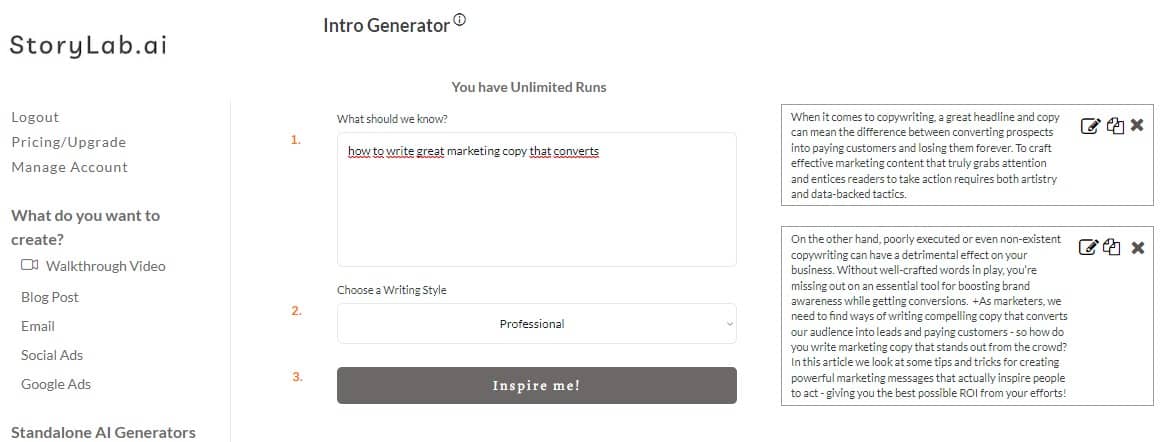
Intro Generator examples:
- When it comes to copywriting, a great headline and copy can mean the difference between converting prospects into paying customers and losing them forever. To craft effective marketing content that truly grabs attention and entices readers to take action requires both artistry and data-backed tactics.
- On the other hand, poorly executed or even non-existent copywriting can have a detrimental effect on your business. Without well-crafted words in play, you’re missing out on an essential tool for boosting brand awareness while getting conversions. +As marketers, we need to find ways of writing compelling copy that converts our audience into leads and paying customers – so how do you write marketing copy that stands out from the crowd? In this article we look at some tips and tricks for creating powerful marketing messages that actually inspire people to act – giving you the best possible ROI from your efforts!
We could have run the generator a couple of times more, but let’s assume we like the first output that was generated. We might want to add some meat to the text and there’s where the content expander comes in.
Simply copy/paste the output you like in the sentence expander and expand your marketing copy.
Here’s what that looks like:
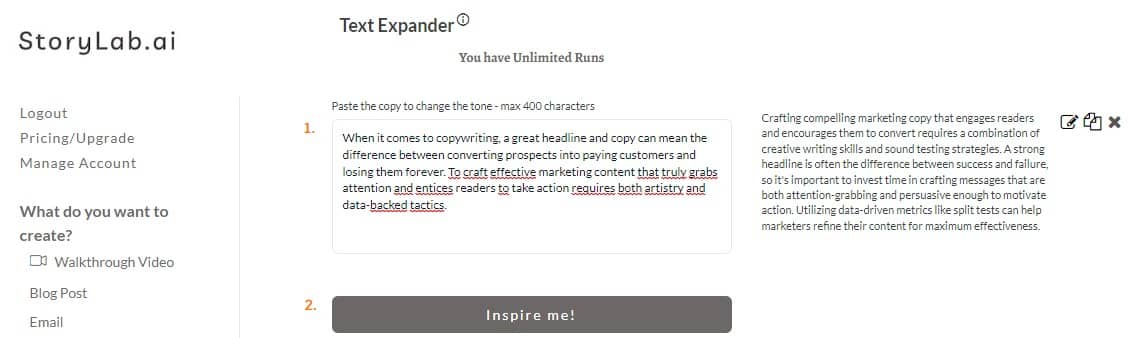
Text – Content – Sentence Expander examples:
- Crafting compelling marketing copy that engages readers and encourages them to convert requires a combination of creative writing skills and sound testing strategies. A strong headline is often the difference between success and failure, so it’s important to invest time in crafting messages that are both attention-grabbing and persuasive enough to motivate action. Utilizing data-driven metrics like split tests can help marketers refine their content for maximum effectiveness.
Now, If we like this piece for our blog intro, we can add our human touch and perfect it.
We went from idea, to entering a couple of keywords, to expanding and having a nice intro example within a couple of seconds.
AI-Powered Social Media Caption Generator and Sentence Expander
Let’s do another use case. For this example, we’ll combine the AI-powered Social Media Caption Generator (more specifically our LinkedIn Caption Generator) with the sentence expander.
It’s fun to experiment with different LinkedIn post formats and lengths but it can be difficult (and time-consuming) to write rather large LinkedIn Captions. Here’s how the two AI Tools work together.
For this example, we’re going to create a nice post about: ‘How to write great marketing copy that converts’
We simply entered that in our Social Media Caption Generator, chose LinkedIn as the platform and here’s what the AI Tool generated for us on the first run:
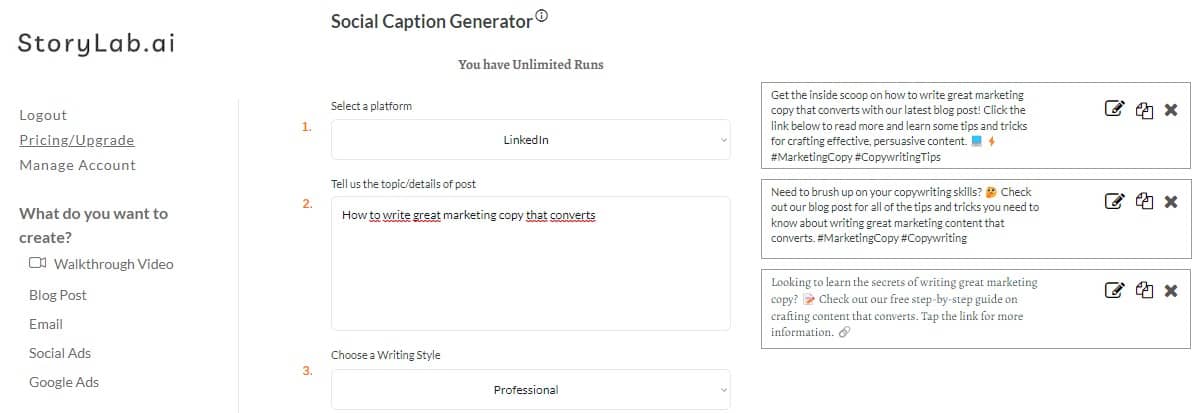
Social Media Caption Generator examples:
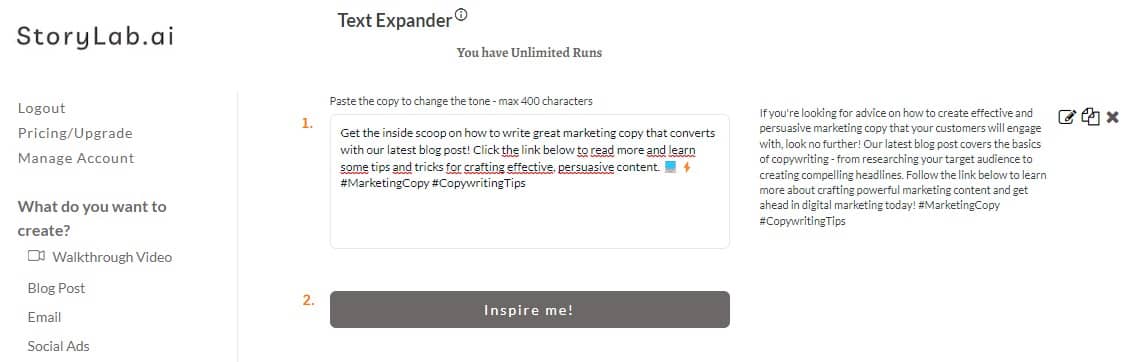
- Get the inside scoop on how to write great marketing copy that converts with our latest blog post! Click the link below to read more and learn some tips and tricks for crafting effective, persuasive content. 💻⚡ #MarketingCopy #CopywritingTips
- Need to brush up on your copywriting skills? 🤔 Check out our blog post for all of the tips and tricks you need to know about writing great marketing content that converts. #MarketingCopy #Copywriting
- Looking to learn the secrets of writing great marketing copy? 📝 Check out our free step-by-step guide on crafting content that converts. Tap the link for more information. 🔗
We could have run the generator a couple of times more, but let’s assume we like the first output that was generated. We might want to add some meat to the text and there’s where the content expander comes in.
Simply copy/paste the output you like in the sentence expander and expand your marketing copy.
Here’s what that looks like:
Sentence – Content – Text Expander examples:
- If you’re looking for advice on how to create effective and persuasive marketing copy that your customers will engage with, look no further! Our latest blog post covers the basics of copywriting – from researching your target audience to creating compelling headlines. Follow the link below to learn more about crafting powerful marketing content and get ahead in digital marketing today! #MarketingCopy #CopywritingTips
Now, If we like this piece for our LinkedIn post, we can add our human touch and perfect it.
We went from idea, to entering a couple of keywords, to expanding and having a nice LinkedIn Post Example within a couple of seconds.
Text – Content – Sentence Expander Pricing
StoryLab.ai’s Text – Content – Sentence Expander (and other AI generators) runs on the largest and qualitatively best Natural Language Processing model. This means that every output you receive is unique.
Our pricing is set up as follows:
- Free – get 3 runs a month to try our tools out for free;
- Pro – $15 a month – 100 runs a month;
- Unlimited – $19 a month – unlimited runs a month;
You can also opt-in for the yearly membership and receive a 20% price reduction.
You can check out our full pricing here.
Start with our AI-Powered Content Creation Platform
StoryLab.ai is more than just a Social Media Caption Generator. It’s an AI-Powered Content Creation Platform that helps you create more and better marketing copy faster than ever before. Check out the quick video walkthrough below.
Best Use Cases for a Sentence Expander
| Use case | Input | Output you want |
|---|---|---|
| Marketing copy | A short claim | Clear benefit + context + CTA |
| Blog writing | A thin paragraph | More detail + examples |
| Social posts | A one-liner idea | Hook + supporting points |
| Emails | A rough draft sentence | More clarity + better flow |
| Product descriptions | Feature list | Benefits + use scenario |
Before/After Examples
Example 1: Blog sentence
Before: “Email subject lines matter.”
After: “Email subject lines matter because they decide whether someone opens your message or ignores it. A clear benefit, a specific promise, or a simple curiosity hook can lift opens without sounding spammy.”
Example 2: Marketing sentence
Before: “Our tool saves time.”
After: “Our tool saves time by giving you multiple draft options in seconds, so you can pick the best version and edit instead of starting from zero.”
Example 3: Social post opener
Before: “Consistency is important.”
After: “Consistency is important because it makes your message familiar. And familiar wins attention faster than ‘brand new’ every single day.”
Choose Your Expansion Style
| You want | Tell the tool | Best for |
|---|---|---|
| More detail | “Add 2–3 concrete details and one example.” | Blogs, guides, landing pages |
| More clarity | “Rewrite so a beginner understands it.” | Docs, onboarding, education |
| More persuasive | “Use benefit-first framing and a soft CTA.” | Ads, emails, product pages |
| More concise (still expanded) | “Expand slightly, but keep it tight.” | Social, headlines, intros |
Sentence Expander vs Paraphraser vs Paragraph Expander
| Tool | What it does | Use it when |
|---|---|---|
| Sentence expander | Adds detail and context | Your text is correct but too short |
| Paraphrase tool | Rewrites with different wording | You want a fresh phrasing or simpler version |
| Paragraph expander | Expands multiple sentences into a fuller paragraph | You need more depth and supporting points |
Many tools describe sentence expanders as adding detail/description/context, while paraphrasing focuses on rewording. :contentReference[oaicite:14]{index=14}
Best Practices (So Expanded Text Still Reads Well)
- Expand one idea at a time. If you paste a messy paragraph, you’ll get a messy expansion.
- Add one real detail. A number, example, or specific situation beats filler every time.
- Keep the original meaning. If the expanded version changes the claim, regenerate.
- Edit the final draft. Remove repeats, tighten sentences, and match your brand voice.
Next steps: Use the Paraphrase Generator or AI Tone Changer to refine the result.
FAQ
What is an AI Text Expander?
An AI Text Expander is a tool that uses artificial intelligence to automatically expand short phrases or abbreviations into longer text segments, sentences, or paragraphs.
How does an AI Text Expander work?
It works by learning from user input and context to predict and generate longer text forms based on short inputs or predefined shortcuts.
What are the benefits of using an AI Text Expander?
Benefits include increased typing efficiency, consistency in long-form responses, reduced effort in repetitive writing tasks, and maintaining a standard quality of responses.
Can AI Text Expanders be customized for specific industries?
Yes, many AI Text Expanders can be tailored to specific industries by training them with industry-specific language and terminology.
How do AI Text Expanders ensure accuracy in expanded content?
They use machine learning algorithms to understand context and user patterns, ensuring the expanded content is accurate and relevant to the given input.
Are AI Text Expanders useful for customer support?
Absolutely, they are particularly useful in customer support for quickly generating standard responses to common queries, saving time and ensuring consistent communication.
Can AI Text Expanders integrate with different software and applications?
You can use Grammarly’s browser extension to check grammar and writing for instance.
How does an AI Text Expander handle different languages?
Our advanced AI Text Expander can support multiple languages, expanding text based on the language of the input or user’s preference.
What is the difference between an AI Text Expander and traditional text expansion tools?
AI Text Expanders are more advanced, using machine learning to adapt to user preferences and context, unlike traditional expanders that rely solely on predefined shortcuts.
Can AI Text Expanders adapt to individual writing styles?
Yes, over time, AI Text Expanders can learn and adapt to an individual’s writing style, making the expanded text more personalized and consistent with the user’s tone.
How can AI Text Expanders improve email efficiency?
AI Text Expanders can quickly generate common email responses or phrases, significantly reducing the time needed to compose emails, especially in professional settings.
Can AI Text Expanders assist with creative writing?
These tools can aid creative writers by expanding brief ideas into more developed narratives, providing suggestions for story development or descriptive text.
How do AI Text Expanders handle technical or specialized vocabulary?
Advanced AI Text Expanders can be trained with technical or industry-specific vocabularies, allowing them to accurately expand abbreviations or jargon relevant to specific fields.
How does an AI Text Expander differ from autocorrect or autocomplete features?
Unlike autocorrect or autocomplete, which correct or finish individual words, AI Text Expanders generate longer text blocks based on shorter inputs or specific cues.
Can AI Text Expanders be used for educational purposes?
Yes, they can assist in educational settings by helping teachers and students quickly generate standard responses, feedback, or even help in drafting essays and reports.
How user-friendly are AI Text Expanders for non-technical users?
Our AI Text Expanders are designed to be user-friendly, with intuitive interfaces that require minimal technical expertise to use effectively.
Do AI Text Expanders improve over time with usage?
Yes, as they are used more, AI Text Expanders learn from interactions and can improve their text predictions and expansions based on individual user patterns.
Can AI Text Expanders help in reducing repetitive strain injuries?
By reducing the amount of typing required for common phrases and responses, AI Text Expanders can potentially help in minimizing the risk of repetitive strain injuries associated with extensive typing.
What is an AI sentence expander?
An AI sentence expander takes short text and adds detail, context, and clarity while keeping the meaning intact.
Is a sentence expander the same as a paraphraser?
No. Expanding adds information and depth. Paraphrasing mainly changes wording and structure.
Can I expand marketing copy with this tool?
Yes. It’s useful for turning a short benefit statement into clearer copy with context and a CTA.
How do I stop the expanded text from getting fluffy?
Add constraints: “keep it tight,” “no filler,” “add one example,” and “no hype.” Then edit the final version.
Is StoryLab.ai’s Sentence Expander free?
Yes. You can start free and upgrade when you need more runs.
YouTube Video Title Generator
Create catchy titles for your next videos.
YouTube Description Generator
Write great descriptions in half the time.
AI eBook Generator
Create full eBooks
Social Media Caption Generator
Get the most out of your Social Marketing.
Instagram Caption Generator
Stand out on Insta with great captions.
LinkedIn Caption Generator
Awesome captions in half the time
YouTube Video Idea Generator
Effective Video ideas
YouTube Video Script Generator
Engaging Videos
AI Video Hook Generator
Create Engaging Videos
All Marketing Copy Generator
See all our AI Geenrators