
How to Conduct a YouTube Audit [Worksheet Included]
To Get More YouTube Views and Traffic to your Website
A YouTube audit helps you understand what is working, what is holding your channel back, and what you should improve next.
It is not just a quick look at views.
A useful YouTube audit reviews the full channel:
- Video topics
- YouTube keyword research
- Titles
- Descriptions
- Thumbnails
- Tags
- Playlists
- End screens
- Cards
- Comments
- Audience retention
- Click-through rate
- Watch time
- Traffic sources
- Publishing rhythm
- Channel branding
- Website traffic
- Conversions
The goal is simple:
Find the changes that can help your existing and future videos perform better.
That matters because YouTube videos do not only live on YouTube. They can support SEO, website traffic, brand awareness, product education, lead generation, social media, email marketing, and customer trust.
A good audit helps you answer questions like:
- Are we targeting the right topics?
- Are our titles clear and clickable?
- Do our thumbnails create enough interest?
- Are our descriptions helping viewers and sending traffic to our website?
- Are playlists organized around useful themes?
- Are viewers dropping off early?
- Are we guiding people to the next video?
- Are we replying to comments?
- Are we turning videos into social posts, emails, blog content and campaign assets?
YouTube Analytics gives creators reports for impressions, impressions click-through rate, views, unique viewers, watch time, average view duration, audience retention, audience data and revenue where applicable. That makes it possible to audit both the creative side and the performance side of your channel.
Use this guide to audit your YouTube channel step by step and prioritize the improvements that matter most.
- YouTube keyword research – optimizing for SEO means knowing how to select the right keywords
- The videos – what can we optimize?
- The channel as a whole – how can we improve?
- Promotion – your videos should not only live on YouTube.
Let’s get started!
Related: Conducting an Effective SEO Audit
How to Conduct a YouTube Keyword Research
Alright! We’ve learned that focusing on the right keyword and adding them to the video titles and in the description will help us rank better!
Cool. What are the right keywords?
[Crickets]
Yes. The scenario sketched above actually occurs.
Let’s make sure you’ll never end up in such a situation.
Let’s have a look at how to conduct keyword research to rank well with YouTube videos.
Using tools to conduct a YouTube Keyword Research
To be honest, keyword research tools for YouTube should mostly be used to get a general idea if people are actually searching for a topic. The estimations the tools give you are broad. To say te least.
Check out Ahrefs’s data on the keywords ‘Social Media Marketing Strategy’ for YouTube:
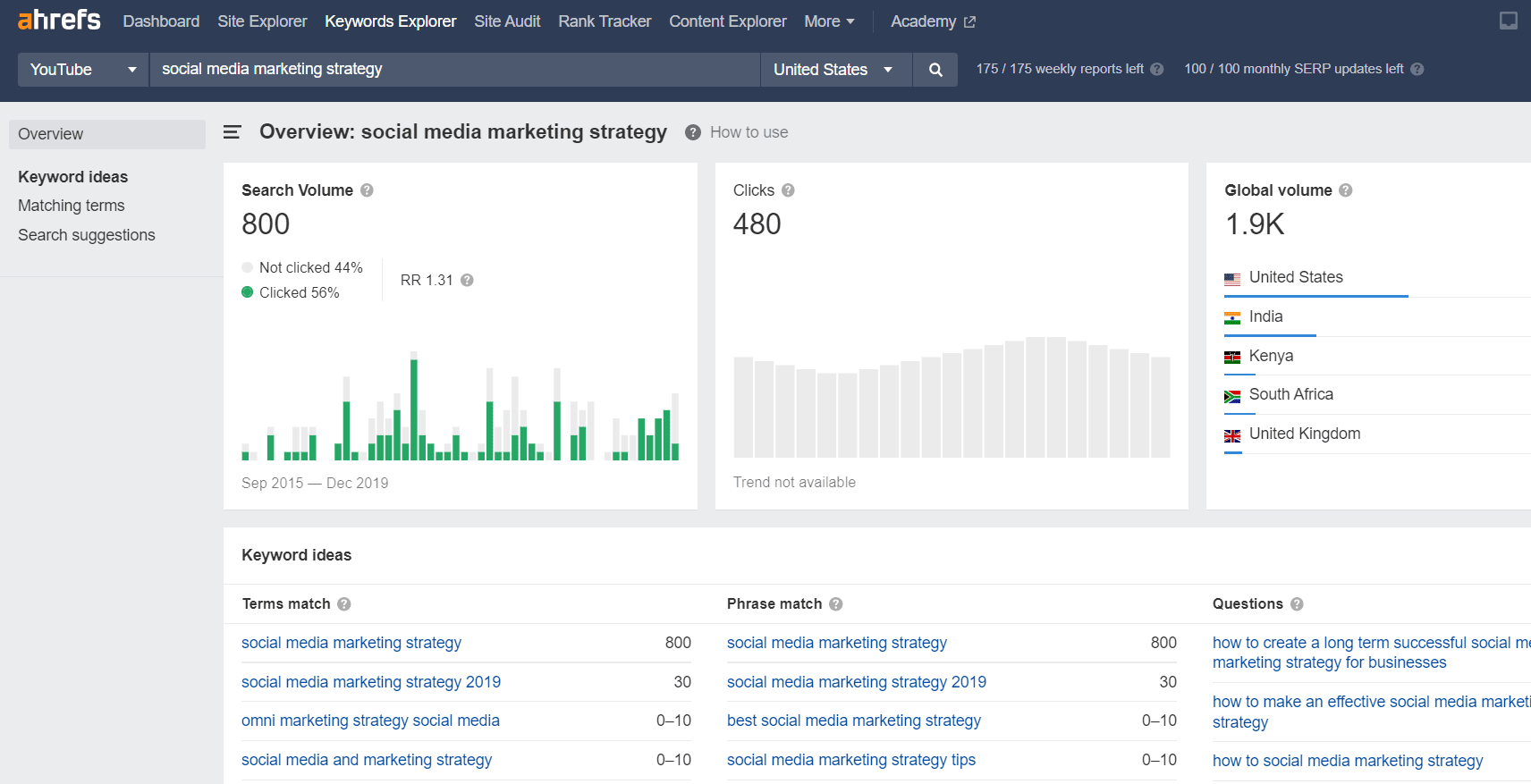
Ahrefs estimates it to be around 1900 searches a month.
That seems a bit low to me.
Let’s see what results a different YouTube keyword research tool gives us. This time we’re using TubeBuddy, which uses data from Keywordtool.io.

70,000!
That seems to be a bit on the high side….
The nice thing about TubeBuddy is that they do try to give you some guidance on how easy it would probably be to rank for that keyword. They look at the number of videos with that keyword and how well-optimized they are.
We all know that oftentimes… not very well optimized.
Doing YouTube keyword research using common sense
Up to you if you want to use YouTube keyword research tools or not.
We often check YouTube’s auto-complete to see which keywords they suggest using.
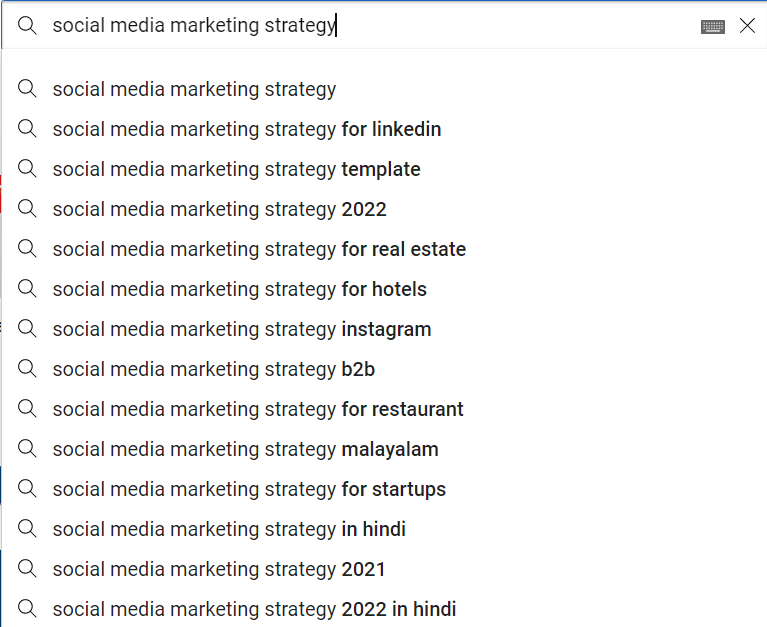
If YouTube suggests so many variations of your keyword, you’re almost certain that the topic is popular.
You can add a space at the start of the search bar and get even more keyword suggestions from YouTube:
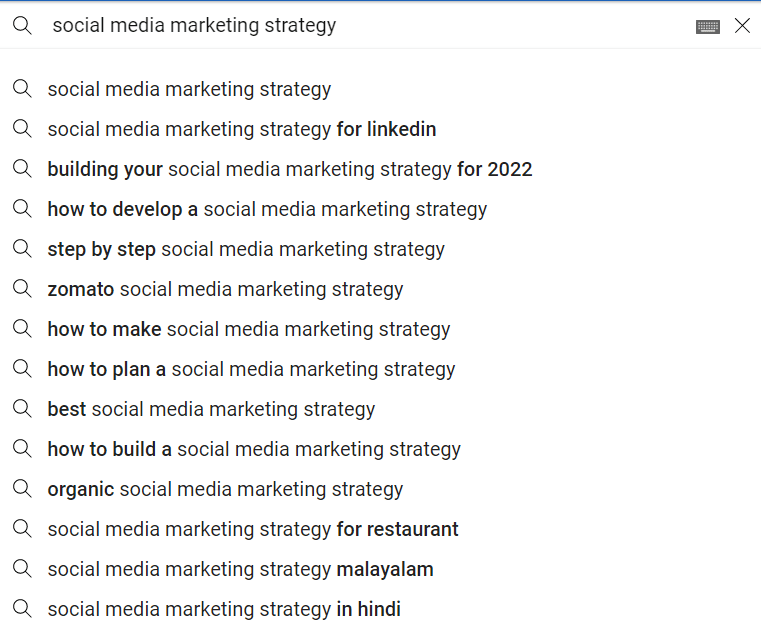
Now you can select the best matching keyword and try to optimize for it.
We’ll show you how in the audits we’re going to do below.
YouTube Video Audit Checklist
How many of the points below can you tick off the checklist for your (or your client’s) videos?
Optimize your YouTube Video File Name for SEO
The more data you can provide YouTube on what the video is about, the better your chances to rank well and get more views. That also includes the video file name.
Looking at the videos that are posted on the YouTube channel, can you say the videos have a descriptive file name? Preferably with the main keywords the video targets included in the file name?
Or is the file name something like; December 16 – final – final?
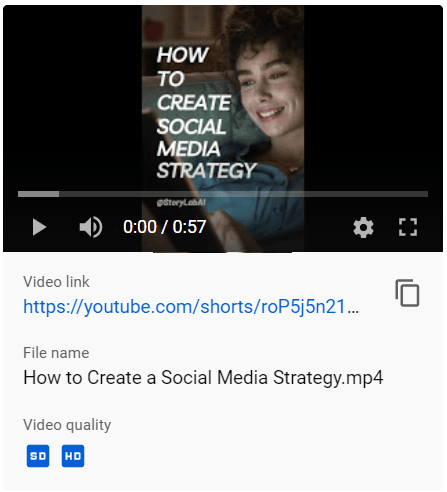
If the video file names are not optimized, you can’t simply change them and we don’t advise taking the video down to make the change and re-upload them.
It is something you can note and be mindful of when creating and uploading future videos.
YouTube Video Title Optimization for SEO
Next on the checklist is the video title.
A perfect YouTube video title has the following elements:
- It helps people understand what the video is about
- It’s catchy but not spammy to get high click-through rates
- It includes the main keyword to signal to users and YouTube what the video is about
How well are the video titles optimized?
Do they simply mention the company name or do they actually try to let people and YouTube know what the value of the video is?
The good news is that you can actually go ahead and change and optimize all video titles!
So if the account has 100 videos with titles that don’t make much sense for YouTube or users, this is your chance to improve greatly.
Note down all the video URLs and titles in a sheet and suggest new titles.
Try to add the main keyword at the start of the title to give it an extra boost.
To help you out, check out our Title Generator and how it can help you brainstorm new catchy titles. Simply input what the video is about and the AI will help spark creativity.
Here’s what it looks like:

YouTube Video Description Optimization for SEO and website traffic
The video description on YouTube is very important. It helps you to:
- Further optimize your video for SEO;
- Go deeper on telling your story;
- Activate people to take action and visit your website;
- Interlink to other videos and build relevance;
- Add relevant hashtags.
This is at the same time exactly how you should structure your video description.
Video description and SEO
Start the first section of your video description by repeating your main keyword and other relevant keywords. Explain briefly the problems and solutions you’re covering in your video.
If you need help, Check out our Intro Generator.
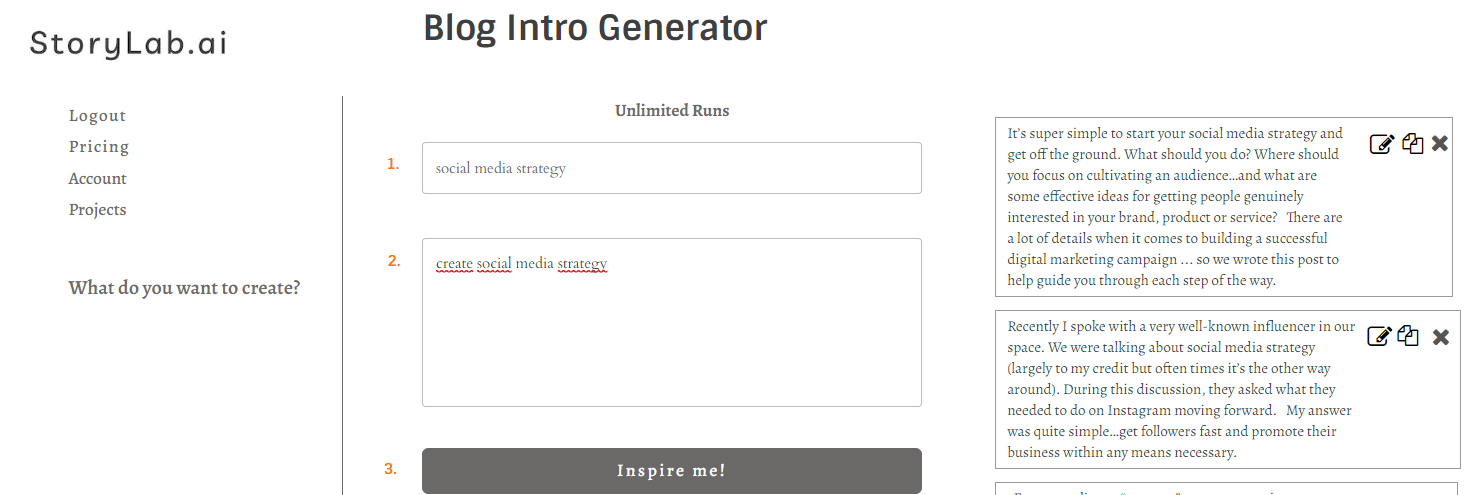
Video description, Company Story and next steps
Use the next section of your video description to dive deeper into the brand story.
Try to activate people to take the next step. Link to a valuable resource that is related to the video they are watching.
Interlink to related videos in your description
It is important to build topical relevancy and expertise on YouTube. One way you can do that is by linking in your description to other related videos of yours. More tips will follow later in this audit.
Add relevant hashtags to your description
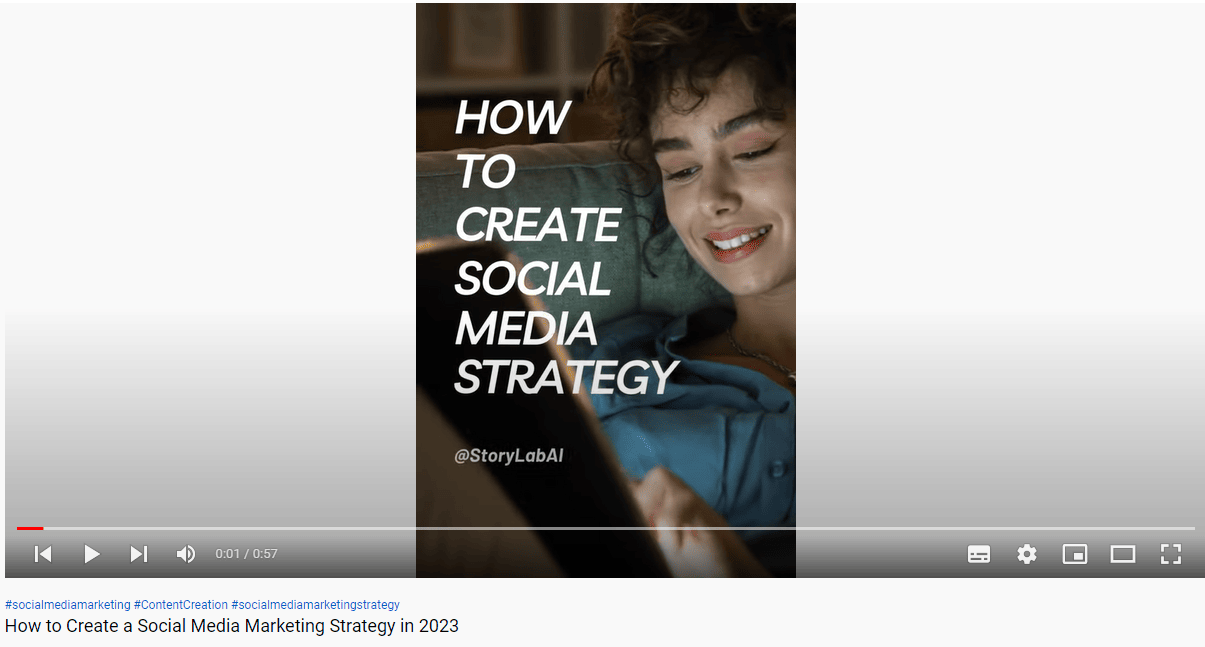
In the last section of your video description, you can add three relevant hashtags which will help with SEO even more. These three hashtags will also be shown just below the video:
Create eye-catching YouTube Video Thumbnails
The more people click on your result, the better you will rank on YouTube.
Having an eye-catching YouTube Video Thumbnail makes a big difference.
When uploading your video, YouTube tries to help you with a couple of thumbnail suggestions. This is ok, but uploading your own design is almost always better.
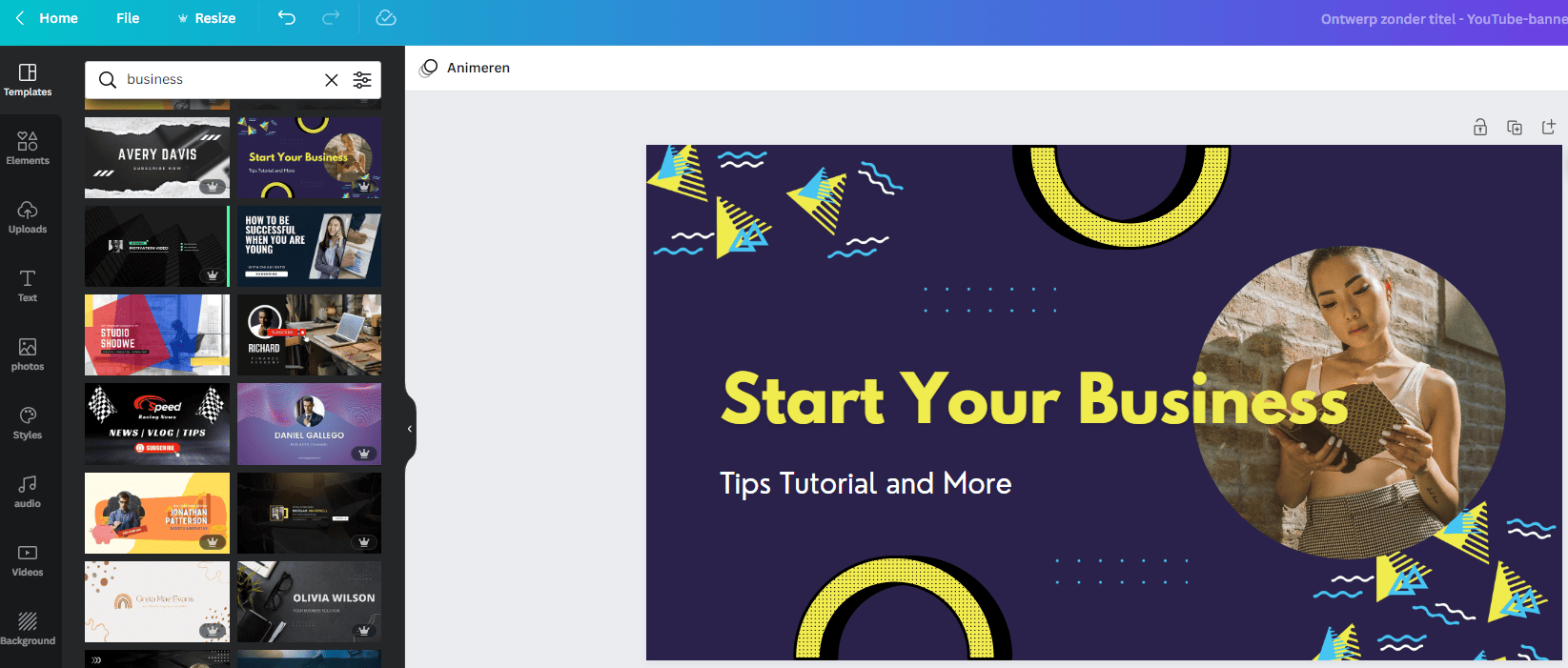
If you need help, check out Canva. You can select from their design templates or create your own.
Adding Tags to your YouTube Videos
Here’s YouTube’s official short explanation of using Tags for your YouTube Videos:
Tags are useful if content in your video is often misspelled. Furthermore, tags hardly play a role when it comes to helping viewers find your video.
So two no-nos straight off the bat:
- Don’t skip adding tags.
- Don’t overdue it.
Also, pay attention to the word ‘hardly’ 😉
A best practice is to start by adding your main keyword and variations of that keyword to your video. Any other relevant or often misspelled words (like your name if you’re using that in your title) are a big plus.
Try to also match tags with your other videos. For us for instance, our videos are often about content creation. We tag all our videos that are on that topic with that tag to build up relevancy between our videos.
Adding End Screens and Cards to your YouTube videos
Adding end screens and cards to your videos helps to get people to take action, build relevancy amongst your videos and get people to subscribe and watch more videos.
What we like to do for instance is to upload a long-form video but also cut it down into short videos.
The short videos link in the description and end screen to the full video. A YouTube viewer can help creators quickly review public videos, channels, and thumbnails during content research.
Here’s an example:
Adding Pinned Comments to your YouTube videos
A fine way to draw attention to a next step you want people to take or to get people to leave a comment on your video is to comment first and to pin that comment at the top.
Some people don’t bother to open the video description but scroll down to the comments section.
This is a great way to get your message in front of people.
It’s obviously not a must, but can be a nice addition, and did want to mention it.

YouTube Channel Audit Checklist
Alright. We’ve gone over steps to take in your YouTube audit and looking at videos individually and optimizing.
Now let’s have a look at doing an audit of the channel as a whole. What should you pay attention to and optimize?
Does the YouTube channel look professional?
This is a bit of a broad question maybe, but I’m sure you can answer it for yourself.
Just by looking at the various tabs and links people can click on a YouTube channel, does everything look on-brand and professional?
Many set up a YouTube channel, create playlists, etc. but don’t really bother to optimize their profile.
It’s up to you during the audit to do click on all the possible tabs (home, videos, playlist, channel, about, and the links that have been added and find misfits.
Are YouTube Playlists being created and are they optimized for SEO?
Playlists are great for building more topical relevancy and increasing the number of views. When someone watches a video from within a playlist, the next video will play automatically. Sweet!
We often times see that Playlists are created but not being SEO optimized. They often don’t even have a great descriptive name. We’ve seen playlists like these: [company name playlist 1], [company name playlist 2], etc.
That’s not helpful for anyone.
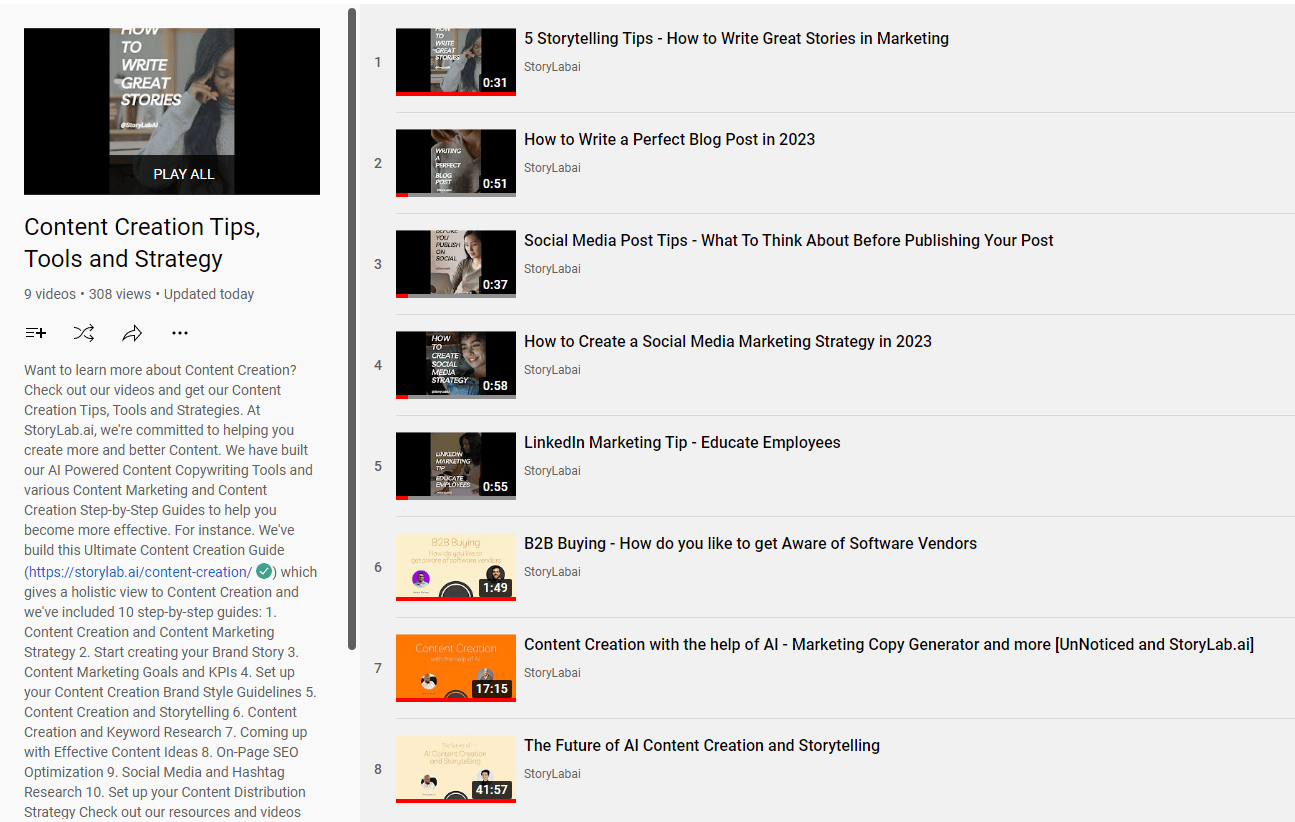
It includes:
- A descriptive name with relevant keywords;
- An in-depth description that includes relevant keywords;
- A link to a resource of ours about Content Creation (playlist topic);
- Videos on various content creation topics
- Videos in that playlist also have the tags ‘content creation’.
- We’ve also thought about the order of the videos. They’re not sorted randomly.
How many of the above points can you tick off for the playlists that have been created?
You can actually go in and make the edits that are needed to optimize every playlist.
How is the channel reacting to comments?
Receiving comments on your videos is highly important for increasing engagement and growing in organic rankings.
Do an audit on how the channel is reacting to comments. It’s usually one of the following:
- Noone reacts to comments;
- The channel manager reacts to comments but only very short comments and not trying to get more people to comment (spark conversation more);
- The channel manager is doing a perfect job.
I think you can already guess which of the above is optimal and which next steps you can propose if any of the above scenarios occur.
You want to have a process in place for reacting timely to comments and trying to get the conversation going every time the YouTube manager interacts.
YouTube Audit Checklist
Use this checklist to review your videos and channel.
| Audit area | What to check | Possible improvement |
|---|---|---|
| Topic strategy | Are videos based on topics your audience actually cares about? | Use YouTube search suggestions, comments, competitor videos, analytics and customer questions to plan better topics. |
| Titles | Do titles clearly explain the value of the video? | Rewrite vague titles so they include the topic, outcome or curiosity angle. |
| Thumbnails | Do thumbnails stand out and match the video promise? | Use fewer words, stronger contrast and one clear visual focus. |
| Descriptions | Do descriptions explain the video, include useful links and guide viewers to the next step? | Add a short summary, related links, timestamps where useful, and a relevant CTA. |
| Tags | Are tags used for relevant keywords, names and common misspellings? | Do not overfocus on tags. YouTube says title, thumbnail and description are more important. |
| Playlists | Are videos grouped into useful playlists? | Create keyword-friendly playlist names and descriptions around clear topics. |
| End screens | Do videos guide viewers to another video, playlist or subscribe action? | Add relevant end screen elements to eligible videos. |
| Cards | Are cards used to point viewers to related videos, playlists, channels or approved links? | Add cards only where they support the viewing experience. |
| Retention | Where do viewers drop off? | Improve intros, remove slow sections and create stronger pacing. |
| CTR | Are impressions turning into views? | Test stronger titles and thumbnails for videos with impressions but low clicks. |
| Comments | Does the channel respond to comments and questions? | Create a comment response process and pin useful comments. |
| Promotion | Are videos reused outside YouTube? | Turn videos into blog embeds, social posts, emails, Shorts and campaign content. |
This checklist helps you move from “we should improve YouTube” to a specific action list.
YouTube Metrics to Review During an Audit
A YouTube audit should combine creative judgment with performance data.
Do not only look at views.
Views tell you what happened, but they do not always explain why.
Use this table to review the right metric for each problem.
| Question | Metric to review | What it can tell you |
|---|---|---|
| Are people seeing the video? | Impressions | Shows how often the thumbnail was shown on YouTube. |
| Are people clicking? | Impressions click-through rate | Shows how often people watched after seeing the thumbnail. |
| Are people staying? | Average view duration and audience retention | Shows whether the video keeps attention after the click. |
| Does the video create watch time? | Watch time | Shows how much viewing time the video generates. |
| Is the topic attracting the right viewers? | Audience tab and returning viewers | Shows who watches and whether people come back. |
| Where do viewers come from? | Traffic sources | Shows discovery from search, suggested videos, external sites and other sources. |
| Do people interact? | Likes, comments, shares and subscribers gained | Shows whether the video creates engagement or channel growth. |
| Do end screens work? | End screen element click rate | Shows whether viewers click the next suggested action. |
YouTube’s Analytics help explains that the Reach tab includes impressions, impressions click-through rate, views and unique viewers, while the Engagement tab includes watch time and average view duration.
A simple way to interpret the data:
- High impressions + low CTR = title or thumbnail problem.
- High CTR + low retention = video promise or intro problem.
- Good retention + low impressions = topic, SEO or promotion problem.
- Good views + no next step = description, end screen, pinned comment or CTA problem.
YouTube Title and Thumbnail Audit
Titles and thumbnails work together.
The title explains the promise.
The thumbnail creates the first visual reason to click.
Do not audit them separately only. Review them as a pair.
Ask:
- Does the title make the topic clear?
- Does the thumbnail create curiosity?
- Do title and thumbnail say the same thing in different ways?
- Is the thumbnail readable on mobile?
- Is the visual too crowded?
- Does the video deliver on the promise?
- Is the title written for the viewer, not only for the algorithm?
- Would someone understand the video topic in one second?
| Weak title or thumbnail issue | Why it hurts performance | Better audit action |
|---|---|---|
| Title is only the company name or episode number | Viewers do not understand the value of the video. | Add the topic, result, problem or useful angle. |
| Thumbnail repeats the full title | It wastes space and becomes hard to read. | Use a short hook that supports the title. |
| Thumbnail has too much text | Small previews become unreadable. | Use a few bold words and one clear visual. |
| Title is clickbait | Viewers may leave quickly if the video does not deliver. | Create curiosity without misleading the audience. |
| Thumbnail style changes randomly | The channel becomes less recognizable. | Create a consistent visual style for series and playlists. |
Over to you
Alright. If you’re looking to do a YouTube audit, take the steps mentioned above into consideration. It’s not a full list of everything one could do to optimize their YouTube channel to get more views but also to take people to take action but you need to start somewhere and prioritize the most important items you or a team can pick up and start making improvements.
Access our Google Sheet here for free to input all your videos and go over the points mentioned step-by-step.
FAQ
What is a YouTube audit?
A YouTube audit is a comprehensive review of a YouTube channel to assess its performance, content strategy, SEO, audience engagement, and overall effectiveness in meeting its goals.
Why is conducting a YouTube audit important?
Conducting a YouTube audit is important for identifying areas of improvement, understanding audience preferences, optimizing content and strategy, and maximizing channel growth and engagement.
What key metrics are analyzed in a YouTube audit?
Key metrics include view counts, subscriber growth, watch time, engagement rates (likes, comments, shares), and the performance of specific videos.
How can a YouTube audit improve content strategy?
An audit can reveal insights into what types of content are most successful, helping to refine content strategy to better align with audience interests and trends.
What role does SEO play in a YouTube audit?
SEO in a YouTube audit involves evaluating video titles, descriptions, tags, and keywords to ensure they are optimized for YouTube search and discoverability.
Can a YouTube audit help in understanding the target audience better?
Yes, by analyzing audience demographics, viewing patterns, and engagement, a YouTube audit can provide a deeper understanding of who the target audience is and what they prefer.
How does a YouTube audit address video engagement?
The audit assesses factors that influence engagement, such as video length, quality, content relevance, and the effectiveness of calls-to-action.
What is the significance of thumbnail analysis in a YouTube audit?
Thumbnail analysis is significant as thumbnails play a crucial role in click-through rates. The audit evaluates their appeal, relevance, and consistency.
How can channel branding be assessed in a YouTube audit?
Channel branding is assessed by reviewing the channel’s visual identity (logo, banner), consistency in messaging, and how effectively the channel communicates its value proposition.
Can a YouTube audit provide insights into content monetization?
Yes, it can offer insights into monetization strategies, including ad revenue performance, effectiveness of sponsored content, and opportunities for merchandise sales or memberships.
How can a YouTube audit identify opportunities for audience growth?
An audit can reveal gaps in content, untapped audience segments, and areas where competitors are succeeding, providing opportunities for audience growth and channel expansion.
What impact does video frequency have on a YouTube channel, as analyzed in an audit?
An audit assesses how posting frequency correlates with viewer engagement and subscriber growth, helping to optimize the content calendar for consistent audience retention.
How does an audit evaluate the effectiveness of video descriptions and CTAs?
The audit reviews whether video descriptions are informative and keyword-optimized and whether calls-to-action (CTAs) effectively encourage viewer interaction and conversion.
Can a YouTube audit assist in improving video quality and production?
Yes, by evaluating visual and audio quality, editing, and presentation styles, an audit can provide insights into production improvements that enhance viewer engagement.
What role do comments and community engagement play in a YouTube audit?
Analyzing comments and community interaction can provide feedback on viewer sentiment, content preferences, and engagement levels, guiding content and community management strategies.
How are playlist strategies evaluated in a YouTube audit?
Playlists are evaluated for their organization, relevance, and ability to enhance viewer experience and guide them to more content, improving watch time and engagement.
Can a YouTube audit help in refining video topics and themes?
By analyzing which topics and themes resonate most with the audience, an audit can guide the creation of future content that aligns with viewer interests.
What insights can a YouTube audit provide on competitor analysis?
A competitor analysis in an audit can reveal what content strategies, video formats, and topics are successful for similar channels, offering ideas for improvement and differentiation.
How does a YouTube audit assess channel optimization for mobile viewers?
The audit evaluates how the channel and its content perform on mobile devices, considering factors like video format, viewing experience, and mobile engagement.
What is the importance of analyzing viewer retention rates in a YouTube audit?
Analyzing viewer retention rates is crucial for understanding at what points viewers are most engaged or tend to drop off, informing strategies to improve content and maintain viewer interest.
Jump back to a section
Author bio:
 Raul Tiru: Raul loves to build companies and help startups and scale-ups grow. Raul started his first website when he was 17 years old, has held several growth marketing positions in fast-growing companies, and has helped companies via his Freelance Marketing services. Raul is the Founder of GlobalOwls, Co-Founder of StoryLab.ai, and Co-Founder of StrongEcho.
Master the Art of Video Marketing
AI-Powered Tools to Ideate, Optimize, and Amplify!
- Spark Creativity: Unleash the most effective video ideas, scripts, and engaging hooks with our AI Generators.
- Optimize Instantly: Elevate your YouTube presence by optimizing video Titles, Descriptions, and Tags in seconds.
- Amplify Your Reach: Effortlessly craft social media, email, and ad copy to maximize your video’s impact.