
Effective Business LinkedIn Content Ideas [+ LinkedIn Caption Generator]

LinkedIn is not just a place to announce job openings, repost company news, and occasionally write “We are thrilled to share…”
Businesses can use LinkedIn to build trust, educate buyers, share expertise, attract talent, support sales conversations, and stay visible with the people who may need them later.
But there is a big difference between posting on LinkedIn and using LinkedIn well.
A company can post every week and still sound like a press release wearing a blazer. Another business can post fewer times but share useful lessons, customer insights, founder perspectives, and practical examples that people actually remember.
That is where good LinkedIn content ideas help.
Below, you’ll find business LinkedIn content ideas you can use for company pages, founder posts, team updates, thought leadership, customer stories, product education, and more. After the ideas, we’ll show how to use them better with stronger hooks, clearer formats, AI-assisted captions, and a simple workflow that turns LinkedIn from “we should post something” into a real marketing channel.
Why is it important to share LinkedIn posts consistently?
It’s important to share LinkedIn posts consistently for several reasons:
- Increases visibility: Consistent posting can increase your visibility on LinkedIn. LinkedIn’s algorithm favors active and engaged users, so if you post regularly, your content is more likely to be seen by a larger audience.
- Establishes thought leadership: Consistently sharing valuable and informative content can position you or your business as a thought leader in your industry. It demonstrates your knowledge and expertise and helps you build trust and credibility with your audience.
- Builds engagement: Regular posting encourages engagement with your audience. When you consistently share content that is relevant and valuable, your followers are more likely to like, comment, and share your posts. This can help increase your reach and visibility even further.
- Keeps you top of mind: Consistent posting helps keep you top of mind with your network. When you appear regularly in their LinkedIn feed, your followers are more likely to think of you when they need a product or service that you offer.
- Helps you stay up-to-date: Consistent posting requires you to stay up-to-date with industry news, trends, and best practices. This helps you stay informed and relevant and positions you as a valuable resource to your network.
Overall, consistent posting on LinkedIn can help you build your brand, establish yourself as a thought leader, and increase engagement with your audience.
Additional resources:
- Creating a Successful LinkedIn Marketing Strategy
- How to get more LinkedIn Followers for your Business Page
AI Tools to help you come up with ideas and create effective LinkedIn Captions
At StoryLab.ai we’re committed to helping your Business to become more effective on LinkedIn by helping you tell more and better stories. We do that with our resources and with our tools.
- Our AI-Powered Content Idea Generator helps you come up with awesome new ideas.
- Our AI-Powered LinkedIn Caption Generator helps you take those ideas and turn them into LinkedIn captions in seconds
How the AI-Powered LinkedIn Caption Generator Works
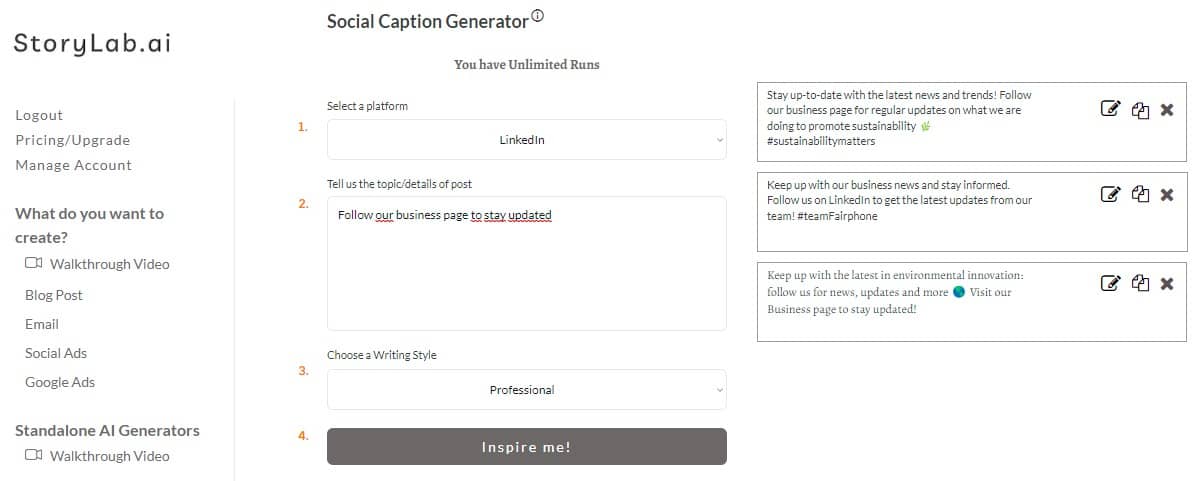
For this example, we’ve taken one of the LinkedIn content ideas below and entered it into our LinkedIn Caption Generator.
In the image below you can see what the AI Tool created for us in seconds:
LinkedIn Caption Ideas the AI Tool Generated for us:
- Stay up-to-date with the latest news and trends! Follow our business page for regular updates on what we are doing to promote sustainability 🌿 #sustainabilitymatters
- Keep up with our business news and stay informed. Follow us on LinkedIn to get the latest updates from our team! #teamFairphone
- Keep up with the latest in environmental innovation: follow us for news, updates and more 🌎 Visit our Business page to stay updated!
Re-run the AI Tool if you need more inspiration, or take one of the captions, add your unique human touch, perfect it, and post it.
Grab a couple of LinkedIn ideas below, throw them into the LI Post Generator, and build your LinkedIn content calendar in minutes.
Effective Business LinkedIn Content Ideas
- Share industry news and insights.
- Post about upcoming industry events or conferences.
- Write about a recent project or client success story.
- Share a relevant and interesting article from a reputable source.
- Give your opinion on a trending topic in your industry.
- Offer tips or advice for others in your field.
- Share an inspiring quote or thought-provoking statistic.
- Write a case study on a project you recently completed.
- Share a recent accomplishment or milestone in your career.
- Post about a recent job opening at your company.
- Share photos or videos from a recent company event.
- Write about a recent challenge you overcame and what you learned from it.
- Offer career advice for those just starting out in your industry.
- Share a fun or interesting fact about your industry.
- Highlight an employee or team member and their accomplishments.
- Share your thoughts on a recent industry trend or development.
- Write a how-to guide on a topic relevant to your industry.
- Offer advice on how to achieve success in your field.
- Share a recent blog post or article you wrote.
- Post a poll or survey to get insights from your connections.
- Share a new product or service your company is offering.
- Write about the history of your company or industry.
- Share a personal story about your experience in your industry.
- Highlight a charity or cause your company supports.
- Post a video interview with an industry expert.
- Share a book or resource that has helped you in your career.
- Offer tips on how to improve your skills in your industry.
- Write a review of a relevant industry event or conference.
- Share a relevant infographic or data visualization.
- Post about a recent speaking engagement or webinar you participated in.
- Write about a challenge your industry is facing and how to address it.
- Share a relevant podcast or webinar you found helpful.
- Highlight a partnership or collaboration your company has formed.
- Offer insights into a common problem faced by your industry.
- Write a response to a recent industry article or opinion piece.
- Share a success story from a client or customer.
- Post about a recent award or recognition your company received.
- Offer insights into the future of your industry.
- Share a relevant meme or joke related to your industry.
- Write a summary of a recent industry report or study.
- Post about a recent acquisition or merger in your industry.
- Share a motivational quote to inspire others in your industry.
- Offer insights into the hiring process for your industry.
- Write about a mentor or role model who has helped you in your career.
- Share a relevant TED talk or other video.
- Post about a recent rebranding or repositioning of your company.
- Share a behind-the-scenes look at your company culture.
- Write about a recent event or conference you attended.
- Offer tips for networking in your industry.
- Share a recent project you’re working on and what you’ve learned so far.
- Post about a recent industry partnership or collaboration.
- Share a relevant article or blog post from a colleague.
- Offer insights into the benefits of working in your industry.
- Write about a recent product or service launch.
- Share a relevant podcast or interview you participated in.
- Post about a recent milestone your company has achieved.
- Share a relevant news article or opinion piece.
- Offer tips on how to be a successful leader in your industry.
- Write about a recent professional development opportunity you took advantage of.
- Share a recent achievement or milestone your business has reached.
- Post about a new product or service your business has launched.
- Share a positive review or testimonial from a satisfied customer.
- Share industry news or trends and offer your thoughts or opinions on it.
- Post a behind-the-scenes photo or video of your team working on a project.
- Share a success story of a customer or client that your business helped.
- Post a quote that inspires you or your business.
- Share a story of how your business got started and grew to where it is now.
- Post a job opening and encourage qualified candidates to apply.
- Share an article or blog post that you wrote about a topic related to your industry.
- Share an interesting fact or statistic about your industry.
- Post a photo or video of a recent event your business attended or hosted.
- Share an infographic that explains a complex topic related to your industry.
- Post a photo or video of your team volunteering or giving back to the community.
- Share a thought-provoking question related to your industry to spark discussion.
- Post a photo or video of your team bonding or team-building activities.
- Share an interesting article or podcast episode related to your industry.
- Post a photo or video of a satisfied customer using your product or service.
- Share an upcoming event that your business is hosting or attending.
- Post a photo or video of your team brainstorming or working on a creative project.
- Share a customer success story in the form of a case study.
- Post a photo or video of your team celebrating a recent achievement.
- Share a blog post or article from a thought leader in your industry.
- Post a photo or video of your team attending a conference or networking event.
- Share a motivational quote or message related to your industry.
- Post a photo or video of your team collaborating with other businesses or organizations.
- Share a recent award or recognition your business has received.
- Post a photo or video of your team enjoying a company outing or team-building event.
- Share a success story of a project your business completed for a client.
- Post a photo or video of your team working remotely or in a non-traditional workspace.
- Share a customer testimonial in the form of a video or audio clip.
- Post a photo or video of your team participating in a charitable event or fundraiser.
- Share an interesting infographic about your industry or a related topic.
- Post a photo or video of a team member sharing their expertise on a particular topic.
- Share an article or blog post that features your business or a team member.
- Post a photo or video of your team participating in a workshop or training session.
- Share a thought-provoking article or video about a current event related to your industry.
- Post a photo or video of your team giving a presentation or speaking at an event.
- Share an interesting statistic or trend related to your industry.
- Post a photo or video of your team conducting a meeting or brainstorming session.
- Share a recent blog post or article written by someone on your team.
- Post a photo or video of your team using a new tool or technology.
- Share an interesting fact or trivia related to your industry.
- Post a photo or video of a team member giving a tour of your workspace or facility.
- Share an article or blog post that offers tips or advice related to your industry.
- Post a photo or video of your team at a team-building or company retreat.
LinkedIn Tips for Businesses
For businesses aiming to enhance their LinkedIn presence, the platform offers a unique space to establish thought leadership, engage with a professional audience, and drive meaningful conversations around your brand. Here’s a compilation of specialized LinkedIn tips for businesses, enriched with novel LinkedIn content ideas, designed to cultivate your brand’s presence and foster engagement in a professional context.
Develop a Robust Company Page
Your LinkedIn Company Page is the cornerstone of your presence on the platform. Ensure it’s fully optimized by including a compelling company description, key products or services, and high-quality images. Regular updates about company news, achievements, and milestones can keep your audience informed and engaged.
Share Industry Insights and Trends
Position your business as a thought leader by publishing posts and articles that delve into industry insights, trends, and forecasts. This type of content not only demonstrates your expertise but also provides valuable information to your followers, encouraging shares and discussions.
Highlight Customer Success Stories
Share success stories and testimonials from your clients that showcase the impact of your products or services. These stories can be particularly persuasive to potential clients, as they provide real-world examples of the benefits of working with your business.
Engage with Interactive and Visual Content
Leverage interactive content like polls, surveys, and LinkedIn Stories to engage your audience. Additionally, incorporating visuals such as infographics, videos, and high-quality images can significantly increase engagement rates on your posts.
Feature Employee Spotlights and Expertise
Humanize your brand and showcase your team’s expertise through employee spotlights. Share their achievements, professional insights, or experiences working with your business. This approach can enhance your company culture’s visibility and attract potential talent.
Provide Educational Content and How-Tos
Offer your audience educational content, how-tos, and best practices related to your industry. This type of content is highly valued on LinkedIn and can help establish your business as a helpful resource within your professional community.
Utilize LinkedIn Live for Events and Announcements
Take advantage of LinkedIn Live to stream events, product launches, or important company announcements. Live streaming allows for real-time engagement with your audience, making your content more dynamic and interactive.
Publish Case Studies and White Papers
Sharing in-depth case studies and white papers can significantly boost your credibility on LinkedIn. These documents provide detailed insights into your business’s solutions and the tangible benefits they offer, helping to educate potential clients on your value proposition.
Participate in and Create LinkedIn Groups
Engage with existing LinkedIn Groups in your industry or create your own to foster a community around specific topics or interests. This can increase your visibility, help you gain insights into your audience’s needs, and establish your business as an active industry participant.
Monitor and Act on Analytics
Regularly review your LinkedIn analytics to understand which content performs best and why. Before publishing, running your draft through a LinkedIn post analyzer tool like YouScan gives you an objective read on readability, hook strength, and predicted engagement so you can refine before the algorithm decides how widely to distribute it. Use these insights to refine your content strategy, focusing on the types of posts that generate the most engagement and contribute positively to your business goals.
Incorporating these targeted LinkedIn tips and content ideas into your business strategy can significantly enhance your brand’s presence on the platform. By focusing on providing value, fostering engagement, and demonstrating your industry leadership, you can build a strong LinkedIn profile that resonates with your professional audience.
How Businesses Can Use These LinkedIn Content Ideas Better
A list of LinkedIn content ideas is helpful.
But the list alone will not grow your business.
The results come from choosing the right ideas, adding a clear point of view, publishing consistently, learning from the response, and connecting content to business goals.
Here is how to use the ideas above more strategically.
Start With the Business Goal
Before choosing a LinkedIn post idea, ask what the post should help achieve.
Not every post needs to sell. But every post should have a reason to exist.
| Business goal | Best type of LinkedIn content | What to focus on |
|---|---|---|
| Build brand awareness | Thought leadership, founder insights, industry observations | Make the business easier to remember. |
| Build trust | Customer stories, case studies, behind-the-scenes posts, team expertise | Show proof, not just promises. |
| Generate leads | Problem-solution posts, educational posts, offer posts, event posts | Help the right people take the next step. |
| Support sales | Objection-handling posts, comparison posts, product education, buyer questions | Answer what prospects usually ask before buying. |
| Attract talent | Culture posts, team stories, mission posts, employee spotlights | Show what it feels like to work with the company. |
| Strengthen retention | Customer education, product tips, success stories, community updates | Help existing customers get more value. |
The best LinkedIn strategy is not “post more.”
It is “post with clearer intent.”
Do Not Make Every Post About the Company
Businesses often make the same mistake on LinkedIn.
They post as if the audience wakes up thinking about them.
They do not.
Your audience thinks about their own problems, goals, pressures, deadlines, decisions, and opportunities. Your content should meet them there.
A good business LinkedIn post usually starts from one of these angles:
- A problem your audience recognizes
- A lesson your team learned
- A mistake people can avoid
- A customer question
- A shift in the industry
- A practical framework
- A behind-the-scenes decision
- A useful example
- A clear opinion
- A common myth
Then your company becomes relevant because it has something useful to add.
That is much stronger than opening every post with:
“We are excited to announce…”
Sometimes you are excited. Lovely. But the reader still needs a reason to care.
3. Balance Company Page and Personal Profile Content
For many businesses, LinkedIn works best when the company page and personal profiles support each other.
The company page builds the official brand presence. Personal profiles, especially founders, leaders, experts, and customer-facing team members, often make the message feel more human.
| Channel | Best for | Content style |
|---|---|---|
| Company page | Brand updates, official announcements, hiring, resources, events, customer proof | Clear, useful, professional, consistent |
| Founder profile | Point of view, lessons, business journey, market observations, trust building | Personal, direct, opinionated, story-driven |
| Team profiles | Expertise, customer lessons, role-specific insights, behind-the-scenes work | Practical, specific, human, experience-based |
| Sales profiles | Buyer education, objection handling, industry commentary, relationship building | Helpful, conversational, problem-aware |
The company page can say what the business does.
People can show why it matters.
Use both.
Turn One LinkedIn Idea Into Multiple Post Formats
You do not need to reinvent your LinkedIn strategy every week.
One strong idea can become multiple useful posts.
| Original idea | Repurposed LinkedIn format | How to make it feel fresh |
|---|---|---|
| Customer story | Company page post, founder lesson, carousel, sales enablement post | Focus each version on a different pain point or lesson. |
| Blog article | Short takeaway post, document post, poll, comment prompt | Pull out one useful point instead of summarizing the whole article. |
| Product update | Demo clip, customer problem post, founder note, FAQ answer | Explain why the update matters, not only what changed. |
| Webinar | Quote post, lessons post, short clips, checklist post | Turn the strongest insights into smaller posts. |
| Sales objection | Educational post, myth post, comparison post, founder POV | Answer the objection before the next sales call. |
Repurposing is not lazy.
It is how busy businesses get more value from good ideas.
Write Stronger LinkedIn Hooks
The first line decides whether people keep reading.
Weak LinkedIn openings often sound like this:
- We are excited to announce…
- Check out our latest blog…
- We recently attended…
- Meet our amazing team…
- Our new feature is live…
These can work, but only when they quickly explain why the reader should care.
| Weak opening | Stronger opening |
|---|---|
| We are excited to announce our new feature. | Our customers kept asking for one thing: a faster way to see what changed. |
| Check out our latest blog post. | Most businesses make LinkedIn harder than it needs to be. |
| We recently attended a great event. | We asked five buyers the same question at this event. Their answers changed how we think about our messaging. |
| Meet our new team member. | We hired someone to solve the part of our customer experience we knew had to improve. |
| We are proud to share this customer story. | This customer did not need more leads. They needed better-fit conversations. |
A strong hook does not need to be dramatic.
It needs to create relevance quickly.
Add a Clear Point of View
LinkedIn is full of correct but forgettable content.
A point of view makes your post more useful and more memorable.
Instead of saying:
“Consistency is important on LinkedIn.”
Say:
“Consistency matters, but posting three weak company updates a week will not build trust. One useful post with a clear lesson often does more than five safe posts nobody remembers.”
That is more specific. It gives the audience something to agree with, question, or apply.
Before publishing, ask:
- What do we believe?
- What have we learned?
- What do most people misunderstand?
- What would we advise a client or customer?
- What mistake should our audience avoid?
- What is our honest take?
Businesses do not need to be controversial for the sake of attention.
But they do need to sound like they have actually thought about the topic.
Use AI to Draft, Then Add Real Business Context
AI can help businesses create LinkedIn posts faster.
Use AI for:
- Caption drafts
- Hook options
- Post variations
- Repurposing blog content
- Turning webinars into posts
- Summarizing customer questions
- Creating first drafts from internal notes
- Adapting one post for company and founder profiles
But do not publish AI output without adding real context.
Add:
- A customer example
- A team lesson
- A specific number when appropriate
- A real objection
- A product detail
- A market observation
- A founder opinion
- A before-and-after moment
- A more natural brand voice
AI gives you the clay.
Your business experience shapes the post.
Make LinkedIn Posts Easier to Read
LinkedIn posts should be easy to scan.
That does not mean every sentence needs its own line forever. But walls of text are hard to read, especially on mobile.
Use:
- Short paragraphs
- Clear first lines
- Simple structure
- One idea per post
- Specific examples
- Natural language
- Useful line breaks
- A clear ending
- A CTA when needed
Avoid:
- Long corporate intros
- Too many hashtags
- Five CTAs in one post
- Vague claims
- Over-polished AI language
- “Thought leadership” that says nothing new
- Posts that sound like internal announcements copied into public view
The best LinkedIn posts feel like a clear thought from a real person or business.
Not a brochure that escaped.
Use LinkedIn as a Listening Channel
Businesses should not only publish on LinkedIn.
They should listen.
Look at:
- What questions people ask in comments
- Which posts get saves and shares
- Which topics attract the right audience
- Which posts bring profile visits or page follows
- Which posts start sales conversations
- Which comments reveal objections
- Which posts employees feel proud to share
- Which topics create useful replies from customers or peers
LinkedIn Page analytics can help businesses understand follower demographics, visitor behavior, and content performance.
Use that data to improve the next batch.
A good LinkedIn strategy becomes sharper over time.
Track More Than Likes
Likes are easy to see. They are not always the best signal.
For business LinkedIn content, track metrics based on the goal.
| Goal | Better metrics to watch |
|---|---|
| Build awareness | Impressions, reach, follower growth, profile visits, company page visits |
| Build trust | Comments, saves, shares, quality replies, connection requests |
| Drive traffic | Link clicks, UTM-tracked visits, landing page engagement |
| Generate leads | Demo requests, form fills, newsletter signups, calls booked, inbound DMs |
| Support sales | Prospect engagement, sales conversations, content used by reps, objection reduction |
| Attract talent | Job page visits, applicant quality, employee shares, candidate messages |
Google Analytics lets marketers add UTM parameters to URLs to identify which campaigns refer traffic, so LinkedIn posts that drive clicks should use clean campaign tracking.
Do not judge every post by the same metric.
A thought leadership post, hiring post, event post, and lead generation post have different jobs.
Create a Simple Weekly LinkedIn Workflow
Businesses often struggle with LinkedIn because every post feels like a new project.
Make the workflow easier.
| Step | What to do | AI support |
|---|---|---|
| Collect inputs | Gather customer questions, sales objections, blog posts, product updates, and team lessons. | Summarize raw notes into possible post angles. |
| Choose posts | Select 2 or 3 ideas that support current business goals. | Suggest formats for company, founder, and team posts. |
| Draft | Write first versions with a clear hook, body, and ending. | Generate hooks, captions, and variations. |
| Edit | Add examples, proof, brand voice, and a stronger point of view. | Shorten, clarify, and improve readability. |
| Publish | Post from the best page or profile for the message. | Create alternate versions for other profiles. |
| Engage | Reply to comments and continue useful conversations. | Draft thoughtful reply options when needed. |
| Review | Check performance and save learnings for the next batch. | Summarize patterns from top-performing posts. |
The easier the system, the more likely the business will keep doing it.
Turn LinkedIn Content Into a Wider Marketing Asset

A good LinkedIn post should not always stop on LinkedIn.
Strong posts can become:
- Email newsletter sections
- Blog paragraphs
- Sales follow-up notes
- Website FAQ answers
- Short video scripts
- Webinar topics
- Case study angles
- Internal training notes
- Ad copy tests
- Founder newsletter ideas
This is especially useful for B2B businesses.
If a post gets thoughtful comments from your target audience, that is not just engagement. It is market feedback.
Use it.
Business LinkedIn Content Checklist
Before publishing, check:
| Checklist item | Question to ask |
|---|---|
| Audience | Is this clearly written for the people we want to reach? |
| Goal | Does this post support awareness, trust, leads, sales, retention, or hiring? |
| Hook | Does the first line make people want to keep reading? |
| Point of view | Does the post say something useful or specific? |
| Proof | Can we add a real example, customer insight, lesson, or result? |
| Readability | Is the post easy to scan on mobile? |
| Voice | Does it sound like our business, or like generic AI content? |
| CTA | Is the next step clear when a next step is needed? |
| Tracking | Do links use UTM tracking when performance matters? |
| Learning loop | Will we review the response and improve the next post? |
Final Tip: Useful Beats Polished
Many businesses over-polish LinkedIn content until it loses all personality.
The result sounds safe, but forgettable.
LinkedIn content works better when it feels useful, specific, and connected to real business experience.
- Share the lesson.
- Explain the decision.
- Answer the question.
- Show the customer problem.
- Make the point clearly.
- Add the human detail.
You do not need every post to be perfect.
You need your audience to feel that your business understands something worth paying attention to.
FAQ
What should businesses post on LinkedIn?
Businesses should post content that helps the right audience understand the company, trust its expertise, and take the next step. Strong LinkedIn content can include company updates, customer stories, thought leadership, founder insights, hiring posts, product education, event updates, practical tips, and behind-the-scenes lessons. LinkedIn says Pages help organizations share information about their brand with visitors and followers.
Should a business post from a company page or personal profile?
Use both when possible. A company page is useful for official brand presence, updates, resources, hiring, and customer proof. Personal profiles are often better for founder stories, expert opinions, relationship building, and more human content. The strongest LinkedIn strategy often combines the trust of people with the consistency of the company page.
How often should a business post on LinkedIn?
There is no perfect posting frequency for every business. A better goal is to publish consistently without lowering quality. Start with a realistic schedule the team can maintain, then use LinkedIn analytics to see which topics, formats, and posting rhythms attract the right audience. LinkedIn Page analytics can show follower demographics, sources of followers, visitor behavior, and content performance.
What makes a good LinkedIn post for business?
A good business LinkedIn post has a clear audience, strong opening line, useful insight, real example, readable structure, and a clear point. It should not sound like a press release. LinkedIn’s content recommendation guidance says certain low-quality content may not be shared beyond direct connections, so quality and professional relevance matter.
How can B2B companies use LinkedIn content?
B2B companies can use LinkedIn content to educate buyers, build trust, support sales conversations, explain product value, share customer proof, attract talent, and stay visible during long buying cycles. LinkedIn Marketing Solutions discusses thought leadership as a way for B2B companies to show expertise and help buyers assess capabilities.
What is the best LinkedIn content for lead generation?
The best lead generation content usually starts with a real buyer problem and offers a useful next step. That could be a guide, checklist, webinar, demo, case study, consultation, newsletter, or practical resource. The post should explain why the resource matters instead of simply saying “download now.”
Should businesses use AI for LinkedIn posts?
Yes. AI can help businesses brainstorm post angles, write first drafts, improve hooks, repurpose blog content, summarize webinars, and create caption variations. But the final post should still include real business context, customer language, proof, examples, and brand voice. AI should speed up the workflow, not make every company sound the same.
How do businesses avoid sounding generic on LinkedIn?
Add specificity. Share what your team learned, what customers ask, what changed your thinking, what problem you solved, or what mistake others can avoid. Generic LinkedIn posts usually come from vague inputs. Strong posts come from real experience and clear opinions.
How should businesses measure LinkedIn content?
Measure LinkedIn content based on the goal. For awareness, track impressions, reach, followers, and page visits. For trust, track comments, shares, saves, and quality replies. For lead generation, track clicks, landing page visits, demo requests, signups, and sales conversations. Use UTM parameters on important links so Google Analytics can identify which LinkedIn campaigns referred traffic.
Should businesses disclose sponsored LinkedIn content?
Yes. If there is a material connection between the company and the person endorsing, recommending, or promoting the business, that relationship should be clear. The FTC says endorsement messages should make it obvious when there is a relationship with a brand.
Are LinkedIn polls good for businesses?
LinkedIn polls can be useful when they ask a question your audience genuinely cares about and when the results lead to a useful follow-up post. Do not use polls as lazy engagement bait. Use them to learn about opinions, challenges, priorities, or objections.
Should businesses use hashtags on LinkedIn?
Hashtags can help give context, but they should not carry the post. Use a few relevant hashtags when they make sense. The post itself still needs a strong hook, useful content, and a clear audience.
What is the biggest mistake businesses make on LinkedIn?
The biggest mistake is posting company-centered updates without explaining why the audience should care. A business LinkedIn post should not only say what happened. It should explain the lesson, problem, customer benefit, or useful takeaway.
How can LinkedIn content support sales?
LinkedIn content can support sales by answering common objections, explaining use cases, sharing customer proof, educating buyers, and giving sales teams useful content to share with prospects. Strong posts can warm up conversations before a sales call and keep the company visible after one.
How can a business repurpose LinkedIn posts?
A strong LinkedIn post can become an email section, blog paragraph, short video script, carousel, sales follow-up, FAQ answer, or webinar topic. Repurposing works best when each version is adapted to the channel instead of copied word for word.
More Resources For Business Content Creators
Social Media Ideas
Blog Titles
LinkedIn ideas
eBook Ideas
More LinkedIn Content Ideas
- LinkedIn Content Ideas for Banking
- Airline LinkedIn Content Ideas
- Accounting LinkedIn Content Ideas
- Automotive LinkedIn Content Ideas
- Effective B2B LinkedIn Content Ideas
- Business LinkedIn Content Ideas
- E-Commerce LinkedIn Content Ideas
- Startup LinkedIn Content Ideas
- Healthcare LinkedIn Content Ideas
- Technology LinkedIn Content Ideas
Write great LinkedIn posts in half the time
Want to get more out of your LinkedIn Marketing Efforts? Write LinkedIn posts like a pro! Never worry about running out of ideas; our AI-Powered LinkedIn Caption Generator inspires you whenever you feel stuck.
Next, coming up with great LinkedIn captions, you can reword existing copy with our AI Paraphrase Generator, extend your LI posts with our AI Text Extender, and more.
Our Marketing Copy Generators run on GPT. Trained, as the largest and qualitatively best Natural Language Processing model. Check out our resource hub and see how AI Marketing can help you reach your goals faster. The time to start using this new technology is now.