
Effective Social Media Content Ideas for Businesses [+ AI Tool]

Coming up with social media content ideas for your business is only the first step.
The harder part is knowing what to do with those ideas.
A long list can help when you feel stuck, but posting random ideas without a plan can make your social media feel messy. One day you share a promotion. The next day you post a quote. Then a customer story. Then a behind-the-scenes photo. Each post may be fine on its own, but together they may not tell a clear story about your brand.
That is why good social media content needs more than inspiration.
It needs structure.
Your content should help people understand:
- What your business does
- Who you help
- Why your offer matters
- What problems you solve
- What makes your brand trustworthy
- What customers can expect from you
- Why they should keep following
The ideas below can help you fill your social media calendar with useful, varied posts. But the real value comes from turning those ideas into content that fits your audience, platform, brand voice, and business goals.
Use this guide in two ways.
First, browse the list of social media content ideas when you need inspiration.
Then use the tips below to turn those ideas into better captions, visuals, videos, carousels, campaigns, and recurring content themes.
StoryLab.ai can help with that workflow. You can use the AI-powered Social Media Idea Generator to brainstorm directions, then use the Social Media Caption Generator to turn selected ideas into stronger captions faster.
How can Businesses stay Consistent with their Social Media?
Staying consistent with social media marketing can be a challenge for businesses, but it is essential for building a strong brand presence and engaging with customers. Here are some tips for staying consistent with your social media marketing efforts:
Develop a social media content calendar: Planning your social media content in advance can help you stay organized and ensure that you are posting regularly. Use a content calendar or social media content management tool to schedule your posts in advance, and include a mix of different types of content, such as promotions, educational content, and behind-the-scenes content.
Use a social media management tool: Social media management tools can help you schedule your posts in advance and manage your social media accounts in one place. This can save you time and make it easier to stay consistent with your social media efforts.
Create a social media posting schedule: Determine how often you want to post on each social media platform and create a schedule that you can stick to. For example, you might post on Facebook three times a week, Instagram once a day, and Twitter five times a day.
Repurpose content: You don’t need to create new content for every social media post. Repurpose existing content, such as blog posts or videos, and share them on social media. This can help you save time and ensure that you are providing valuable content to your followers.
Monitor your social media accounts: Make sure you are monitoring your social media accounts regularly so you can respond to comments and messages in a timely manner. This can help you build stronger relationships with your customers and demonstrate that you are actively engaged with them.
Measure your results: Track your social media metrics, such as engagement, followers, and website traffic, to see what is working and what isn’t. Use this information to adjust your social media strategy and ensure that you are getting the most out of your efforts.
By following these tips, you can stay consistent with your social media marketing efforts and build a strong brand presence on social media.
Effective Social Media Content Ideas for Businesses
- Share how-to guides and tutorials.
- Share updates about your products or services.
- Share industry news and insights.
- Share inspirational quotes or stories.
- Share customer testimonials or success stories.
- Share behind-the-scenes photos or videos.
- Share company milestones and achievements.
- Share company culture and values.
- Share information about upcoming events or webinars.
- Share case studies or white papers.
- Share infographics or data visualizations.
- Share news about your employees.
- Share a day in the life of an employee.
- Share a virtual tour of your office or workspace.
- Share a “meet the team” post.
- Share your company’s history and founding story.
- Share charitable initiatives or causes your company supports.
- Share industry trends and predictions.
- Share updates on current projects or collaborations.
- Share fun facts about your industry or company.
- Share a Q&A with a company expert or industry influencer.
- Share funny memes or jokes related to your industry using a meme maker.
- Share company announcements or press releases.
- Share product demonstrations or tutorials.
- Share customer reviews or feedback.
- Share “how it’s made” videos or photos.
- Share news about your industry’s regulation or legislation.
- Share a blog post or article written by your team.
- Share user-generated content from your customers.
- Share information about your customer service process.
- Run a contest or giveaway.
- Share tips and tricks related to your industry.
- Share news about your company’s expansion or growth.
- Share a product launch announcement.
- Share a product update or enhancement.
- Share a customer spotlight or success story.
- Share news about industry awards or recognition.
- Share a “get to know us” post.
- Share a “day in the life” post for a specific employee.
- Share a “what’s in my bag” post for an employee or executive.
- Share your company’s sustainability efforts.
- Share a recipe or food-related post (if applicable).
- Share a funny or relatable meme related to your industry.
- Share information about your hiring process.
- Share updates about your company’s work culture.
- Share a company milestone or anniversary.
- Share a post highlighting your company’s core values.
- Share an infographic about your industry or company.
- Share a post asking for feedback or suggestions from customers.
- Share a “before and after” post showcasing your product or service.
- Share a “sneak peek” of a new product or service.
- Share news about your company’s philanthropic efforts.
- Share a post about your company’s customer service philosophy.
- Share news about your company’s partnerships or collaborations.
- Share a “day in the life” post for a customer or client.
- Share news about your company’s involvement in community events.
- Share a “myth-busting” post about your industry.
- Share a post celebrating a holiday or special occasion.
- Share a “fun facts” post about your industry or company.
- Share a “thank you” post to your customers or clients.
- Share a post highlighting a team member’s achievements or milestones.
- Share a post announcing a company rebrand or new website launch.
- Share a post about your company’s diversity and inclusion efforts.
- Share a post about your company’s commitment to customer privacy and security.
- Share a post highlighting your company’s awards and recognitions.
- hare industry news and updates.
- Share tips and tricks related to your industry.
- Share insights and data related to your industry.
- Share behind-the-scenes photos and videos of your team or office.
- Share fun facts or trivia related to your business or industry.
- Share inspirational quotes or stories related to your industry.
- Share customer testimonials or success stories.
- Share a “day in the life” of an employee.
- Share a “meet the team” post to introduce your employees to your followers.
- Share a product or service demo video.
- Share a product or service review.
- Share a customer case study or success story.
- Share a blog post or article related to your industry.
- Share a video interview with an industry expert.
- Share a how-to guide related to your industry.
- Share a FAQ post that answers common questions from customers.
- Share a “Did you know?” post that shares interesting facts about your business or industry.
- Share a poll or survey to engage with your followers and gather feedback.
- Share a “Throwback Thursday” post that showcases your company’s history or evolution.
- Share a “Motivation Monday” post that inspires your followers.
- Share a “Workout Wednesday” post that promotes wellness in the workplace.
- Share a “Foodie Friday” post that showcases a local restaurant or food vendor.
- Share a “Spotlight Saturday” post that highlights a local business or organization.
- Share a “Selfie Sunday” post that showcases your team or office.
- Share a “Holiday Greetings” post for upcoming holidays.
- Share a “Thankful Thursday” post that expresses gratitude to your followers or customers.
- Share a “Fun Fact Friday” post that shares a surprising or interesting fact about your industry or company.
- Share a “Caption This” post that encourages engagement from your followers.
- Share a “TBT” post that shares a throwback photo from your company’s history.
- Share a “Trivia Tuesday” post that asks a fun trivia question related to your industry or business.
- Share a “Friday Funday” post that shares a funny or entertaining meme or video.
- Share a “National Day” post that celebrates a fun holiday or national day related to your industry or business.
- Share a “Product Spotlight” post that showcases a specific product or service.
- Share a “Customer Spotlight” post that showcases a loyal or noteworthy customer.
- Share a “Team Spotlight” post that highlights a specific team member and their role in the company.
- Share a “Behind the Scenes” post that gives followers a sneak peek into your business operations.
- Share a “Milestone Celebration” post that celebrates a significant achievement or milestone for your business.
- Share a “Throwback” post that shares a memory or milestone from your company’s past.
- Share a “Monday Motivation” post that inspires and motivates your followers.
- Share a “Tip Tuesday” post that shares a helpful tip or trick related to your industry or business.
- Share a “Wellness Wednesday” post that promotes health and wellness for your followers and team.
- Share a “Throwback Thursday” post that shares an old photo or memory related to your business or industry.
- Share a “Feature Friday” post that highlights a partner or vendor that you work with.
- Share a “Weekend Plans” post that shares your team’s weekend plans or activities.
- Share a “Thank You” post that expresses gratitude to your followers, customers,
AI Tools to help you come up with ideas and create cool Social Media Captions
At StoryLab.ai we’re committed to helping your Business to become more effective by helping you tell more and better stories. We do that with our resources and with our tools.
- Our AI-Powered Social Media Idea Generator helps you come up with awesome new ideas.
- Our AI-Powered Social Media Caption Generator helps you take those ideas and turn them into social media captions in seconds
How the AI-Powered Social Media Caption Generator works
For this example, we’ve taken one of the social media content ideas below and entered it into our AI-Powered LinkedIn Caption Creator.
In the image below you can see what the AI Tool created for us in seconds:
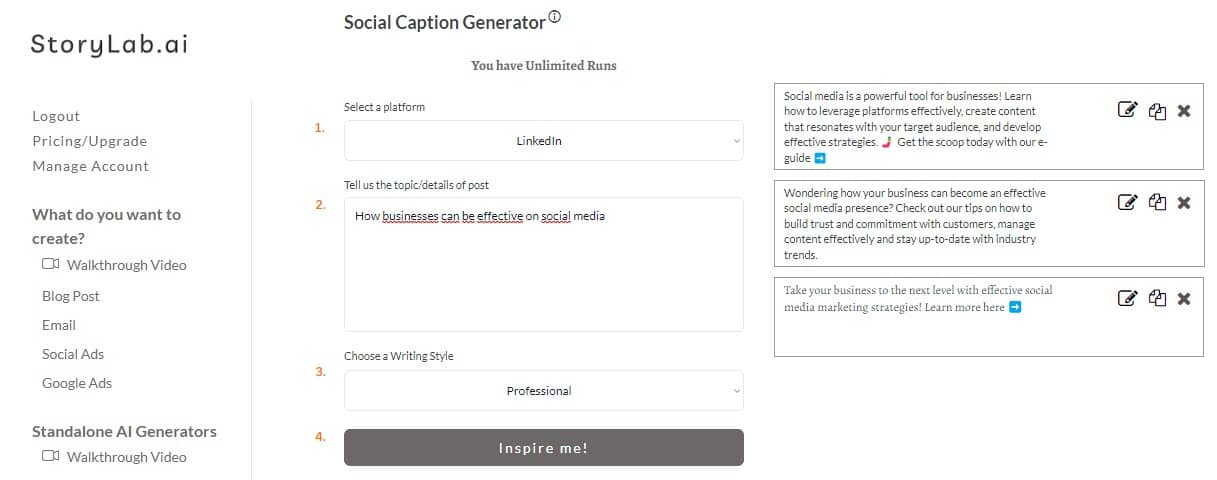
LinkedIn Caption Ideas the AI Tool Generated for us:
- Social media is a powerful tool for businesses! Learn how to leverage platforms effectively, create content that resonates with your target audience, and develop effective strategies. 🤳 Get the scoop today with our e-guide ➡️
- Wondering how your business can become an effective social media presence? Check out our tips on how to build trust and commitment with customers, manage content effectively and stay up-to-date with industry trends.
- Take your business to the next level with effective social media marketing strategies! Learn more here ➡️
Re-run the AI Tool if you need more inspiration, or take one of the captions, add your unique human touch, perfect it, and post it.
Grab a couple of social media ideas below, throw them into the AI Generator, and build your social media content calendar in minutes.
Social Media Tips for Businesses
For businesses aiming to refine their social media strategies, the goal is to stand out in a crowded digital landscape. A dynamic and engaging social media presence can help businesses of all sizes to connect with their audience, enhance brand visibility, and drive sales. Below are tailored social media tips for businesses, infused with innovative social media ideas to distinguish your brand.
Embrace Micro-Moments
Capitalize on micro-moments by creating quick, impactful posts that cater to the spontaneous needs of consumers looking for immediate answers, discoveries, or purchases. These bite-sized pieces of content should be designed to engage users swiftly and effectively, offering valuable insights or solutions right when they’re most needed.
Dive into Niche Platforms
While mainstream platforms like Facebook, Instagram, and Twitter are essential, don’t overlook niche social media platforms that align with your business’s specific audience. For instance, if you’re in a visual or creative industry, platforms like Pinterest or Behance might offer a more targeted audience engagement. This approach can help you tap into communities that are more aligned with your brand’s offerings.
Foster a Community with Exclusive Groups
Create exclusive groups or forums on platforms like Facebook or LinkedIn to foster a sense of community among your customers. These spaces can be used for sharing industry insights, offering special promotions, or facilitating discussions among members. It’s a brilliant way to build loyalty and encourage peer-to-peer interactions about your brand.
Launch Interactive Campaigns
Engage your audience with interactive campaigns that encourage participation. Think along the lines of contests, polls, quizzes, or user-generated content challenges. This not only boosts engagement but also provides valuable user data and insights, while simultaneously keeping your audience entertained and involved.
Utilize Augmented Reality (AR) Filters
For businesses in sectors like fashion, beauty, or retail, creating custom AR filters for Instagram or Snapchat can be a game-changer. These filters allow users to ‘try on’ products virtually or interact with your brand in a fun and immersive way, enhancing the online shopping experience and driving engagement.
Share Customer Testimonials and Reviews
Word-of-mouth is still one of the most powerful marketing tools. Share customer testimonials and reviews on your social media platforms. Highlighting real-life experiences and stories can significantly boost your brand’s credibility and attract new customers.
Implement a Content Series
Develop a series of themed content that runs weekly or monthly. This could be expert interviews, behind-the-scenes tours, or educational content related to your industry. A consistent series keeps your audience coming back for more and can establish your brand as a thought leader in your sector.
Leverage Social Listening
Use social listening tools to monitor conversations about your brand and industry online. This can inform your content strategy, helping you to create posts that answer questions your audience is asking and engage in trends they are interested in. This proactive approach ensures your social media efforts are aligned with your audience’s needs and interests.
Focus on Sustainability and Social Responsibility
Showcase your business’s commitment to sustainability and social responsibility initiatives. Sharing your efforts to make a positive impact can resonate deeply with your audience, especially with the increasing consumer interest in supporting ethical brands.
Personalize Your Messaging
With the advent of AI and data analytics, personalizing your social media content to cater to the preferences and behaviors of your audience is more feasible than ever. Tailored content can significantly increase engagement rates, as it shows your audience that you understand their needs and preferences.
By integrating these unique social media tips and ideas into your strategy, your business can cultivate a vibrant, engaging online presence that not only attracts but also retains customer interest. Remember, the key to social media success lies in being authentic, responsive, and innovative in how you connect with your audience.

Social media content ideas for businesses by content goal
Not every post should try to do the same job. Some posts are meant to build awareness. Others are meant to create trust, start conversations, drive traffic, or support sales. When you organize content by goal, planning becomes much easier.
Awareness content ideas
Introduce what your business does in plain language
Share a quick explanation of a service or product
Post a short brand story about how the business started
Show the problem your business helps solve
Share a simple industry insight your audience should know
Trust-building content ideas
Customer testimonials with context
Before-and-after examples
Team introductions
Behind-the-scenes process posts
Common questions answered clearly
Engagement content ideas
Ask followers about their biggest challenge
Share a relatable opinion on your industry
Post a myth-versus-fact carousel
Create simple polls or this-or-that style posts
Share one practical tip and invite others to add theirs
Conversion-support content ideas
Product or service spotlight posts
Case study summaries
Limited offer reminders
Comparison posts that make choices easier
Posts explaining what happens after someone buys or books
Thinking this way helps you build a feed that feels more balanced and more strategic without sounding repetitive.
Social media post ideas businesses can use every month
Many businesses struggle with consistency because they think every post needs a new idea. In reality, a strong content system usually comes from repeating useful formats with fresh examples.
Here are reliable post types you can return to every month:
- customer story of the month
- one common mistake your audience keeps making
- one practical tip people can use today
- one behind-the-scenes look at your workflow
- one team spotlight
- one product or service explanation
- one opinion on an industry topic
- one frequently asked question turned into a post
- one myth-versus-fact carousel
- one post about what changed, improved, or launched recently
This gives you a repeatable framework while still leaving room for seasonal posts, promotions, and timely content.
Social media content ideas for different business types
The best business content ideas often depend on the kind of business you run. A service business, software company, ecommerce brand, and local business will all need different angles.
For service businesses
explain your process step by step
answer common client concerns
show how projects move from problem to solution
share lessons from real client work
explain when someone should hire help
For ecommerce brands
product-in-use content
customer reviews and reactions
comparisons between popular products
unboxing or packing videos
tips that help customers get more from the product
For SaaS and tech businesses
feature walkthroughs
onboarding tips
workflow improvement posts
customer success highlights
educational content tied to the problem your tool solves
For local businesses
team and community posts
location-based tips
customer spotlights
seasonal updates
behind-the-scenes content from day-to-day operations
The clearer the match between the content and the business model, the stronger the post ideas usually become.
How to turn one business topic into multiple social media posts
One of the easiest ways to create more content is to stop treating each topic like a single post. A good topic can often become a full mini-series across formats and platforms.
For example, a topic like customer onboarding can become:
- a LinkedIn post about a common onboarding mistake
- an Instagram carousel with onboarding tips
- a short video showing the first three steps
- a customer story explaining what improved after onboarding
- a Q and A post answering a frequent onboarding question
- a promotional post showing how your service makes onboarding easier
This makes content planning faster and helps you get more value from each idea.
How AI can help businesses generate better social media content ideas
AI is most useful when you already know your audience and want help creating more angles, hooks, and formats around that audience. Instead of asking for general social media post ideas, prompt around a real business need.
For example:
- social media content ideas for a local service business that wants more leads
- LinkedIn post ideas for a B2B SaaS company
- Instagram content ideas for an ecommerce brand launching a new product
- social media ideas for a consultant building trust with potential clients
- short-form video ideas for a business explaining complex services simply
This usually leads to stronger results because the ideas are tied to a real goal. AI can also help you repurpose blog posts, rewrite captions, brainstorm carousel slides, and test different angles for the same topic.
That makes it useful for a broader AI marketing workflow, especially for teams that want to create more content without lowering quality.
Social media content ideas businesses can use by format
Different ideas work better in different formats. Matching the format to the message helps the content feel easier to consume.
Photo post ideas
team moments
product highlights
event snapshots
customer photos
behind-the-scenes visuals
Carousel ideas
step-by-step tips
myths and facts
common mistakes
mini-guides
side-by-side comparisons
Short-form video ideas
quick tips
product demos
workflow clips
founder insights
before-and-after transformations
Story ideas
polls
Q and A boxes
daily updates
quick promotions
behind-the-scenes moments
LinkedIn-style post ideas
industry takes
lessons learned
customer wins
process insights
short educational breakdowns
Using several formats helps your content feel more dynamic while giving your audience more ways to engage.
Common mistakes businesses make with social media content
Many business accounts struggle not because they lack content ideas, but because the posts are too narrow, too repetitive, or too focused on selling.
Common mistakes include:
Posting only promotions
A feed full of offers gives people little reason to stay engaged between buying moments.
Explaining too little
If the audience does not quickly understand the value of the post, they move on.
Repeating the same format
Too many similar posts can make the account feel flat.
Talking only about the brand
The strongest posts usually connect your business to the audience’s needs, problems, and goals.
Ignoring useful everyday content
Not every strong post needs to be big. Small practical insights often perform better than polished filler.
A better content mix usually comes from combining useful, human, and conversion-supporting posts instead of relying on one type alone.
Build a stronger business content workflow with AI
Once you have one good content idea, AI can help you expand it into a bigger workflow. That means one topic can support several platforms and several post types without starting over every time.
For example, a post about a common customer problem can become:
- three caption variations
- a carousel structure
- a short video hook
- a blog topic
- an email subject line
- a LinkedIn post version
- a follow-up post with a customer example
This turns business social media content into a more scalable AI marketing system. Instead of chasing random ideas, you can build around stronger themes and create more consistent content across channels.
How to Use These Social Media Content Ideas Strategically

A big list of ideas is useful, but only if you use it with purpose.
Before choosing a post idea, ask:
- What do we want this post to achieve?
- Who is this post for?
- Where will it be published?
- Does it teach, inspire, explain, prove, entertain, or sell?
- Does it fit our brand voice?
- Does it connect to a real business goal?
- What should someone do after seeing it?
Not every post needs to sell.
- Some posts build trust.
- Some educate.
- Some show proof.
- Some start conversations.
- Some support customer service.
- Some make your brand feel more human.
Use this table to connect existing social media content ideas to a clearer goal.
| Content goal | Existing idea types to use | Tip |
|---|---|---|
| Educate your audience | How-to guides, tutorials, tips and tricks, FAQs, industry insights | Keep the advice specific and easy to apply. |
| Build trust | Customer testimonials, reviews, case studies, customer success stories | Show the problem, the result, and why it matters. |
| Humanize the brand | Behind-the-scenes posts, meet-the-team posts, employee stories, company culture | Share real details instead of polished corporate copy. |
| Explain the offer | Product updates, service demos, product tutorials, product spotlights | Focus on the customer benefit, not only the feature. |
| Create engagement | Questions, polls, feedback posts, caption-this posts, trivia posts | Ask something people can answer quickly. |
| Show authority | Industry news, trends, data, predictions, expert Q&As, white papers | Add your own opinion so it does not feel like a repost. |
| Support campaigns | Events, webinars, launches, announcements, milestones, partnerships | Plan several posts before, during, and after the campaign. |
This helps turn the list from “things we could post” into “content that supports our strategy.”
Turn One Social Media Idea Into a Better Post
Most social media ideas become weak because they are posted too quickly.
For example, “share a product update” is not enough.
A stronger post needs:
- A clear angle
- A strong opening line
- A useful point
- A visual or format choice
- A reason the audience should care
- A simple next step
Use this simple framework
| Step | Question to answer | Example using an existing idea |
|---|---|---|
| Idea | What are we posting about? | Product update |
| Audience | Who should care? | Current users who want to save time |
| Angle | Why does it matter? | This update removes a repetitive step |
| Hook | What is the first line? | Small update, big time saver |
| Format | What format fits best? | Short demo video or carousel |
| CTA | What should people do next? | Try it, read the update, or ask a question |
You can use the same framework for testimonials, behind-the-scenes posts, industry news, tutorials, events, and customer stories.
The idea starts the post.
The angle makes it worth reading.
Social Media Caption Tips for Business Posts
A good caption does not need to be long.
It needs to be clear.
Use these tips to improve captions for the ideas listed above.
Start with the point
Do not open every caption with a slow introduction.
Weak opening:
“We are excited to announce that we have been working on something for a while.”
Stronger opening:
“Our new update helps teams create campaign drafts faster.”
Write like a person
Social media is not the place for stiff corporate language.
Instead of:
“Our organization is committed to delivering innovative solutions.”
Try:
“We built this because our customers kept asking for a faster way to get started.”
Make the benefit obvious
When sharing a product update, service demo, tutorial, or case study, explain what the audience gains.
Ask:
Does this save time?
Does it reduce stress?
Does it improve results?
Does it help people make a better decision?
Does it make something easier to understand?
Use one idea per post
Do not overload one caption with five messages.
A single post should usually focus on one clear point.
If you have several points, turn them into a carousel, thread, video series, or multiple posts.
Add a simple CTA
A CTA does not always need to be sales-focused.
Examples:
- Read the full guide
- Watch the demo
- Try the tool
- Save this for later
- Ask us a question
- Tell us what you think
- Share this with your team
Match the caption to the platform
The same idea can work on multiple platforms, but the caption should be adapted.
LinkedIn may need a stronger professional insight.
Instagram may need a cleaner visual and shorter caption.
TikTok may need a fast hook and more natural language.
Facebook may work better with community, events, and conversation.
Meta has an Instagram Best Practices hub in the professional dashboard with guidance for content creation, engagement, reach, and monetization. LinkedIn also recommends creating valuable, impactful content and using Page analytics to guide content decisions.
How to Repurpose Social Media Content Ideas
You do not need to create every post from scratch.
The current article already mentions repurposing existing content such as blog posts or videos for social media. That is one of the best ways to stay consistent without constantly inventing something new.
Use one idea in multiple formats.
| Original content | Repurposed formats | Tip |
|---|---|---|
| Blog post | LinkedIn post, carousel, short video, quote post, email teaser | Pull out the most useful takeaway instead of summarizing the whole article. |
| Customer testimonial | Quote graphic, case study snippet, short video, sales proof post | Show the customer problem and outcome clearly. |
| Product demo | Short clip, carousel, tutorial post, FAQ answer | Focus on one feature or benefit at a time. |
| Webinar | Key takeaways, event recap, expert quote, short video clips | Create posts before and after the event, not only during promotion. |
| Industry insight | Opinion post, poll, carousel, short explainer video | Add your own perspective so the post does not feel generic. |
| Behind-the-scenes content | Photo post, Reel, team story, culture update | Keep it real and specific instead of overly polished. |
Repurposing works best when you adapt the content, not when you copy and paste the exact same post everywhere.
- Change the hook.
- Change the format.
- Change the length.
- Change the CTA.
- Keep the core idea.
StoryLab.ai’s Social Media Repurposing tool can help turn one piece of content into several social post drafts.
Platform Tips for Using the Same Social Media Idea
The same content idea can work differently depending on the platform.
A customer story on LinkedIn may become a business lesson.
On Instagram, it may become a visual before-and-after.
On TikTok, it may become a short story with a fast hook.
On Facebook, it may become a community conversation.
Use this table to adapt the existing ideas without creating a completely new strategy.
| Platform | How to adapt the idea | Best tip |
|---|---|---|
| Turn the idea into a lesson, insight, customer story, company update, or professional takeaway. | Lead with the business value or learning. | |
| Use strong visuals, carousels, Reels, behind-the-scenes moments, and clear captions. | Make the first visual easy to understand quickly. | |
| TikTok | Use short, natural, vertical videos with a quick hook and simple story flow. | Do not make it feel like a traditional ad. |
| Use updates, community posts, events, customer stories, and conversation starters. | Write in a way that invites replies. | |
| Turn useful ideas into searchable visuals, guides, checklists, and inspiration pins. | Make the visual clear even before someone clicks. | |
| YouTube | Turn tutorials, case studies, demos, interviews, and tips into longer videos or Shorts. | Use the title and thumbnail to make the value clear. |
TikTok’s business guidance emphasizes building content for the platform, using consistent posting, creator or user-generated content, and testing creative over time.
Do not force every idea onto every channel.
Use the platforms where your audience actually pays attention.
How to Build a Social Media Content Calendar From These Ideas
A content calendar helps you stay consistent without panicking every week.
The current article already recommends planning content in advance and using a posting schedule to stay organized.
Keep the calendar simple.
You do not need a huge system.
Start with four recurring content pillars:
| Content pillar | Existing idea types | Why it helps |
|---|---|---|
| Education | How-to guides, tips, FAQs, tutorials, industry insights | Helps your audience solve problems. |
| Trust | Testimonials, reviews, case studies, customer stories, awards | Shows proof that your business can help. |
| Brand | Behind-the-scenes, team posts, company culture, values, milestones | Makes the business more recognizable and human. |
| Action | Product updates, service demos, events, launches, webinars, announcements | Gives people a next step when they are ready. |
A simple weekly structure could look like this:
| Day | Content pillar | Existing idea type to choose from |
|---|---|---|
| Monday | Education | Tip, how-to guide, FAQ, tutorial |
| Tuesday | Trust | Customer story, review, testimonial, case study |
| Wednesday | Brand | Behind-the-scenes, meet the team, company values |
| Thursday | Authority | Industry insight, trend, data point, expert Q&A |
| Friday | Action | Product update, service demo, event, webinar, launch |
This does not mean you must post every day.
It simply gives your content variety.
If you post three times per week, choose three pillars.
If you post daily, rotate through more.
If one platform performs better, spend more energy there.
Consistency should support quality, not replace it.
How to Measure Which Social Media Ideas Work Best
Do not judge social media content only by likes.
Likes can be useful, but they do not tell the whole story.
Track different metrics based on the purpose of the post.
| Post goal | Metrics to watch | What to learn |
|---|---|---|
| Awareness | Reach, impressions, views, follower growth | Which topics help more people discover your brand? |
| Engagement | Comments, shares, saves, replies, poll responses | Which ideas make people react or participate? |
| Trust | Profile visits, website clicks, comments, direct messages | Which proof points make people want to learn more? |
| Traffic | Link clicks, landing page visits, UTM performance | Which posts move people from social media to your website? |
| Leads or sales | Signups, bookings, demo requests, purchases, email subscribers | Which content supports business results? |
| Customer support | Questions answered, fewer repeated questions, support-related comments | Which posts reduce confusion? |
LinkedIn recommends using Page and content analytics to decide what to keep doing, stop doing, test, or amplify. Meta’s Instagram Best Practices hub also includes guidance around content performance and reach.
Review your posts monthly.
Ask:
Which topics got the most saves?
Which posts started conversations?
Which formats brought clicks?
Which posts helped explain the offer?
Which ideas were easy to repurpose?
Which posts looked good but did not support any goal?
Which platform deserves more effort?
Which content pillar is missing?
The best content calendar improves because you learn from what happened.
FAQ
What are good social media content ideas for businesses?
Good social media content ideas for businesses include customer stories, behind-the-scenes posts, educational tips, product or service explainers, team spotlights, FAQs, case studies, and simple opinion posts about industry topics.
Is there a Social Media Post Generator for Nonprofits instead of businesses?
Yes. You can use GlobalOwls’s Nonprofit Social Media Post Generator if you want to take advantage of the NGO branch.
How often should businesses post on social media?
The best posting frequency is the one your business can maintain consistently with useful content. A smaller number of strong posts usually works better than posting often with weak ideas.
What types of social media posts drive the most engagement for businesses?
Posts that teach something useful, show real people, answer common questions, share relatable insights, or invite easy interaction often create stronger engagement than posts that only promote an offer.
Can AI help businesses create social media content ideas?
Yes. AI can help businesses brainstorm content angles, rewrite captions, generate post variations, repurpose existing content, and build faster social media workflows.
How do businesses avoid repetitive social media content?
Use different formats, rotate content goals, build posts around real customer questions, and turn one topic into several angles instead of treating every idea like a one-time post.
Should businesses create different content for different platforms?
Yes. The same core idea can often be adapted for LinkedIn, Instagram, Facebook, TikTok, or email, but the format and wording should fit the platform.
What is the easiest way to plan business social media content?
Start by grouping ideas by goal, such as awareness, trust, engagement, and conversion. Then build a repeatable mix of post types you can use each month.
More Resources For Business Content Creators
Social Media Ideas
Blog Titles
LinkedIn ideas
eBook Ideas
Looking for more Social Media Content Ideas? Check out.
- Social Media Content Ideas for Accountants
- Airline Social Media Content Ideas
- Christmas Social Media Content Ideas for Companies
- Social Media Content Idea Automotive Brands
- Effective Crypto Social Media Content Ideas
- Effective B2B Social Media Content Ideas
- Electrician Social Media Content Ideas
- Gardening Social Media Content Ideas
- Banking Social Media Content Ideas
- Social Media Content Ideas for Businesses
- E-Commerce Social Media Content Ideas
- Effective Food Social Media Content Ideas
- Effective Fitness Social Media Content Ideas
- Real Estate Social Media Content Ideas
- Effective Startup Social Media Content Ideas
- Environmental Social Media Content Ideas
- Social Media Comtent Ideas for Landscapers
- Social Media Content Ideas for Roofers
- Effective Travel Social Media Content Ideas
- Pest Control Social Media Content Ideas
- Plumber Social Media Content Ideas
- Social Media Content Ideas for Nonprofits
Or, check out all other examples like Blog Intros, Google and Facebook ad copies, and more.
Write great Social Media Captions in half the time
There is nothing worse than staring at a blank piece of paper. StoryLab.ai’s Marketing Copy Generators help you to get new ideas and even complete copy with a click of a button.
Get inspired by how many different ways there are to describe your blog titles, Instagram captions, ad copy, and more. Next to generating new ideas and creating new copy, you can reword existing copy with our AI Paraphrase Generator, extend your copy with our AI Text Extender, and more.
Our Marketing Copy Generators run on GPT. Trained as the largest and qualitatively best Natural Language Processing model. Check out our resource hub and see how AI Marketing can help you reach your goals faster. The time to start using this new technology is now.
Master the Art of Video Marketing
AI-Powered Tools to Ideate, Optimize, and Amplify!
- Spark Creativity: Unleash the most effective video ideas, scripts, and engaging hooks with our AI Generators.
- Optimize Instantly: Elevate your YouTube presence by optimizing video Titles, Descriptions, and Tags in seconds.
- Amplify Your Reach: Effortlessly craft social media, email, and ad copy to maximize your video’s impact.