
Write a UGC Video Script That Sounds Like a Person

Jess needs five UGC-style ad drafts this week, with no creator partner or filming budget. Refill Ritual, the fictional deodorant brand in this example, has an aluminum case and replaceable refills. Her UGC video script will use a brand-explainer voice, so the speaker describes the product without claiming to be a customer.
The refill click gives her a starting point: draft openings, edit for speech, then prepare and review video drafts.
Chapters
Gather Ten Hooks Around One Audible Detail

Ask AI for ten openings about the refill action. Supply approved product facts and exclude invented purchases, personal experiences, and performance claims. For a real product, confirm that the mechanism actually makes the sound before building a hook around it.
For Jess’s hypothetical product, three candidate openings are:
- “Hear that click? The refill is in.”
- “Replacing the refill? Keep the aluminum case.”
- “The insert changes. The case stays.”
These are draft brand lines, not quotations from buyers. Each needs a visible product action or verified description behind it.
Read them aloud. Keep openings you can say naturally and demonstrate honestly. Rewrite a line that promises more than the mechanism shows. Campaign results remain untested.
Edit the UGC Video Script for Spoken Rhythm
Attach each opening to the same product explanation. Cut adjectives that add nothing to the fitting action or the case-and-refill description.
Mark a pause where the refill clicks into place. The picture and sound need room to make sense. Read the whole script with a timer against Jess’s 15-second creative limit. Cut a secondary point if it runs long; do not race through it to fit.
Try this short brand-explainer draft, then time a real read against the limit:
| Part | Spoken Line or Action |
|---|---|
| Hook | "Hear that click? The refill is in." |
| Body | Pause for the verified fitting action. "Refill Ritual has an aluminum case with a replaceable refill." |
| Close | "When you replace the refill, keep the case." |
Time the click and pause too. Shorten awkward wording while preserving product facts.
Hand the Approved Script to a Video Tool
A guide to an AI UGC video generator maps scripts, product inputs, presenter roles, and review into a video-draft workflow. It provides a reference for the handoff after writing. It does not establish which specific editing controls or batch-generation features a particular product offers.
Choose the presentation the script needs. Product shots with a voiceover may be enough. If considering an AI avatar video, use an authorized stock synthetic presenter with a clearly defined brand-explainer role; do not create one from a real person’s photo or use a face swap.
Check the selected tool’s actual options and applicable terms before production. Supply approved product material and the final wording. Ask for a reviewable draft, then inspect the speech, captions, and product action against that package.
If usable footage becomes available, an editor can assemble approved clips with recorded narration instead. Keep responsibility for the script and any customer evidence with the reviewing team.
Separate Creator Style from Customer Testimony
UGC-style content borrows the conversational delivery associated with creator videos. Keep Jess’s brand-explainer role consistent when choosing a voice: the conversational style supplies no evidence of a purchase or personal experience.
A brand explainer can describe the aluminum case and how its refill is replaced. Jess might draft: “Hear the click as the refill fits into the aluminum case. Keep the case when you replace the insert.” Check those words against the real mechanism before use. A synthetic presenter must not claim a purchase, a daily routine, or a personal result that never happened. Remove those statements when the speaker has no such experience.
For this exercise, Jess has no supplied customer quotation or permission record. She leaves testimonials out. Build the short-form video script around the click and replacement demonstration.
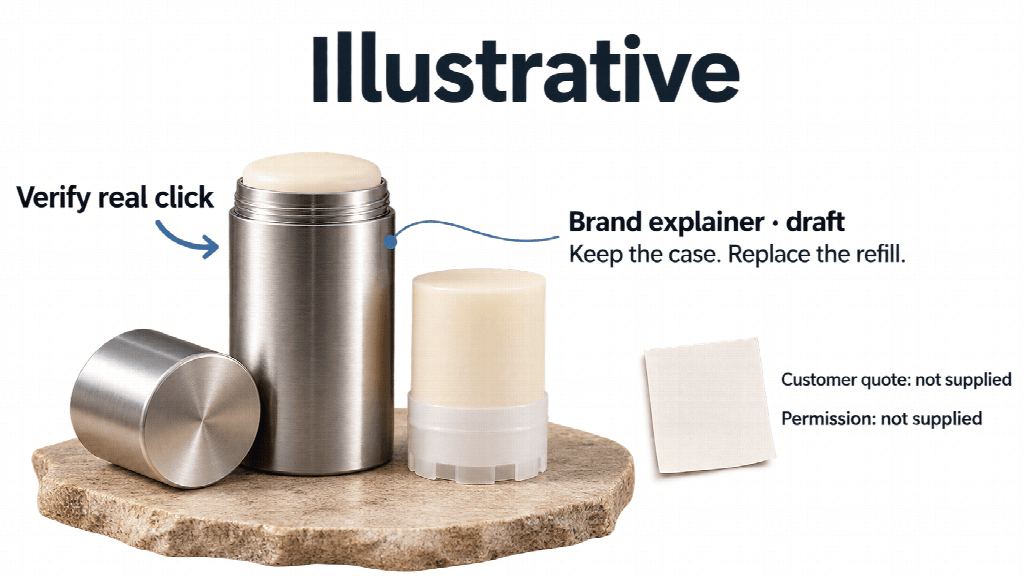
The brand-explainer line is a draft, the refill click still needs real-product verification, and no customer quote or permission has been supplied.
If your own team has a real quotation, locate the original and confirm the applicable permission before using it. Preserve the customer’s exact words and their meaning in context. Make its source clear instead of having a synthetic speaker present the quotation as their own personal experience.
Review the exported clip as well as the writing. Captions or an improvised spoken line can introduce an experience claim absent from the approved script. Correct that before approval. Keep the speaker’s identity and role consistent across the picture, narration, and accompanying copy.
Test One Opening at a Time
Start by comparing the selected UGC ad hooks over the same product footage and body script. Keep the closing line and next step fixed. If the intended change is written opening text, keep the voiceover unchanged too. If testing spoken wording instead, label that as the opening element being changed.
Use a simple review sheet before any campaign launch:
| Hook Idea | Product Fact Behind It | Read Aloud | Decision |
|---|---|---|---|
| Refill click | Actual sound and fitting action | Record after rehearsal | Keep or rewrite |
| Replacement question | Verified replacement process | Record after rehearsal | Keep or rewrite |
| Case and insert | Confirmed product construction | Record after rehearsal | Keep or rewrite |
The table contains planned checks, not scores. Someone familiar with the product must confirm the facts; a writer judges whether the words sound natural. Then inspect whether the video actually shows the action the hook introduces.
Jess’s five-draft brief does not require inventing five customer stories. The three selected hooks are a starting set. If she needs five distinct openings, she can return to the remaining candidates and apply the same checks to two more. Keep those additions separate from a comparison meant to change only one opening element.
Internal approval establishes that a draft meets the brief. Without actual campaign observations, it establishes no winning hook, audience response, or sales effect.
Save Only Hooks Your Team Can Reuse
Store approved video ad copy with its supporting product facts and script version. Include the presenter role, source material permissions, and the rehearsal notes. Save the exact hook wording alongside any category label, such as “click hook.”
When the product or refill mechanism changes, check the saved hook again. A sound or action that belonged to an earlier version needs fresh verification. Retire a line that no longer describes what customers will receive.
In this hypothetical workflow, Jess is preparing five drafts for review. Her team can reuse the approved script structure while checking each new opening and export separately.
For one real product, ask AI for ten hook ideas and read them aloud. Choose three that sound natural and point to facts you can verify.
Other Interesting Articles
- AI LinkedIn Post Generator
- Gardening YouTube Video Idea Examples
- AI Agents for Gardening Companies
- Top AI Art Styles
- Pest Control YouTube Video Idea Examples
- Automotive Social Media Content Ideas
- Plumber YouTube Video Idea Examples
- AI Agents for Pest Control Companies
- Electrician YouTube Video Idea Examples
- How Pest Control Companies Can Get More Leads
- AI Google Ads for Home Services
- 60-Second Training Videos Are the New Corporate Standard
- Cybersecurity PR Pricing: Retainers, Deliverables & ROI
- Best AI Tools for Product Consistency in E-Commerce Video
Master the Art of Video Marketing
AI-Powered Tools to Ideate, Optimize, and Amplify!
- Spark Creativity: Unleash the most effective video ideas, scripts, and engaging hooks with our AI Generators.
- Optimize Instantly: Elevate your YouTube presence by optimizing video Titles, Descriptions, and Tags in seconds.
- Amplify Your Reach: Effortlessly craft social media, email, and ad copy to maximize your video’s impact.