
Best AI Tools to Repurpose Podcast Content for Social Media

A podcast episode should not disappear after one upload.
Most episodes contain far more than one piece of content. A single conversation can become short-form video clips, LinkedIn posts, quote graphics, newsletter sections, blog posts, audiograms, YouTube Shorts, Instagram Reels, TikToks, X threads, and email snippets.
The problem is time.
Manually finding the best moments, cutting clips, writing captions, formatting posts, resizing videos, adding subtitles, and scheduling everything across platforms can take longer than recording the episode itself.
That is why AI podcast repurposing tools have become so useful.
They can turn one long episode into a full social media content system. Some tools focus on transcripts and written assets. Others are better for short-form video clips. Some help with editing, while others automate distribution across platforms.
But the best results still need human review.
AI can find moments, draft captions, create clips, and suggest hooks. It cannot fully understand your brand, your audience, your guest relationship, your sales goals, or which nuance should stay in the final cut.
This guide compares the best AI tools to repurpose podcast content for social media and shows how to build a practical workflow that turns every episode into more reach, more engagement, and more useful content.
TL;DR
- Podsqueeze is the most complete podcast-first repurposing tool – transcripts, show notes, social posts, short clips, and audiograms from one upload.
- Castmagic is the strongest option for content teams managing multiple shows or brands, with deep customization and a campaign builder.
- OpusClip leads for AI-powered short video clips and viral moment detection.
- Descript is best if you want a full podcast editor and repurposing workflow in one place.
- Repurpose.io is the right pick for automated cross-platform distribution without manual intervention.
- StoryLab.ai is a useful layer for generating platform-specific social captions and copy once your raw content assets are ready.
- Most podcasters will get the best results combining a podcast-first tool (like Podsqueeze) with a caption/copy generator for final polish.
Chapters
Quick Comparison Table
| Tool | Best for | Main output | Best fit |
|---|---|---|---|
| Podsqueeze | All-in-one podcast repurposing | Transcripts, show notes, clips, audiograms, blog drafts, social posts | Solo podcasters and podcast managers who want many assets from one upload |
| Castmagic | Content teams and agencies | Transcripts, summaries, social posts, newsletters, long-form content, reusable templates | Teams managing multiple shows, clients, or brand voices |
| OpusClip | Short-form video clipping | Vertical clips, captions, reframed video, social-ready highlights | Video podcasters focused on TikTok, Reels, and YouTube Shorts |
| Descript | Editing and repurposing in one workspace | Edited episodes, clips, captions, show notes, promotional copy | Podcasters who want transcript-based editing and content reuse together |
| Repurpose.io | Automated distribution | Cross-platform publishing, resizing, scheduling, reposting workflows | Creators who already have clips and want to publish everywhere faster |
| StoryLab.ai | Platform-specific captions and social copy | LinkedIn posts, TikTok captions, Instagram captions, X posts, hooks, promo copy | Marketers who need better copy after clips and quotes are ready |
Why Repurposing Podcast Content Manually Doesn’t Scale
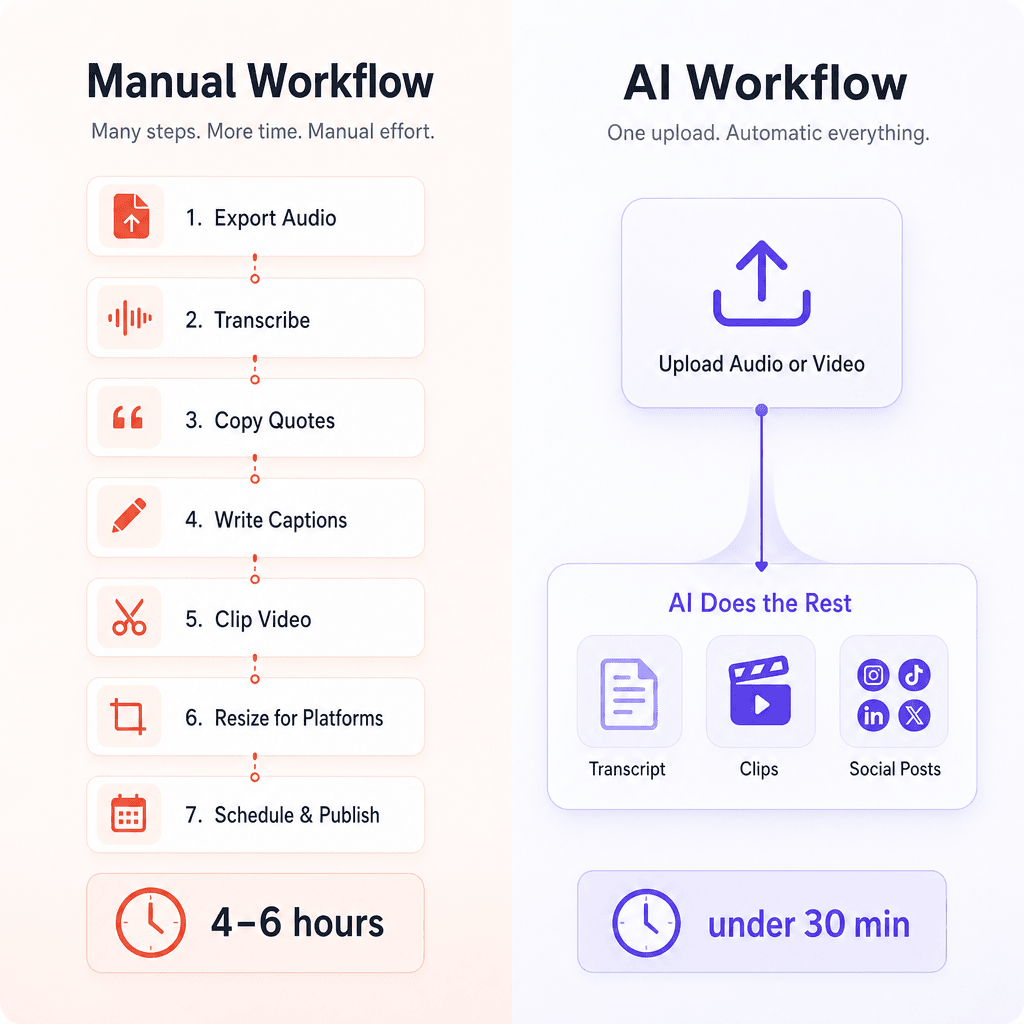
A typical workflow without AI looks like this: export the audio, send it to a transcription service, wait, copy-paste quotes into a doc, write social captions from scratch, clip video manually in a timeline editor, resize for each platform, and schedule everything one post at a time.
That process can take four to six hours per episode. For a weekly show, that’s a part-time job.
AI tools compress that to under 30 minutes by automating the heaviest steps: transcription, content extraction, clip generation, and copy writing. The output still needs a human review pass, but the raw material is ready almost instantly.
The 6 Best AI Tools for Repurposing Podcast Content
1. Podsqueeze – Best All-in-One Tool for Podcasters
Best for: Solo podcasters and podcast managers who want every content asset from a single upload.
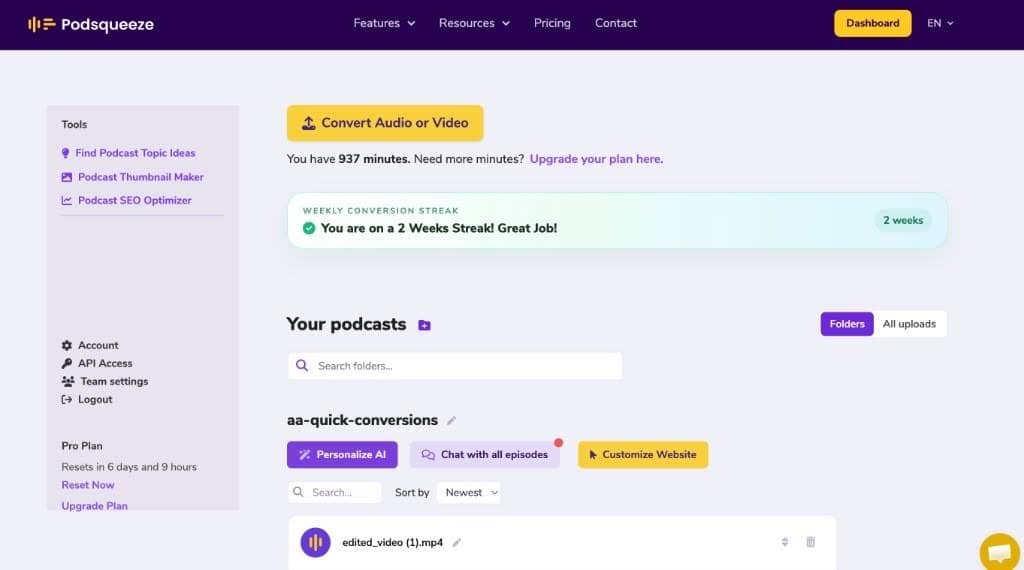
Podsqueeze is built specifically for podcast repurposing, which shows in how complete its output is. Upload an audio or video file and it generates a full transcript with speaker labels, timestamped show notes, a blog post draft, a newsletter, and ready-to-post social media copy – all in one workflow.
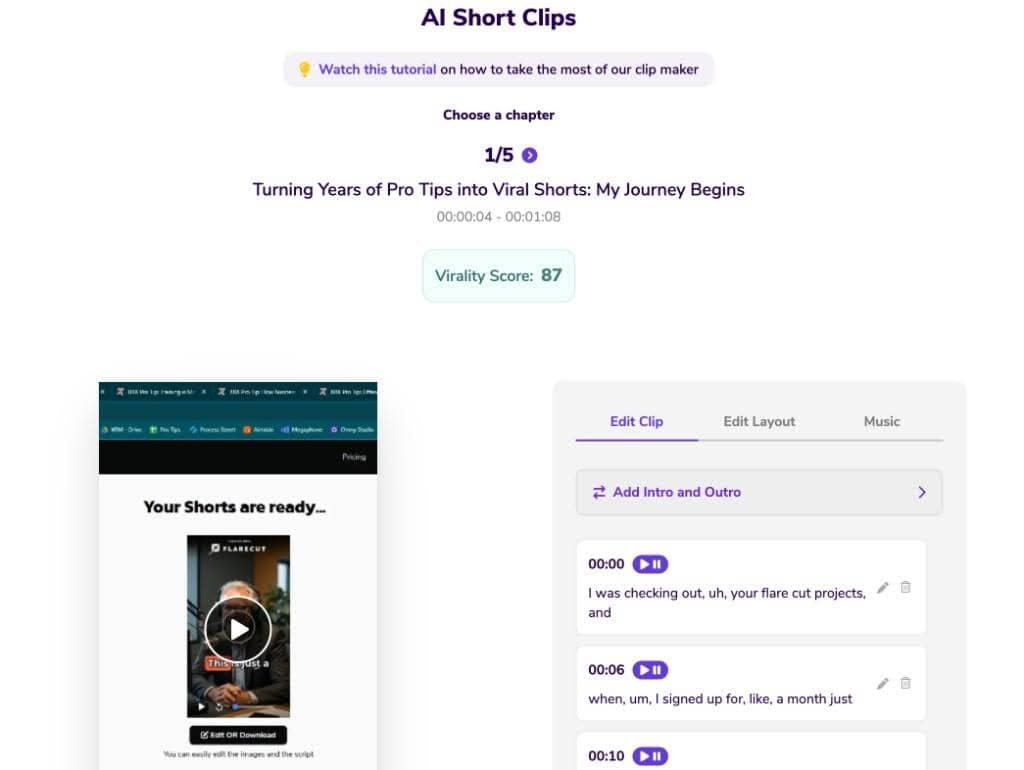
The clips feature is where it stands out for social media specifically. You can select any chapter from your episode and export it as a short video clip or audiogram formatted for TikTok, Instagram Reels, or YouTube Shorts. The AI can also auto-generate one-click shorts of around 60 seconds per chapter, which removes the need to manually identify the best moments. A text-based editor lets you trim clips by editing the subtitle text directly – no timeline scrubbing required.
Podsqueeze also includes AI audio enhancement that removes filler words, silences, and background noise, which matters when you’re publishing clips to social platforms where production quality affects watch time.
For teams and agencies managing multiple shows, it supports podcast folders, per-show AI voice tuning, and shareable content pages for clients.
Limitations: Podsqueeze is podcast-first. If you need to repurpose webinars, sales calls, or YouTube videos that aren’t podcast episodes, other tools may fit better. The clip editor is functional but not as advanced as a dedicated video editing tool.
Trusted by 70,000+ content creators and podcast professionals.
2. Castmagic – Best for Content Teams and Agencies
Best for: Marketing teams, agencies, and creators managing multiple shows or brands who need high-volume, customizable output.
Castmagic positions itself as an AI-powered content operating system. Upload an audio or video file and it produces transcripts, summaries, show notes, LinkedIn posts, tweet threads, email newsletters, YouTube descriptions, and social carousels – all from a single recording.
What separates Castmagic from simpler tools is its brand voice training and editable template system. You can train the AI on your brand’s tone and save recurring prompt templates so every piece of output sounds consistent across episodes and clients. For agencies running content for multiple podcasts, the multi-brand CMS with user permissions and approval workflows is a genuine differentiator.
It also includes a semantic search feature that lets you find specific quotes, stories, or moments across your entire content library – useful when you want to pull a relevant clip from an older episode for a current campaign.
A newer integration connects your Castmagic media library directly to Claude, allowing you to build longer-form assets like lead magnets, course outlines, or ebooks from your back-catalog.
Limitations: Castmagic is priced for teams and agencies. Solo podcasters on a tight budget may find it more than they need. The interface has a steeper learning curve than simpler tools.
3. OpusClip – Best for Short-Form Video Clips
Best for: Podcasters with video recordings who want to generate viral short-form clips for TikTok, Reels, and YouTube Shorts.
OpusClip is purpose-built for one thing: turning long videos into short clips that perform on social media. Its AI analyzes the full video, scores moments by their viral potential, and automatically selects and trims the best segments – complete with animated captions, auto-reframe for vertical formats, and AI-generated B-roll.
For podcasters, the workflow is straightforward: upload your video episode (or paste a YouTube link), and OpusClip returns a set of ranked clips ready to publish. The ReframeAnything feature automatically keeps speakers centered when converting horizontal video to 9:16 for mobile platforms, which saves significant manual work.
It also includes a social scheduler that lets you publish directly to multiple platforms from within the tool, and a brand template system for consistent visual identity across clips.
Limitations: OpusClip is video-first. If your podcast is audio-only, you’ll need to pair it with a tool that generates audiograms or handles text-based content. It doesn’t produce show notes, blog posts, or written social copy – it’s a clips tool, not a full repurposing suite.
4. Descript – Best for Editing and Repurposing in One Place
Best for: Podcasters who want to record, edit, and repurpose inside a single tool without switching between apps.
Descript is an AI video and podcast editor that doubles as a repurposing tool. Its core workflow is text-based editing: import your audio or video, get an automatic transcript, then edit the recording by editing the text. Delete a sentence in the transcript and it disappears from the audio. This makes cutting filler words, removing retakes, and tightening episodes significantly faster than traditional timeline editing.
On the repurposing side, Descript generates show notes, YouTube descriptions, captions, and short clips. Its Studio Sound feature removes background noise and enhances voice quality. Eye Contact correction makes it look like the speaker is addressing the camera even when reading from notes – a small but meaningful detail for social clips.
The Underlord AI assistant can handle tasks like creating clips, writing promotional copy, and generating social captions on command.
Limitations: Descript tries to do a lot, and the repurposing features are secondary to the editing workflow. If you already have a clean, edited episode and just need social content, Descript is more tool than you need. Pricing scales up quickly for teams.
5. Repurpose.io – Best for Automated Cross-Platform Distribution
Best for: Podcasters who want content published automatically across platforms without manual scheduling.
Repurpose.io takes a different approach from the other tools on this list. It’s less about generating new content from your podcast and more about automating the distribution of content you’ve already created. Set up a workflow once – for example, “take every new podcast episode and publish a clip to TikTok, Instagram Reels, and YouTube Shorts” – and it runs automatically every time you publish.
It handles watermark removal, automatic video resizing for each platform, caption preservation, and direct publishing to all major social networks. For podcasters who publish consistently and want their content to appear everywhere without manual effort, it removes the distribution bottleneck entirely. A podcast promotion agency can also help expand the reach of each episode across relevant channels. It also supports image repurposing, story automation, and backup to Google Drive or Dropbox.
Limitations: Repurpose.io doesn’t generate written content – no show notes, no social captions, no blog posts. It’s a distribution and formatting layer, not a content creation tool. You’ll need to pair it with a tool like Podsqueeze or Castmagic to produce the actual content assets first.
6. StoryLab.ai – Best for Social Caption and Copy Generation
Best for: Marketers and content creators who need platform-specific social media copy and captions at scale.
Once you have your clips, quotes, and key takeaways extracted from a podcast episode, you still need copy that fits each platform’s tone and format. A LinkedIn caption reads differently from a TikTok caption, which reads differently from a tweet thread.
StoryLab.ai is built for exactly this step. It offers dedicated caption generators for Instagram, LinkedIn, Twitter/X, TikTok, Facebook, and Pinterest, along with tools for video scripts, hooks, email subject lines, and social media repurposing workflows. For podcast content specifically, you can feed in a key quote or episode summary and generate multiple caption variations for different platforms in seconds.
It’s a strong complement to podcast-first tools: use Podsqueeze or Castmagic to extract the raw content, then use StoryLab.ai to generate polished, platform-native copy for each channel.
Limitations: StoryLab.ai doesn’t process audio or video files directly. It’s a copy and caption generation layer, not a transcription or clip tool. It works best as part of a broader repurposing stack.
How to Build a Practical Podcast Repurposing Workflow
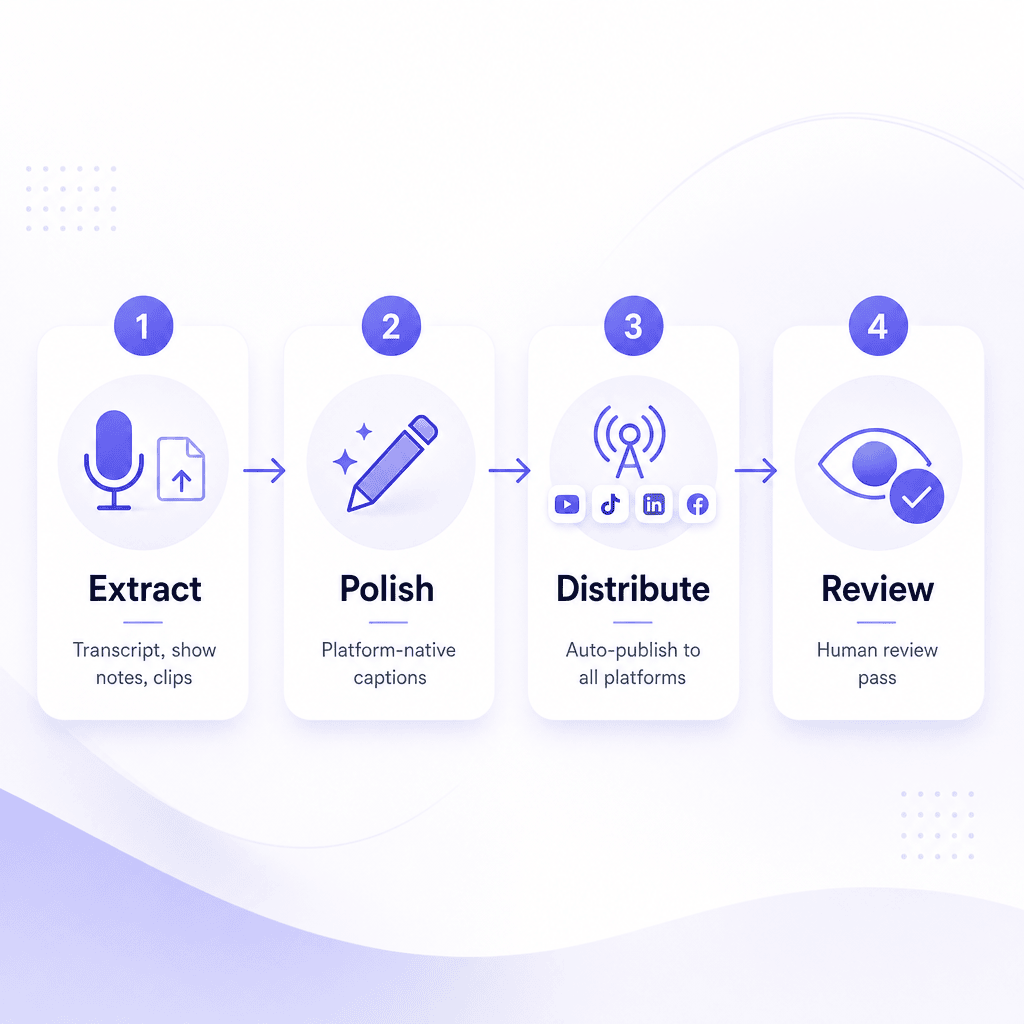
You don’t need every tool on this list. Most podcasters get strong results from a two-tool stack:
Step 1 – Extract content assets. Upload your episode to a podcast-first tool (Podsqueeze or Castmagic). Get your transcript, show notes, social post drafts, and short clips in one pass.
Step 2 – Polish platform-specific copy. Take the raw social post drafts and run them through a caption generator (StoryLab.ai) to produce platform-native variations for LinkedIn, Instagram, TikTok, and Twitter/X.
Step 3 – Distribute. Either publish manually from your repurposing tool, or set up automated workflows in Repurpose.io to push clips to all platforms on a schedule.
Step 4 – Review and post. Do a quick human review pass. AI output is a strong first draft, not a final draft. Check for tone, accuracy, and anything that sounds off-brand before publishing.
This workflow takes 20–30 minutes per episode once you’ve set it up, compared to several hours manually.
Start With the Podcast Asset, Not the Tool
Before choosing an AI tool, look at the format of your podcast.
Different source assets need different workflows.
| Podcast format | Best repurposing angle | Useful outputs |
|---|---|---|
| Audio-only interview | Transcript, quotes, audiograms, LinkedIn posts, newsletter snippets | Show notes, social captions, quote cards, email content, blog post |
| Video podcast | Short-form clips for TikTok, Reels, Shorts, and LinkedIn | Vertical clips, captions, teaser videos, YouTube Shorts, social posts |
| Solo expert episode | Thought leadership and educational content | LinkedIn posts, carousel ideas, blog sections, email lessons, short clips |
| Panel discussion | Multiple viewpoints and debate-style clips | Quote posts, contrast clips, recap threads, key takeaways |
| Customer interview | Proof, story, and case-study content | Testimonials, case study outline, sales snippets, customer quote clips |
| Founder conversation | Brand story and trust-building content | Founder posts, short clips, behind-the-scenes content, newsletter intro |
Do not choose a tool just because it is popular.
Choose the tool that matches your source format and the content you actually need.
What to Repurpose From a Podcast Episode
Not every part of a podcast deserves to become social content.
Look for moments that can stand alone.
Good repurposing moments include:
- Strong opinion
- Clear lesson
- Surprising statistic
- Personal story
- Practical tip
- Short framework
- Mistake to avoid
- Contrarian point
- Emotional moment
- Before-and-after story
- Useful explanation
- Memorable quote
- Answer to a common question
- Industry prediction
- Customer pain point
- Funny or relatable moment
- Strong guest insight
Weak moments include:
- Long setup with no payoff
- Inside jokes without context
- Vague agreement
- Rambling sections
- Overly technical details without explanation
- Sales pitches that do not add value
- Clips that require too much missing context
AI can help identify moments, but your human judgment decides what is actually worth publishing.
Podcast Repurposing Workflow
A practical AI workflow looks like this:
Step 1: Record with repurposing in mind
The best repurposing starts before editing.
While recording, try to capture:
- Clear guest audio
- Clean video if possible
- Short standalone answers
- Strong opening moments
- Clear episode themes
- Repeatable frameworks
- Useful examples
- Guest stories
- Quote-worthy lines
If every answer is 12 minutes long and full of context, AI has a harder job creating clips.
Step 2: Create a clean transcript
The transcript is the foundation for most AI repurposing.
Use it to create:
- Show notes
- Blog post drafts
- LinkedIn posts
- Quote lists
- Email summaries
- Short-form scripts
- Clip notes
- Episode summaries
- SEO descriptions
Always review the transcript before publishing anything based on it.
AI transcripts can still struggle with names, product terms, accents, overlapping speakers, and technical vocabulary.
Step 3: Pull out the best moments
Ask AI to identify:
- Best quotes
- Best teaching moments
- Best hooks
- Best stories
- Best controversial points
- Best social clips
- Best audience questions
- Best title angles
Then review the list manually.
AI may choose moments that sound dramatic but do not fit your brand or audience.
Step 4: Turn moments into platform-native content
Do not post the same caption everywhere.
A LinkedIn post, TikTok caption, Instagram Reel caption, YouTube Shorts title, and X post need different structures.
Use StoryLab.ai or another copy tool to turn one podcast moment into several platform-specific variations.
Step 5: Edit for context
A podcast clip should make sense without the full episode.
Add context when needed:
- Who is speaking
- What problem they are answering
- Why the point matters
- What the viewer should do next
- Where to hear the full episode
Do not assume the viewer knows the guest or the show.
Step 6: Publish and measure
Track what happens after posting.
Do not only ask whether the clip got views.
Ask:
- Did people watch past the hook?
- Did they comment?
- Did they save it?
- Did they click to the full episode?
- Did they follow?
- Did they share?
- Did it create useful conversations?
- Did it support your content goals?
A viral clip is nice.
A clip that brings in the right audience is better.
Platform-Specific Podcast Repurposing Tips
| Platform | Best podcast content type | Repurposing tip |
|---|---|---|
| Expert insights, lessons, frameworks, founder thoughts, B2B takeaways | Turn one strong idea into a short post with a clear hook, lesson, and takeaway | |
| Instagram Reels | Short clips, relatable moments, visual quotes, behind-the-scenes content | Use vertical format, captions, strong opening frame, and simple visual focus |
| TikTok | Fast insights, strong opinions, useful tips, funny or surprising moments | Make the clip feel native, clear, and easy to understand without watching the full episode |
| YouTube Shorts | Highlights, answers, mini-lessons, teaser clips, guest moments | Use vertical or square format and make the clip work as standalone content |
| X / Twitter | Quotes, quick lessons, threads, strong opinions, episode takeaways | Turn the best ideas into short posts or a thread with one clear point per post |
| Community clips, practical advice, longer captions, discussion prompts | Use captions and context so the post makes sense in the feed | |
| Email newsletter | Episode summary, top lessons, quote of the week, full episode CTA | Do not just say “new episode live.” Give readers the reason to care |
| Blog | Expanded episode recap, transcript-based article, expert Q&A, topic guide | Turn the episode into a structured article, not a raw transcript dump |
YouTube says Shorts can be vertical or square videos up to three minutes, and YouTube also recommends that repurposed short-form clips work as standalone content rather than only acting as teasers for long-form videos. Source to link: YouTube Shorts guidance.
TikTok recommends vertical video and notes that captions can add useful context to videos. Source to link: TikTok creator tips.
Meta also emphasizes Reels as a way for brands and businesses to be discovered on Facebook and Instagram. Source to link: Meta Blueprint Reels guidance.
How to Turn One Podcast Episode Into a Week of Content
Here is a simple weekly repurposing plan.
| Day | Content asset | Purpose |
|---|---|---|
| Monday | Episode announcement post | Tell people why the episode matters |
| Tuesday | Short video clip | Share the strongest hook or guest insight |
| Wednesday | LinkedIn lesson post | Turn one idea into a practical takeaway |
| Thursday | Quote graphic or text quote | Make one memorable line easy to share |
| Friday | Newsletter section | Summarize the episode and link to the full version |
| Weekend | Second clip or recap post | Reach people who missed the first promotion |
This is enough for most podcasters.
You do not need to create 40 assets from every episode.
You need a repeatable system you can actually maintain.
Podcast Clip Quality Checklist
Before posting AI-generated podcast clips, check the basics.
| Check | Question |
|---|---|
| Hook | Does the first few seconds give people a reason to keep watching? |
| Context | Can someone understand the clip without hearing the full episode? |
| Audio | Is the sound clear enough for mobile viewing? |
| Captions | Are captions accurate, readable, and not covering important visuals? |
| Crop | Does the vertical crop keep the speaker, face, or visual focus in frame? |
| Length | Is the clip as short as it can be while still making sense? |
| Branding | Does the clip match your show, brand, colors, and tone? |
| CTA | Is there a clear next step if viewers want more? |
| Accuracy | Does the clip preserve the speaker’s meaning? |
| Permission | Are guests comfortable with the clip being used this way? |
The fastest AI clip is not always the best clip.
Choose the clip that makes the strongest point clearly.
Common Mistakes When Repurposing Podcasts With AI

Posting raw transcripts as blog posts
A transcript is useful source material.
It is not a finished article.
Turn transcripts into structured posts with headings, summaries, examples, links, and clear takeaways.
Using the same caption on every platform
Every platform has a different culture.
A formal LinkedIn caption may feel wrong on TikTok. A short TikTok caption may not give enough context on LinkedIn.
Use AI to adapt the message by platform.
Choosing clips only because AI scored them highly
AI clip scores can help, but they are not perfect.
The tool may choose a dramatic moment that does not match your strategy.
Human review still matters.
Removing too much context
Short clips need focus, but they still need meaning.
Do not cut a guest answer so tightly that the point becomes misleading.
Ignoring captions
Many people watch social videos without sound or in noisy environments.
Captions make podcast clips easier to follow.
Forgetting the guest
A podcast clip represents your guest too.
Avoid using awkward, unclear, or out-of-context clips just because they might get attention.
Creating too many assets
Repurposing should save time.
If your workflow creates 30 assets that nobody reviews, schedules, or improves, it becomes clutter.
Start smaller and build consistency.
Not tracking results
If you do not measure which clips, captions, topics, and platforms work, every episode starts from zero again.
How to Use StoryLab.ai in a Podcast Repurposing Workflow
StoryLab.ai fits best after you already have the raw material.
Use another tool to extract the transcript, quotes, clips, or episode summary. Then use StoryLab.ai to turn those inputs into stronger platform-specific copy.
You can use StoryLab.ai to create:
- LinkedIn posts
- Instagram captions
- TikTok captions
- X posts
- Facebook captions
- YouTube Shorts titles
- YouTube descriptions
- Episode promotion copy
- Newsletter snippets
- Blog intros
- Blog outlines
- Social media hooks
- Content ideas
- Follow-up post variations
A practical workflow:
- Upload the episode to your podcast repurposing tool.
- Extract the transcript, summary, quotes, and clips.
- Choose the strongest ideas.
- Paste one idea into StoryLab.ai.
- Generate platform-specific caption variations.
- Edit for tone, accuracy, and brand voice.
- Add the clip, image, or audiogram.
- Publish and track engagement.
- Reuse winning angles for future episodes.
StoryLab.ai is not the audio processing layer.
It is the copy and campaign layer.
That makes it a strong partner for tools like Podsqueeze, Castmagic, OpusClip, Descript, and Repurpose.io.
How to Measure Podcast Repurposing Performance
Do not measure only downloads.
Podcast repurposing is partly about reaching people who may never open a podcast app.
Track:
| Metric | What it tells you |
|---|---|
| Clip views | Whether the short-form topic attracts attention |
| Watch time or retention | Whether people stay with the clip after the hook |
| Saves | Whether the content is useful enough to revisit |
| Comments | Whether the clip starts conversation |
| Shares | Whether the idea travels beyond your audience |
| Profile visits | Whether social viewers want to learn more about the show or brand |
| Full episode clicks | Whether clips send people to the long-form episode |
| Newsletter signups | Whether repurposed content grows owned audience |
| Guest shares | Whether guests help distribute the content |
| Topic performance | Which episode themes create the strongest social response |
FAQ
Do I need a video podcast to use these tools?
No. Most tools on this list, including Podsqueeze and Castmagic, work with audio-only files. They generate audiograms, written content, and social copy from audio. OpusClip and Descript are more video-focused, but the others handle audio natively.
Which tool is best if I’m a solo podcaster on a budget?
Podsqueeze offers the most complete output for solo podcasters and has a free tier to get started. It covers transcripts, show notes, social posts, and clips without needing multiple tools.
Can these tools match my brand voice?
Castmagic has the most developed brand voice training system. Podsqueeze lets you tune the AI voice per show. Most tools produce a strong first draft that you’ll want to lightly edit for tone, full brand voice matching still requires a human review pass.
How accurate are AI transcripts?
Accuracy varies by tool and audio quality. Most modern AI transcription tools achieve 90–95% accuracy on clean audio with a single speaker. Accuracy drops with heavy accents, multiple overlapping speakers, or poor recording quality. Always review transcripts before publishing.
Is it worth using multiple tools together?
Yes, for most podcasters. A podcast-first tool handles extraction and clip generation. A caption tool handles platform-specific copy. A distribution tool handles scheduling. Each layer does one thing well, and the combination is faster than any single tool trying to do everything.
Do these tools work for video podcasts recorded on Zoom or Riverside?
Yes. All tools on this list accept standard video file formats. OpusClip also accepts direct YouTube links and supports uploads from Zoom, Riverside, Loom, and other recording platforms.
How long does it take to process an episode?
Most tools process a 60-minute episode in 5–10 minutes. Processing time depends on file size, audio quality, and the tool’s current server load.
Other Interesting Articles
- AI LinkedIn Post Generator
- Gardening YouTube Video Idea Examples
- AI Agents for Gardening Companies
- Top AI Art Styles
- Pest Control YouTube Video Idea Examples
- Automotive Social Media Content Ideas
- Plumber YouTube Video Idea Examples
- AI Agents for Pest Control Companies
- Electrician YouTube Video Idea Examples
- How Pest Control Companies Can Get More Leads
- AI Google Ads for Home Services
- 60-Second Training Videos Are the New Corporate Standard
- Cybersecurity PR Pricing: Retainers, Deliverables & ROI
- Best AI Tools for Product Consistency in E-Commerce Video
Master the Art of Video Marketing
AI-Powered Tools to Ideate, Optimize, and Amplify!
- Spark Creativity: Unleash the most effective video ideas, scripts, and engaging hooks with our AI Generators.
- Optimize Instantly: Elevate your YouTube presence by optimizing video Titles, Descriptions, and Tags in seconds.
- Amplify Your Reach: Effortlessly craft social media, email, and ad copy to maximize your video’s impact.