
Top Instagram Marketing Tools to Boost your Growth
Increase your effectivity by using the right tools

Have you ever heard the story that humans are much slower than the fastest animals on earth?
Have you also heard that if you add a bike to the equation, humans all of a sudden win? Not even to talk about cars and planes.
The moral of the story is:
Humans are tool-making creatures.
Tools are how we have advanced our lives and everything we have around us.
If you want to boost your Instagram Marketing efforts, you need to right tools. Not just the right tools, but also understanding how they should work together, what you need before using the tools, and more.
Instagram marketing is not just about posting pretty pictures anymore.
A strong Instagram workflow now includes strategy, Reels, captions, carousels, Stories, hashtags, scheduling, analytics, link tracking, community engagement, paid promotion, and content repurposing.
That can feel like a lot.
But the right tools make the work easier.
An Instagram caption generator can help you move past the blank page. A design tool can keep your visuals on brand. A scheduling tool can help you stay consistent. A bio link tool can turn profile visits into traffic. Analytics can show which posts, Reels, and campaigns are actually working.
The key is not to collect as many tools as possible.
The key is to build a simple workflow where each tool has a clear job.
You need tools that help you:
- Plan what to post
- Create better captions
- Design stronger visuals
- Produce more Reels
- Choose useful hashtags
- Schedule consistently
- Drive traffic from your profile
- Understand performance
- Improve the next round of content
This article walks through practical Instagram marketing tools and shows how to use them together, so you can create more consistent content, save time, and grow with a clearer strategy.
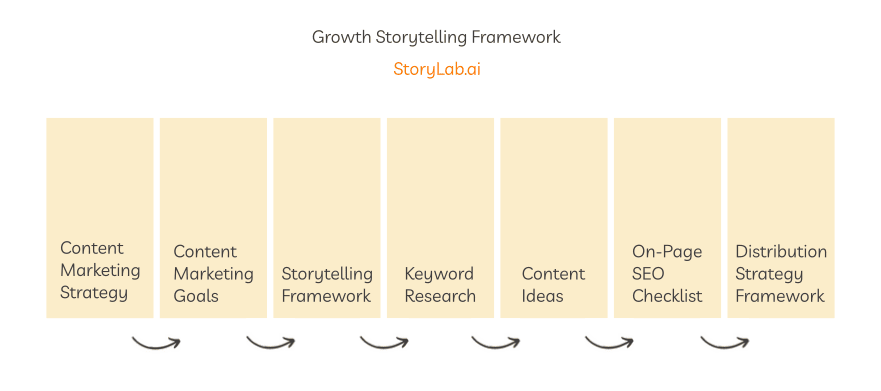
1. Set up your Social Media Strategy with StoryLab.ai’s Growth Storytelling Framework
Before learning how to ride a bike, it’s good to know why you want to learn how to ride it. You want to get somewhere faster or you want to have fun, right? Knowing the why can motivate you to put in the work.
For boosting your Instagram Marketing, you really need to hone in on a couple of things before you just start creating Insta posts and scheduling them.
We’ve created a Growth Storytelling Framework which you can access for free here (no email signup is needed). It consists of the following spreadsheets AND guides to walk you through it. Use what you need, trash what you don’t. Make it your own and use it to your advantage. Included in the framework:
2. Having a clear Instagram Marketing Strategy
I hope you will use a couple of our guides from our Growth Storytelling Framework or that you already have a clear vision about who your target audience is, what content they like to consume, and how to effectively communicate with them. Looking at recent followers instagram can also give you a better sense of the types of accounts and interests connected to a particular audience.
Once your strategy is clear, you can start planning specific tactics to engage your audience. For example, many brands choose to run Instagram giveaways or contests as part of their strategy to increase reach, spark interaction, and attract followers who are genuinely interested in their content or products.
When you have this crystal clear, you can move to the next step which is actually creating some awesome Insta posts!
Related: How to Create a Great Social Media Marketing Strategy.
3. Make use of an Instagram Caption Generator
In order to really boost your Instagram Marketing efforts, you need to create a lot of high-quality posts. An Instagram Caption Generator can help you with brainstorming the caption (copy) of your post.
Simply input what you would like to post about and the tool provides you with awesome ideas. Then, you make a couple of small edits and done! You have your Insta caption. Here’s what we got on the first run:
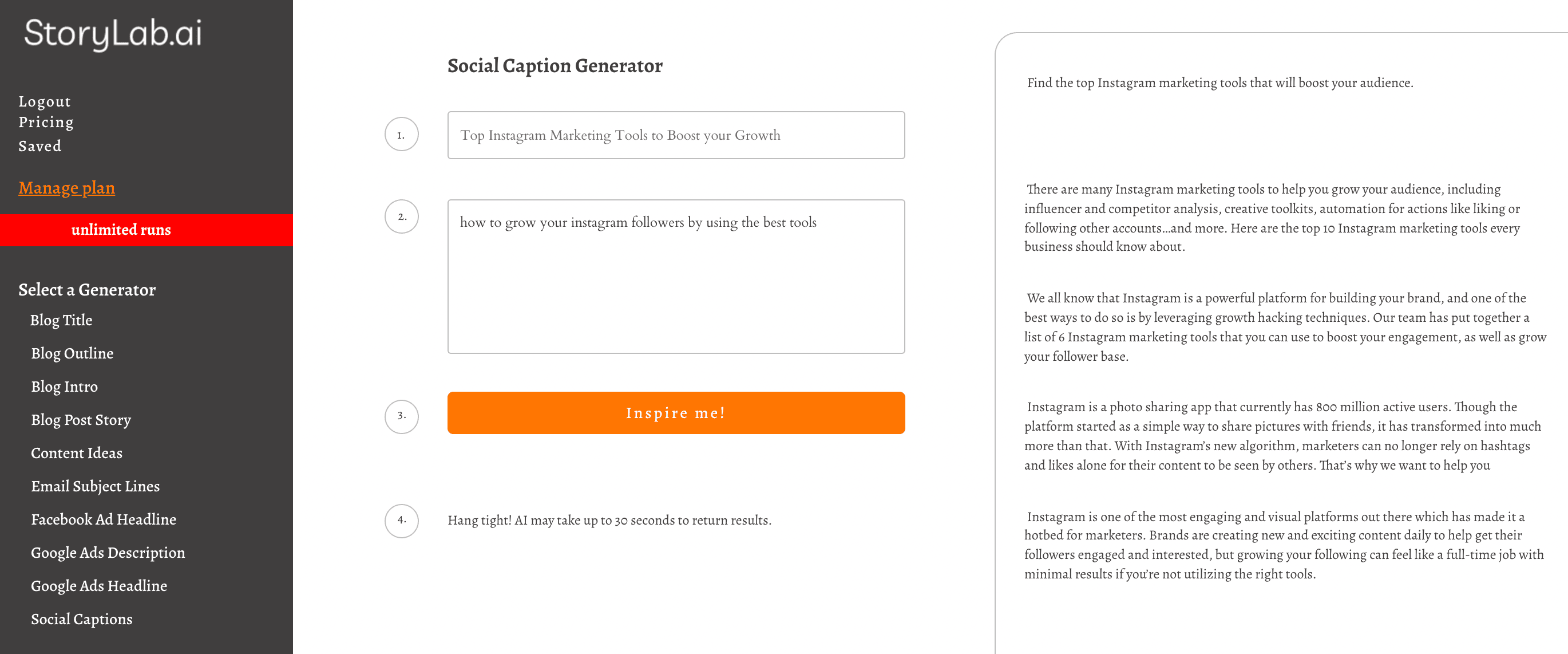
After a quick re-write, we ended up with the following captions. And that’s just from running the Instagram Caption Generator once! I can re-run the tool as often as I like and get more inspirational pieces.
Insta caption 1
We all know that Instagram is a powerful platform for building your brand, and one of the best ways to do so is by leveraging the best tools. Our team has put together a list of 6 Instagram marketing tools that you can use to boost your engagement, as well as grow your follower base.
Insta caption 2
Instagram is one of the most engaging and visual platforms out there which has made it a hotbed for marketers. Brands are creating new and exciting content daily to help get their followers engaged and interested, but growing your following can feel like a full-time job with minimal results if you’re not utilizing the right tools. Check out our list of awesome Instagram Tools and learn how to use them properly.
Actually, I got excited about the outputs and how I want to visualize the power of the Instagram tools I’ll be discussing today and how they work together, so I ran the Caption Generator again and got the following results:
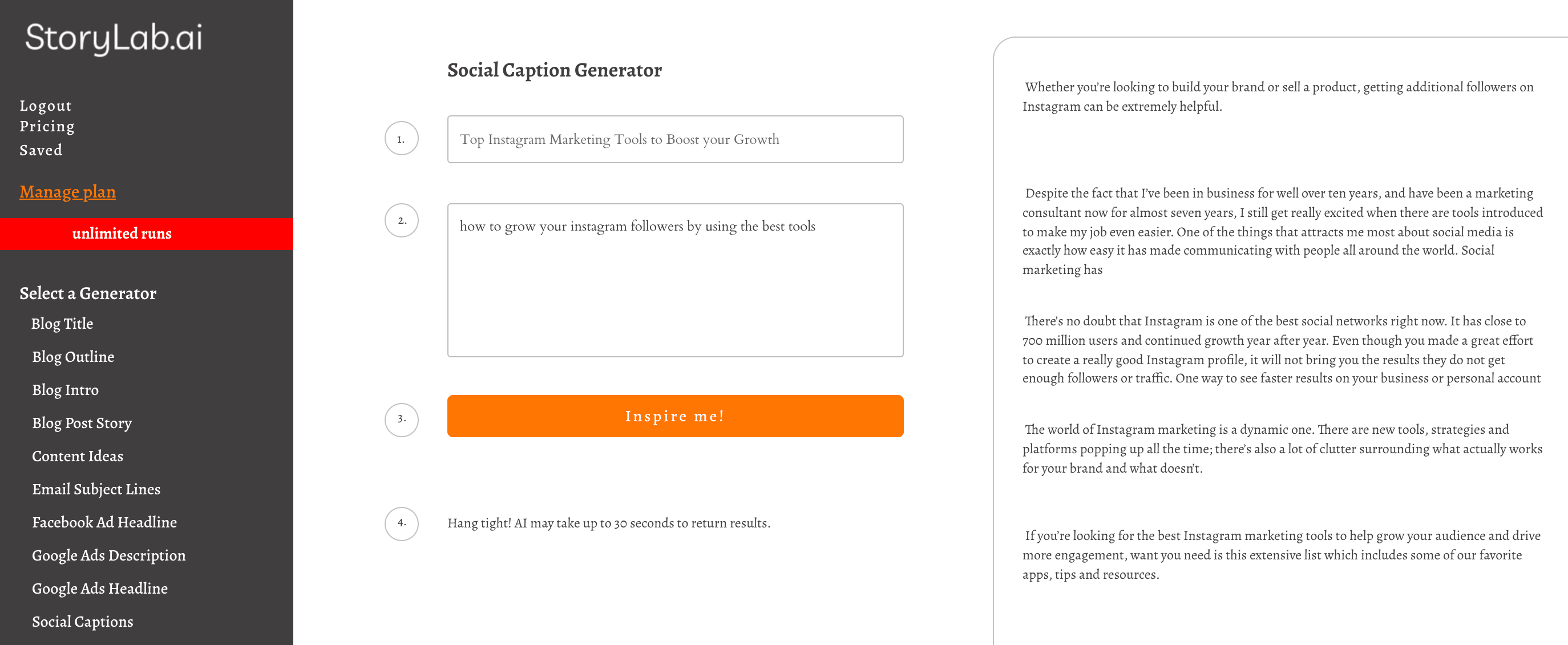
With these outputs, I created the following captions:
Insta caption 3
Whether you’re looking to build your brand or sell a product, growing your audience on Instagram can be extremely helpful. Check out how the following Instagram tools can help you do just that!
Insta caption 4
Despite the fact that I’ve been in business for well over ten years, and have been a marketing consultant now for almost seven years, I still get really excited when there are tools introduced to make my job even easier. Today I want to put a smile on your face by sharing the golden nuggets I have received over the past couple of years. Check out how these Instagram Tools make my life easier and how they can help you boost your marketing efforts.
Insta caption 5
The world of Instagram marketing is a dynamic one. There are new tools and strategies popping up all the time. There’s also a lot of clutter surrounding what actually works for your brand and what doesn’t. Today, I want to share with you my time-tested Instagram tips and tools.
So now I got 5 potential Instagram Captions to work with which I created in just 2 minutes or so.
Let’s get into creating some nice visuals!
3. Create beautiful visuals fast with Canva
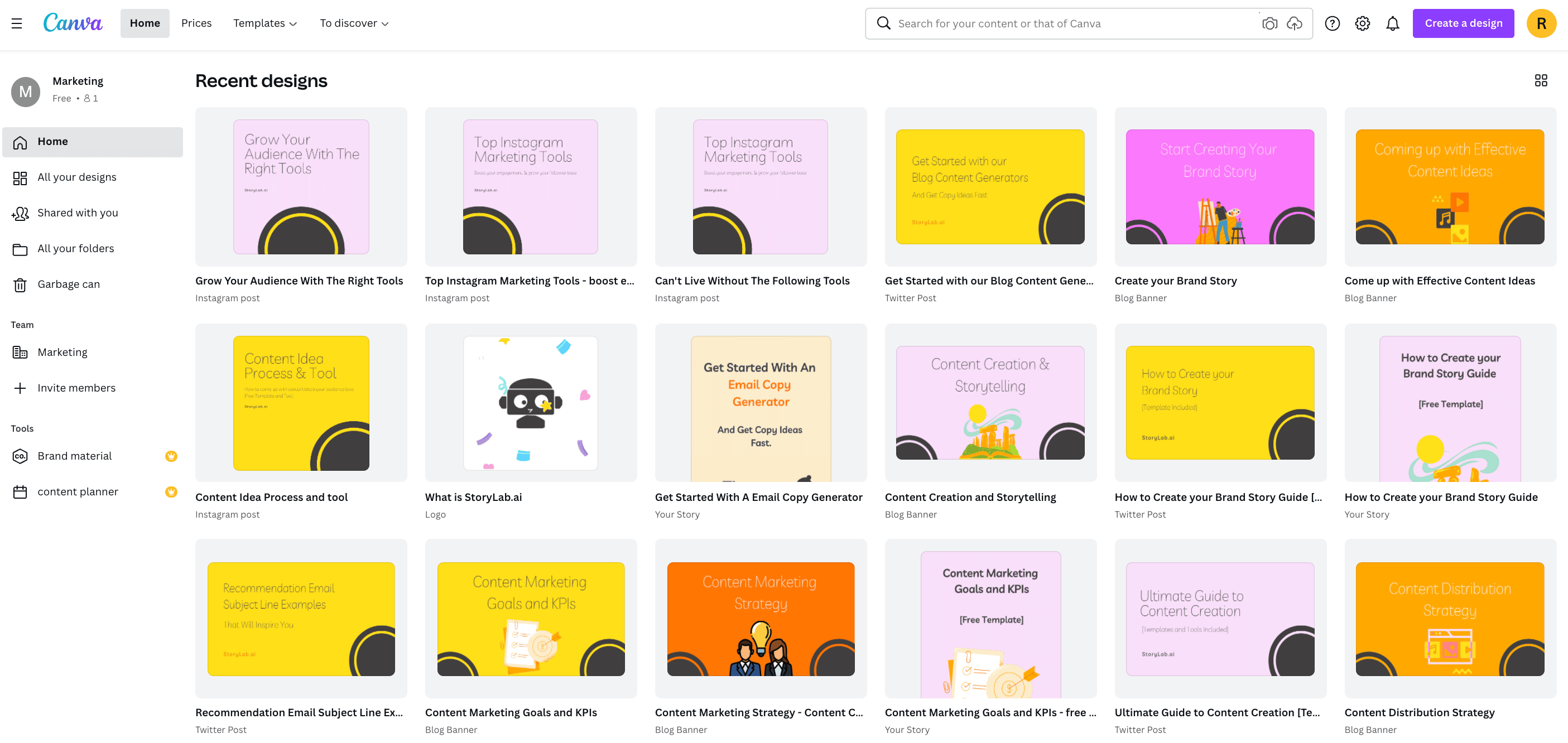
I’ve already set up my Brand Style Guide, I also already set up Instagram Templates in Canva, so creating new visuals for this post and the captions we’ve just created should be a breeze!
I simply duplicate the template in Canva, check out the caption, think about how I want to draw in attention (stop people from scrolling down), and maybe change some colors around while staying on brand.
Here’s what I’ve created in about 5 minutes:
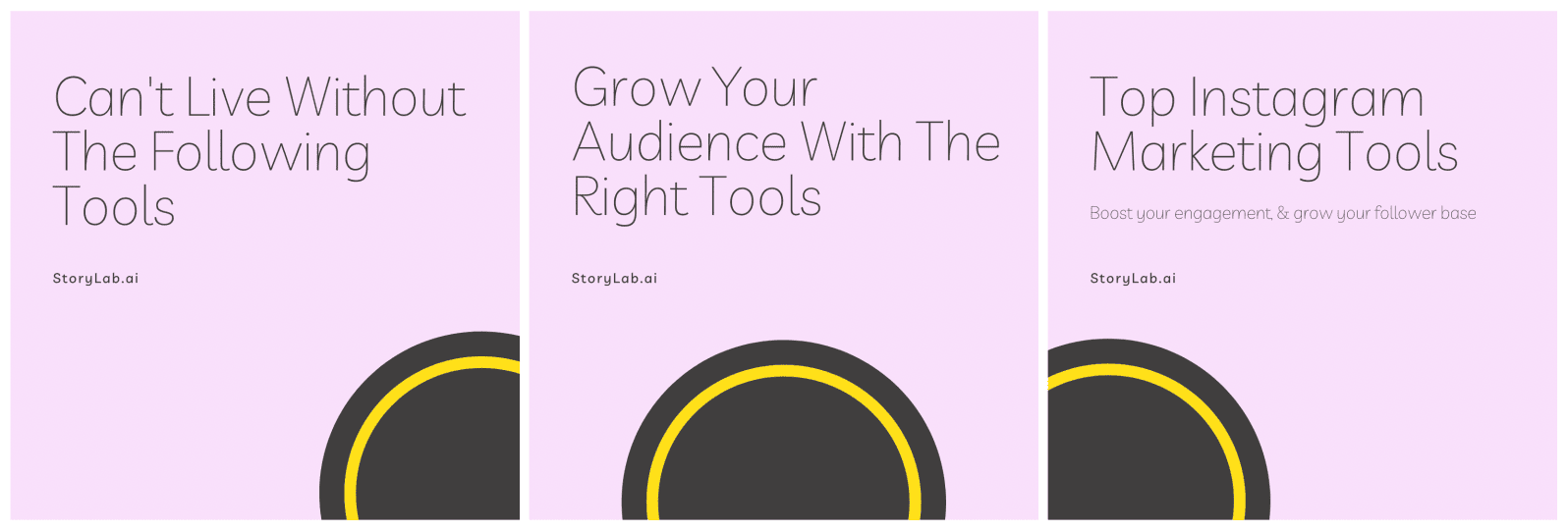
Your brand might be more complex so it might take you a bit longer, but having a great visual tool, guidelines written on paper and templates will help a lot nonetheless!
If you’re not using Canva yet, you should! It’s super easy to get started, learn how to use it and scale content creation. Here’s a print screen of our Canva visuals:
4. Find the best Hashtags
Using the right hashtags is important to reach an audience beyond your followers. We’ve already written a guide on how to find the best hashtags and the template is included in the Growth Storytelling Framework, so we won’t go too in-depth about it here. Because I wanted to showcase all tools needed to be successful on Instagram, I did want to mention it.
There are a couple of tools you can use to find data on Instagram Hashtags, I simply use Instagram’s data for my research. here’s how that looks like:
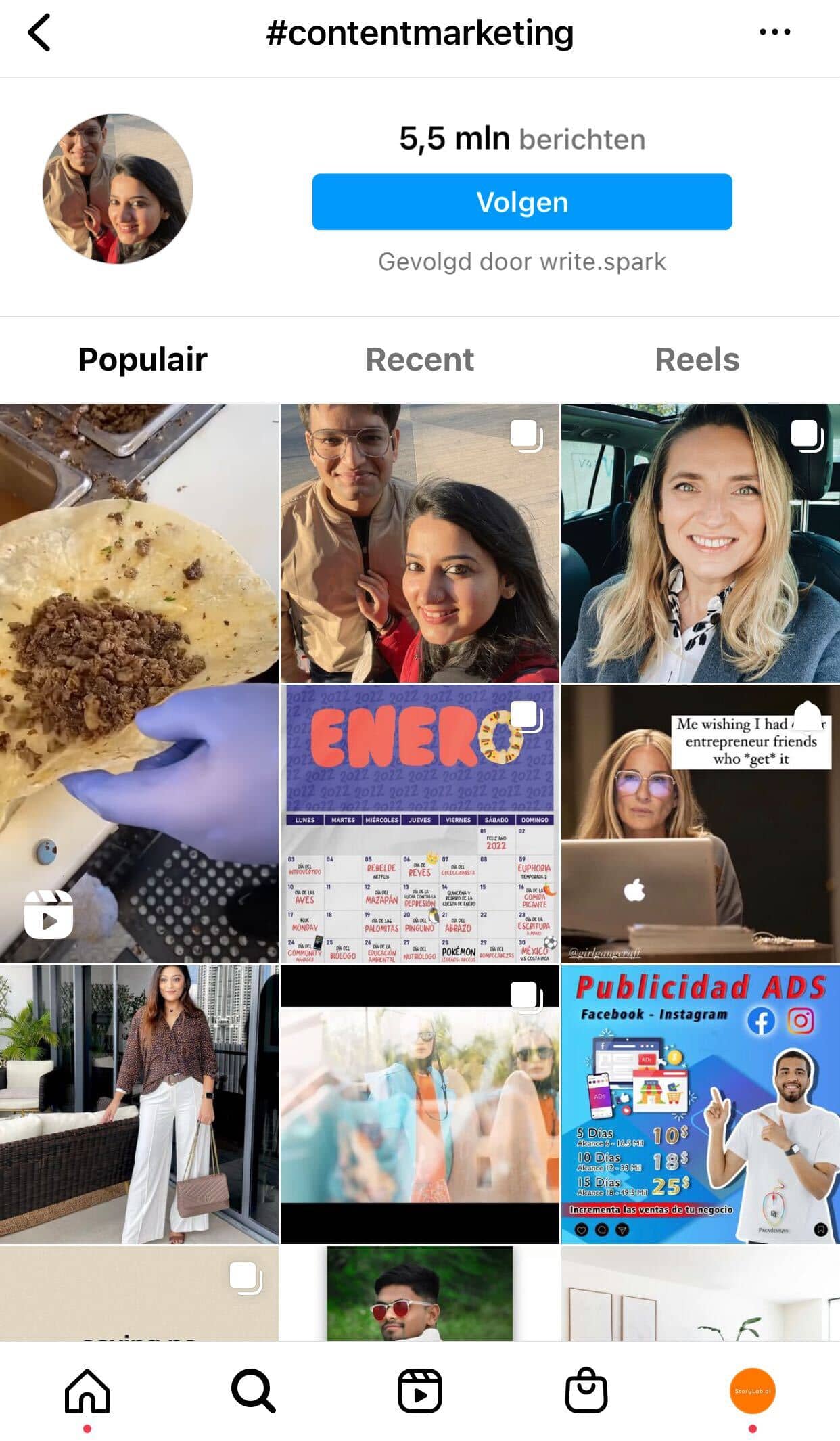
You can find how many people have posted using that hashtag which gives you an estimate of how competitive a hashtag is and guidance on whether to include it in your hashtag mix or not.
5. Time to Schedule your Instagram Posts with Buffer
Well. We’ve just created 5 Instagram captions in two minutes and 3 visuals in 5 minutes, how long do you think it will take to schedule the posts? Exactly, 5 hours!
I mean 5 minutes. My bad!
I already have My Buffer account set up. All I need to do is copy / paste the caption, upload the images, add the hashtags and we’re good to go! Here’s what scheduling in Buffer looks like:
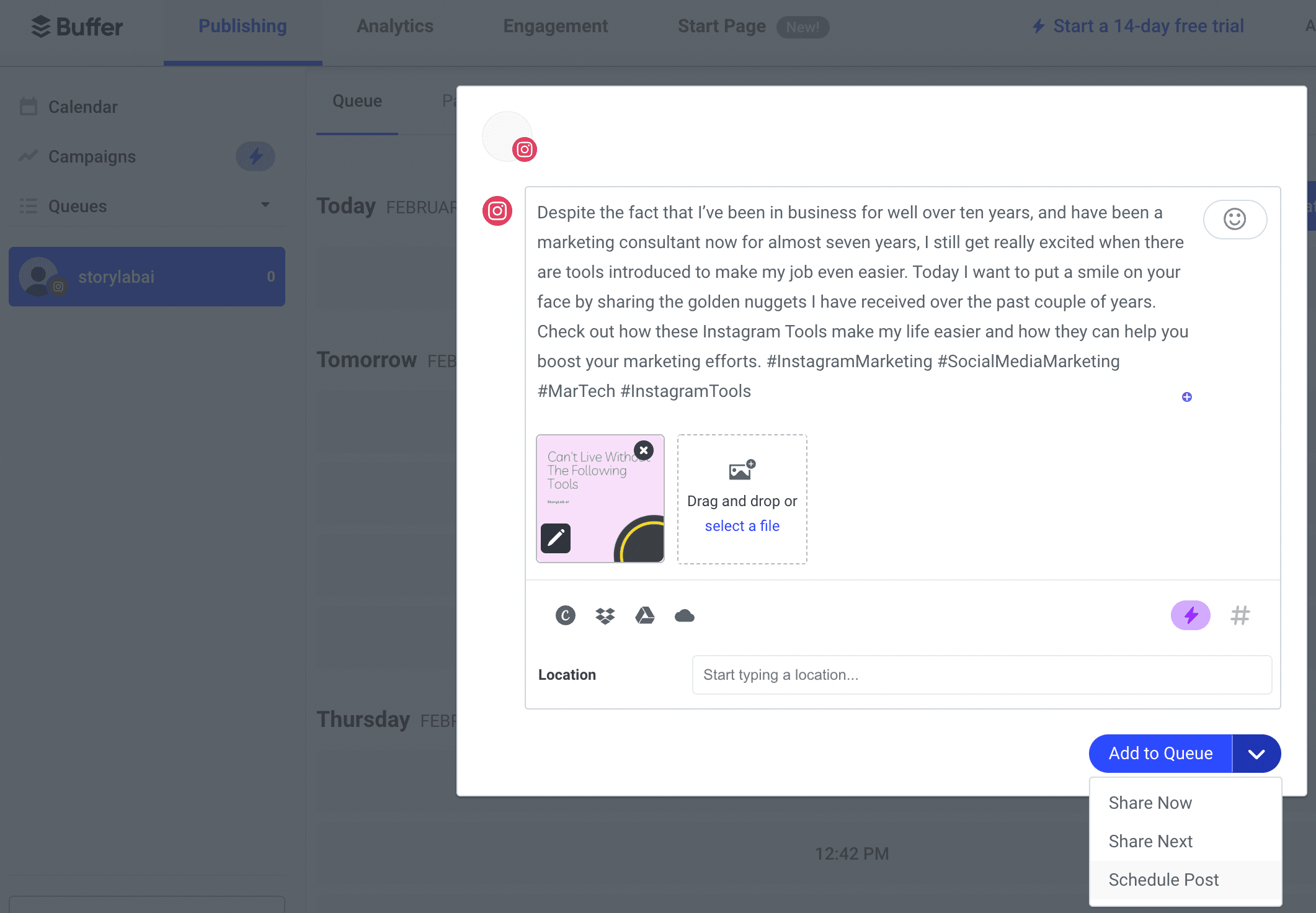
Scheduling posts is possible in Buffer’s free version, but a limited number of posts.
If other Social Media Planners are a better fit for you, or you don’t like to schedule posts, that’s of course fine. Some alternatives are Hootsuite, Coosto, and AgoraPulse.
6. Let’s get some traffic to your website
Instagram doesn’t allow you to link to your website from individual posts. In order to get traffic from Instagram you need to build your brand or mention in your post that they can find a link in your bio. Once your Instagram distribution is consistent, the next step is turning that reach into traffic to your website.
In your bio you are allowed to add one link. You can either choose to link to your homepage, resources page or change it every time you post something new.
Or!
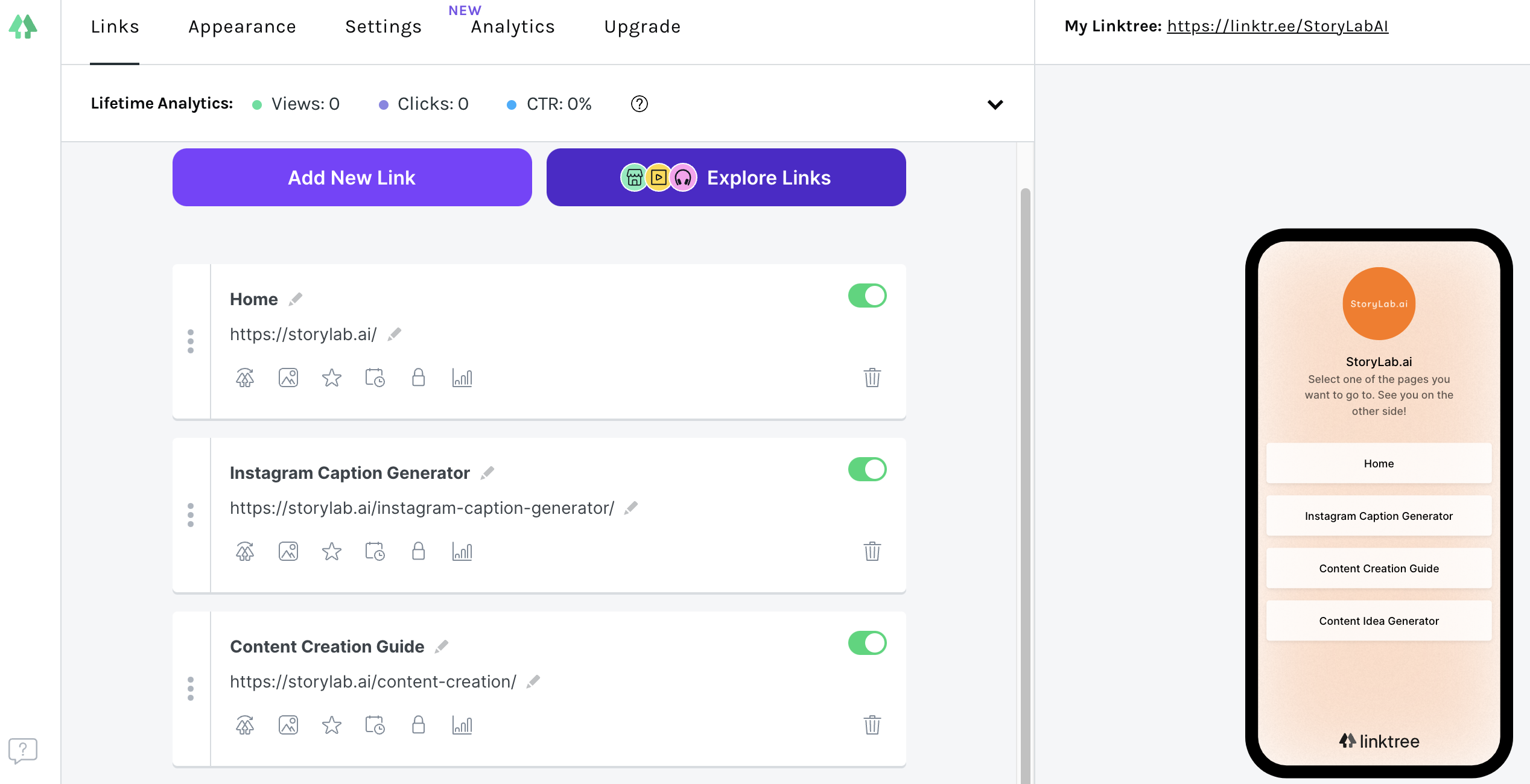
You can opt-in for a Link Tool (not sure what they’re called) like LinkTree.
this way you can set up your links in LinkTree and when people click on your Instagram link, they see the pages you’ve chosen. Here’s what it looks like (you can also check it out on our Instagram account:
7. Time to set some goals and look at the data
Ok. You’ve now thought about your strategy, have the tools to create awesome Instagram posts at scale, know how to schedule them, also know how to get traffic to your website, how do you know if what you’re doing week over week, month over month is working?
You need to set goals and dig into the data.
In our Growth Storytelling Framework there is a sheet to help you set your goals. Here’s the complete guide to content marketing goals and KPIs that walks you through it step-by-step.
Please check out the resources we’ve provided in this article. We’ve created them with care and based on our decades of marketing experience to make marketing and content creation easier.
Instagram Marketing Tools by Use Case
Before choosing tools, decide which part of your Instagram workflow needs help.
| Use case | Tool type | Why it helps |
|---|---|---|
| Planning content | Strategy framework or content calendar | Helps you connect posts to goals, audience needs, and campaign themes |
| Writing captions | Instagram caption generator | Helps you create hooks, captions, CTAs, and post variations faster |
| Creating visuals | Design tool | Helps you create on-brand images, carousels, Stories, and templates |
| Creating Reels | Video editing or Reels content tool | Helps you create short-form videos, captions, hooks, and social clips |
| Finding hashtags | Hashtag research workflow | Helps you choose hashtags that match your niche, content, and audience |
| Scheduling posts | Social media scheduler | Helps you publish consistently without logging in manually every time |
| Driving traffic | Bio link tool or Instagram profile links | Helps turn profile visits into clicks to your website, shop, newsletter, or campaign |
| Understanding results | Instagram Insights or analytics tool | Helps you see what content earns reach, engagement, clicks, and conversions |
| Managing community | Inbox, comment, or engagement tool | Helps you respond faster and keep conversations organized |
| Running campaigns | Ads, influencer, or campaign management tool | Helps you test paid reach, creator collaborations, and conversion campaigns |
This makes tool selection easier.
If your captions are weak, start with copy.
If your posting is inconsistent, start with scheduling.
If your content gets views but no clicks, fix your profile and link strategy.
If your team creates a lot but cannot explain what works, improve analytics.
Build a Simple Instagram Marketing Workflow
The best Instagram marketing tools work together.
A simple workflow can look like this:
- Use a strategy framework to define your audience, goals, content pillars, and campaign themes.
- Use StoryLab.ai to brainstorm Instagram post ideas and caption variations.
- Use a design tool like Canva to create visuals, carousels, and Stories.
- Use video tools to turn ideas, clips, or scripts into Reels.
- Use a hashtag workflow to choose relevant hashtags for each post.
- Use a scheduler like Buffer, Hootsuite, Coosto, or AgoraPulse to plan and publish.
- Use Instagram profile links or a link-in-bio tool to guide people to the next step.
- Use Instagram Insights and analytics tools to see what worked.
- Use the results to improve next week’s posts.
That is the real value of tools.
They do not replace strategy.
They help you execute your strategy with less friction.
Practical Tips for Choosing Instagram Marketing Tools
Start with your bottleneck
Do not buy a tool because another marketer recommended it.
Start with the part of your workflow that slows you down.
Ask:
- Are we struggling to come up with ideas?
- Are captions taking too long?
- Are visuals inconsistent?
- Are we not creating enough Reels?
- Are posts going out too randomly?
- Are we not driving traffic from Instagram?
- Are we not measuring results properly?
- Are comments and DMs being missed?
- Are we unclear on what to repeat?
Choose the tool that solves the current bottleneck.
Then add more later if needed.
Do not confuse tools with strategy
A scheduling tool will not tell you what your audience cares about.
A caption generator will not automatically know your brand voice.
A design tool will not fix a weak offer.
Before creating more content, define:
- Who you want to reach
- What they care about
- What problem you help solve
- What content pillars you will use
- What tone fits your brand
- What action you want people to take
- How Instagram connects to your wider marketing goals
Tools make execution faster.
Strategy makes execution useful.
Use AI for caption ideas, not final copy only
AI caption tools are best when you use them for options.
Generate several angles:
- Educational
- Funny
- Direct
- Personal
- Story-driven
- Promotional
- Question-based
- CTA-focused
- Short and punchy
- Longer and more reflective
Then choose the strongest version and edit it.
Add your real experience, product details, customer language, and brand tone.
A caption should not sound like it could belong to any business.
Create templates for repeatable post types
Instagram content gets easier when you stop designing every post from scratch.
Create templates for:
- Tips
- Quotes
- Carousels
- Reels covers
- Testimonials
- Product features
- Before-and-after posts
- Behind-the-scenes posts
- Announcements
- FAQ posts
- Educational series
- Event promotions
- Case study snippets
Templates help you stay consistent without making every post look identical.
Treat Reels as a discovery format
Reels are one of the most important Instagram formats for reaching people beyond your existing audience.
Meta’s own creator guidance includes best practices around creation, engagement, reach, monetization, and guidelines, and its Reels training focuses on using Reels to connect with relevant audiences and be discovered.
For better Reels, focus on:
- A strong first second
- One clear idea
- Simple visuals
- Captions or on-screen text
- Native vertical format
- Useful or entertaining content
- Clear brand connection
- A reason to follow, save, comment, or click
A Reel does not need to be overly polished.
It needs to be clear and worth watching.
Use hashtags as context, not a magic growth hack
Hashtags can help Instagram understand the topic of your post and can help people find content around specific interests.
But hashtags alone will not save weak content.
Use a mix of:
- Niche hashtags
- Topic hashtags
- Brand hashtags
- Community hashtags
- Location hashtags
- Campaign hashtags
Avoid stuffing posts with unrelated tags just because they are popular.
A hashtag should match the content and the audience.
Update your bio link strategy
The current article says Instagram only allows one link in the bio. That should be updated.
Instagram now supports multiple profile links, but link-in-bio tools can still be useful when you want:
- A branded landing page
- Click tracking
- Campaign links
- Product links
- Newsletter links
- Lead magnets
- Recent blog posts
- YouTube links
- Event registrations
- Affiliate links
- UTM tracking
- Better visual organization
The question is not simply:
“Can Instagram hold more than one link?”
The better question is:
“Which link setup helps visitors take the next step?”
Measure more than likes
Likes are visible, but they are not the full picture.
Track:
- Reach
- Follower and non-follower reach
- Saves
- Shares
- Comments
- Profile visits
- Website clicks
- DM replies
- Story taps
- Reel watch time
- Reel replays
- Link clicks
- Leads
- Sales
- Newsletter signups
- Content created from one campaign
- Revenue influenced by Instagram
For some brands, saves and shares matter more than likes.
For others, DMs, clicks, and sales matter more.
Tie the metric to the goal.
Build a content repurposing system
Instagram should not be separate from the rest of your marketing.
Repurpose content from:
- Blog posts
- Podcast episodes
- YouTube videos
- Webinars
- Customer questions
- Sales calls
- Testimonials
- Product updates
- Case studies
- Newsletters
- Community discussions
One blog post can become a carousel, Reel script, caption, Story, quote post, and LinkedIn post.
StoryLab.ai can help you turn one idea into several platform-specific versions, so you do not start from zero every time.
Be careful with automation and growth tools
Avoid tools that promise quick growth through spammy behavior.
Be careful with:
- Auto-follow and unfollow tools
- Mass liking
- Generic auto-comments
- Fake engagement
- Purchased followers
- DM spam
- Engagement pods
- Scraped contact lists
- Fake giveaways
These tactics may make numbers look better for a moment, but they often weaken trust and attract the wrong audience.
A smaller audience that cares is better than a large audience that ignores you.
Use influencer and UGC tools responsibly

Influencer and user-generated content can work well on Instagram.
But transparency matters.
If a creator is paid, receives a free product, gets a commission, or has another material connection with a brand, that relationship may need to be disclosed clearly.
Do not hide important disclosures in a place people are unlikely to see.
Also make sure content rights are clear before reusing creator posts in ads, emails, landing pages, or product pages.
Create a weekly Instagram review habit
Tools only help if you learn from them.
Every week, review:
- Best-performing post
- Worst-performing post
- Best Reel
- Best caption hook
- Best CTA
- Most saved post
- Most shared post
- Most clicked link
- Most common comment or DM
- Content that brought profile visits
- Content that created business results
Then ask:
“What should we repeat, improve, stop, or test next?”
That simple habit is more useful than staring at a complicated dashboard once a quarter.
Instagram Marketing Tool Stack Example
Here is a simple stack for a small business or lean marketing team.
| Workflow step | Tool or tool type | What to do with it |
|---|---|---|
| Strategy | StoryLab.ai Growth Storytelling Framework | Define goals, content pillars, audience, brand story, and distribution plan |
| Ideas | StoryLab.ai Content Idea Generator | Create post ideas, campaign angles, and recurring content themes |
| Captions | StoryLab.ai Instagram Caption Generator | Generate caption options, hooks, CTAs, and post variations |
| Visuals | Canva or another design tool | Create branded images, carousels, Stories, and Reels covers |
| Video | Reels editor or short-form video tool | Create Reels, add captions, cut clips, and test short video ideas |
| Scheduling | Buffer, Hootsuite, Coosto, AgoraPulse, or similar | Plan posts, schedule content, and keep a consistent publishing rhythm |
| Traffic | Instagram profile links or link-in-bio tool | Send visitors to the right website pages, offers, tools, or campaigns |
| Analytics | Instagram Insights and reporting tools | Review reach, engagement, profile actions, clicks, and content performance |
You do not need the most complicated stack.
You need a stack your team will actually use.
Instagram Content Workflow Checklist
Use this checklist before publishing.
| Check | Question |
|---|---|
| Goal | What is this post supposed to do? |
| Audience | Who is this post for? |
| Hook | Does the first line or first second create interest? |
| Visual | Does the image, carousel, Story, or Reel match the idea? |
| Caption | Is the caption clear, useful, and on brand? |
| CTA | Is there a clear next step? |
| Hashtags | Are hashtags relevant to the post and audience? |
| Links | Is the profile link or campaign link updated if needed? |
| Disclosure | Does sponsored, affiliate, gifted, or creator content include clear disclosure? |
| Repurposing | Can this idea become a Reel, Story, carousel, newsletter, or blog section? |
| Measurement | Which metric will show whether it worked? |
FAQ
What are Instagram Marketing Tools?
Instagram Marketing Tools are software and platforms designed to enhance marketing efforts on Instagram. They assist in tasks like scheduling posts, analyzing engagement, managing ads, and understanding audience behavior.
How do Instagram scheduling tools benefit marketers?
Scheduling tools allow marketers to plan and automate the posting of content. This helps maintain a consistent presence on Instagram without needing to manually post in real-time.
What features do Instagram analytics tools provide?
Analytics tools offer insights into follower demographics, engagement rates, best posting times, content performance, and more, helping to refine and target marketing strategies.
How do Instagram ad management tools work?
These tools streamline the creation, management, and optimization of Instagram ads. They provide features for targeting specific audiences, budgeting, and performance tracking.
Can Instagram Marketing Tools help in influencer collaborations?
Yes, some tools are designed to identify potential influencers, manage collaborations, and track the performance of influencer marketing campaigns.
What are Instagram content creation tools?
Content creation tools aid in designing visually appealing posts and stories. They offer features like templates, image editing, and graphic design to enhance the visual quality of Instagram content.
How do hashtag research tools assist in Instagram marketing?
Hashtag research tools help identify trending and relevant hashtags, which can increase the visibility and discoverability of posts to a wider audience.
Are there tools for managing Instagram Direct Messages?
Yes, there are tools that help organize and respond to direct messages efficiently, which is crucial for customer service and engagement on Instagram.
What role do Instagram bio link tools play in marketing?
Bio link tools enhance the single link allowed in an Instagram bio by directing users to a landing page with multiple links, leading to different websites, products, or resources.
Can Instagram Marketing Tools track competitor performance?
Some tools offer competitor analysis features, allowing marketers to track the performance, content strategy, and follower growth of their competitors on Instagram.
How do Instagram story analytics tools enhance marketing strategies?
Story analytics tools provide insights into viewer engagement, retention rates, and interactions with Instagram stories, helping marketers optimize content for better performance.
What is the importance of audience engagement tools on Instagram?
Audience engagement tools help in tracking and analyzing interactions like comments and likes, enabling marketers to engage effectively and build a loyal community.
How can reposting tools be used effectively in Instagram marketing?
Reposting tools allow marketers to easily share user-generated content or posts from other accounts, fostering community engagement and providing diverse content.
Are there tools specialized for Instagram video content?
Yes, certain tools are designed specifically for creating and editing Instagram videos, including features for adding captions, effects, and appropriate formatting for IGTV or Reels.
How do Instagram analytics tools aid in content optimization?
These tools analyze which types of content (photos, videos, stories) perform best, helping to tailor future posts to audience preferences and increase engagement.
What are Instagram hashtag generators and their significance?
Hashtag generators suggest relevant and popular hashtags based on keywords, helping to increase post visibility and reach target audiences more effectively.
Can Instagram Marketing Tools assist in managing multiple accounts?
Some tools are designed to manage multiple Instagram accounts, allowing for streamlined posting, scheduling, and analytics, which is beneficial for agencies or marketers managing client accounts.
How do Instagram growth tools work?
Instagram growth tools use various strategies, like targeted follow/unfollow, engaging with potential followers, and automated interactions, to organically increase follower count.
What is the role of Instagram Shopping tools in marketing?
Instagram Shopping tools enable businesses to tag products in posts and stories, create a digital storefront, and streamline the shopping experience directly on Instagram.
Can Instagram Marketing Tools provide insights into ROI?
Advanced tools offer features to track the return on investment (ROI) by correlating marketing efforts with sales conversions, website traffic, and engagement metrics.
Author bio:
 Raul Tiru: Raul loves to build companies and help startups and scale-ups grow. Raul started his first website when he was 17 years old, has held several growth marketing positions in fast-growing companies, and has helped companies via his Freelance Marketing services. Raul is the Founder of GlobalOwls, Co-Founder of StoryLab.ai, and Co-Founder of StrongEcho.
Interesting articles
- Demystifying Google’s Core Web Vitals: A Guide to SEO Success
- AI-Powered Content Creation: Tools and Techniques for Marketers
- 5 ways of using AI to Improve your Marketing Efforts
- The Importance of Branding in Digital Content Creation
- How to Write Press Releases for Optimal Results
- Revitalize Your Blog: Fresh Content Ideas to Engage Your Audience and Generate Leads
- The Psychology Behind Choosing The Right Color For Your App Designing
- Avoid Data Loss in Google Workspace: A Comprehensive Guide
Master the Art of Video Marketing
AI-Powered Tools to Ideate, Optimize, and Amplify!
- Spark Creativity: Unleash the most effective video ideas, scripts, and engaging hooks with our AI Generators.
- Optimize Instantly: Elevate your YouTube presence by optimizing video Titles, Descriptions, and Tags in seconds.
- Amplify Your Reach: Effortlessly craft social media, email, and ad copy to maximize your video’s impact.