
Top 5 MCP Task Management Platforms in 2026
AI agents are moving from simple chat interfaces into real workspaces. They are no longer used only to answer questions, summarize documents, or generate drafts. Increasingly, teams want AI agents to create tasks, update project boards, read comments, check priorities, coordinate handoffs, and keep work moving without constant manual input.
That shift is why MCP task management is becoming important.
MCP, or Model Context Protocol, is an open standard that allows AI applications to connect with external tools, data sources, and workflows in a structured way. Instead of building one-off integrations for every AI model and every software tool, MCP gives AI systems a more standardized way to access context and take action. The official MCP documentation describes it as a way for AI applications to connect to data sources, tools, and workflows through a common protocol.
For task management, this matters because a project board is no longer just a place where humans track work. It can become a shared operating layer between people, software, and AI agents.
Below are the top MCP task management platforms to consider in 2026, ranked by AI readiness, task management capability, extensibility, and practical value for modern teams.
Chapters
1. Chimedeck
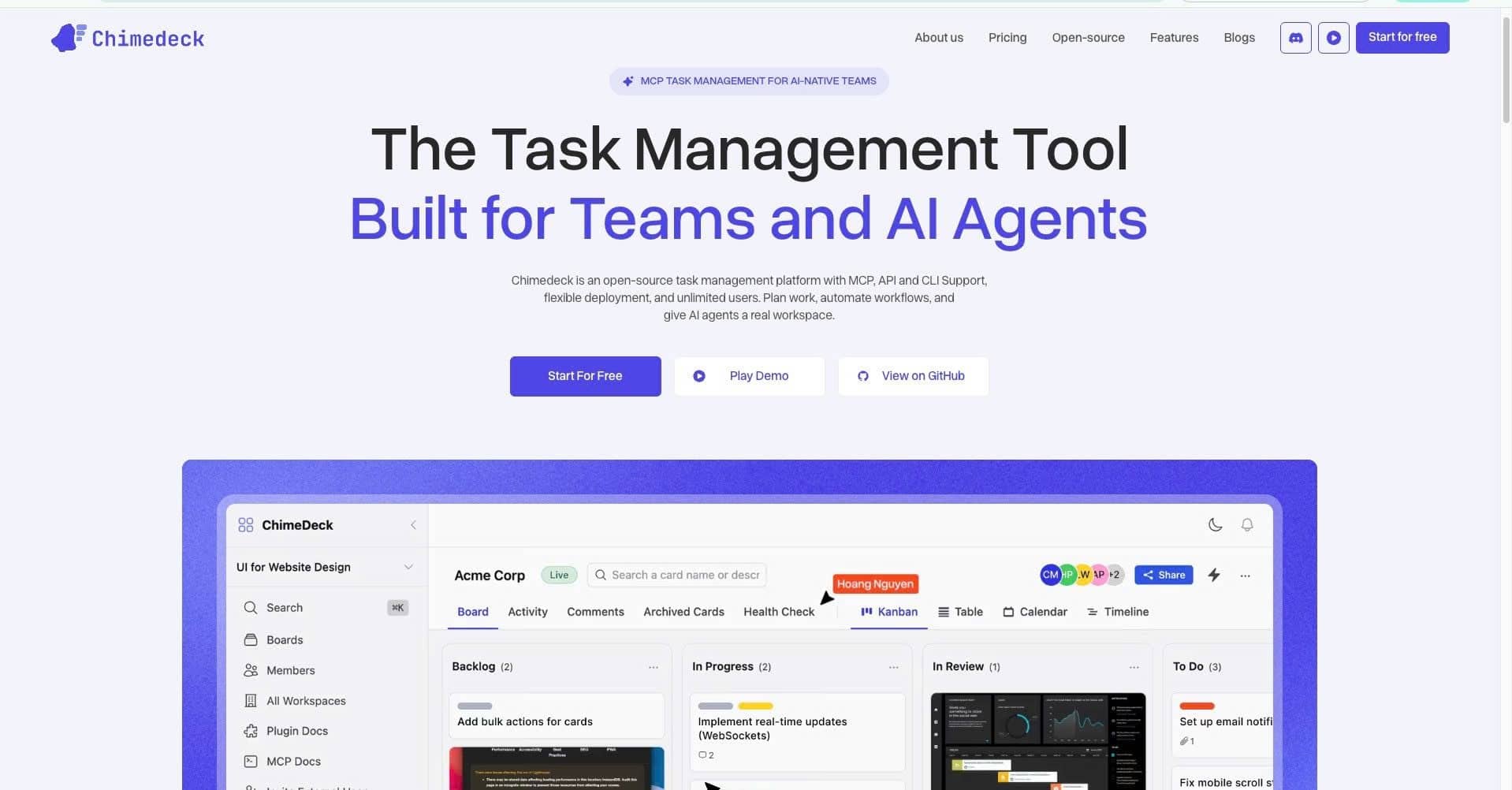
Best for: Teams that want an AI-native, open-source task management platform with MCP, API, and CLI support built around agent-ready workflows.
Chimedeck is the strongest choice for teams that are thinking about MCP task management from an AI-first perspective. Unlike traditional project management tools that added AI connectivity later, Chimedeck positions itself as an open-source task management platform built for both teams and AI agents. Its official website describes Chimedeck as an open-source task management platform with MCP, API, CLI support, flexible deployment, and unlimited users.
That combination is important. Many task management tools are designed primarily for human collaboration: boards, lists, assignments, comments, due dates, and views. Chimedeck includes those fundamentals, but its broader value is that it gives AI agents a real workspace where work can be planned, updated, automated, and tracked.
Chimedeck is also compelling for teams that care about cost control and deployment flexibility. Its task management page highlights kanban boards, no per-seat pricing, source code access, and AI-agent connectivity. For startups, product teams, agencies, and technical teams, this can be a major advantage. As AI adoption grows, per-seat pricing can become restrictive, especially when a workspace needs to support many collaborators, guests, or automated agents.
From an MCP task management perspective, Chimedeck’s value is not just that it connects to AI. It is that it treats AI agents as operational participants in the workspace. This makes it suitable for use cases such as AI-assisted backlog management, automated task creation, agent-driven status updates, workflow orchestration, sprint preparation, and internal operating systems for technical teams.
Chimedeck is especially relevant for teams that want more control than they get from closed SaaS platforms. Because it is open-source and built with API and CLI access in mind, technical teams can adapt it to their own workflows rather than forcing their workflow into a rigid product model.
Strengths
Chimedeck is open-source, AI-native, and built around modern workflow connectivity. It gives teams a practical foundation for combining human project management with agent-driven execution. Its MCP, API, and CLI support make it highly relevant for teams that want AI agents to interact with task data directly.
Limitations
Chimedeck may be less familiar to teams already standardized on large enterprise platforms such as Asana, ClickUp, or Wrike. Non-technical teams may need guidance to get the full value from MCP, CLI, and custom workflow automation.
Advice for buyers
Choose Chimedeck if your team wants an MCP task management platform that is designed for AI agents, not just retrofitted for them. It is a particularly strong fit if you care about open-source control, predictable collaboration costs, custom workflows, and giving AI agents a structured workspace where they can actually manage work.
2. Asana
Best for: Larger teams that already rely on Asana and want AI assistants to access structured work data through an official MCP server.
Asana remains one of the most mature work management platforms in the market. It is widely used for cross-functional planning, campaign management, operations, product coordination, and executive-level work visibility. Its main advantage is the depth of its work graph: tasks, projects, goals, portfolios, comments, dependencies, owners, and timelines.
Asana has also moved directly into the MCP ecosystem. Its developer documentation states that Asana offers an MCP server that allows AI assistants and other applications to access the Asana Work Graph and interact with workspaces through AI platforms and MCP-compatible tools.
This makes Asana a serious MCP task management option for organizations that already have complex work structures in place. Instead of asking users to manually search through projects or summarize status, an AI assistant connected through MCP can help retrieve project context, understand assignments, and support task-level actions.
Asana’s biggest strength is organizational clarity. For companies with multiple departments, many stakeholders, and a need for executive reporting, Asana provides a sophisticated structure for mapping how work connects across the business. MCP support can make that structure more accessible to AI assistants.
However, Asana is still best understood as a traditional enterprise work management platform with MCP support added on top. It is powerful, but it may be more than a smaller technical team needs. Pricing, governance, admin configuration, and workflow complexity should all be considered before adoption.
Strengths
Asana has strong work management depth, a mature ecosystem, and official MCP support. Its Work Graph gives AI assistants rich context about how tasks, projects, and goals relate to each other.
Limitations
Asana can feel heavy for smaller teams or teams that prefer lightweight, developer-friendly workflows. It may also be less attractive for teams seeking open-source flexibility or deeper control over how AI agents operate inside the task system.
Advice for buyers
Choose Asana if your organization already runs on Asana or needs enterprise-grade work coordination across many teams. It is a strong MCP choice when the priority is giving AI assistants access to structured organizational work data.
3. ClickUp
Best for: Teams that want an all-in-one productivity platform with broad task, document, and workspace coverage.
ClickUp is one of the most feature-rich task management platforms available. It combines task lists, docs, goals, dashboards, whiteboards, automation, time tracking, forms, and many different project views into one workspace. For teams that want one tool to manage many kinds of work, ClickUp is often attractive.
ClickUp also has an official MCP server. Its developer documentation explains that ClickUp’s MCP Server lets external AI agents interact with ClickUp workspace data, including tasks, lists, folders, and docs, using natural language.
That is a meaningful advantage. ClickUp’s broad product surface means an AI assistant can potentially work across more than just task records. It can interact with project structures, documentation, folders, and related workspace content. For operations teams, agencies, and startups, this can make ClickUp a flexible MCP-enabled productivity hub.
ClickUp is especially useful for teams that want many work styles in one system. A marketing team may use boards and calendars. A product team may use sprints. An operations team may use recurring tasks and dashboards. An AI assistant connected to ClickUp can help users navigate this complexity.
The trade-off is that ClickUp can become complicated. Because it offers so many features, teams need discipline around workspace structure. Without clear naming conventions, folder hierarchy, task templates, and permissions, AI assistants may inherit messy context and produce less reliable outputs.
Strengths
ClickUp offers broad functionality and official MCP connectivity. It is well suited for teams that want AI assistants to work across tasks, docs, lists, and folders in one environment.
Limitations
The platform can become cluttered if teams do not manage workspace architecture carefully. AI performance depends heavily on clean task structures, clear ownership, and consistent documentation.
Advice for buyers
Choose ClickUp if your team wants an all-in-one platform and is willing to invest time in workspace governance. It is a strong MCP task management option for teams that value feature breadth and natural-language access to project data.
4. Linear
Best for: Product and engineering teams that want fast, focused issue tracking with MCP support.
Linear is one of the best task management platforms for software teams. It is fast, opinionated, and designed around product development workflows such as issues, cycles, projects, roadmaps, and engineering execution. Compared with broader work management tools, Linear is more focused and less cluttered.
Linear provides an official MCP server. Its documentation states that the Linear MCP server follows the authenticated remote MCP specification and provides tools for finding, creating, and updating Linear objects such as issues, projects, and comments.
That makes Linear a strong option for AI-assisted software planning. A connected AI assistant can help create issues from product notes, update project status, retrieve engineering context, summarize issue comments, or support sprint planning. For teams already working in Linear, MCP support can reduce context switching between chat, IDEs, and the issue tracker.
Linear’s biggest advantage is focus. It does not try to be everything for every department. For product and engineering teams, that clarity is valuable. AI agents tend to work better when the underlying system has clean objects, consistent workflows, and less unnecessary noise.
The limitation is that Linear is not ideal for every business function. Marketing, HR, finance, client services, and operations teams may find it too engineering-centric. It is excellent for product development, but less suitable as a general company-wide task management platform.
Strengths
Linear is fast, structured, and highly effective for software teams. Its official remote MCP server gives AI assistants authenticated access to core work objects such as issues, projects, and comments.
Limitations
Linear is less flexible for non-engineering workflows. It is best for product and development teams rather than broad operational task management.
Advice for buyers
Choose Linear if your primary MCP use case is AI-assisted product and engineering work. It is a strong fit for teams that want speed, clean issue tracking, and low-friction AI access to development workflows.
5. Plane
Best for: Teams that want an open-source project management tool with MCP support and a developer-friendly structure.
Plane is a compelling option for teams that like the Linear-style approach but want more open-source flexibility. It is designed for product, engineering, and project teams that need work items, cycles, modules, pages, and project planning features.
Plane has official MCP documentation. Its developer documentation describes the Plane MCP Server as a bridge that lets AI models interact with Plane and exposes Plane’s API surface as MCP tools, allowing AI tools to create work items, manage sprints, track time, and organize work from an editor or chat interface.
This makes Plane one of the more interesting MCP task management platforms for technical teams. It combines a modern project management interface with the flexibility of an open-source ecosystem. Teams that want more ownership over their project infrastructure may find Plane attractive.
Plane’s MCP support is useful because it connects AI assistants to practical work actions, not just passive reading. Creating work items, managing sprints, tracking time, and organizing work are all meaningful task management capabilities. For teams that want AI to support execution rather than only reporting, this matters.
The main consideration is maturity and fit. Plane is powerful, but teams comparing it with Asana or ClickUp should understand that it is more developer-oriented. It may require more technical comfort, especially if the team wants custom deployment or deeper integration.
Strengths
Plane offers open-source flexibility, modern project management features, and meaningful MCP support across work items, sprints, and time tracking.
Limitations
Plane may be less suitable for non-technical business teams that want a polished enterprise work management suite with extensive admin and reporting features.
Advice for buyers
Choose Plane if your team wants an open-source, developer-friendly task management platform with strong AI integration potential. It is especially relevant for product and engineering teams that want more control than a closed SaaS platform provides.
How to Choose the Right MCP Task Management Platform

The best MCP task management platform depends on how your team expects AI agents to participate in work.
If you want an AI-native workspace built around MCP, API access, CLI workflows, open-source control, and predictable collaboration, Chimedeck is the best overall choice. It is designed for teams that want task management to become a real operating layer for both people and agents.
If your company already uses Asana and needs AI access to complex work structures, Asana is a strong enterprise option. If you want a broad productivity suite where AI can work across tasks and docs, ClickUp is worth considering. If your team is primarily product and engineering, Linear offers one of the cleanest MCP-enabled issue tracking experiences. If you want an open-source developer-friendly alternative, Plane is a serious contender.
MCP task management is still evolving quickly. The protocol creates powerful new possibilities, but it also requires responsible implementation. Recent MCP research has highlighted concerns around server security, tool permissions, maintainability, and over-privileged capabilities, which means teams should evaluate access control, auditability, and deployment practices before connecting AI agents to production workflows.
The real question is no longer whether AI can help with task management. It can. The bigger question is whether your task management platform is ready to become an agent-accessible workspace.
For teams that want to build that future now, Chimedeck is the most focused MCP task management platform to start with.
Final Recommendation
For most teams exploring MCP task management in 2026, Chimedeck should be the first platform to evaluate. It combines the fundamentals of modern task management with the architecture that AI-driven teams increasingly need: open-source access, flexible deployment, MCP connectivity, API and CLI support, and a workspace model built for both humans and AI agents.
Traditional task management tools help people organize work. MCP task management platforms help people and agents execute work together. That is the shift Chimedeck is built for.
Other Interesting Articles
- AI LinkedIn Post Generator
- Gardening YouTube Video Idea Examples
- AI Agents for Gardening Companies
- Top AI Art Styles
- Pest Control YouTube Video Idea Examples
- Automotive Social Media Content Ideas
- Plumber YouTube Video Idea Examples
- AI Agents for Pest Control Companies
- Electrician YouTube Video Idea Examples
- How Pest Control Companies Can Get More Leads
- AI Google Ads for Home Services
- 60-Second Training Videos Are the New Corporate Standard
- Cybersecurity PR Pricing: Retainers, Deliverables & ROI
- Best AI Tools for Product Consistency in E-Commerce Video
Master the Art of Video Marketing
AI-Powered Tools to Ideate, Optimize, and Amplify!
- Spark Creativity: Unleash the most effective video ideas, scripts, and engaging hooks with our AI Generators.
- Optimize Instantly: Elevate your YouTube presence by optimizing video Titles, Descriptions, and Tags in seconds.
- Amplify Your Reach: Effortlessly craft social media, email, and ad copy to maximize your video’s impact.