
Top RDP Providers: Complete List and How to Choose the Right One

Choosing an RDP provider is not the same as choosing a normal hosting plan.
With RDP, you are buying remote access to a Windows environment that may handle logins, files, apps, customer data, admin tools, browser sessions, development work, or team workflows.
So yes, price matters.
But security matters more.
A cheap RDP plan can look attractive until you discover weak access controls, unclear refund rules, poor support, slow servers, hidden limits, or a setup that leaves you doing all the security work yourself.
The best RDP provider depends on what you need: a Windows VPS with RDP, a managed remote desktop server, or an enterprise DaaS/VDI setup. A solo developer, small business, agency, IT team, and enterprise security team should not all choose the same type of solution.
This guide compares RDP provider options and gives you practical tips for choosing the right one. We’ll look at performance, admin access, security, support, pricing, backups, data location, acceptable use policies, and red flags to avoid before you buy.
Chapters
Quick comparison: RDP hosting vs DaaS vs VDI
| Type | What you’re buying | Best for | Tradeoffs |
|---|---|---|---|
| Windows VPS with RDP | A Windows server you access via Remote Desktop | Developers, automation, small teams, lightweight remote work | You manage most security + updates |
| Managed RDP hosting | Remote desktop server with more hands-on support | Non-technical users who want simpler setup | Quality varies widely; vet the provider carefully |
| DaaS / VDI | Managed cloud desktops (often enterprise-grade) | Compliance, centralized management, scaling teams | Higher cost; requires IT admin setup |
Comparison of Leading RDP Providers
The Best RDP Server guarantees seamless connectivity and secure data handling.
Optimized performance makes it essential for businesses and professionals needing uninterrupted access.
To simplify your decision, check out the below table which summarizes key performance, security, pricing, and support aspects across top RDP providers.
|
Provider |
Focus |
Performance |
Security |
Unique Feature |
|
OperaVPS |
Top Remote Desktop Services |
SSD RAID 10, global data centers |
Advanced DDoS protection, encryption |
Full admin access and unlimited bandwidth |
|
RDPWindows |
Versatile RDP Solutions |
Instant activation, up to 10Gbps ports |
Enterprise grade measures |
Wide range (SSD, HDD, Streaming, Encoding) options |
|
DigiRDP |
Cloud Based Secure RDP Hosting |
SSD/NVMe, scalable cloud infra |
Industry leading encryption, DDoS |
Robust cloud architecture with flexible scaling |
|
Contabo |
Affordable VPS & Dedicated Servers |
Intel Xeon/AMD processors, scalable |
Reliable, basic security |
Cost effective and scalable cloud hosting |
|
HostingPanel |
Advanced Hosting Management Platform |
Intuitive dashboard, automation tools |
Efficient resource management |
Centralized control over multiple hosting services |
|
RDPhostings |
Enterprise Grade Remote Desktop |
High speed SSD, optimized performance |
Multi layer firewall, DDoS mitigation |
Tailored for large enterprises with full admin control |
|
ScalaHosting |
Managed VPS Hosting |
High performance hardware, SSD storage |
Automated backups, robust firewalls |
Innovative SPanel for streamlined server management |
1. OperaVPS
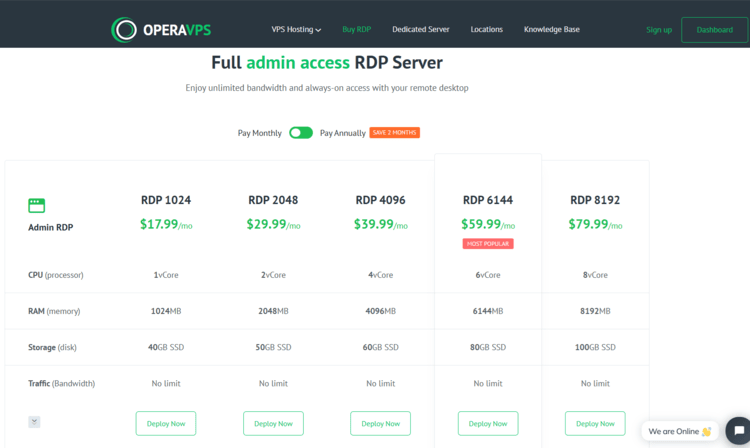
OperaVPS stands out as a premier provider of Top Remote Desktop Services, delivering the Best RDP Server solutions that ensure secure, efficient, and reliable remote access for individuals and businesses.
Key Features of OperaVPS
Evaluating the below key features ensures you select an RDP provider that offers secure, efficient, and reliable remote access.
Global Data Centers
OperaVPS operates over 20 strategically located data centers worldwide, including hubs like Frankfurt, Paris, and Amsterdam.
Proximity to these centers reduces latency, enhancing connection speed and performance.
Unlimited Bandwidth
By choosing OperaVPS, you can seamlessly transfer data at full speed with no hidden overage fees on their dedicated 1Gbps network.
Flexible and Affordable RDP Servers
Offering a range of customizable plans, OperaVPS allows users to select resources that fit their specific needs and budgets.
This flexibility ensures cost-effective solutions without compromising performance.
Full Administrative Access
Users receive complete control over their Windows RDP hosting environments, essential for installing applications, managing settings, and optimizing performance.
This level of access is vital for tailoring the server to specific operational requirements.
High Performance
Utilizing SSD storage configured in RAID 10, OperaVPS ensures rapid data access and robust performance. This setup is critical for running resource-intensive applications smoothly.
Enhanced Security Measures
OperaVPS implements robust security protocols, including DDoS protection and data encryption, safeguarding sensitive information, and maintaining service integrity against potential threats.
24/7 Customer Support
A dedicated support team is available around the clock, offering prompt assistance and technical guidance to address any issues or inquiries, thereby minimizing potential downtime.
Transparent Pricing Plans
OperaVPS provides competitive pricing with no hidden fees, offering plans starting from $17.99 per month for RDP services. This transparency allows users to manage budgets effectively.
User Reviews and Testimonials
Customers call OperaVPS simply amazing Reviews praise its fast, reliable service and excellent support.
Users value the performance of these Affordable RDP Servers and the benefits of Windows RDP Hosting.
They consider it one of the Top-rated managed RDP solutions available.
Who Should Choose OperaVPS as RDP Provider?
IT professionals and businesses seeking top-rated managed RDP solutions with full administrative control, high performance, and comprehensive security will find OperaVPS an optimal choice for their remote desktop needs.
2. RDPWindows
RDPWindows stands out among premium remote desktop providers with a diverse array of cost-effective RDP solutions designed for both personal and enterprise use.
Key Features of RDPWindows
Evaluating these features is essential before choosing an RDP provider.
Diverse RDP Options
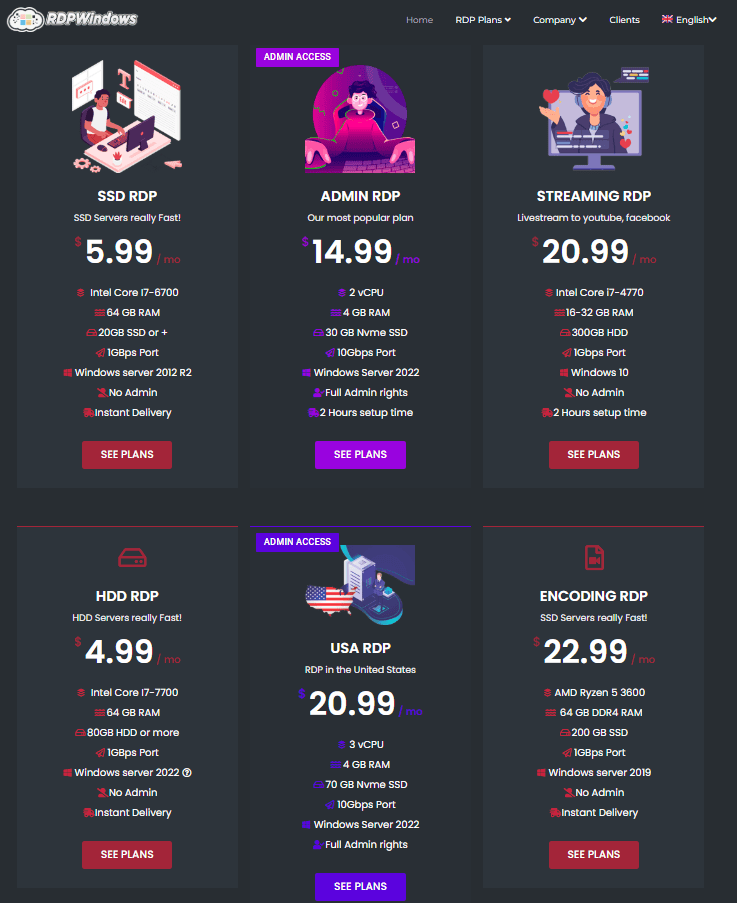
RDPWindows offers SSD RDP, HDD RDP, Admin RDP, Streaming RDP, and Encoding RDP.
This variety lets you pick the ideal plan for high-speed data processing, live-streaming, or video encoding.
Instant Activation & Speed
Enjoy rapid setup and robust performance. High-speed ports, up to 10Gbps on select plans, ensure you get instant RDP access without delays.
Enterprise-Grade Performance
Powered by top-tier Intel and AMD processors, RDPWindows delivers optimized performance and next-gen RDP reliability. Its robust infrastructure is built for demanding tasks.
Cost-Effective Solutions
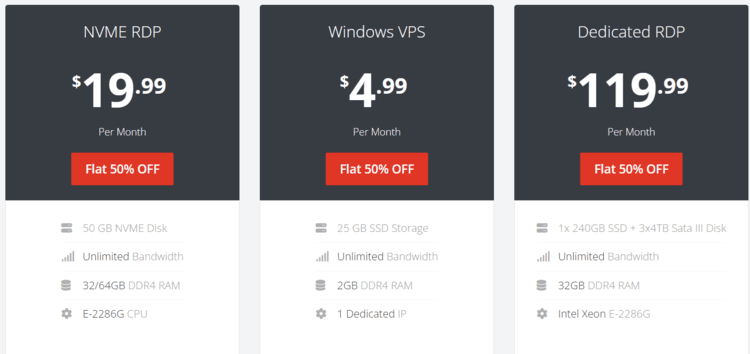
With plans starting as low as $4.99 per month, these premium RDP servers balance quality with budget-friendly pricing.
RDPWindows Notable Limitations
Restricted Admin Control
Not all plans include full admin access, limiting your ability to customize and manage software installations.
Geographic Constraints
With fewer server locations available, global connectivity may be compromised.
Activation Delays
A setup time of around six hours can hinder rapid deployment, which is critical for fast-paced environments.
Who Should Choose RDPWindows RDP Provider?
IT professionals and businesses looking for scalable, secure, and efficient remote desktop solutions will find RDPWindows to be an ideal choice.
3. DigiRDP
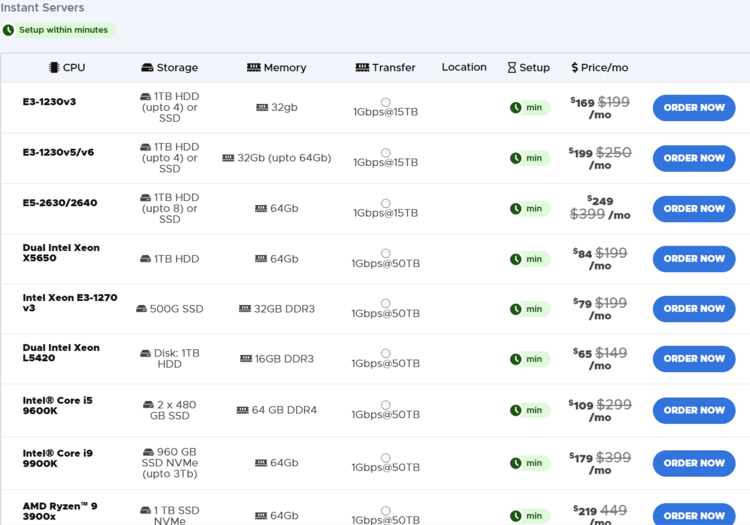
DigiRDP is emerging as one of the Top RDP Providers by delivering advanced, cloud-based remote desktop solutions.
With its secure platform, DigiRDP offers Secure RDP Hosting Solutions that combine state-of-the-art encryption, redundant infrastructure, and expert 24/7 support.
Key Features of DigiRDP
A close look at DigiRDP’s feature set highlights its advanced cloud-based RDP servers, robust security measures, and scalability, qualities that position it as one of the Top RDP Providers.
Blazing-Fast Performance
Leveraging SSD and NVMe storage ensures ultra-low latency and rapid data access.
Robust Security
DigiRDP implements industry-leading encryption, DDoS protection, and regular security updates for safe remote access.
24/7 Expert Support
A dedicated support team is available around the clock to ensure a seamless experience.
Affordable Pricing
Competitive rates make it easy for businesses and individuals to adopt high-quality RDP services.
DigiRDP Critical Drawbacks
Collaboration Limitations
The platform does not support multiple users, which can restrict teamwork.
Inflexible Plan Locations
Fixed server locations limit geographical flexibility.
Policy and Fee Issues
Users report a strict, sometimes vague refund policy and hidden fees.
Delayed Activation
Setup times can extend from 12 to 24 hours, potentially delaying project timelines.
Who Should Choose DigiRDP RDP Provider?
Remote teams, IT professionals, and growing businesses that demand secure, scalable, and high-performance cloud-based remote desktop solutions will find DigiRDP the ideal partner.
4. Contabo
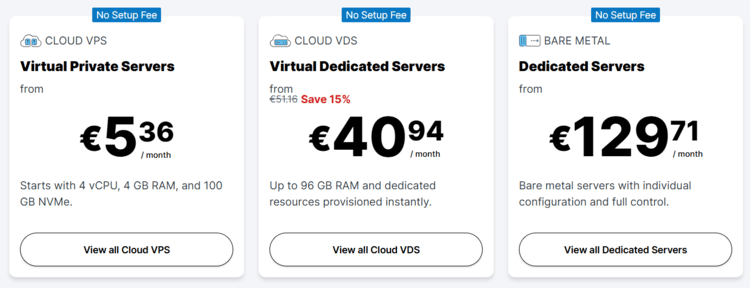
Contabo has built its reputation on offering remarkably Affordable VPS Hosting and dedicated servers without compromising performance.
Their extensive data center network and scalable infrastructure make them a favorite for users who demand robust, budget‑friendly solutions.
Key Features of Contabo
Contabo’s features highlight a perfect balance of affordability and performance, delivering scalable, budget friendly cloud solutions.
Cost Effective Solutions
Contabo’s competitive pricing ensures that both individuals and enterprises can access high performance cloud hosting without breaking the bank.
High Performance Hardware
Equipped with modern Intel Xeon and AMD processors, their servers deliver impressive speed and reliability.
Scalability & Flexibility
Whether you need a VPS for a small project or a dedicated server for a complex enterprise application, Contabo’s scalable plans adapt seamlessly to growing demands.
Contabo Critical Red Flags
Performance Issues
Multiple user reviews highlight slow server performance and extended downtime (up to 8+ hours), which can be detrimental for business-critical applications.
Support Shortcomings
Poor customer support responsiveness and difficulty in resolving issues are commonly cited.
Additional Charges
Extra fees for plan location changes, setup, and paid SSL certificates can erode the cost benefits.
Payment Limitations
The absence of cryptocurrency payment options and restricted full admin access on certain plans may not meet modern expectations.
Who Should Choose Contabo?
Businesses and tech enthusiasts seeking Budget Friendly Cloud Hosting with enterprise grade reliability and room to grow will find Contabo a smart, cost effective choice.
5. HostingPanel
HostingPanel stands out as an advanced Hosting Management Platform designed to simplify control over web hosting environments.
Its intuitive interface and robust feature set empower users to manage their digital assets effortlessly.
Key Features of HostingPanel
HostingPanel’s features transform complex hosting management into an intuitive, automated experience for effortless control.
Intuitive Control Panel
The platform provides a user friendly dashboard that streamlines tasks such as domain management, file transfers, and server monitoring.
Customization & Automation
With powerful tools for automation and scripting, HostingPanel caters to developers and administrators who require tailored hosting solutions.
Efficient Resource Management
The solution is optimized for resource allocation, ensuring minimal downtime and smooth operations.
HostingPanel Critical Considerations
Additional Costs for Full Control
Full admin access is available only with an extra fee, reducing immediate server management flexibility.
Limited Global Reach
With only two data center locations (in the Netherlands and USA), scalability for international operations is constrained.
Plan Rigidity
Monthly-only plans with hidden fees and activation delays of up to eight hours may lead to unpredictable expenses and slower deployment.
Who Should Choose HostingPanel?
IT managers, web developers, and hosting resellers who demand Advanced Hosting Management and centralized control over their digital infrastructure will benefit greatly from HostingPanel.
6. RDPhostings
RDPhostings is dedicated to delivering Enterprise‑Grade Remote Desktop Solutions.
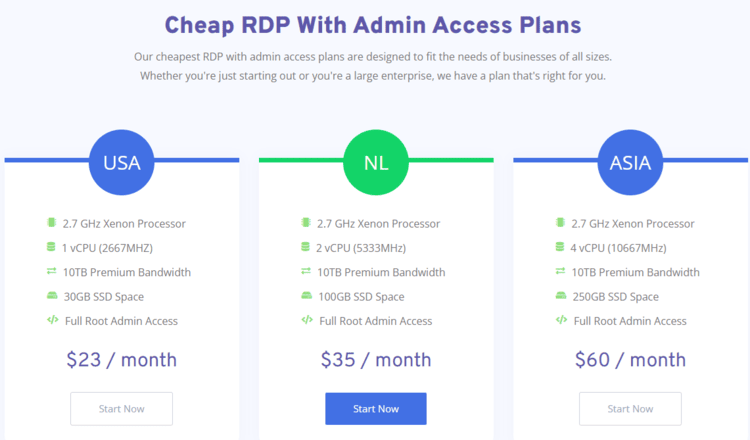
With a focus on secure, fast, and reliable remote access, they cater to organizations that rely on high‑performance RDP services for daily operations.
Key Features of RDPhostings
RDPhostings’s features ensure enterprise grade remote desktop performance with robust security and lightning fast access.
Optimized Performance
Leveraging high speed SSD storage and cutting edge processors, RDPhostings minimizes latency while delivering a smooth user experience.
Enhanced Security
Comprehensive encryption, multi layered firewall protection, and DDoS mitigation ensure that sensitive data remains secure at all times.
Flexible Deployment
With various plan options, from shared RDP to private dedicated environments—they meet the diverse needs of enterprises and remote teams alike.
RDPhostings Key Drawbacks
Limited Free Tier
Free plans often lack full admin privileges and have reduced resources.
Scalability Limits
Upgrading beyond the free tier can be slow and may incur additional costs.
Support Prioritization
Free users may experience lower support priority during issues.
Who Should Choose RDPhostings?
Large enterprises, IT departments, and remote workforces looking for Secure Remote Desktop Solutions with exceptional performance and robust security protocols will find RDPhostings an ideal partner.
7. ScalaHosting
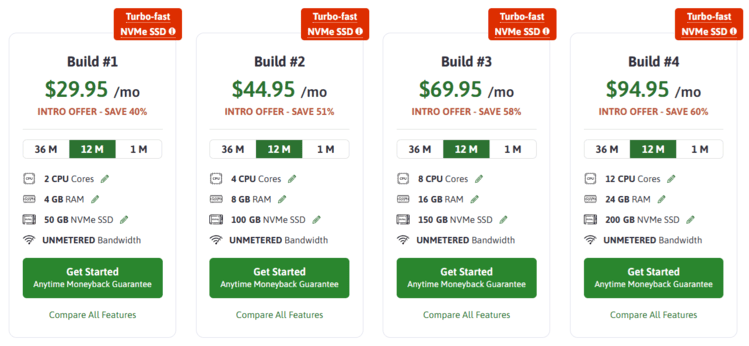
ScalaHosting is renowned for its Managed VPS Hosting and innovative control panel solutions.
The company offers an impressive blend of performance, security, and ease of use, making it a preferred choice for those who value quality managed hosting.
Key Features of ScalaHosting
ScalaHosting’s features combine managed VPS excellence with cutting edge security and an innovative control panel for seamless operations.
Superior Performance
With high performance hardware and SSD storage, ScalaHosting ensures rapid load times and consistent reliability.
Comprehensive Security
Advanced security measures, including automated backups, robust firewalls, and regular updates, protect your digital assets effectively.
ScalaHosting: Key Drawbacks
OS Limitations
Primarily Linux-based, with few robust Windows options.
Scaling Costs
Resource upgrades can become expensive as demands grow.
Onboarding Hurdles
Documentation and initial setup may require a steeper learning curve.
Who Should Choose ScalaHosting?
Companies and developers seeking Managed VPS Hosting with an intuitive control panel, top notch security, and reliable performance will appreciate the tailored solutions ScalaHosting provides.
Key Considerations for Selecting the Best RDP Provider
When choosing an RDP provider, it’s vital to assess more than just the basic connectivity.
Understanding what is latency matters here: look for ultra-low latency and high-speed performance to ensure your remote sessions are smooth and responsive.
Robust security measures such as advanced encryption, DDoS protection, and regular updates are essential to safeguard your data.
Additionally, ensure the provider offers scalability options, full administrative control, transparent pricing, and round-the-clock customer support to quickly resolve any issues and adapt to your growing needs.
How to Choose an RDP Provider Safely
A good RDP provider should give you more than a login and a low monthly price.
Remote desktop access can become a serious security risk when it is poorly configured. CISA’s remote access guidance highlights that remote access software is often targeted by attackers, which is why buyers should think about security from the beginning.
Use the tips below before choosing a provider.
Know What Type of RDP Setup You Actually Need
“RDP provider” can mean different things.
Some people mean a cheap Windows VPS they access through Remote Desktop. Others mean a managed remote desktop server. Larger teams may actually need Desktop as a Service or VDI.
| Option | Best for | What you manage | What to watch out for |
|---|---|---|---|
| Windows VPS with RDP | Developers, solo users, automation, testing, lightweight remote work | Security, updates, software, firewall rules, backups, users | Low-cost plans may leave most security work to you. |
| Managed RDP hosting | Small teams or non-technical users who want more support | Usually less than a raw VPS, depending on the provider | Quality varies. Check what “managed” actually includes. |
| DaaS or VDI | Businesses needing centralized desktops, compliance, identity control, and scaling | Policy, users, apps, data, and cloud configuration | Costs and setup can be higher, but control is usually stronger. |
Do not buy the cheapest RDP plan if you really need business-grade remote desktops.
That is like using a garden hose as a fire sprinkler. Technically water. Wrong job.
Make Security the First Filter
Before comparing speed, storage, or price, check security.
A serious RDP provider should support or clearly explain:
- Multi-factor authentication
- Network Level Authentication
- Firewall rules or IP allowlisting
- VPN or Remote Desktop Gateway options
- Strong password policy support
- User role management
- Regular patching
- Backup options
- DDoS protection where relevant
- Activity logs or access logs
- Clear abuse and acceptable use policies
Microsoft provides guidance for integrating Remote Desktop Gateway with Microsoft Entra multifactor authentication, which shows how important MFA is for secure remote access workflows. NIST’s digital identity guidance is also useful when discussing stronger authentication and account protection.
A provider that cannot clearly explain authentication, access control, and update responsibility should not be your first choice.
Do Not Judge the Provider by Price Alone
Low-cost RDP hosting can be useful for simple tasks, but the cheapest option is not always the safest or most reliable.
When comparing RDP pricing, check the full cost:
| Cost item | Why it matters |
|---|---|
| Monthly plan price | The base cost is only the starting point. |
| Setup fees | Some providers charge extra before activation. |
| Admin access | Full admin rights may cost more or may not be included. |
| Bandwidth limits | Heavy usage can become expensive if limits are unclear. |
| Storage upgrades | Cheap plans may have limited SSD or NVMe storage. |
| Backup fees | Backups may not be included by default. |
| Support level | Priority support may require a higher plan. |
| Location changes | Moving to another data center may cost extra. |
| Refund rules | Strict refund terms can make testing risky. |
A low monthly price is only useful if the provider is reliable, transparent, and secure enough for your use case.
Check Latency and Server Location
Remote desktop performance depends heavily on latency.
A powerful server can still feel slow if the data center is far away from the user.
Check:
- Data center locations
- Expected latency from your region
- Whether you can choose the region before buying
- Whether location changes are allowed
- Whether the provider offers test IPs or trial access
- Whether the plan uses SSD or NVMe storage
- Whether CPU and RAM are dedicated or shared
- Whether the provider oversells resources
For smooth daily use, choose a location close to the people using the remote desktop. For teams, choose a region that gives the best balance across users.
Understand Admin Access Before You Buy
Not every RDP plan gives full administrative control.
Before purchasing, check whether you can:
- Install your own software
- Change system settings
- Add or remove users
- Configure firewall rules
- Restart the server
- Access Windows updates
- Control security settings
- Use your required apps
- Configure backups
- Rebuild or restore the server
If you need full control, choose a plan that clearly includes admin access.
If you do not need full control, a managed option may be safer because the provider handles more of the technical setup.
Ask What “Managed” Actually Means
“Managed RDP” sounds reassuring, but it can mean very different things.
Ask what is included.
| Managed service area | Question to ask |
|---|---|
| Updates | Do they patch Windows and server software, or is that your responsibility? |
| Security | Do they configure firewall rules, MFA, access restrictions, and monitoring? |
| Backups | Are backups included, how often do they run, and how quickly can you restore? |
| Support | Do they help with OS issues, app issues, access problems, or only infrastructure? |
| Migration | Will they help move files, apps, and users from another provider? |
| Monitoring | Do they monitor uptime, resource usage, suspicious activity, and disk space? |
If the answer is vague, assume you are responsible.
That is safer than discovering during an outage that “managed” meant “we restart the box if it dies.”
Look for Clear Usage Policies
A serious provider should have a clear acceptable use policy.
Avoid providers that market themselves around suspicious use cases, “no questions asked” access, spam-friendly hosting, bot activity, or vague claims that sound designed to attract abuse.
For legitimate business use, clear rules are a good sign.
They protect the provider’s network, your uptime, and your reputation.
Check whether the provider allows your use case before buying, especially if you need:
- Automation
- Scraping
- Trading tools
- Streaming
- Encoding
- Browser-based workflows
- Team access
- High bandwidth
- Data processing
- Business applications
- Sensitive customer data
Do not assume every RDP plan allows every workload.
Check Backup and Recovery Before Something Breaks
Remote desktops are not magic. Servers fail. Updates break things. Users delete files. Credentials get exposed. Apps crash at the worst possible moment because computers enjoy drama.
Before buying, ask:
- Are backups included?
- How often are backups taken?
- How long are backups stored?
- Can you restore individual files?
- Can you restore the full server?
- Are backups stored separately?
- Are backups encrypted?
- Is backup restoration self-service or support-based?
- Is there an extra restoration fee?
- Have you tested restore times?
A backup you have never tested is more like a wish than a recovery plan.
Check Support Before You Need It
Support matters more with RDP than with many normal hosting plans because access issues can stop work immediately.
Check:
- Support hours
- Live chat availability
- Ticket response times
- Emergency support options
- Support language
- Whether support covers Windows issues
- Whether support covers installed apps
- Whether support helps with security setup
- Whether higher support levels cost extra
Read recent customer reviews, but do not rely on testimonials alone. Look for patterns around downtime, billing, refund problems, activation delays, and support response quality.
Choose DaaS or VDI for Team and Compliance Needs
For individual use, a Windows VPS with RDP may be enough.
For business teams, especially teams handling sensitive data, enterprise DaaS or VDI can be a better fit.
Microsoft describes Azure Virtual Desktop as a cloud VDI platform for securely delivering virtual desktops and apps with control across devices.
Consider DaaS or VDI if you need:
- Centralized user management
- Strong identity controls
- Conditional access
- Device policies
- App publishing
- Better auditability
- Scaling for many users
- Compliance support
- Easier offboarding
- Controlled access to business data
A cheap RDP server may solve today’s access problem but create tomorrow’s IT problem.
Build an RDP Security Checklist
Before using any RDP provider, run through this checklist:
| Security item | What to check |
|---|---|
| MFA | Use multi-factor authentication wherever possible. |
| NLA | Keep Network Level Authentication enabled. |
| Access restriction | Restrict access by VPN, gateway, firewall, or trusted IP where possible. |
| Least privilege | Only give admin rights to users who actually need them. |
| Updates | Apply Windows and software updates regularly. |
| Backups | Set backups and test restore procedures. |
| Logging | Monitor logins, failed attempts, and unusual access. |
| Session controls | Use idle timeouts and disconnect rules where appropriate. |
| Clipboard and drive sharing | Disable sharing features if they create data leakage risk. |
| Offboarding | Remove users quickly when they no longer need access. |
This is not just “IT paranoia.”
This is basic risk management for remote access.
Watch for RDP Provider Red Flags
Avoid providers with these warning signs:
| Red flag | Why it matters |
|---|---|
| No clear company information | You may struggle to get support or accountability. |
| No acceptable use policy | The network may attract abuse, which can hurt reliability. |
| Suspicious marketing language | Providers promoting shady use cases are not ideal for serious business work. |
| No security details | You need to know how access, updates, and protection are handled. |
| Unclear admin access | You may not be able to install or configure what you need. |
| Hidden fees | Cheap plans can become expensive after add-ons. |
| No backup information | You may have no recovery path after a mistake or outage. |
| Poor refund policy | Testing the service becomes risky. |
| No clear support scope | You may not know who is responsible when something breaks. |
RDP Provider Evaluation Checklist
Use this before choosing a provider:
| Checklist item | Question to ask |
|---|---|
| Use case | Do we need a Windows VPS, managed RDP hosting, or DaaS/VDI? |
| Security | Does the provider support MFA, NLA, firewall controls, and access restrictions? |
| Location | Is the data center close enough for low-latency sessions? |
| Performance | Are CPU, RAM, storage, and bandwidth enough for the workload? |
| Admin access | Do we get the level of control we need? |
| Support | Can we get help quickly when access or uptime matters? |
| Backups | Are backups included, tested, and restorable? |
| Pricing | Are all fees, limits, renewals, and add-ons clear? |
| Policy | Does the acceptable use policy allow our intended workload? |
| Reviews | Do recent reviews show reliable uptime and responsive support? |
Final Tip: Choose the Safest Option That Fits the Job
The best RDP provider is not always the cheapest or the fastest.
It is the provider that fits your actual workload, gives you the right level of control, explains security clearly, supports your region, offers transparent pricing, and does not leave you guessing when something breaks.
For a small test project, a basic Windows VPS with RDP may be fine.
For daily business work, team access, sensitive data, or compliance-heavy workflows, look harder at managed options, DaaS, or VDI.
Remote access is powerful.
Treat it like a front door, not a toy key.
FAQ
What is an RDP provider?
An RDP provider gives you access to a remote Windows environment through Remote Desktop Protocol. Depending on the provider, this may be a Windows VPS, a managed remote desktop server, or a larger DaaS/VDI solution for teams and enterprises.
Is RDP hosting safe?
RDP hosting can be safe when it is configured and managed properly. The risk increases when remote access is exposed without strong authentication, access restrictions, patching, logging, and monitoring. CISA’s guidance on securing remote access software is a good source to link here because it explains why remote access tools need careful security controls.
What should I look for in an RDP provider?
Look for strong security controls, multi-factor authentication support, Network Level Authentication, firewall or IP restrictions, clear admin access, reliable performance, nearby data centers, transparent pricing, backups, support quality, and a clear acceptable use policy.
What is the difference between RDP hosting and a Windows VPS?
A Windows VPS is a virtual Windows server that you usually manage yourself and access through RDP. RDP hosting is a broader term that may include Windows VPS plans, managed remote desktop servers, or business remote desktop environments. The main difference is how much the provider manages for you.
What is the difference between RDP, DaaS, and VDI?
RDP is the protocol or access method used to connect to a remote Windows environment. DaaS means Desktop as a Service, where cloud desktops are delivered as a managed service. VDI means Virtual Desktop Infrastructure, usually with more centralized control for business or enterprise environments. Microsoft describes Azure Virtual Desktop as a cloud VDI platform for securely delivering virtual desktops and apps remotely.
Should I choose cheap RDP hosting?
Cheap RDP hosting may be fine for simple testing or low-risk use, but it is not always the right choice for business-critical work. Check security, uptime, backups, support, refund policy, server location, and admin access before choosing based on price.
Why is multi-factor authentication important for RDP?
Multi-factor authentication adds another layer of protection if a password is stolen, guessed, or reused. Microsoft provides documentation for integrating Remote Desktop Gateway with Microsoft Entra multifactor authentication, which is useful to cite when explaining MFA for remote desktop access.
What is Network Level Authentication?
Network Level Authentication is a security feature that requires users to authenticate before a full remote desktop session is established. This reduces exposure compared with allowing unauthenticated sessions to reach the remote desktop environment. UC Berkeley’s RDP security guidance recommends leaving NLA enabled for supported Windows systems.
Should RDP be exposed directly to the internet?
For business use, direct exposure is usually not ideal. A safer setup often involves VPN access, a Remote Desktop Gateway, firewall restrictions, IP allowlisting, MFA, and logging. CISA and NSA remote access guidance recommends reducing attack surface and using strong authentication for remote access systems.
What server location should I choose for RDP?
Choose a server location close to the people who will use the remote desktop. Lower latency usually makes remote sessions feel smoother, especially for daily work, browser use, dashboards, development tools, or visual applications.
Do I need full admin access?
You need full admin access if you want to install software, change system settings, manage users, configure security, or control the server yourself. If you do not want that responsibility, a managed RDP or DaaS option may be a better fit.
Are backups included with RDP providers?
Not always. Some providers include backups, some charge extra, and some leave backups entirely to the user. Before buying, check backup frequency, retention, restore process, encryption, storage location, and whether restoration costs extra.
Can businesses use RDP for remote work?
Yes, but businesses should choose remote desktop access carefully. For teams, it is usually better to use identity controls, MFA, device policies, centralized management, monitoring, backups, and clear offboarding. Enterprise DaaS or VDI may be better than a basic cheap RDP server for serious business use.
What are RDP provider red flags?
Red flags include unclear company details, suspicious marketing language, no acceptable use policy, no security information, hidden fees, vague refund rules, poor support reviews, unclear admin access, no backup details, and no explanation of who handles updates or patching.
How can AI help teams manage RDP provider research?
AI can help summarize provider pages, compare plan features, draft vendor questions, create checklists, turn support replies into decision notes, and write internal recommendations. But a human should still verify pricing, policies, security claims, and technical requirements before buying.
Other Interesting Articles
- AI LinkedIn Post Generator
- Gardening YouTube Video Idea Examples
- AI Agents for Gardening Companies
- Top AI Art Styles
- Pest Control YouTube Video Idea Examples
- Automotive Social Media Content Ideas
- Plumber YouTube Video Idea Examples
- AI Agents for Pest Control Companies
- Electrician YouTube Video Idea Examples
- How Pest Control Companies Can Get More Leads
- AI Google Ads for Home Services
- 60-Second Training Videos Are the New Corporate Standard
- Cybersecurity PR Pricing: Retainers, Deliverables & ROI
- Best AI Tools for Product Consistency in E-Commerce Video
Master the Art of Video Marketing
AI-Powered Tools to Ideate, Optimize, and Amplify!
- Spark Creativity: Unleash the most effective video ideas, scripts, and engaging hooks with our AI Generators.
- Optimize Instantly: Elevate your YouTube presence by optimizing video Titles, Descriptions, and Tags in seconds.
- Amplify Your Reach: Effortlessly craft social media, email, and ad copy to maximize your video’s impact.