
9 Best Email Subject Line Generators and Testers: Which Ones Explain the Score?

Paste the same nonsense line into two or three popular testers and you will often get scores 20 or 30 points apart, which is why you should not trust a single badge.
In this guide, we pin down what each tool measures, show who shares their math, and chart the fastest path from draft to data-proven winner, all drawn from live product pages and privacy docs checked on September 10, 2026.
Chapters
Free first pass: InboxArmy’s subject line tester

Looking for a quick reality check? Paste one of your recent subject lines into InboxArmy’s free tester, note the 0-100 score plus any red-flag comments it surfaces, and keep the tab open. We’ll revisit those notes when we compare this tool with eight others and a live A/B framework later in the article.
Which tools actually explain their score?
Below is the fast-track answer: one sentence per contender so you can see who opens the hood and who only flashes a badge.
- SubjectLine.com: Draws on 3 billion tracked emails and more than 800 rules, then flags exactly which ones your line triggered.
- MailerLite: Built-in A/B testing with up to five subject variants and a winner sent automatically to the rest of the list.
- Omnisend: Pairs a free score, AI generator, and inbox preview with built-in A/B tests, ideal for promo-heavy ecommerce flows.
- Mailmeteor: Gives a practical score plus GPT-powered rewrites you can paste straight into Gmail, all at no cost.
- BrandJet: Labels seven factors (length, spam triggers, personalization, emojis, power words, readability, question format) so cold-email senders know what to tweak.
- Jacquard: Skips heuristics and runs continual experiments on your own list, learning which language lifts revenue over time.
- CoSchedule: Breaks every word into common, uncommon, emotional, and power buckets for writers who want a close-up view of tone balance.
- StoryLab.ai: Generates subject ideas in 17 languages but doesn’t issue a numeric grade, so use it to brainstorm first and test elsewhere.
For a zero-cost warm-up, keep your earlier InboxArmy score handy and see how its advice stacks up against the specialists above.
Email subject line generator vs tester vs A/B testing tool
Before we rate anything, let’s align on what each tool in the stack does.
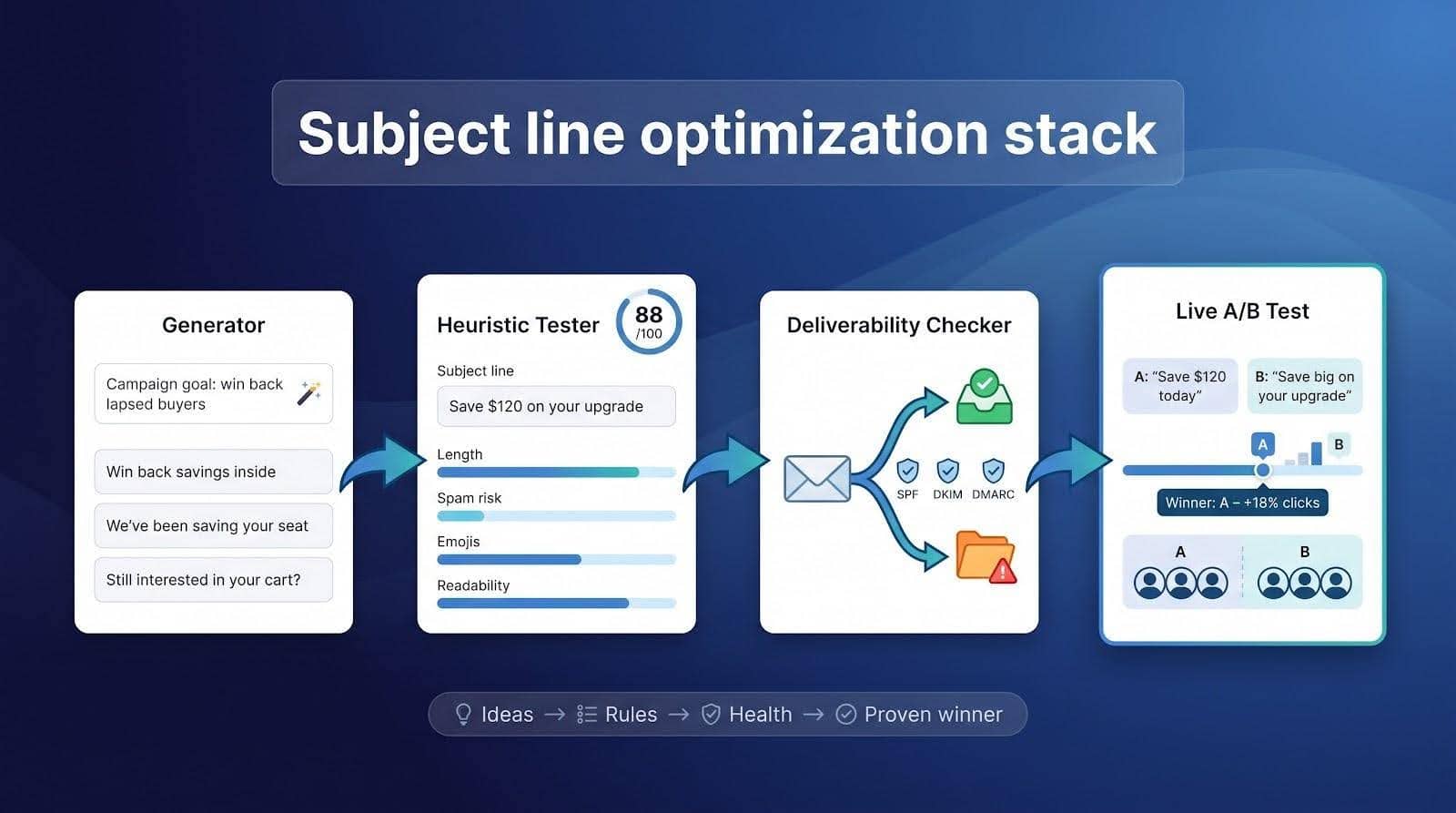
Generator
A generator is a brainstorming engine. Feed it a short prompt (campaign goal, product name, or a desired mood), and it returns half a dozen fresh options in seconds. Speed and variety sit at the core, but the copy is draft material. Generators don’t know your deliverability history or audience quirks. Treat their output as raw clay: tweak tone, length, and language, then send the best two or three lines to a tester or straight into a split test.
Heuristic tester (analyzer)
Testers grade against a rulebook, not a subscriber list. They count characters, flag “spam” phrases, weigh emotional versus common words, and often reward numbers, emojis, or questions. The same nonsensical line can score very differently from one tester to the next. That gap shows that a high mark means “fits our template,” not “promised to win.” Use the feedback to fix mechanics (double spaces, all-caps, mobile clipping), then promote the top scorers to a live test.
Deliverability checker
Copy is only half the inbox battle. Even a flawless headline lands in spam if SPF, DKIM, DMARC, or complaint rates are off. InboxArmy’s free deliverability test sends your message to seed addresses at Gmail, Outlook, Yahoo, and other services, then reports whether each copy landed in the main inbox, the Promotions tab, or spam, alongside SPF, DKIM, and DMARC results, blacklist status, and a spam score. The checker sits right beside the brand’s subject-line tester, so you can verify copy mechanics and infrastructure health in one loop before scheduling a send. Some go further, highlighting broken DNS records or spam-trap hits. They rarely comment on style; think of them as a technical audit you run before big promos, after a domain change, or whenever open rates drop for reasons a copy tester can’t explain.
Live A/B (or multivariate) test
This is the only truly predictive step. Split your list into equal slices, change one variable (the subject line), and crown the winner on a real metric such as click-through, revenue, or qualified replies. ESPs like MailerLite and Omnisend automate the math: pick the metric, set a minimum sample (use the ESP’s significance calculator before calling a winner), and let the platform route the remainder of the list to the champ. Give the test a full business cycle; Apple Mail Privacy Protection can inflate early opens, and smaller samples need time for statistical confidence. Feed the outcome back into your generator and tester for the next campaign, and the loop tightens with every send.
How we evaluated and ranked the tools
Research freeze
September 10, 2026. All facts come from current product pages, pricing tables, and privacy policies. No dusty screenshots or second-hand blog posts.
Source order we followed
- Vendor documentation (primary evidence)
- Recent comparison listicles and software directories (discovery only)
100-point rubric
- 20 pts: Score transparency (factors named, rule count, data-set size)
- 30 pts: Actionable feedback (15) + real-world validation (15)
- 50 pts: Deliverability extras, language support, price, workflow fit, usability, privacy, and documentation
Every product was scored from its public product page, pricing table, and privacy policy. Vendors that hid critical details lost transparency points; tools with gated pricing lost value points.
Publisher note: InboxArmy owns one of the featured testers. We applied the same rubric and let the math dictate its position.
Nine tools at a glance
Skim first, then dig deeper. The grid below helps you spot each contender’s strengths and see who really opens the black box, with special attention to Factors shown and A/B built-in.
| Tool | Best for | Free tier |
Factors shown |
Weights/data disclosed |
AI rewrites |
Subject + preheader preview |
A/B built-in |
Starting paid price* |
|---|---|---|---|---|---|---|---|---|
| InboxArmy | Zero-cost first pass | ✅ | ✅ | ❌ | ✅ | ❌ | ❌ | Free |
| MailerLite | Testing workflow | ✅ | ⚪ | ❌ | ❌ | ✅ | ✅ | Plan-based* |
| SubjectLine.com | Score transparency | ✅ | ✅ | ⚪ | ✅ | ❌ | ❌ | $9.99 yr* |
| Omnisend | Ecommerce workflow | ✅ | ⚪ | ❌ | ✅ | ✅ | ✅ | Plan-based* |
| BrandJet | Cold outreach | ✅ | ✅ | ⚪ | ❌ | ⚪ | ✅ | $79 mo* |
| Mailmeteor | Free score + AI | ✅ | ⚪ | ❌ | ✅ | ❌ | ❌ | Free |
| Jacquard | Enterprise testing | ❌ | ⚪ | ❌ | ✅ | ✅ | ✅ | Contact |
| CoSchedule | Word feedback | ✅ | ✅ | ❌ | ❌ | ❌ | ❌ | Free |
| StoryLab.ai | Multilingual ideas | Limited | n/a | n/a | ✅ | ❌ | ❌ | $15 mo* |
Public list prices or lowest paid tiers verified September 10, 2026.
A strong number on the right cannot rescue a weak showing on the left. Use this table as a filter, then keep reading for real-world pros and cons.
InboxArmy: free first-pass tester
InboxArmy’s subject-line checker feels effortless: no login, no credit card, and a 0-100 score in seconds on a single-page interface. It sits alongside five other free tools (a subject line generator, a deliverability test, an HTML email checker, an ROI calculator, and an AI email writer), so you can brainstorm, score, and spot spam risk without opening new tabs.
The page is open about what it grades: length, clarity, urgency, spam-risk wording, the balance of power, emotional and filler words, reading grade, sentiment, skimmability, and a mobile versus desktop preview. What it does not publish is the weighting behind each factor, so a high score is a mechanics check, not a prediction. The FAQ states that subject lines are processed in real time and are not stored, shared, or used for training, which makes it safe for embargoed copy. Use it to catch over-length subjects, spam-risk words, or emoji bloat, then move the survivors to a live A/B split to learn what your audience clicks.
MailerLite: best built-in testing workflow
MailerLite earns its place through workflow, not a standalone score. The same dashboard lets you launch an A/B test with up to five subject variants or a multivariate test with eight versions. Pick the winner metric (opens, clicks, or conversions), and the system automatically sends the remaining list to the champ. No CSV exports, no copy-paste errors.
Upgrading lifts list-size caps and unlocks multivariate testing on the Comfort or Power plans. For most small businesses, a two-variant A/B test is plenty.
Bottom line: a direct runway from draft to data-proven winner inside the ESP you already use. That is why it sits high on our scoreboard.
SubjectLine.com: best for scoring transparency
SubjectLine.com shares more data than any other public tester. It claims 3 billion tracked emails, 800 rule checks, and a line-by-line report that shows which rules your draft hits. Paste a subject and you get a score plus a rule-by-rule read-out of the deliverability and marketing checks your line triggered.
The free tier offers nine AI rewrites per scored subject. A paid upgrade ($9.99 per year) adds open-rate predictions, industry benchmarks, and project folders. Although SubjectLine.com is now owned by Constant Contact, it still runs as a standalone tool, so no ESP signup or list import is required.
One caution: the platform discloses rule counts and data-set size but not the exact weighting. A 92 is only a heuristic signal, not a promised 92 percent open rate. Use the score to shortlist candidates, then confirm the winner with a live split test.
Omnisend: best for ecommerce workflows
Promotional emails need speed, consistency, and proof. Omnisend puts those steps in one lane. Open the free tester and you’ll see a familiar 0-100 score plus line-by-line feedback on length, word choice, and scannability. The same account offers an AI generator that can shorten, translate, or rewrite a subject; it also pairs each version with a matching preheader so mobile users see a coherent duo.
Testing happens inside the platform. Every plan, including the free tier, supports an A/B split: choose two subject lines, set the winner metric, and let Omnisend randomise delivery, then send the remainder to the champ. Omnisend’s significance calculator tells you whether the gap between two variants is real before you crown a winner, a practical guardrail many ESPs skip.
Pricing scales with contact count, but small stores can stay on the free plan (250 contacts, 500 emails a month) until they add SMS or outgrow those caps. Remember, the score is heuristic; an emoji-heavy line can still break 90. Use the grade to filter drafts, then rely on the live split to pick the revenue winner.
BrandJet: emerging cold-email pick
Cold outreach follows its own rules. Personalization tokens matter more than emojis, and spam filters scrutinize unfamiliar domains. BrandJet’s free tester mirrors that reality with a seven-factor scorecard (length, spam triggers, power words, personalization, emoji use, readability, and question framing), rolled into an overall band from Poor to Excellent so writers know what to tweak.
Because the tester lives inside BrandJet’s multichannel platform, the same subject can roll into an email-plus-LinkedIn cadence and then be A/B-tested across the full sequence. Pricing for the suite starts at $79 per month, but the subject-line tool itself stays free.
Caveat: the company is young, and its privacy statement doesn’t state how long tester inputs are stored. Use a legacy tool for embargoed copy, then return to BrandJet when transparency improves. For outbound teams iterating daily, a visible category score plus multichannel context makes it a promising option to watch.
Mailmeteor: best free score + AI rewrites
Mailmeteor is built for Gmail users who value speed. Paste a draft subject, and the tool returns a 0-100 grade based on length, punctuation, spam words, emojis, and basic grammar. Each flag links to a brief explainer so you see why a stray exclamation point cost five points.
Below the score, GPT-powered alternatives appear, each with its own score, and you can retest until one matches your voice (there is a daily fair-use limit). Mailmeteor’s privacy note says inputs are not saved or shared, though requests may be logged temporarily for maintenance. No account or browser extension is required.
The tester stops at heuristics; it doesn’t offer A/B splits or deliverability checks. Yet if you already run Gmail mail merges, this free mix of score plus instant rewrites is the fastest way to turn “Newsletter #14” into a headline worth opening.
Jacquard: enterprise-grade continuous experimentation
Jacquard (formerly Phrasee) treats subject-line optimisation as an ongoing experiment, not a one-off score. Instead of returning a single grade, it generates dozens of subject-and-preheader pairs, sends them to random audience slices, and learns which language lifts click-throughs, revenue, or in-store redemptions for your brand. Each new campaign refines the model, so performance compounds with volume.
Implementation sits in the Fortune-500 bracket. Connect Jacquard to Salesforce Marketing Cloud or another enterprise ESP, define success metrics, and let the system iterate. Pricing is available only through sales, and rollout usually needs developer help.
If you send high-frequency promos across multiple regions, continuous optimisation and built-in multilingual generation can deliver gains a heuristic tester can’t touch. For large teams, that closed feedback loop turns marginal lifts into measurable return on investment.
CoSchedule: deep word-balance feedback
CoSchedule’s free tester zeroes in on copy diagnostics, not AI generation. It bins every word into common, uncommon, emotional, and power buckets, then shows a pie chart of the mix. You’ll also see flags for sentiment, question marks, numerals, emojis, and skimmability, each linked to a one-sentence tip: swap a vague noun for a verb, trim two characters for mobile, or move the discount up front.
A version-history panel stores recent scores side by side so stakeholders can track changes between drafts. What CoSchedule lacks is predictive validation; it benchmarks wording against best-practice heuristics but doesn’t learn from past campaigns. Run a nonsense phrase through CoSchedule and one or two other tools and the scores will not agree, proving why a single grade should never decide a send.
For writers who care about cadence and adjective balance, CoSchedule delivers the most detailed textual X-ray. Pair it with a deliverability scan and a small A/B test to turn those insights into measurable lift.
StoryLab.ai: multilingual ideation engine
StoryLab.ai is a generator, not a tester. Feed it a brief (product, audience, or tone) and it produces subject-line ideas in 17 languages and 13 writing styles, with toggles for humor, urgency, curiosity, or straight clarity. Because the tool focuses on ideation, it returns no numeric score; you’ll run the best drafts through a tester or an A/B split elsewhere.
- Pricing
- 3 free runs per month
- 100 runs for $15
- Unlimited runs for $19
No deliverability scan or performance history appears, and that choice is intentional. StoryLab prioritises quantity and linguistic reach, leaving statistical proof to downstream tools. If you switch between Spanish promos on Monday, French lifecycle messages on Tuesday, and English flash sales on Friday, this generator supplies fast, multilingual fodder without hiring extra translators.
What subject-line scores actually measure
Length and truncation
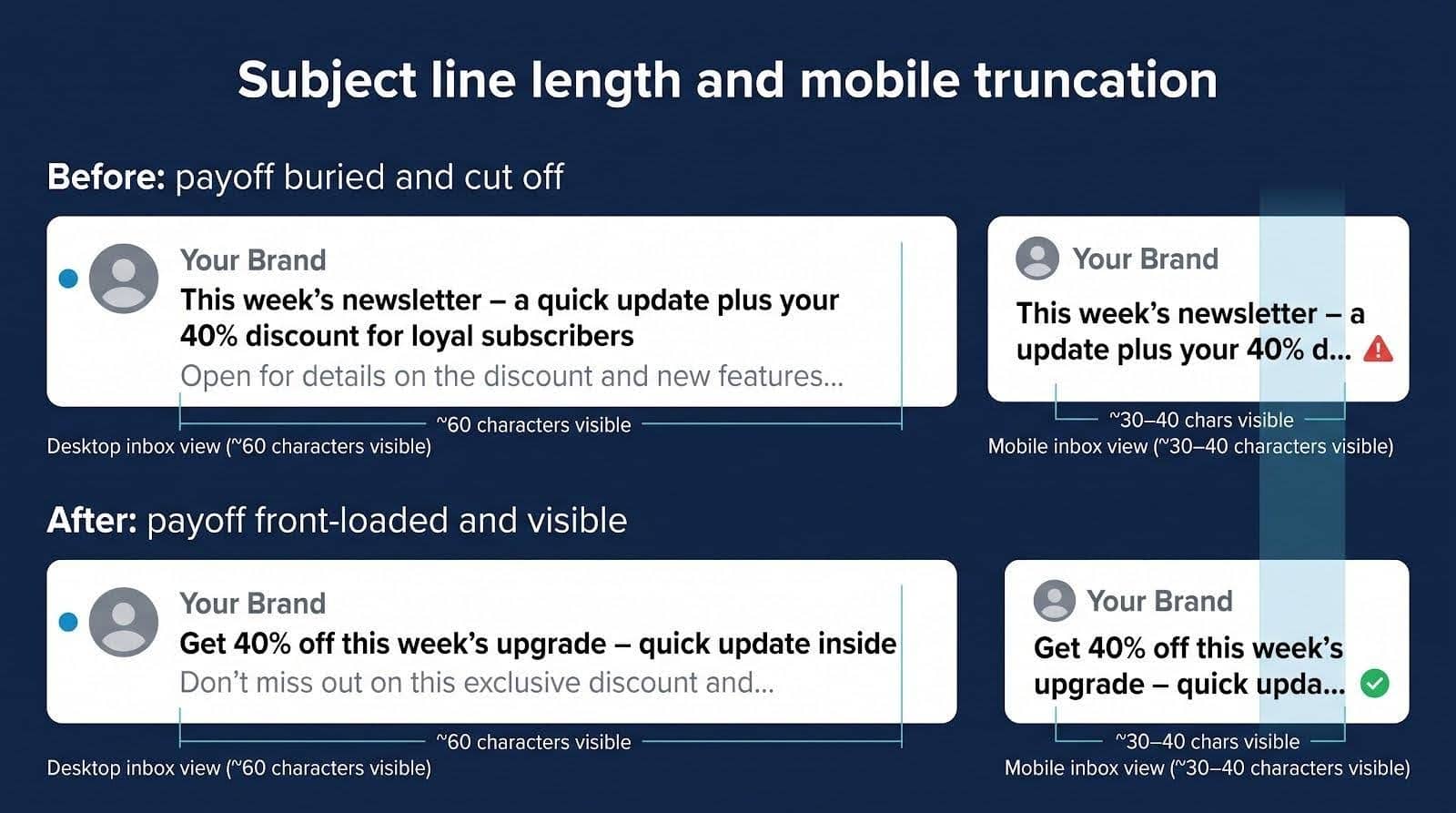
Most testers start with character, word, and pixel counts, then estimate where a mobile inbox will cut the line. Gmail clips around 60 characters, and many iPhones show about 30. Treat length alerts as visibility signals. Move the benefit to the front, trim filler, or shift overflow into the preheader, then focus on wording.
Word mix and “power” vocabulary
Dictionaries tag words as common, uncommon, emotional, or power. Variety can lift a heuristic score, but Mailchimp’s current guidance is simpler: keep to about 9 words and 60 characters, no more than 3 punctuation marks, and at most one emoji. Use the read-out as a prompt, not a prescription.
Readability and scanability
Tools often display a Flesch-Kincaid grade, even though the formula was built for paragraphs, not eight-word teasers. Short, active words still reduce friction. Watch for “wall-of-nouns” subjects and leading ellipses that bury meaning off-screen.
Spam wording and filter heuristics
Flags for terms like free or urgent reflect early spam filters, but modern inboxing leans harder on SPF, DKIM, DMARC, and complaint rates. A permission-based sender with strong authentication can safely run “free shipping” now and then; a domain with a 0.4 percent spam-complaint rate cannot.
Predicted opens and the Apple MPP reality check
Paid tiers such as SubjectLine.com Pro offer “predicted open rates,” but since Apple Mail Privacy Protection began pre-loading images in late 2021, lists heavy with Apple Mail traffic see opens that no longer reflect real reads. Treat these predictions as directional heuristics, and validate with live tests that track clicks, revenue, or replies.
How to run your own test protocol
To compare tools yourself, run a seven-line control panel in one sitting:
- Standard newsletter
- Flash-sale promo
- Polite cold-email opener
- Long mobile-truncation line
- Emoji-plus-caps shout
- Total nonsense phrase
- Natural Spanish translation
For each run, log:
- 0-100 numeric score
- Factors shown, and advice given
- Time to result or login friction
- AI rewrite or preheader preview availability
- Whether history was stored by default
- Stated policy on copy retention
Flag any score gap larger than 20 points as “score whiplash” and use those discrepancies to test vendors’ transparency claims. Swap in your own subject lines (add another language if you localise) and rerun the benchmark every quarter. The data will speak louder than any marketing copy.
How to validate a subject line with real subscribers
Tools can shortlist contenders, but only your audience crowns the winner. Follow this five-step test.
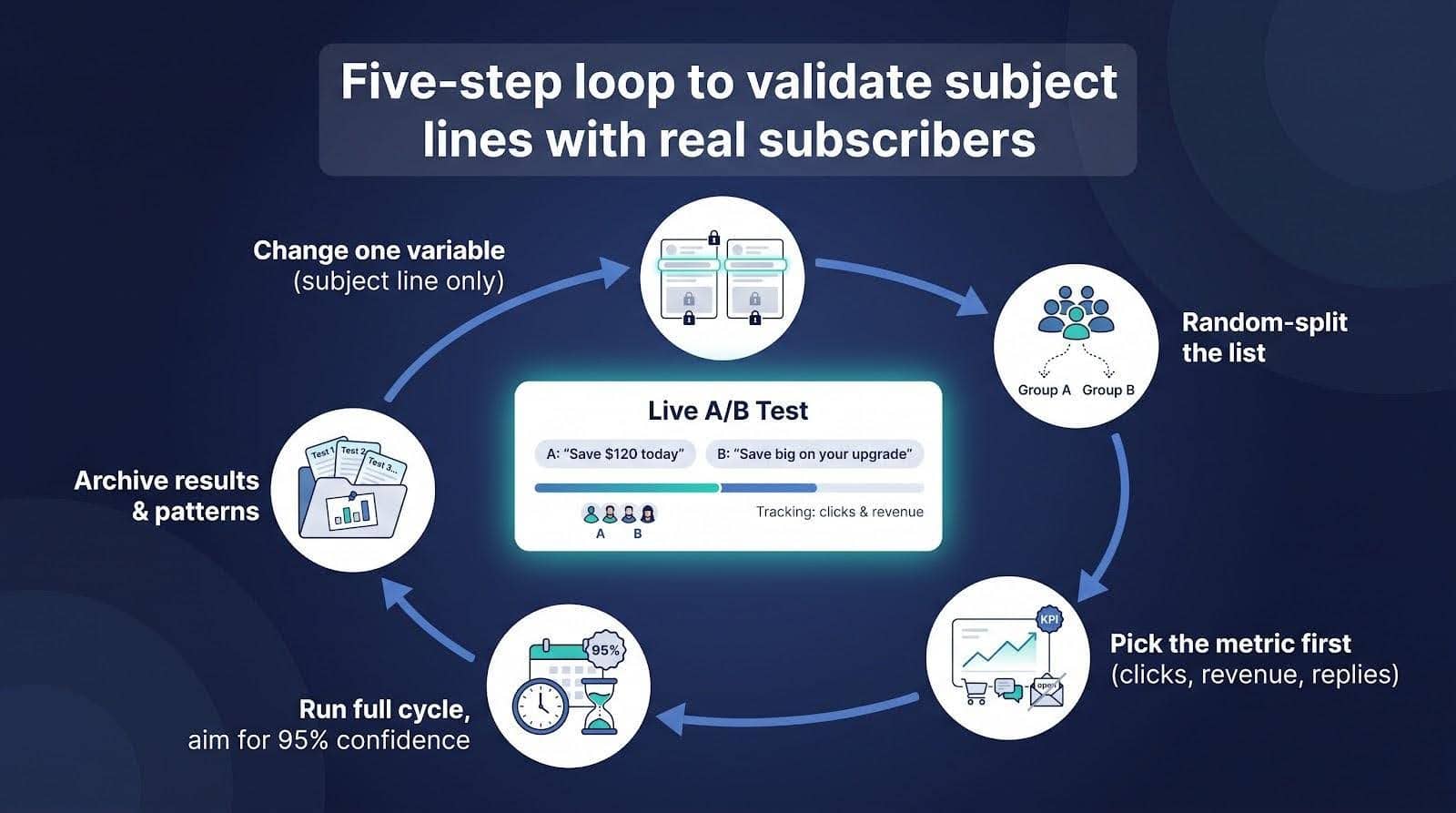
- Change one variable. Keep sender name, preheader, creative, send time, and segment constant; vary only the subject line.
- Random-split the list. Most ESPs handle this automatically, yet confirm each bucket mirrors the same mix of regions, devices, and engagement history.
- Pick the metric first. Ecommerce teams often track revenue per email, SaaS looks at trial starts, and cold-email teams count qualified replies. Opens sit last because Apple Mail Privacy Protection inflates them.
- Run long enough. Aim for at least one full business cycle and 95 percent statistical confidence (use your ESP’s calculator). Avoid calling a winner after an hour of trickle data.
- Archive the result. Patterns surface only when you stack multiple tests; for instance, questions may beat statements for product updates, while statements win for discounts.
Repeat this loop every major campaign, as audiences shift and filters evolve.
Quick subject-line improvement tips
- Lead with the payoff (discount, deadline, or pain point) so it shows in the first 30-40 characters on mobile.
- Draft the preheader next; make the pair read like one sentence split by a colon.
- Read the line aloud, and if you stumble, rewrite.
- Replace vague superlatives with specifics (“Save $120 today” beats “Save big”).
- Personalise only when the data makes the message more relevant, not robotic.
- Use one emoji as emphasis; three feel like a bargain bin.
- Maintain SPF, DKIM, DMARC, and list hygiene; copy can’t convert from the spam folder.
Which tool should you choose?
- InboxArmy: fastest free scan for obvious length or spam-word issues
- MailerLite: best testing workflow thanks to built-in A/B tests with up to five variants and automatic winner sends
- SubjectLine.com: most transparent on why a line scores the way it does (3 billion emails, 800 rules)
- Omnisend: ideal for ecommerce; generator, tester, and A/B revenue tracking in one dashboard
- BrandJet: cold-outreach pick with a seven-category scorecard and multichannel cadence tools
- Mailmeteor: Gmail mail-merge users get a free 0-100 score plus GPT-powered rewrites, no signup
- Jacquard: enterprise-scale continuous optimisation for lists in the seven-figure range
- CoSchedule: deepest word-balance analysis for writers who want granular diagnostics
- StoryLab.ai: quickest multilingual idea generator (17 languages, 13 styles) when inspiration runs dry
Choose the tool that fits your workflow, then pair it with a disciplined A/B test. Stop guessing which subject wins, and let your subscribers prove it.
Where subject-line tools are heading
First-party models replace generic averages. Platforms such as Jacquard already train on a sender’s own clicks and revenue; expect mid-tier tools to ship lightweight models that learn from your recent campaigns, not a pooled data lake.
Subject and preheader become one scoring unit. Mobile inboxes display both lines together, so emerging testers will grade the pair and flag duplication or contradiction.
Segment-level language surfaces in real time. Instead of one winner per send, AI will choose a line for VIP shoppers, deal hunters, or dormant users milliseconds before launch.
Click and revenue models overtake opens. Since Apple Mail Privacy Protection (2021) began pre-loading images for Apple Mail users, open rates stopped reflecting real reads, so vendors are pivoting to click-through and order-value dashboards.
Localization moves past translation. Next generation generators will swap idioms, urgency cues, and even emojis by region, reducing manual editing.
Result: less guesswork, more explainability, and a feedback loop that tightens with every campaign.
Frequently asked questions
What’s the best free subject-line tester?
SubjectLine.com discloses the largest dataset (3 billion emails, 800 rules), and InboxArmy names every factor it grades with no login. Use both, then A/B the finalists.
Are subject-line testers accurate?
They are accurate at spotting mechanical issues but not predictive of your list’s behaviour. Only a live split shows real performance.
Which tester explains its score best?
SubjectLine.com publishes rule counts and dataset size, while InboxArmy and BrandJet show factor categories but keep exact weights private.
Can a tester tell if my email will hit spam?
No. Placement depends more on SPF, DKIM, DMARC, complaint rate, and list hygiene than on individual words.
How long should an email subject be?
Place the key benefit in the first 30-40 characters so it appears on most mobile screens.
Do emojis boost opens?
Sometimes. Results vary by audience and industry, so test one emoji against none before you commit.
Should I use AI-generated subjects without editing?
Use AI for ideas, then edit for brand voice, specificity, and compliance before A/B testing.
How do I test subject lines after Apple MPP?
Measure clicks, revenue, or replies; randomise groups, and ignore early open spikes caused by auto-downloads.
What’s the difference between a generator and a tester?
A generator creates options, and a tester evaluates them. Combine both, then validate with an A/B test.
Other Interesting Articles
- AI LinkedIn Post Generator
- Gardening YouTube Video Idea Examples
- AI Agents for Gardening Companies
- Top AI Art Styles
- Pest Control YouTube Video Idea Examples
- Automotive Social Media Content Ideas
- Plumber YouTube Video Idea Examples
- AI Agents for Pest Control Companies
- Electrician YouTube Video Idea Examples
- How Pest Control Companies Can Get More Leads
- AI Google Ads for Home Services
- 60-Second Training Videos Are the New Corporate Standard
- Cybersecurity PR Pricing: Retainers, Deliverables & ROI
- Best AI Tools for Product Consistency in E-Commerce Video
Master the Art of Video Marketing
AI-Powered Tools to Ideate, Optimize, and Amplify!
- Spark Creativity: Unleash the most effective video ideas, scripts, and engaging hooks with our AI Generators.
- Optimize Instantly: Elevate your YouTube presence by optimizing video Titles, Descriptions, and Tags in seconds.
- Amplify Your Reach: Effortlessly craft social media, email, and ad copy to maximize your video’s impact.