
How B2B Marketing Teams Combine AI, Live-Action Filming, and 3D Product Visualization
A technical product launch can need three different kinds of evidence in the same video. A camera can show the hardware operating. A screen recording can show what the user does. An animation can explain a mechanism hidden inside the enclosure. Choosing one production method for the whole story can leave the most important question unanswered.
Consider a hypothetical laboratory instrument controlled through software. The marketing team needs to explain its physical footprint, an internal process, and an operator’s workflow. Filming the instrument covers the first. Opening it for the camera might be impractical, while a beautiful exterior shot tells us little about the software.
Build the brief around what each scene must establish. Use filming for observable activity, screen capture for the interface, and reviewed 3D or graphics for explanations that need visual construction. AI assistance can support parts of that workflow, with a separate decision about whether generated imagery belongs in the finished piece.
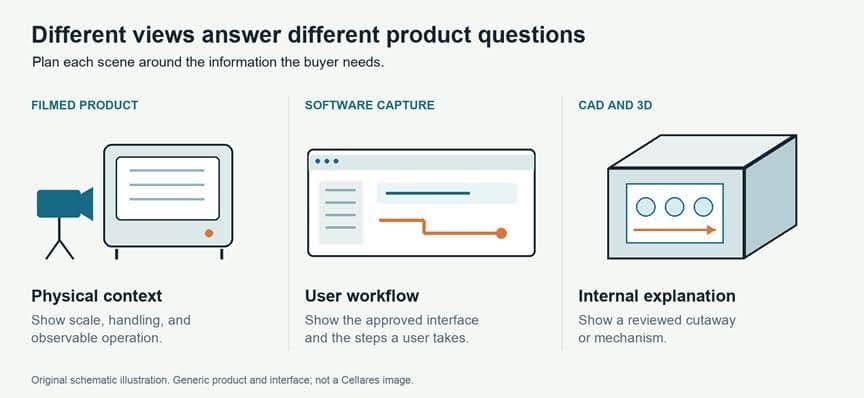
Different visual methods answer different product questions. Original schematic illustration.
Chapters
Start with the claim each scene has to support
Before discussing camera packages or generation tools, write down what the audience needs to understand and what would make that explanation credible.
“The instrument fits into this workspace” calls for a view with useful physical context. “The operator can review an alert” calls for the correct interface and a visible interaction. “This component moves through the assembly” might call for an engineer-reviewed cutaway.
These scenes have different approval requirements. A shot can be attractive and still explain the wrong product configuration. A diagram can be clear while leaving out a condition that changes its meaning.
Give each planned scene a short record: the claim, the source material, the visual method, and the person who can approve its accuracy. This record helps a producer spot missing inputs before the team commits to a shoot or an animation sequence.
Compare the visual methods before commissioning them
| Method | Best suited for | Main limitation | Source material required | Production considerations |
|---|---|---|---|---|
| Live-action product filming | Physical scale, handling, observable operation, and the working environment | The camera sees only what is accessible and visible | Correct product configuration, location access, and a usable demonstration | Agree on operating conditions, camera access, reflections, and what must stay out of frame |
| Employee and customer interviews | Explaining decisions, experience, and the context behind a product | A speaker's account does not independently verify every product claim | Available participants, informed consent, and approved discussion topics | Prepare specific questions; confirm titles, statements, and permission to publish |
| Screen recordings | Showing an actual software workflow or user interaction | A capture represents a particular build, account, and state | Approved software version, demo account, and safe sample data | Record a repeatable path; plan cursor movement, framing, and future updates |
| CAD-based or custom 3D visualization | Internal mechanisms, cutaways, assembly, and views a camera cannot reach | A model or animation may depict an outdated design or an oversimplified process | Approved CAD or modeling references, configuration details, and technical review | Allow for model cleanup, materials, animation, and review of movement and scale |
| Motion graphics | Labels, relationships, process stages, and explanations of abstract concepts | Simplification can imply a relationship the product does not support | Approved language, diagrams, brand assets, and any underlying data | Review arrows, timing, units, and labels as carefully as the script |
| AI-generated or AI-assisted visuals | Early visual exploration and, where appropriate, clearly illustrative material | A generated image is not evidence of actual product behavior | Approved references, a defined use, and review of the chosen tool's terms | Check confidentiality, permissions, consistency, and the distinction between illustration and demonstration |
| Hybrid production | A story that needs several of these methods | Each additional method adds dependencies and review work | An agreed script, asset inventory, and approval responsibilities | Plan transitions, shared design rules, and revision dependencies before production |
An interview earns its place when the speaker contributes something the images cannot: why a workflow matters, what a customer needed, or how a team made a decision. Product b-roll should support that explanation. It shouldn’t have to compensate for an interview that never gets specific.
Five steps for choosing and briefing the workflow
1. Define what the buyer must understand
Choose the decision the video will help someone make. A product marketer introducing a category needs a different explanation from a sales engineer answering an implementation question.
Write one sentence describing what a viewer should understand afterward. Then list the questions that must be answered to get there. For a hardware-and-software product, those might concern the physical setup, an operating step, and the information available to the user.
Set the boundary as well. An overview can explain the purpose of a workflow without becoming an operating manual. Trying to cover both in one edit can make the overview too dense and the instructions incomplete.
2. Audit the available source material
Ask for an asset inventory before requesting a finished creative treatment. A folder labeled “product files” is rarely enough to scope the work.
For hardware, identify the available unit, its configuration, and whether it can perform the planned demonstration. For 3D work, ask which CAD revision is approved, which components may be shown, and who can answer questions about the model. Don’t assume engineering files are ready for animation.
For software, specify the build, account permissions, sample data, and exact path to record. Confirm whether unfinished features or customer information can appear. Give the producer a product contact who can reset the demonstration when something changes.
Collect brand files, existing footage, pronunciation guidance, and publication permissions in the same inventory. Mark missing material explicitly. That makes it possible to choose a simpler visual treatment before an unavailable file becomes a delivery problem.
3. Match the visual method to the claim
Use the least complicated method that explains the point accurately. A clear screen capture may answer a workflow question more directly than a reconstructed interface. A simple diagram may explain a relationship without the expense of a fully modeled environment.
Choose live action when the real object, person, or setting contributes useful evidence. Choose 3D when the explanation requires access the camera cannot provide, with technical review built into the scope. Use motion graphics to guide attention and connect ideas without pretending they are filmed observations.
Separate AI assistance from AI generation. For example, Adobe documents transcript-based video editing: an editor can select and rearrange transcript text to edit associated footage. That is a different production decision from generating a scene that appears to show a machine operating.
Generated material can be useful for exploring a treatment or illustrating an abstract idea. Before using it in a final product story, decide whether viewers could mistake it for an actual feature, facility, employee, or result. Keep product demonstrations tied to approved source material.
4. Validate technical accuracy at reviewable stages
Name the technical reviewer before the storyboard is approved. Marketing can own the message while an engineer or product owner checks whether the visuals support it.
Review a 3D sequence in stages: model and configuration, proposed movement, then the finished rendering. This gives the reviewer a chance to catch an incorrect component or sequence before lighting and polish make changes more involved.
Review software captures against the agreed build. Watch for labels, account permissions, and sample data that change the apparent workflow. For motion graphics, ask whether an arrow implies causation, whether a timer implies speed, or whether a clean transition hides a necessary manual step.
Keep source history alongside those decisions. C2PA’s explainer distinguishes provenance from factual accuracy: knowing an asset’s origin and edit history does not establish that its contents are true. A product reviewer still needs to check what the image communicates.
5. Plan deliverables and revisions together
Specify where each version will be used: a launch page, a sales presentation, a recruiting page, or a short social edit. Give each version a job instead of asking for a long film and assuming every other format will fall out of it.
Agree on aspect ratios, captions, language versions, and editable handoff files where required. A desktop interface that is legible in a presentation may need a different crop or a simpler explanatory treatment on a phone.
Set review gates for the script, storyboard, product accuracy, and final edit. Identify one person to consolidate stakeholder feedback. Also agree on what happens when the product changes after approval: a new screen recording, a revised model, and a text correction require different amounts of work.
Cellares: one product story, several production methods
At Luma Creative, our Cellares production work illustrates why technical communication can require several formats across an engagement. Product overviews combined filmed footage with supplied CAD files and custom 3D assets. A software demo used screen recordings and motion graphics. Separate recruiting work included employee and workplace filming.
Cellares handled scriptwriting, while we provided directorial and creative support. That division matters: the product team contributed the technical narrative, and the production team helped translate it into visual work.
The useful lesson is the fit between source material and explanation. Hardware, software, and workplace culture called for different treatments.
Combine the formats around a single explanation
A hybrid edit needs a clear relationship between its parts. Returning to the hypothetical instrument, a filmed wide shot could establish the physical setup. A labeled 3D view could explain the relevant internal movement. A screen capture could then show what the operator sees at that point in the workflow.
Carry the same component names, colors, and terminology through the sequence. When a diagram introduces a label, the narration and interface discussion should use that label consistently. Explain transitions between filmed behavior, schematic illustration, and software demonstration where the distinction affects understanding.
Give each shot enough context to survive outside the main film. A short sales clip should retain any qualification needed to interpret the process. If a social crop removes a label that made an illustration clear, redesign the crop or restore the explanation.
Before finalizing the edit, ask a colleague outside the project to describe what happens in the sequence. A disagreement between their explanation and the product team’s intended meaning is a reason to revisit the visuals.
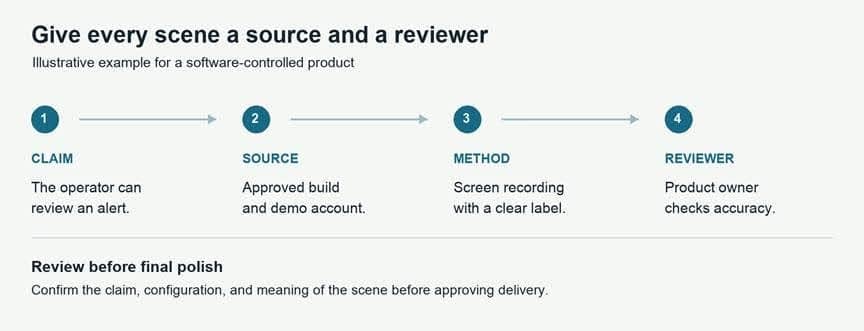
Give every scene a source and a reviewer. The software example is illustrative.
A buyer’s checklist before the brief goes out
- Can the team state the viewer’s main question and the decision the video should support?
- Does each proposed product claim have an approved source and a named technical reviewer?
- Are the hardware configuration, CAD revision, and software build identified?
- Can the production team access the product, location, people, and demo account it needs?
- Are sample data, customer information, and confidential components handled appropriately?
- Are footage, music, participant, and third-party asset permissions confirmed for the intended use?
- Has the team agreed what may enter an AI tool and whether generated material may appear in the final video?
- Are schematic, simulated, and filmed sequences distinguishable wherever accuracy depends on it?
- Are review gates, consolidated feedback, delivery formats, and product-update responsibilities included in the scope?
Send the production team the claim list and source inventory with the brief. Those two documents give the conversation a practical starting point: what needs to be understood, what can be shown, and what still needs to be prepared.
About the author
William Cook is the founder and executive producer of Luma Creative, a San Francisco-based video production company. He oversees production strategy, scope, and senior decisions from the first brief through delivery.
Other Interesting Articles
- AI LinkedIn Post Generator
- Gardening YouTube Video Idea Examples
- AI Agents for Gardening Companies
- Top AI Art Styles
- Pest Control YouTube Video Idea Examples
- Automotive Social Media Content Ideas
- Plumber YouTube Video Idea Examples
- AI Agents for Pest Control Companies
- Electrician YouTube Video Idea Examples
- How Pest Control Companies Can Get More Leads
- AI Google Ads for Home Services
- 60-Second Training Videos Are the New Corporate Standard
- Cybersecurity PR Pricing: Retainers, Deliverables & ROI
- Best AI Tools for Product Consistency in E-Commerce Video
Master the Art of Video Marketing
AI-Powered Tools to Ideate, Optimize, and Amplify!
- Spark Creativity: Unleash the most effective video ideas, scripts, and engaging hooks with our AI Generators.
- Optimize Instantly: Elevate your YouTube presence by optimizing video Titles, Descriptions, and Tags in seconds.
- Amplify Your Reach: Effortlessly craft social media, email, and ad copy to maximize your video’s impact.