
Top AI Video Generators: The Best Text to Video Tools for Every Creator

AI video generation has moved well beyond typing:
“Make me a video of a cat riding a skateboard.”
The strongest tools can now generate cinematic shots, animate product images, maintain characters across scenes, create synchronized audio, transform existing footage, control camera movement, and turn a simple brief into a complete social video.
For marketers, that changes the economics of video production.
You can test an ad concept before booking a shoot.
Turn a product image into motion.
Generate B-roll that would otherwise require stock footage.
Create vertical videos for social media.
Build storyboards before spending money on production.
Or turn a written script into a finished video with voice, visuals, captions, and music.
But AI video tools are not interchangeable.
The best AI video generator therefore depends less on which model wins a benchmark and more on one question:
What kind of video are you actually trying to create?
This guide compares the leading AI video generators by workflow, strengths, limitations, and marketing use case.
Chapters
TL;DR – Quick Comparison Table
| Platform | Key Strength | Pricing (Entry) | Best For |
|---|---|---|---|
| DramaPixel | Multi-model access (Kling V3, Veo 3.1, Hailuo 2.3) under one subscription | $14.90/mo | Creators who want top-tier models without juggling subscriptions |
| Runway | Pro-grade Gen-4.5 with Motion Brush & camera control | $12/mo | Filmmakers, agencies, and production studios |
| Canva | AI video baked into the world's most familiar design suite | Free + $12.99/mo | Designers and small businesses already using Canva |
| Luma | Ray3 reasoning model with HDR & natural motion | $9.99/mo | Realism-focused storytellers |
| Pika | Fun viral effects (Pikaswaps, Pikaffects, Pikaframes) | $8/mo | Social-first creators making scroll-stopping clips |
| PixVerse | Stylized output (anime, clay, cinematic) on a budget | $8/mo | Budget-conscious stylized content creators |
| Higgsfield | Cinematic camera control & viral preset library | $9/mo | Marketers and short-form cinematic creators |
| Invideo AI | Full prompt-to-finished-video automation with stock + voice | $20/mo | Marketers and faceless YouTubers |
| ImagineArt | All-in-one creative suite (image, video, voice, workflows) | $17/mo | Generalist creatives who want one workspace |
| ClipTalk | Script-to-social-video with talking AI characters | Free + $19/mo | Faceless YouTube and TikTok at scale |
This guide ranks the best text to video AI video generator platforms, comparing their strengths, weaknesses, pricing, and ideal use cases.
Whether you need multi-model flexibility, professional camera control, or template-friendly drag-and-drop simplicity, there’s a tool here built for you.
AI Video Marketing Statistics

AI video is becoming important at the same time that video itself remains one of marketing’s strongest formats.
That combination explains why so many new AI video platforms are appearing.
91% of businesses use video as a marketing tool
Wyzowl reports that 91% of businesses surveyed use video as part of their marketing strategy.
That makes AI video generation relevant to considerably more than filmmakers and experimental creators.
Social teams, ecommerce companies, SaaS businesses, agencies, educators, and small companies all need video.
63% of video marketers have already used AI to create or edit video
Wyzowl found that 63% of video marketers surveyed have used AI to help create or edit marketing videos.
AI video is therefore no longer limited to early adopters experimenting with strange six-second clips.
It is becoming part of normal video-production workflows.
82% of marketers say video produces a good ROI
Wyzowl reports that 82% of video marketers say video gives them a good return on investment.
The more interesting AI question is therefore not whether businesses should suddenly start producing video because AI exists.
It is:
Can AI reduce the cost or time required to produce video that already delivers business value?
85% of consumers surveyed say a video has convinced them to buy
Video does more than create awareness.
Wyzowl found that 85% of consumers surveyed had been convinced to buy a product or service after watching a video.
That makes AI-generated product demonstrations, social ads, explainers, testimonials, visual concepts, and product-focused B-roll especially interesting for marketers.
96% have watched an explainer video to learn about a product or service
This is one reason businesses should look beyond cinematic AI clips.
The commercial opportunity is not only generating beautiful scenes.
AI can also help businesses create:
- explainers;
- demonstrations;
- onboarding content;
- tutorials;
- social clips;
- product education.
80% of marketers use AI for content creation and 75% for media production
HubSpot reports that content creation and media production are among marketers’ most common generative AI use cases.
That puts AI video inside a much broader shift toward AI-assisted marketing production.
DramaPixel – Best for Multi-Model Flexibility
What Is DramaPixel?
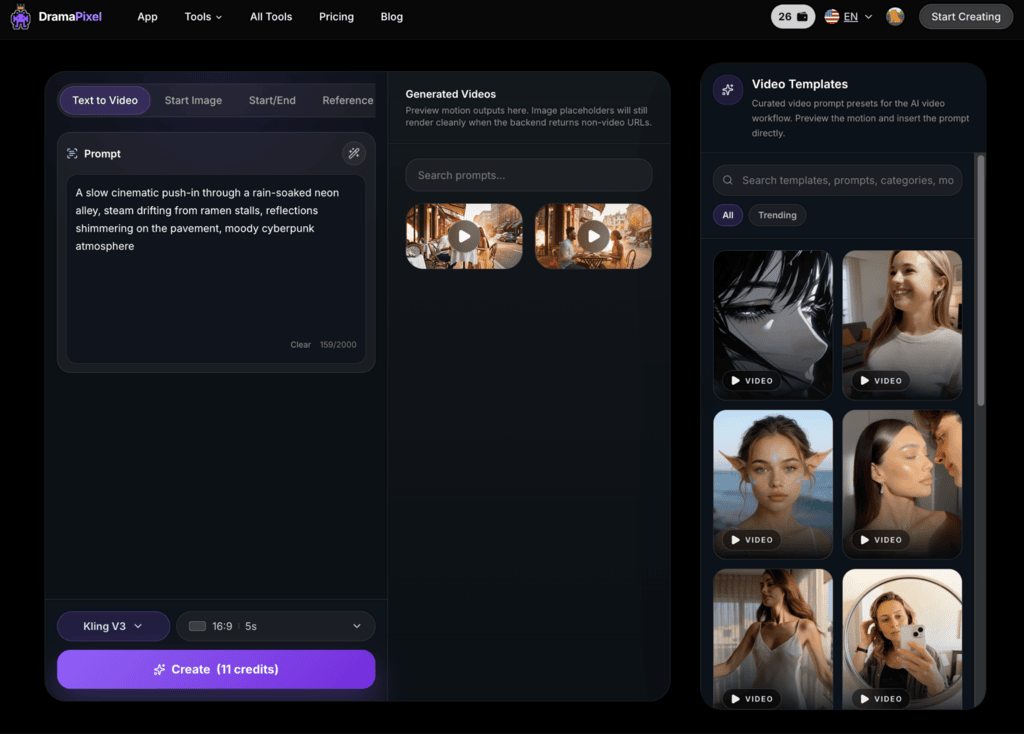
DramaPixel (dramapixel.ai) is a multi-model AI video platform that bundles several leading video-generation engines into one streamlined dashboard. Instead of subscribing to Kling, Veo, and Hailuo separately, you get access to all three under a single, consumer-priced plan, and you can switch between them shot by shot, depending on the look you’re after.
Features
- Multi-model library: Kling V3 for reliable motion, Veo 3.1 (Lite/Fast/Quality) for cinematic keyframe interpolation, Hailuo 2.3 for first-frame controlled image-to-video at up to 1080p
- Multiple generation modes: Text to Video, Start Image, Start/End Image keyframe control, Reference and Source Video
- Aspect ratios: 16:9, 9:16, and 1:1, every major social and broadcast format covered
- Duration control: 5s, 10s, and 15s clips
- Reference image and source video for character/style consistency across shots
Pros & Cons
Pros:
- Eliminates “model FOMO”, you don’t have to guess which platform handles your prompt best
- Per-credit value is exceptionally strong given the breadth of models included
- Keyframe control unlocks cinematic transitions that pure text-to-video tools can’t match
- Covers vertical, square, and landscape outputs in one click
Cons:
- Newer platform with a smaller tutorial library than category veterans like Runway
- Each model has its own quirks; results improve noticeably once you learn each engine’s prompt style
Pricing
- Lite: $14.90/month – 300 credits/month
- Pro: $29.90/month – 600 credits/month
- Premium: $149.90/month – 3,200 credits/month
Annual billing is also available.
Best For
Creators, marketers, and indie studios who want the strengths of Kling, Veo, and Hailuo without paying for three separate subscriptions. DramaPixel is especially powerful for teams testing different aesthetics across campaigns or platforms.
Runway – Best for Professional Filmmakers
What Is Runway?
Runway is one of the most established names in generative video and remains the platform of choice for many professional studios. Its Gen-4 and Gen-4.5 models are widely regarded as some of the most controllable in the industry, with strong character consistency, precise camera direction, and a full creative suite that goes well beyond simple clip generation.
Features
- Gen-4 and Gen-4.5 video models with detailed camera control
- Motion Brush for painting motion onto specific regions of a frame
- Video-to-video transformation and stylization
- Lip sync and custom AI voice creation
- Act-Two for character animation from a driving performance
- Professional editing timeline with 4K export on paid plans
- API access for teams and developers
Pros & Cons
Pros:
- Among the most precise tools available for direction-led generation
- Strong character consistency for narrative work
- Comprehensive ecosystem: video, audio, editing, lip sync, and voice cloning under one roof
- Trusted in production pipelines from indie shorts to major brand campaigns
Cons:
- Credits expire monthly and don’t roll over, which can pressure inconsistent users
- A single 10-second Gen-4 clip can eat a meaningful chunk of the Standard plan
- Adding teammates means buying full additional seats
- Steeper learning curve than consumer-focused tools
Pricing
- Free: 125 one-time credits, watermarked
- Standard: $12/month (annual) – 625 credits/month
- Pro: $28/month (annual) – 2,250 credits, custom voices, 4K export
- Unlimited: $76/month (annual) – 2,250 credits + unlimited video in Explore Mode
- Enterprise: Custom pricing
Best For
Production studios, filmmakers, and agencies who need shot-level control, character consistency, and a full creative suite, and who are comfortable trading simplicity for power.
Canva – Best for Designers and Small Businesses
What Is Canva’s AI Video Generator?
Canva needs no introduction as a design platform, and now its AI video tools are tightly integrated into the same workspace that millions of marketers already use daily. Powered by Google’s Veo-3 model under the hood, Canva’s “Create a Video Clip” feature lets users generate short AI clips directly inside their design projects, complete with synchronized audio.
Features
- AI Video Clip generation (up to ~8 seconds) with native audio, dialogue, and sound effects
- AI Avatars that turn a photo into a talking presenter speaking 40+ languages
- Magic Animate, Magic Switch (auto-resize between formats), and background remover
- Massive template library across every social, presentation, and ad format
- Real-time team collaboration with shared brand kits
- Direct social publishing and scheduling
Pros & Cons
Pros:
- Zero learning curve if you already use Canva for graphics
- Watermark-free exports even on the free plan, unusual in this category
- AI clips drop straight into existing Canva designs, making mixed-media social content trivial
- Best-in-class template library for marketing and education use cases
Cons:
- Output quality lags dedicated AI video platforms, clips often look closer to animated stock footage than true generative video
- 8-second clip cap and a low monthly generation limit on paid plans
- Prompts are English-only and there’s no public API for AI video
- Not suitable for cinematic or narrative production
Pricing
- Canva Free: Basic AI tools and limited video credits
- Canva Pro: ~$12.99/month – 500 AI credits/month, full Magic Studio access
- Canva Teams: ~$100/user/year (3-user minimum) – collaboration features, brand kit, IP indemnity
- Canva Enterprise: Custom pricing – centralized brand management, priority support
Best For
Social media managers, educators, and small business owners who want to add light AI video to existing Canva workflows without learning a new tool.
Luma – Best for Natural Cinematic Motion
What Is Luma?
Luma AI’s Dream Machine, now powered by the Ray3 model, is widely considered one of the most natural-looking video generators available. The Ray3 release introduced reasoning-based generation, where the model better understands cause and effect across a scene, plus native HDR output. Luma also integrates with Adobe Firefly, making it a smooth fit for creatives already in the Adobe ecosystem.
Features
- Ray3 reasoning-based text-to-video and image-to-video
- HDR/EXR export for color-graded workflows
- “Modify with Instructions” – natural-language video editing
- Draft Mode for rapid concept testing
- Visual annotations and keyframe control
- Up to 10-second clips, extendable to ~30 seconds
- 1080p native, 4K upscaling available
Pros & Cons
Pros:
- Some of the most physically plausible motion in the category
- Reasoning model produces more coherent, story-aware sequences
- Fast generation times suit iterative creative workflows
- HDR output is a genuine differentiator for high-end visual work
- Adobe Firefly integration extends professional pipelines
Cons:
- Free and Lite plans are personal-use only and watermarked
- Maximum clip length lags some competitors
- Quality can degrade on extended generations beyond ~30 seconds
- Less suited for highly stylized or surreal aesthetics
Pricing
- Free: 30 generations/month, non-commercial
- Lite: $9.99/month – 70 generations
- Standard: $29.99/month – 150 generations, watermark-free, commercial use
- Plus: $64.99/month – 310 generations
- Pro: $99.99/month – 480 generations
- Premier: $499.99/month – 2,430 generations
Best For
Indie filmmakers, brand storytellers, and Adobe-native creatives who want photoreal motion and smooth, story-coherent transitions.
Pika – Best for Fun, Viral Social Effects
What Is Pika?
Pika (pika.art) has carved out a reputation as the most playful AI video generator on the market. Its toolkit is built explicitly around social-friendly creative tricks, Pikaswaps for object swapping, Pikaffects for surreal transformations, Pikaframes for start/end frame control, and Pikaformance for lip-sync from a still image. Pika 2.5 in particular has become a go-to for creators chasing scroll-stopping moments.
Features
- Text-to-video and image-to-video generation
- Pikaswaps, Pikaffects, Pikatwists, and Pikadditions
- Pikaframes for first/last frame control
- Pikaformance for talking image and lip-sync
- PikaScenes for structured scene composition
- Turbo, Pro, and 2.5 model options
- Rollover credits on paid plans
Pros & Cons
Pros:
- Most beginner-friendly UI in the category
- Effects library is purpose-built for viral, meme-style content
- Generations are fast – great for iteration
- Pro and Fancy plans include commercial rights and watermark-free downloads
Cons:
- 700 monthly credits on Standard run out fast for active creators
- Free and Standard tiers don’t include commercial rights, a meaningful constraint
- Premium effects have higher credit costs than basic generations
- Not the right tool for cinematic realism or branded narrative work
Pricing
- Free: 80 credits/month, 480p, watermarked, no commercial use
- Standard: $8/month – 700 credits, watermark-free
- Pro: $28/month – 2,300 credits, commercial use, faster generation
- Fancy: $76/month – 6,000 credits, all models, fastest generation
Best For
TikTok, Reels, and Shorts creators, lifestyle brands, and meme-driven social campaigns where novelty and shareability matter more than realism.
PixVerse – Best for Stylized Content on a Budget
What Is PixVerse?
PixVerse stands out as the budget-friendly stylization specialist of the AI video space. While most platforms chase photorealism, PixVerse gives equal weight to anime, clay, 3D, and cinematic styles, making it a go-to for creators who want a distinctive visual identity without paying premium-tier prices. Its daily-renewing credit system also makes it unusually practical for daily use.
Features
- Text-to-video and image-to-video
- Multiple style presets: Realistic, Anime, Clay, 3D, Cinematic
- Fusion and transition modes for blending media
- Audio and dialogue integration via prompt
- Fast rendering optimized for daily creation
- API access on Enterprise plan
Pros & Cons
Pros:
- Best price-to-style ratio in the category
- Anime and clay outputs are surprisingly polished at this tier
- Daily renewing credits, even on free, make consistent posting realistic
- Simple, low-learning-curve interface
Cons:
- Realistic output doesn’t match Runway, Luma, or Veo at comparable settings
- Limited tooling for narrative or long-form video
- Free plan adds watermarks
- Not appropriate for production-grade cinematic deliverables
Pricing
- Free: ~60 daily renewing credits, watermarked
- Standard: $8/month – 30 daily + 1,200 monthly credits
- Pro: $24/month – 30 daily + 6,000 monthly credits
- Premium: $48/month – 30 daily + 15,000 monthly credits
- Enterprise: $100/month – full API access
Best For
Anime fans, stylized social brands, and budget-conscious creators who care more about aesthetic personality than photoreal fidelity.
Higgsfield – Best for Cinematic Camera Control
What Is Higgsfield?
Higgsfield AI is a cinematic-first video generator that places camera language at the center of the experience. Where most tools generate motion as a side-effect of the prompt, Higgsfield lets creators direct it explicitly, with virtual camera bodies, lens choices, focal lengths, and a deep library of preset moves like dolly-ins, FPV drone shots, and Hollywood-style sweeps.
Features
- Access to multiple leading models in one workspace, including Seedance 2.0, Kling 3.0, Veo 3.1, Wan 2.7, Sora 2, and others
- Cinema Studio 3.5 with directed camera language and aperture control
- 50+ professional camera movements (dynamic zooms, pans, FPV drone, etc.)
- Motion Control for character actions up to 30 seconds
- Click-to-Ad: turn a product link into a finished ad
- Sora 2 Trends: viral preset templates
- Mobile-first Diffuse app
Pros & Cons
Pros:
- Unmatched camera-language control for AI video
- Side-by-side model comparison without leaving the platform
- Excellent for creators who think in shots, not just prompts
- Strong mobile-first workflow for on-the-go creation
- Wide library of viral presets ideal for short-form social campaigns
Cons:
- Still struggles with complex physical interactions and long multi-shot continuity
- Most powerful features sit behind higher-tier plans; free outputs are watermarked
- Learning curve for advanced motion features
Pricing
- Basic: $9/month (billed yearly) – 3K credits/month, ~97 video generations
- Standard: $20/month – 8K credits/month, ~265 video generations, Seedance 2.0 access
- Ultimate: $34/month – 16K credits/month, ~530 video generations, all styles & models, unlimited Runway 4.5, Veo 3.1 Fast, Seedance 1.5 Pro
- Creator: $175/month – 100K credits/month, ~3.4K video generations, unlimited access to top models including Seedance 2 Fast and Kling 3.0 Pro
- All paid plans include complimentary access to GPT, Gemini, and Claude models.
Best For
Marketers, fashion teams, and short-form cinematic creators who think in camera moves and want directorial control without traditional production overhead.
Invideo AI – Best for End-to-End Prompt-to-Video Automation
What Is Invideo AI?
Invideo AI takes a different approach from the rest of this list: instead of generating raw clips, it produces complete videos. Type a prompt, and Invideo’s agent assembles the script, voiceover, music, B-roll, transitions, and captions for you. It’s positioned squarely at marketers and faceless content creators who care about finished output, not individual generations.
Features
- AI Text-to-Video that produces full videos with scripts, scenes, voiceovers, music, transitions, and subtitles, powered by GPT-4.1, Sora 2, and Veo 3.1 under the hood
- AI Movie Maker for full-length scripted videos
- AI Avatar Generator for UGC-style ads
- AI Voice Cloner from a 30-second sample
- AI Video Translator supporting 50+ languages
- Natural-language editing, change scenes, swap media, edit style with text commands
- Massive built-in stock footage and music library
Pros & Cons
Pros:
- The fastest path from “idea” to “publishable video” in this list
- Strong for repurposing scripts, blog posts, and URLs into finished social content
- Multilingual voice and translation capabilities are excellent for global creators
- Highly rated across review platforms
Cons:
- Less creative control than dedicated clip generators, better for drafts than brand-strict ads
- Each prompt attempt consumes minutes whether the result is usable or not
- Re-edits also burn minutes, which can add up quickly on lower tiers
- Visual matching between AI-generated script and stock footage isn’t always tight
Pricing
- Plus: $17/mo – 75 credits/mo (≈ 300 Nano banana pro or 600 Nano banana 2 generations), 4 AI avatars & voice clones, 20 GB storage, 100 iStock, unlimited watermark-free exports
- Max: $85/mo – 390 credits/mo, 16 AI avatars & voice clones, 100 GB storage, 200 iStock
- Generative (Best Value): $170/mo – 800 credits/mo, 40 AI avatars & voice clones, 2 TB storage, 1,000 iStock
- Elite: $900/mo – 4,250 credits/mo, 200 AI avatars & voice clones, 10 TB storage, 5,000 iStock
All paid plans include access to 200+ models including Veo 3.1, Sora 2 Pro, Kling 3.0, Nano Banana Pro, and ElevenLabs music; the Invideo v4 agent that can generate up to 30 minutes of video from a single prompt; and access to top stock providers like iStock and Storyblocks.
Best For
Marketers, content agencies, and faceless YouTube creators who need finished, publishable videos rather than raw clips to assemble in post.
ImagineArt – Best All-in-One Creative Suite
What Is ImagineArt?
ImagineArt (imagine.art) bundles AI image generation, video generation, voice tools, avatar creation, and node-based workflows into a single platform. It’s pitched as a creative operating system rather than a single-purpose tool, and that breadth is what makes it appealing for generalist creators who don’t want to context-switch between five different apps to finish one project.
Features
- Generate AI videos in seconds from text, images, or existing videos using Sora, Kling, Veo, Seedance, and more
- Image editing toolkit: reference, inpaint, upscale, lipsync, motion control, reframe, recolor, face swap
- Node-based Workflow builder (similar to ComfyUI), plus the Chatly AI productivity agent
- AI avatars for tutorials and explainer videos
- Cinematic video generator with predefined effects, camera motions, and aspect-ratio control
- Browser-based with iOS and Android apps
Pros & Cons
Pros:
- One credit pool covers dozens of image, video, audio, and editing tools
- Generations are often remarkably fast, sometimes around 30 seconds
- Strong fit for creators who blend image, video, and voice into one project
- Mobile and web parity, which is rare in this space
Cons:
- Credit system has a learning curve, different tools cost different amounts
- Output consistency varies across the wide model lineup
- Best results require deliberate, well-structured prompting
Pricing
- Plus: $17/month (billed $200 yearly) – 75 credits/mo, 4 AI avatars & voice clones, 20 GB storage, 100 iStock, unlimited watermark-free exports
- Max: $85/month – 390 credits/mo, 16 AI avatars & voice clones, 100 GB storage, 200 iStock
- Generative (Best Value): $170/month – 800 credits/mo, 40 AI avatars & voice clones, 2 TB storage, 1,000 iStock
- Elite: $900/month – 4,250 credits/mo, 200 AI avatars & voice clones, 10 TB storage, 5,000 iStock
All paid plans include access to Veo 3.1, Sora 2, Kling 3, all AI workflows, and AI video trends.
Best For
Generalist creators, designers, and small teams who want a single creative OS for images, videos, voice, and end-to-end visual workflows.
ClipTalk – Best for Faceless Channels at Scale
What Is ClipTalk?
ClipTalk (cliptalk.pro) is laser-focused on one job: turning text and scripts into ready-to-publish short-form videos with minimal manual editing. It’s built around the faceless content workflow, script, voiceover, B-roll, captions, talking AI characters, and direct publishing, all stitched together into a single pipeline.
Features
- Script-to-video and URL-to-video conversion
- AI talking characters and voice cloning from a 30-second sample
- Auto-captions in 20+ languages
- AI-generated B-roll footage
- Silence and filler-word removal
- Natural-language video editing
- 48-language support
- Direct publishing to social platforms
Pros & Cons
Pros:
- Extremely fast end-to-end production
- Voice cloning is a standout for faceless YouTube and TikTok creators
- Optimized for high-volume, repetitive content workflows
- No editing skills required
- Auto-publishing saves real time for multi-platform creators
Cons:
- Not designed for cinematic or highly stylized output
- User reviews note variable quality consistency
- Free plan is very limited (1 minute)
- Less suitable for narrative, brand-led, or high-production-value video
Pricing
- Free: 1 minute of AI video, auto-captions in 20+ languages
- Starter: $19/month – 120 AI minutes, 15+ voices, 2 voice clones
- Pro: $60/month – 300 AI minutes, 30+ voices, 12 voice clones, priority rendering
Best For
Faceless YouTube and TikTok operators, content agencies, and marketers turning blog posts and scripts into volume-driven social video.
Slate – Best for Social Teams
What Is Slate?
Slate is an AI-assisted content creation platform for social teams, combining video and image editing with brand management and collaboration.
Features
- AI-assisted editing for social-ready videos and imagery
- Long-to-short video clipping that identifies key moments and turns them into social clips
- Brand Hub for keeping approved brand assets accessible to content creators
- Tools for organizing brands, teams, campaigns, users, and assets
Best For
Social teams and brands that need to repurpose longer videos, create on-brand content, and collaborate without relying on dedicated video specialists.
AI Video Generator vs AI Video Model: Know the Difference
This distinction is becoming increasingly important.
An AI video model is the underlying system that generates the video.
Examples include:
- Veo;
- Kling;
- Runway Gen models;
- Luma Ray;
- Adobe Firefly Video.
An AI video platform is the interface, editing environment, workflow, or service you use to create the finished content.
Examples include:
- Adobe Firefly;
- Runway;
- Canva;
- Higgsfield;
- InVideo AI.
Increasingly, one platform can give you access to several models.
Adobe Firefly, for example, currently provides access to models including its own Firefly Video model as well as Veo 3.1, Kling 3.0, Luma Ray models, and Runway Gen-4.5.
That means asking:
“Which AI video model is best?”
is becoming less useful than asking:
“Which workflow gives me the models and editing controls I need?”
| Term | What It Means | Examples |
|---|---|---|
| AI Video Model | The underlying AI system generating the video | Veo, Kling, Ray, Firefly Video, Runway Gen |
| AI Video Platform | The application where you generate, edit, organize or publish videos | Firefly, Runway, Canva, Higgsfield, InVideo AI |
| Multi-Model Platform | A platform providing access to several different generation models | Firefly, Higgsfield and other AI creative suites |
| End-to-End Video Tool | A platform that can combine scripting, visuals, audio and editing | InVideo AI and similar automated video makers |
This multi-model approach may become increasingly important.
Instead of choosing one AI model for everything, marketers can select the model that works best for each shot.
Quick Comparison: Best AI Video Generators by Use Case
| Tool | Best For | Main Strength | Marketing Use Case |
|---|---|---|---|
| Runway | Professional creative control | Prompt adherence, camera direction and production workflow | Campaign creative, branded films, visual concepts and advertising |
| Adobe Firefly | Marketing and creative teams | Multi-model workflow plus Adobe ecosystem | Product video, social creative, B-roll, ads and commercial content |
| Canva | Small teams and non-video specialists | Simple AI video inside an existing design workflow | Social posts, presentations, product teasers and campaigns |
| Luma AI | Natural cinematic motion | Realistic movement and camera behavior | Product shots, storytelling and cinematic B-roll |
| Pika | Fast social experimentation | Creative effects and transformations | Short-form social content and attention-grabbing effects |
| Higgsfield | Cinematic and multi-model generation | Model choice, camera movement and creative control | Ads, fashion, social video and cinematic campaigns |
| InVideo AI | Complete video automation | Turns prompts into videos with scripts, visuals and audio | YouTube, explainers, social videos and content repurposing |
| ImagineArt | Multi-format creative production | Image, video, avatar and audio workflows | General marketing creative |
| PixVerse | Stylized video generation | Creative styles and effects | Social video and entertainment-style content |
| DramaPixel | Access to multiple generation models | Switching models within one service | Testing different creative styles and campaign concepts |
Do not treat the ranking as permanent.
AI video models change quickly.
The more useful question is which platform currently gives you the combination of:
quality + control + workflow + rights + price
that your project requires.

Key Takeaways: Choosing Your AI Video Generator
The best AI video generator depends on what kind of work you’re actually shipping. A quick decision framework:
- You want flexibility across the best models without juggling subscriptions → DramaPixel. Kling V3, Veo 3.1, and Hailuo 2.3 in one place at consumer pricing.
- You’re producing professional client work that demands shot-level control → Runway for industry-grade tooling, or Higgsfield if cinematic camera language is your priority.
- You already live inside a design tool and want light AI video on top → Canva.
- You want photoreal motion that just looks “right” → Luma with the Ray3 reasoning model.
- You’re chasing viral effects and fast social content → Pika for surreal effects, PixVerse for stylized aesthetics on a tight budget.
- You want a finished, publishable video from a single prompt → Invideo AI for full automation, or ClipTalk for faceless social pipelines.
- You want one creative OS for image, video, voice, and workflows → ImagineArt.
There’s no single “best” platform, only the best fit for your specific output, volume, and budget.
Conclusion
AI video has stopped being a novelty and started being a production tool. Every platform on this list does something genuinely well: Runway nails directorial control, Canva makes AI video accessible to non-creators, Luma delivers natural motion, Pika thrives on viral creativity, PixVerse owns stylization on a budget, Higgsfield brings cinematic camera language, Invideo AI automates the full pipeline, ImagineArt unifies the creative toolkit, and ClipTalk industrializes faceless content.
What sets DramaPixel apart is that it doesn’t force you to commit to one of those tradeoffs. By bundling Kling V3, Veo 3.1, and Hailuo 2.3, three of the strongest video models on the market, under a single affordable plan with proper keyframe control, it functions as a multi-model studio for creators who want both quality and flexibility.
Whichever tool you pick, the smartest approach hasn’t changed: start with a free or low-cost tier, test against your actual use cases, and only commit when the output matches your real workflow. The best AI video generator isn’t the one with the longest feature list, it’s the one you’ll actually use to ship.
Other Interesting Articles
- AI LinkedIn Post Generator
- Gardening YouTube Video Idea Examples
- AI Agents for Gardening Companies
- Top AI Art Styles
- Pest Control YouTube Video Idea Examples
- Automotive Social Media Content Ideas
- Plumber YouTube Video Idea Examples
- AI Agents for Pest Control Companies
- Electrician YouTube Video Idea Examples
- How Pest Control Companies Can Get More Leads
- AI Google Ads for Home Services
- 60-Second Training Videos Are the New Corporate Standard
- Cybersecurity PR Pricing: Retainers, Deliverables & ROI
- Best AI Tools for Product Consistency in E-Commerce Video
Master the Art of Video Marketing
AI-Powered Tools to Ideate, Optimize, and Amplify!
- Spark Creativity: Unleash the most effective video ideas, scripts, and engaging hooks with our AI Generators.
- Optimize Instantly: Elevate your YouTube presence by optimizing video Titles, Descriptions, and Tags in seconds.
- Amplify Your Reach: Effortlessly craft social media, email, and ad copy to maximize your video’s impact.